 Author:


In today’s digital landscape, engaging visual content is king — especially on platforms like Instagram, TikTok, and YouTube Shorts. But traditional influencer campaigns can be costly, time-consuming, and unpredictable.
That’s where YouCam AI Pro’s AI Influencer Generator changes the game — enabling brands and creators to produce virtual influencers in product videos quickly and affordably.
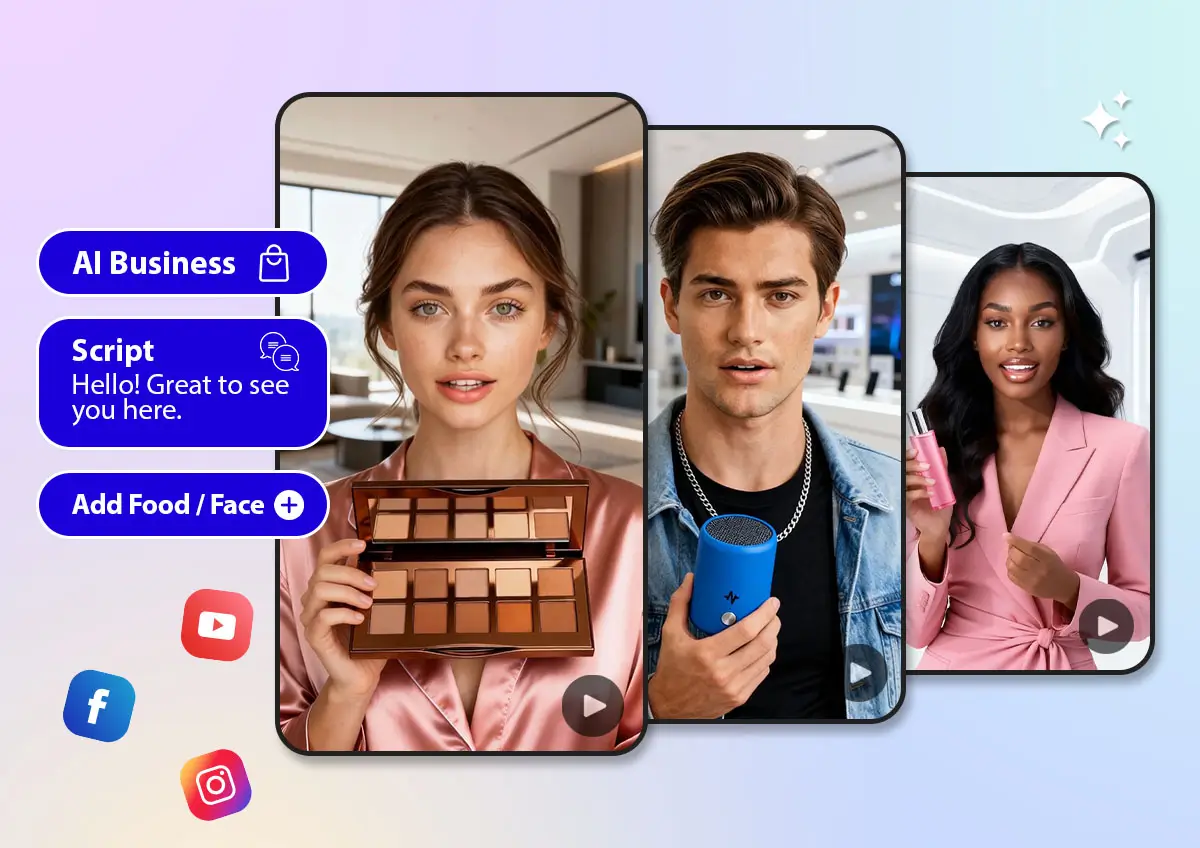
Whether you’re a marketer, e-commerce seller, or content creator looking to scale your video production, this feature empowers you to generate dynamic, influencer-style product videos without hiring real talent or scheduling shoots.
What Is YouCam AI Pro’s AI Influencer Generator?
YouCam AI Pro’s AI Influencer Generator is an advanced generative AI tool that creates virtual influencer personas capable of presenting, reviewing, or demoing your products in video format.
Instead of relying on real influencers or professional video crews, YouCam AI Pro uses AI avatars, realistic lip-sync, and natural gestures to produce influencer-style videos in minutes — all from text prompts or product details you provide.

This approach is part of a larger trend in AI content creation where virtual presenters replace traditional content workflows, delivering brand messages with consistency and at scale.

How It Works: 4 Simple Steps for You
Creating viral content shouldn't be stressful. YouCam AI Pro has simplified the process, turning complex AI rendering into a "tap-and-go" experience.
Here are the simple steps for you to create a virtual AI influencer:
Step 1. Download YouCam AI Pro

AI Video & Image Generator
Turn text & Image into AI Video instantly.
Supports Text-to-Image & Image-to-Video.
First, grab the app from the App Store or Google Play. It’s the leading tool for creators who want professional-grade AI effects without the steep learning curve. Open the app and click on “AI Business” to start.
Step 2. Choose or Customize Your Influencer
Build a virtual host by selecting from avatar styles or customizing features to match your brand identity. There are five categories for you to choose: Beauty Products, Electronic Products, Food Products, Fashion Showcase and Fashion Speaker.
Step 3. Add Script, Product and Face
Upload your product and a face (optional) to start, then write a script and select a voice that matches your product and AI Influencer.
Step 4. Generate a Realistic Video Output
Hit the generate button. The AI will analyze the anatomy of the image and apply the dance movements realistically. With AI-driven lip-sync, movement, and voiceovers, YouCam AI Pro produces a scroll-stopping influencer video that feels natural and professional!

Best AI Influencer Prompts (Copy & Paste)
Use these specific text-to-video prompts in YouCam AI Pro to get the most realistic results:
🤱 Cute Chubby Cheek AI Influencer (Viral Favorite)
- Prompt: "A cute AI influencer with soft chubby cheeks and a gentle pinch-cheek effect, warm blush on the face, big expressive eyes, soft glow AI photography, pastel background, modern cute style, smooth facial animation, natural smile, TikTok-ready vertical video, high quality."
- Best for: TikTok, Instagram Reels, Southeast Asia trends
💄 Beauty & Lifestyle AI Influencer
- Prompt: "A stylish AI influencer with flawless skin, soft warm light photo effects, subtle pinch cheek expression, elegant smile, modern beauty influencer style, clean background, cinematic soft glow, realistic facial movement, premium aesthetic, vertical social media video."
- Best for: Beauty brands, lifestyle content, tutorials
🐈⬛ Kawaii / Anime-Inspired AI Influencer
- Prompt: "A kawaii anime-style AI influencer with chubby cheeks, exaggerated cute pinch cheek effect, sparkling eyes, rosy blush, floating heart animations, pastel colors, soft lighting, adorable expression, smooth loopable animation, high-quality vertical video."
- Best for: Cute trends, Gen Z audiences, Valentine’s Day content
☕ Realistic Cafe AI Influencer
- Prompt: "A realistic AI influencer in a modern café setting, natural facial features, warm daylight coming through the window, casual yet professional outfit, holding a coffee cup and gently smiling. Clean, authentic lifestyle aesthetic, soft natural shadows, realistic skin texture, minimal retouching, cinematic depth of field, subtle motion, vertical 9:16 video, social-media-ready, high quality."
- Best For: Cafe Instagram Reels, lifestyle branding, coffee product promotions, small business marketing
![YouCam AI Pro: Best AI Ad Generator for UGC & Product Videos [2026]](https://plugins-media.makeupar.com/smb/blog/post/2025-12-17/webp_125725e9-4bd9-4392-9090-12631c77dc29.webp)
Why Use an AI Influencer Generator for Product Videos?
If you found yourself stuggling in these scenarios, it's the perfect time for you to try YouCam AI Pro!
#1 Reduce Marketing Costs, Keep High-Quality
Hiring real influencers or actors for product videos often involves high fees, long production timelines, and unpredictable results.
With YouCam AI Pro’s AI Influencer Generator, brands can create professional AI-powered virtual influencer videos without expensive shoots or talent contracts.

By using AI-generated virtual influencers, you gain full creative control while significantly reducing production costs. Easily customize scripts, visuals, and presentation styles to match your brand — all without scheduling or reshoots.
#2 Maintain Consistent Brand Messaging
Working with real influencers can lead to inconsistent brand messaging.
With YouCam AI Pro, every AI influencer video follows your brand voice, tone, and visual identity precisely.

Customize the look, delivery style, and messaging of your virtual influencer to ensure every product video feels cohesive, professional, and on-brand — no matter how many versions you create.
#3 Create Faster & Capture Marketing Opportunities
In the fast-moving world of short-form video, speed is everything.
With the AI Influencer Generator, you can go from script to finished video in just minutes — perfect for trend-based content, flash sales, or new product launches.

Skip the delays of traditional production and publish content exactly when your audience is most active!
#4 One Video, Multiple Platforms
Videos created with YouCam AI Pro are optimized for today’s top social platforms, including Instagram Reels, TikTok, and YouTube Shorts. Export vertical, platform-ready videos without extra editing or resizing.

This makes it easy to scale your content strategy, increase reach, and drive engagement across all major social channels!
Create with AI Influencer Generator now
The era of lengthy production schedules and expensive influencer partnerships is being reshaped by AI. With YouCam AI Pro’s AI Influencer Generator, brands and creators can now generate compelling product videos both quickly and cost-effectively, amplifying reach and impact across social media.
AI Video & Image Generator
Turn text & Image into AI Video instantly.
Supports Text-to-Image & Image-to-Video.
Whether you’re a small business owner or a seasoned creator, integrating virtual influencers into your marketing strategy can unlock new levels of creativity, speed, and engagement.
Ready to turn your ideas into reality?
Download YouCam AI Pro now and create your first AI influencer today!
About the Editors

The PERFECT Corp. Editorial Team
We are a team of experts in AI-powered photo and video editing, dedicated to creating trend-driven content for AI influencers—from virtual portraits to eye-catching AI video effects. We also share practical tips to help creators build, style, and grow AI-driven digital identities with confidence.