


 Author:
AI ads are everywhere right now. But let’s be honest. Not all of them work.
Some look impressive but feel robotic. Others grab attention but fail to convert. The difference between AI ads that get ignored and AI ads that actually drive clicks, leads, and sales comes down to strategy, creative quality, and the right tools.
In this guide, you’ll learn how to create AI ads that convert using ads creative AI the smart way. We’ll also show how small business owners can use YouCam AI Pro’s AI Business feature to produce expressive, lifelike AI avatar ads without a studio, actors, or big budgets
Why AI Ads Are Changing Digital Marketing
AI ads are transforming how businesses create and scale ad content. Instead of spending weeks filming, editing, and localizing ads, brands can now generate high quality ad creatives in minutes.
For small business owners, this is a game changer.
With an AI ad generator, you can:
- Create more ad variations for A B testing
- Localize ads into multiple languages without reshoots
- Produce UGC style ads that feel authentic and relatable
- Launch campaigns faster with lower production costs
But technology alone does not guarantee results. The key is knowing how to use ads creative AI in a way that feels human and conversion focused.
What Makes AI Ads Actually Convert
Not all AI ads perform well. High converting AI ads usually share a few things in common.
They Feel Human
People connect with faces, voices, and expressions. Ads that include a natural speaking avatar or UGC style delivery tend to perform better than static visuals.
They Are Clear and Direct
Strong AI ads quickly answer three questions:
- What is this product
- Who is it for
- Why should I care
They Match the Platform
Short vertical videos work best on TikTok and Instagram. Polished explainers perform well on Facebook and YouTube. AI ads should be created with the platform in mind.
They Scale Without Losing Quality
The best AI ad generators let you create multiple versions without sacrificing realism or brand consistency.
This is where AI avatar ads stand out.
What Is YouCam AI Pro AI Business Feature
YouCam AI Pro’s AI Business feature is built for businesses that want to create realistic, expressive AI ads without expensive production.
It allows you to generate AI talking avatar videos designed specifically for marketing and advertising use cases.
🔑 Key Features
- Expressive AI avatars with natural facial movement and lip sync
- 25+ professional ad templates for beauty, electronics, food, and fashion
- Support for 80+ languages to reach global audiences
- Ideal for UGC style ads, product explainers, and social media campaigns
- No camera, studio, or actors required
For small business owners, this means you can create professional looking AI ads that feel personal and trustworthy.
Best Use Cases for AI Ads with AI Business
Here are some practical ways small businesses are using AI ads today.
UGC Style Social Ads
Create short videos where an AI avatar speaks directly to the camera like a creator or customer. These perform especially well on TikTok and Instagram Reels.
Product Launch Ads
Quickly explain product benefits using a clear talking avatar and visuals. Perfect for beauty, electronics, and food products.
Multilingual Ads
Reach international customers by generating the same ad in multiple languages with natural voice and lip sync.
Always On Ads
Keep ads running consistently without constantly filming new content. Just update the script or visuals.
E-Commerce Product Highlights
Use AI avatars to introduce features, promotions, or seasonal offers.
How to Make AI Ads with YouCam AI Pro
Creating AI ads with YouCam AI Pro is simple and beginner friendly.
Step 1: Download YouCam AI Pro
Download and open YouCam AI Pro. Then select the AI Business feature.
Step 2: Pick a Professional Template
Choose from 25+ ready made ad templates designed for beauty, electronics, food, and fashion.
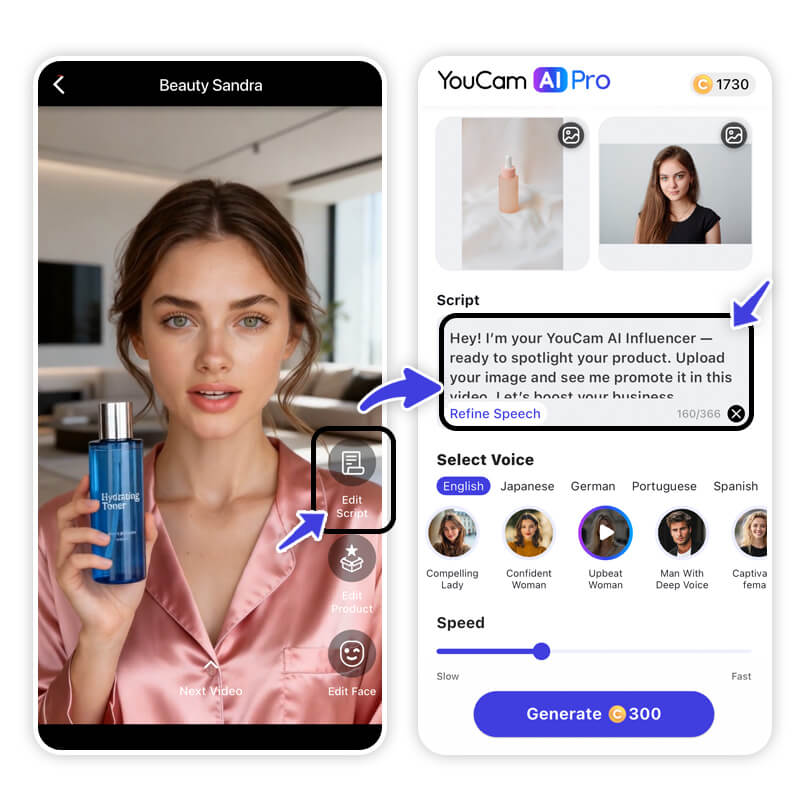
Step 3: Customize Model, Script, Product, and Language
Write a short, clear script focused on one main benefit. Keep it conversational and under 30 seconds for best results. You can also select from 80+ languages to localize your ad instantly.
Step 4: Adjust Voice and Pacing
Select a voice that matches your brand tone. Adjust the pacing for a natural feel.
Step 5: Export and Publish
Download your AI ad video and post it across social media, ad platforms, or your website.
Tips to Improve AI Ad Performance
To get the best results from ads creative AI, keep these tips in mind.
- Start with one clear message per ad
- Use short scripts with strong hooks in the first 3 seconds
- Match the avatar style to your target audience
- Test multiple versions using different templates or scripts
- Keep videos short and platform specific
AI ads perform best when they feel like content, not commercials.
Make a Creative AI Ad for Your Small Business Today
AI ads are no longer experimental. They are becoming one of the most effective ways to create scalable, high performing ad creatives.
When done right, ads creative AI helps small business owners produce human feeling, conversion focused ads without complexity. With YouCam AI Pro’s AI Business feature, you can create expressive AI avatar videos, use professional templates, speak to global audiences, and launch ads faster than ever.
If you want to make AI ads that actually convert, start with the right strategy and the right tools.
AI Ad Generator FAQs
What are AI ads?

AI ads are marketing ads created or enhanced using artificial intelligence. They use AI to generate scripts, visuals, avatars, voiceovers, and video content faster and more efficiently than traditional ad production.
How do AI ads help small businesses?
AI ads help small businesses save time and money by eliminating the need for actors, studios, or expensive editing. With tools like YouCam AI Pro’s AI Business feature, you can create professional, high-converting ads in minutes.
What is an AI ad generator?
An AI ad generator is a tool that automatically creates ad content using AI. It can generate visuals, videos, scripts, and even AI avatars to deliver marketing messages across platforms like TikTok, Instagram, and YouTube.
Can AI ads actually convert?
Yes. AI ads can convert extremely well when they feel authentic and relevant. Using expressive AI avatars, natural lip-sync, and UGC-style templates helps AI ads feel more human and trustworthy to viewers.
What makes a good AI ad creative?
A strong AI ad creative focuses on one clear benefit, uses short and engaging visuals, includes a human-like face or avatar, and ends with a clear call to action. AI tools make it easy to test multiple versions quickly.
Is it legal to use AI avatars in ads?
Yes, as long as you are using licensed AI avatars or platforms that provide proper usage rights. YouCam AI Pro’s AI Business feature is built for commercial use and safe marketing deployment.
Can AI ads be used on social media platforms?
Absolutely. AI ads work especially well on TikTok, Instagram Reels, Facebook, and YouTube Shorts. Vertical video formats and UGC-style AI avatar ads perform best on these platforms.
What types of businesses can use AI ads?
AI ads are ideal for beauty brands, fashion, electronics, food, ecommerce stores, service businesses, and local brands. YouCam AI Pro offers 25+ templates designed specifically for these industries.
How many languages can AI ads support?
With YouCam AI Pro’s AI Business feature, you can create ads in over 80 languages with natural voice delivery and realistic lip-sync, making it perfect for global marketing.
Do I need video editing experience to create AI ads?
No. AI ad generators like YouCam AI Pro are designed for beginners. You simply choose a template, add your text, select an AI avatar, and generate a ready-to-use ad video.



