


 Author:


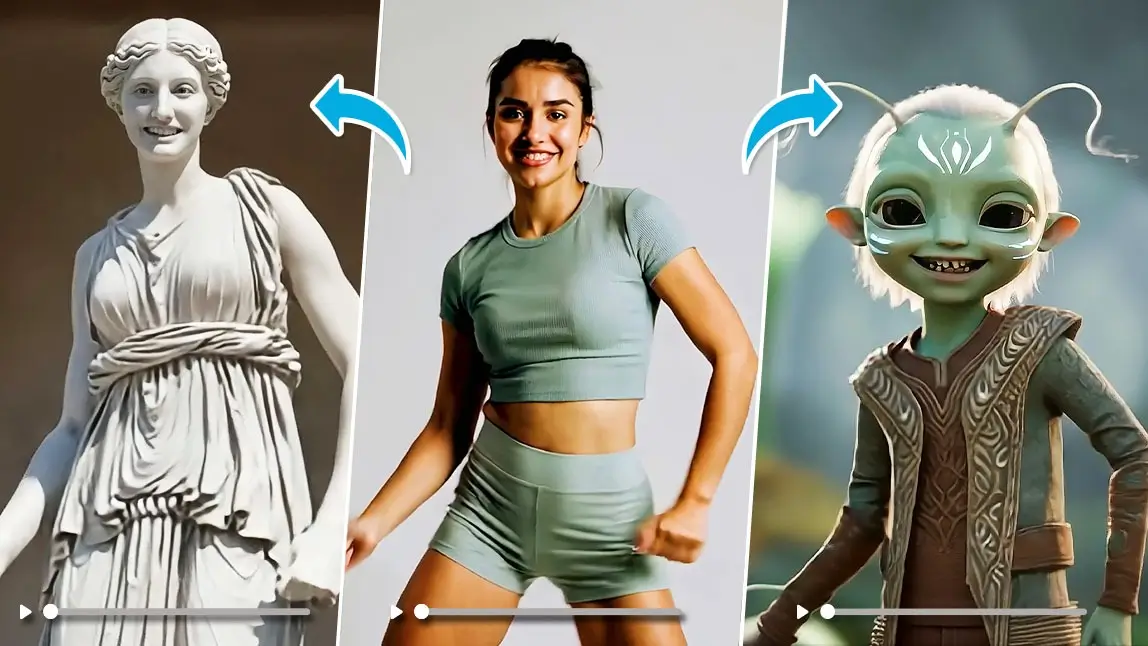
AI video to video is a technology that transforms an existing video into a new one using AI. Common examples include applying artistic styles (like anime), swapping faces or outfits, and changing backgrounds, all of which can be done with user-friendly apps like YouCam Video.

AI video to video tech is taking over your social media feeds, and honestly, it’s kind of mind-blowing. Whether you're a content creator, a small business owner, or just playing around with aesthetic edits, AI can now transform one video into another with a completely different look, vibe, or even person. Let’s dive into what AI video to video really means, with 10 examples and how you can use them today.
10 AI Video to Video Best Use Cases and Examples
1. Sync the Motion in the Video
With AI video to video, you can perfectly replicate the motion from your original clip and apply it to any new style or character. The AI reads every movement, like hand waves, dance steps, body turns, and recreates it smoothly so the transformed video stays natural and on-beat. No awkward jittering or delayed limbs, just clean motion sync.
2. Change the Complete Scene
AI video to video lets you swap the entire scene of your video in one go. Your bedroom can instantly turn into streets, a snowy village, or even a futuristic sci-fi world. The AI doesn’t just paste a background, it rebuilds lighting, shadows, and textures so the new environment looks like it was filmed on location.
3. Change the Clothes in the Video
You can use AI video to video to change the outfit you’re wearing in the clip without reshooting anything. Formal dresses, streetwear, cosplay. Anything can be generated and fit naturally to your body as you move. The fabric follows your pose and flow realistically, making it perfect for fashion content, try-ons, or creative concepts.
4. Change the Season in the Video
AI video to video can transform your clip from summer to winter, or any season you want. Trees, lighting, colors, weather effects, and the overall mood shift together. A sunny street walk can instantly become a soft snowy scene, creating a totally different atmosphere without any editing headaches.
5. Transform the Video into Animation
This feature turns real-life footage into animation styles like anime, hand-drawn art, 3D cartoons, or painterly looks. AI video to video keeps your original motion and camera movement but completely changes the visual style. It’s like turning your vlog into a Ghibli scene or a stylized animated short.
6. Remove Background Bystanders in the Video
When random people or objects show up in your video, AI video to video can remove them cleanly. It erases bystanders, cars, or distractions and rebuilds the background to make it look untouched. Super helpful for travel clips or crowded places.
7. Change Characters in the Video
AI video to video allows you to replace the person in the video with an entirely different character. It regenerates the face, hairstyle, and appearance while keeping all the original movements. You can turn yourself into an animal, a fictional character, or even swap in friends for fun.
8. Lip and Voice Syncing in the Video
With AI video to video, you can keep your original voice and lip movements while swapping yourself into a completely different character. The AI maps your real mouth shapes and timing onto the new character so the speech still looks natural and perfectly synced. This feature is especially great for people who feel shy on camera, you can “be in the video” without actually showing your real face.
9. Transform the Person in the Video into Cute Charater
AI video to video can turn you into a cute mascot-style version of yourself. Q-style characters, cartoon mascots, plushie-like characters, you name it. The adorable character still follows all your real motions, making everyday actions like dancing or turning your head look extra fun and expressive.
10. Add Cinematic Effect to Video
You can also use AI video to video to instantly add cinematic vibes to your footage. Think film-style colors, dramatic lighting, lens flares, soft focus, or vintage film grain. Even simple phone footage can end up looking like a movie trailer with just one generation.
Try AI Video to Video with the Best AI AI Video Generator App: YouCam Video
If you’re ready to level up your videos, YouCam Video makes AI video to video edits ridiculously easy, no advanced skills, no heavy software, just pure creativity on tap. It’s the fastest way to transform scenes, outfits, characters, and animation styles while keeping your original motion and vibe perfectly intact. Whether you’re filming trends, storytelling clips, or just playing around, the app turns everyday footage into something instantly scroll-stopping.
Why YouCam Video Is the Go-To App for AI Video-to-Video Edits:
- Instant Scene Swaps: Turn your room into Paris, a snowy village, or a cyberpunk city with just one tap.
- AI Outfit Changes: Switch into stylish fits, cosplay outfits, or completely new looks without re-filming.
- Animation Transformations: Convert real-life videos into anime, 3D, hand-drawn, or stylized visuals effortlessly.
- Character Replacement: Keep your motion but swap into a new character, perfect for camera-shy creators.
- Clean Background Removal: Remove random people and distractions to make your shots look professionally framed.
- Cinematic Effects: Add film-style lighting, colors, and vibes that make your video feel like a mini-movie.
- Fast, Fun, and Beginner-Friendly: Just upload, tap, and watch your video glow up in seconds .

Key Takeaways
- AI Video to Video is More Than a Filter: It's a transformative technology that reconstructs your video, allowing for changes that were previously impossible on a mobile device.
- It's a Massive Time-Saver: For content creators, the ability to generate multiple versions of a video from a single take is a revolutionary workflow improvement.
- The Use Cases are Expanding Rapidly: From entertainment and social media to e-commerce and marketing, AI video to video is becoming an integral tool across many industries.
- Ethical Use is Paramount: As this technology becomes more powerful, it's crucial to use it responsibly, especially when it comes to altering images of other people.
Final Thoughts
AI video to video isn’t just a trend. It’s the new normal for creators, brands, and anyone who wants to push the boundaries of their content. With tools like YouCam Video, high-level editing feels less like work and more like play. You don’t need a Hollywood budget, just an idea and a little AI magic.
✨ Try YouCam Video to transform your content effortlessly. From style edits to background swaps, it’s your new favorite editing sidekick.
About the Editors

The PERFECT Corp. Editorial Team
We are a team of experts on photo and video editing apps. Our goal is to deliver engaging content on everything from stunning selfie edits to eye-catching video effects. We cover the latest trends and share niche tips to help you master digital creation.
AI Video to Video: Questions Answered (FAQ)
- What is AI video to video?
- AI video to video is a process where AI transforms an existing source video into a new video. This can involve changing the style (e.g., to anime), the subject (e.g., face swapping), or the environment (e.g., background replacement).
- Is AI video to video free?
- Many tools, including YouCam Video, offer free trials or basic free versions. However, for high-resolution exports, longer videos, and access to the most advanced features, a subscription is usually required.
- What is the best AI video to video tool?
- The "best" tool depends on your needs. YouCam Video is excellent for beauty, fashion, and social media edits. Runway ML is a powerful option for more artistic and cinematic transformations. It's a good idea to try a few to see which one fits your workflow.
- Is it safe to use AI for face-swapping?
- While the technology itself is neutral, its use must be ethical. Most reputable tools add watermarks or have policies against creating harmful or deceptive content. Always use these features responsibly and never alter a video of someone else without their explicit permission.

![I Tested 20+ AI Video Generators and Here’s the Result [2026]](https://plugins-media.makeupar.com/smb/blog/post/2026-09-24/webp_c2169e72-46d8-46ad-8e53-efefa9b8d31a.jpg)
