Author:


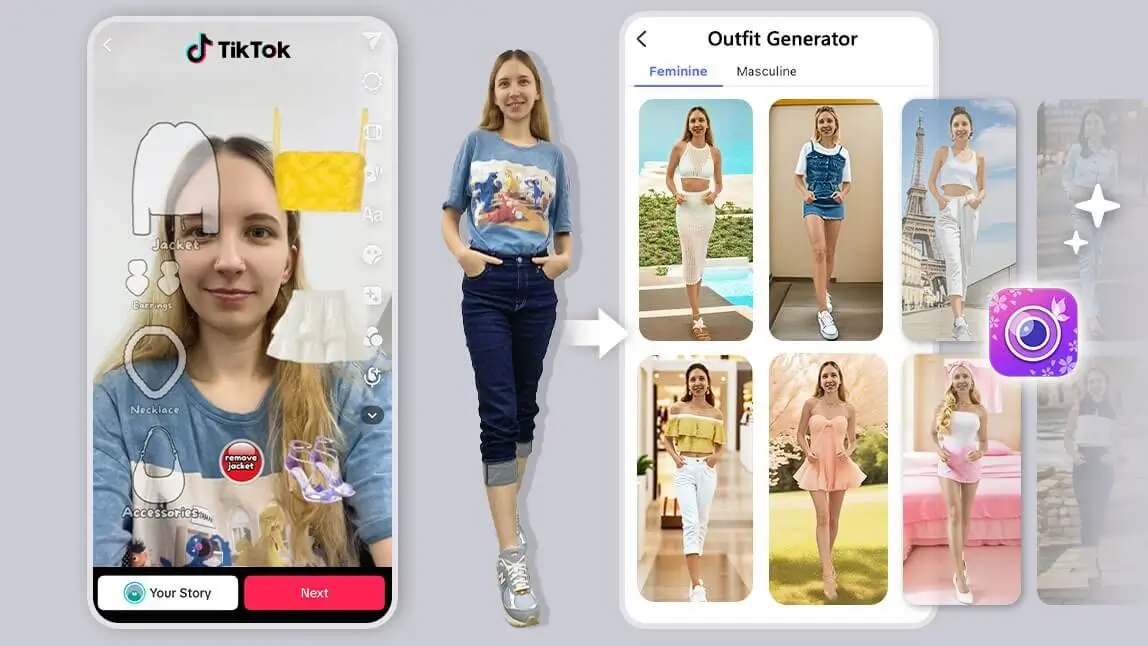
In 2026, the "What should I wear?" dilemma is solved by a "Digital Twin" ecosystem.
That’s exactly why outfit filters and random outfit generators have gone viral on TikTok. Filters like “Your Fall Outfit Filter” help users quickly explore outfit ideas by randomly flipping through tops, jackets, pants, shoes, and accessories.
But what if you could go beyond guessing—and actually see yourself wearing those outfits? That’s where AI outfit generators like YouCam Perfect come in.
What Is an Outfit Filter?
An outfit filter is a digital tool—often found on TikTok or in apps—that randomly selects clothing combinations for inspiration. It works like a choose-my-outfit generator, helping you decide what to wear based on categories like dresses, jackets, shoes, or aesthetics.
While TikTok outfit filters are great for inspiration, they don’t let you preview how the outfit looks on your body—which is where AI outfit generators stand out.
How to Find the Outfit Filter on TikTok?
You can find popular outfit picker filters by searching keywords such as:
- “outfit filter”
- “random outfit generator filter”
- “pick my outfit generator”
Popular TikTok outfit filters include:
- Your Random Outfit v2
- Your Random Outfit v3
- Your Summer Outfit Filter
- Dress to Impress Filter
These filters are fun—but they stop at suggestions.

Try Outfit Filters That Actually Show You the Look

Best AI Photo Editor
The Best AI Photo Editor & Selfie Camera.
Remove objects, apply filters & more.
Instead of just picking outfits randomly, wouldn’t it be better to see yourself wearing them?
That’s exactly what YouCam Perfect, an AI Outfit Generator, allows you to do. With its AI Fashion feature, you can try on outfits virtually and preview how different styles fit your look.
Read more: Dress to Impress Filter: Pick, Try, and Style My DTI Outfits
Why YouCam Perfect is the Top AI Outfit Generator in 2026?
The Random Outfit Generator is perfect for discovering styles you may not normally consider.
AI Fashion Styles for Every Aesthetic
- The "Eco-Goth" & Sustainable Luxe: High-end style with zero waste.
- Y3K Cyber-Street: Future-ready metallics and neon accents.
- Old Money / Quiet Luxury: Timeless tailoring powered by AI precision.
- Agentic Styling: Ask the AI, "What should I wear to a 2026 tech summit in Tokyo?" and let it generate a curated ensemble.
With YouCam Perfect, you can try 60+ AI outfit styles, including:
- Party outfits
- Prom looks
- Casual wear
- Business outfits
- Swimwear & bikinis

☝ Besides trying out the Choose My Outfit Filter, see how these outfits actually look on you
How to Use the Outfit Filter with an AI Outfit Generator
Here’s how to find your next outfit using YouCam Perfect’s AI Fashion:
- Download YouCam Perfect and find "AI Fashion" feature under AI Tools

- Choose 1-5 AI Fashion styles you want to try (YouCam Perfect provides outfit picker filters for both men and women)

- Upload an image of yourself (preferrably one with your full face) and click the button "Next"
- Give it a few minutes, and then AI will provide you 20 different outfits under each style
- You can flip through them and see which one works out best for you

And that's it! That's how you find your next outfit idea by using "AI Fashion".
💡 Bonus Tip: Try On a Specific Clothing Item
If you want to try on a specific item without the entire outfit, there's another solution: the "AI Replace" feature in YouCam Perfect allows you to add any piece of clothing you like on yourself!

- Find "AI Replace" in YouCam Perfect's homepage
- Choose a photo of yourself
- Use your finger to paint the areas you want to replace, such as your shoes or shirt
- Type a prompt in the text field, and tap "Replace"
- The app will automatically generate your requests onto your photo

☝ Use 'AI Replace' to Generate Outfits & Accessories on Your Picture
Popular AI Outfit Filters in YouCam Perfect
Best AI Photo Editor
The Best AI Photo Editor & Selfie Camera.
Remove objects, apply filters & more.
#1 Prom Outfit Filter
Try elegant gowns, formal dresses, and stylish evening looks—no fitting room required.
I tried this one on a plain headshot-style photo, and the gown draping looked convincingly real — the fabric folds followed my actual pose instead of looking pasted on.

#2 Casual Wear Outfit Filter
Explore relaxed everyday outfits like jeans, tees, and athleisure for daily inspiration.

This is the filter I'd trust most for everyday use — the fit and proportions stayed accurate across a few different photos I tested, including one taken at an angle.
AI Fashion> Upload Your Picture > Choose the Casual Wear Outfit Filter> Generate Image
#3 Y3K Fashion Outfit Filter
The metallic textures held up well in good lighting, but in a dimly lit photo the reflective fabric looked a bit flat — bright, evenly lit photos give this one the best results.
Go futuristic with metallic fabrics, neon accents, and cyber-inspired designs straight from the future.
AI Studio > Upload Your Picture > Choose the Y3K Outfit Filter> Generate Image
Results here were noticeably more convincing on full-body photos than close-up ones, since the generator has more of your actual body shape to work from.
#4 AI Bikini Outfit Filters
Preview swimsuit and bikini styles before your next trip or summer outing.
AI Fashion > Swimsuit > Choose the Bikini Outfit Filter > Generate Image
Of the five styles, this was the most consistent — the tailored silhouettes rendered cleanly across every photo I tried, likely because the outfit shapes are simpler than the more elaborate looks like Y3K.
#5 Old Money Outfit Filter
Create timeless, classy looks with blazers, pleated skirts, and preppy “quiet luxury” outfits.

AI Studio > Fashion > Choose the Old Money Outfit Filter > Generate Image
Create Your Perfect Outfit with an AI Outfit Generator
The next time you’re stuck wondering what to wear tomorrow, planning a date outfit, or looking for fashion inspiration, outfit filters and AI outfit generators have you covered. While TikTok outfit filters are fun for ideas, YouCam Perfect lets you actually try the outfits on, helping you choose with confidence. From floral prints and smart casual looks to denim, vintage, and trend-forward aesthetics—AI makes styling easier than ever.
✨ Try YouCam Perfect today and turn outfit guessing into instant fashion inspiration.
Outfit Filter vs. AI Clothes Changer: Which Should You Use?
If you want to try on a specific real garment rather than a generated style, YouCam Perfect's outfit filters aren't the only option worth comparing.
| Tool | Best For |
|---|---|
| AI Fashion Outfit Filters (in-app) | Fast, fun style discovery across dozens of pre-built looks — best when you don't have a specific outfit in mind |
| AI Clothes Changer | Trying on a specific real garment — upload a clothing photo and see it on your own picture |
| TikTok outfit filters | Quick inspiration and suggestions, though they don't show the outfit on your actual photo |
My take: use the in-app outfit filters when you're browsing for style ideas, but switch to the AI Clothes Changer when you already have a specific piece — a dress you saw online, for example — and want to see it on yourself before buying.