 Author:


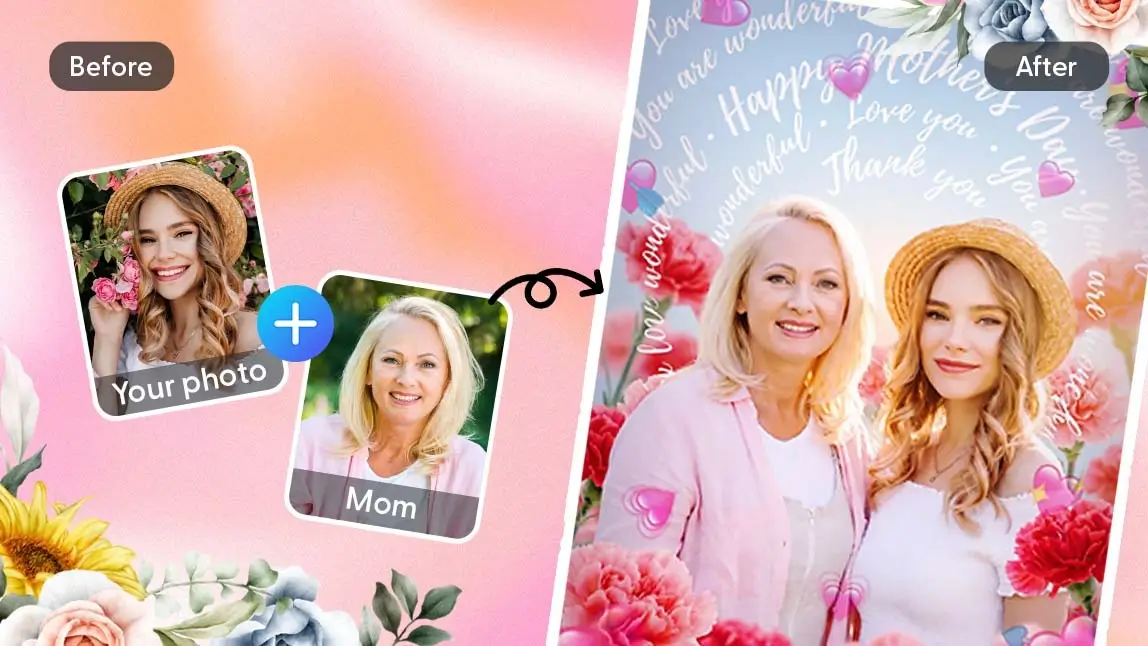
As Mother's Day approaches, many people are looking for meaningful ways to celebrate and capture special moments with their moms.
 Mom's Day Image


One of the most popular trends right now is using a flower filter to enhance photos with soft, romantic floral effects. Even better, with AI technology, you can now create beautiful AI group photos—perfect for combining family members into one heartwarming picture.
In this guide, we’ll show you how to use flower filters and AI tools to create stunning Mother’s Day photos effortlessly. 🌼🌻🌷
What Is a Flower Filter?
A flower filter is a photo effect that adds floral elements—such as blossoms, petals, or floral frames—to your images. These filters are designed to create a warm, elegant, and emotional tone, making them especially popular for occasions like Mother’s Day.

Unlike traditional filters, modern AI-powered flower filters can:
- Blend flowers naturally into the background
- Adjust lighting and color tones automatically
- Match floral styles with your photo’s mood
This makes them ideal for portraits, especially mother-daughter or mother-son photos.
Why Flower Filters Are Trending for Mother’s Day
Flower filters are more than just aesthetic—they help tell a story. Flowers symbolize love, appreciation, and gratitude, which perfectly align with the spirit of Mother’s Day. Here’s why they’re trending:
🌸 Emotional appeal: Soft floral visuals enhance sentimental moments
📸 Social media ready: Perfect for Instagram, TikTok, and digital cards
🤖 AI-powered convenience: No editing skills needed

Combined with AI group photo technology, you can even create photos with loved ones who aren’t physically together.

Best AI Photo Editor
The Best AI Photo Editor & Selfie Camera.
Remove objects, apply filters & more.
How to Create a Floral AI Group Photo with YouCam Perfect
With YouCam Perfect, you can combine multiple photos into one and apply a beautiful flower filter in just a few steps.
Create An AI Group Photo
- Download the YouCam Perfect app from your device’s app store.
- Open "AI Group Photo" and select a template you like (templates like Eternal Duo, Motherly Bloom work the best for Mother's Day).

Apply a Flower Filter
- Open "Effects" and choose from floral templates designed for Mother’s Day, such as rose frames, cherry blossoms, or soft pastel petals.
- Customize your look by adjusting brightness, tones, or filter intensity to match your style.
- Download, save and share your image and share it as a heartfelt Mother’s Day post or digital card.

Pro Tips for Mother's Day Photos
Here are some pro tips for you before you try YouCam Perfect:
- Choose light, clean backgrounds for more natural blending
- Avoid overly complex scenes for best AI accuracy
- Match flower styles (e.g., roses, cherry blossoms) with your photo’s mood
- Keep filter intensity moderate for a realistic finish
YouCam Perfect combines advanced AI with user-friendly design, making it easy for anyone to create professional-quality images. Here are some key benefits:
✔️ Realistic AI group photo merging
✔️ High-quality flower filter effects
✔️ Fast, beginner-friendly workflow
✔️ Perfect for seasonal content like Mother’s Day
Whether you’re creating a digital memory or a social media post, YouCam Perfect helps you bring your ideas to life effortlessly.
Create with AI Group Photo & Flower Filters Now
Using a flower filter is one of the easiest ways to elevate your photos for Mother's Day. When combined with AI Group Photo technology, you can create meaningful, visually stunning images that celebrate family and connection—even from a distance.
Download YouCam Perfect now and start generating beautiful, meaningful visuals that Mom will treasure forever. 🌸