


 Author:
Don't panic. You don't need a designer budget or a personal stylist to look like an editorial powerhouse. With advanced AI virtual try-on technology, you can instantly see yourself in the film's most striking looks.
In this quick guide, we’ll show you exactly how to transform your everyday photos into high-fashion lookbook shots—including how to test out those iconic, sharply-debated eyebrows. Here is your roadmap to a total digital makeover.
Key Takeaways
| Feature | What You Can Do | Why It's Iconic in The Devil Wears Prada 2 |
|---|---|---|
| AI Clothes Try-On | Swap your current clothes for high-fashion runway outfits in photos. | Recreate Emily’s sharp Dior blazers and Andy’s confident editorial styles. |
| Virtual Eyebrow Styler | Instantly adjust the shape, thickness, and color of your eyebrows. | Directly test the brows Emily Blunt's character famously calls out in the trailer. |
| Couture Makeup Filters | Apply professional red-carpet makeup looks with a single tap. | Match the bold reds and minimalist elegance of the sequel's stars. |
Why Is The Devil Wears Prada 2 Outfits & Makeup So Fascinating?
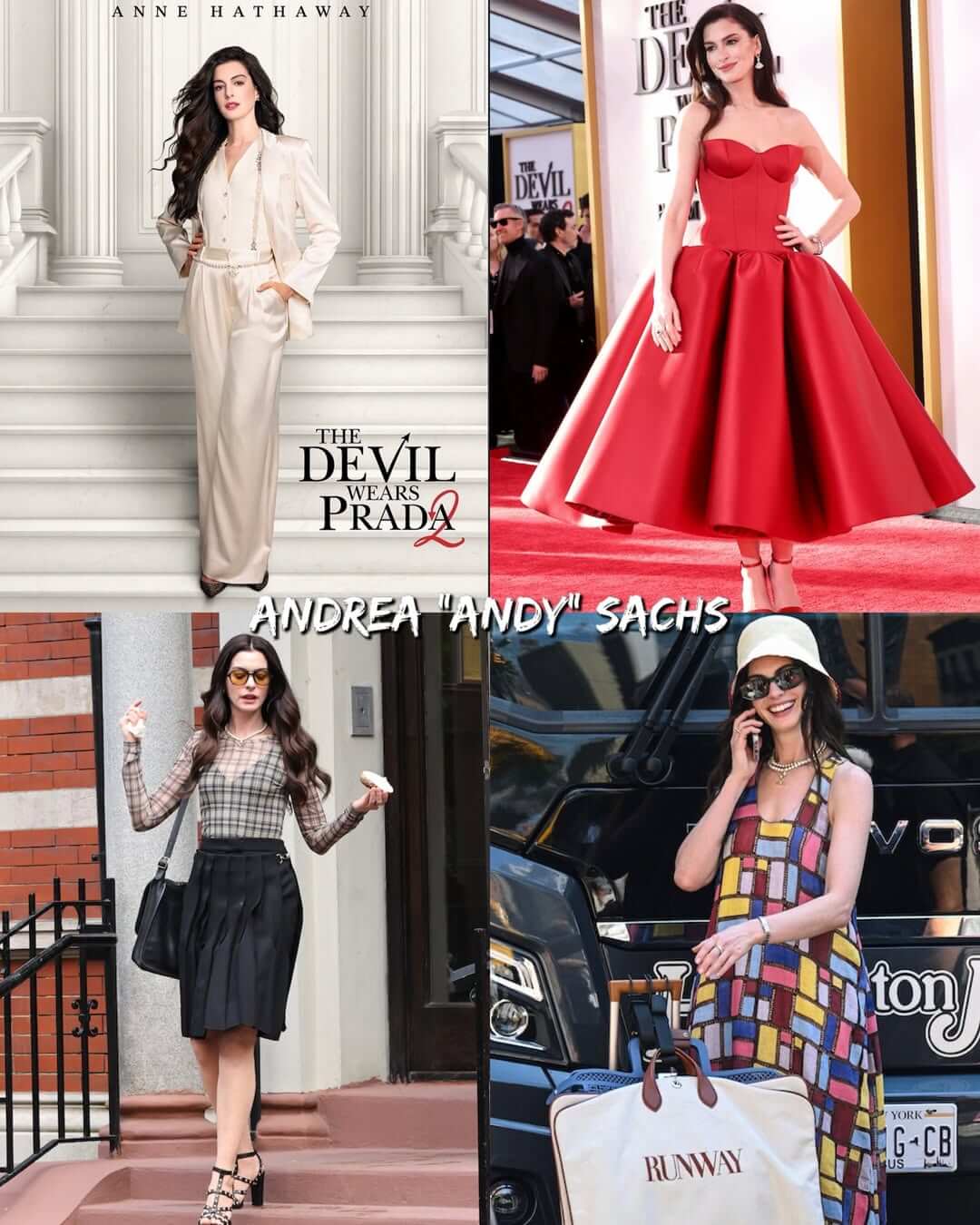
Two decades after the original movie redefined workplace style, the sequel proves that fashion isn't just about clothes—it’s armor. This time around, the tables have turned. Emily Charlton (Emily Blunt) is no longer a frantic assistant; she’s a powerhouse Dior executive dressing with absolute "no-mercy" energy. Meanwhile, Andy Sachs (Anne Hathaway) returns with a sleek, menswear-inspired, and highly confident look.
Every single the devil wears prada 2 outfit serves as a masterclass in modern power dressing. But it’s not just the clothes. The beauty looks—from Emily’s signature sharp red lips to Andy's highly discussed features—prove that a single styling choice can completely change your vibe.
How to Try The Devil Wears Prada 2 Outfits in Photos with AI
Want to see how you'd look wearing a high-fashion the devil wears prada 2 outfit without spending a fortune? The YouCam Makeup app makes virtual clothes-changing ridiculously simple. Here’s how to do it in five quick steps:
Step 1. Download YouCam Makeup

Best AI Selfie Camera
The #1 Virtual Makeover & Selfie Camera App.
Experience real-time AR makeup trials.
First, head over to the App Store or Google Play Store and download YouCam Makeup. It's free to download and packed with intuitive AI fashion tools.
Step 2. Upload Your Photo
Open the app and navigate to the AI Wardrobe tool. Choose a clear, well-lit photo of yourself where your body is facing the camera. A simple portrait or full-body shot works best.
Step 3. Upload Your Desired Style
To get that editorial look, you can upload a reference image of your favorite movie look, or choose from YouCam's curated high-fashion, blazer, or couture templates.
Step 4. Let the AI Swap Your Clothes
Once you’ve selected your style, tap to generate. The smart AI will automatically map the clothing to your body shape, tailoring the fit, shoulders, and fabric texture so it looks completely real.
Step 5. Preview & Save
Check out your high-fashion upgrade! If you love the look, save the photo directly to your camera roll, ready to share with your friends or post to your social feed.
How to Try The Devil Wears Prada 2 Makeup in Photos with AI
Of course, you can't talk about the devil wears prada 2 without talking about the beauty details. In the trailer for the sequel, Emily drops an instant classic of a one-liner when confronting Andy:
"You've changed, you have—you're much more confident. Kept those eyebrows, though, didn't you?"
Ouch. While Emily might still be throwing her signature shade, it’s a brilliant reminder of just how much power a pair of brows holds.
If you want to make sure your brows are Miranda-approved, you can use the virtual eyebrow try-on tool in YouCam Makeup to experiment with different shapes, arches, and colors in real-time. Here is exactly how to do it:
Step 1. Head to Makeup
Open the YouCam Makeup app and select the Makeup tool from the main screen to unlock the beauty customization suite.
Step 2. Upload Your Photo
Choose a clear, front-facing photo of yourself. Good, even lighting on your face will help the AI accurately detect your features and map the makeup flawlessly.
Step 3. Go to Eyebrows & Try the Styles
Navigate to the Eyebrow section under the makeup tools. From here, you can browse through dozens of different shapes—from soft, natural arches to sharp, defined power brows. Tap on them to see how they look on your face instantly.
Step 4. Adjust with Sliders
Once you find a shape you like, use the built-in adjustment sliders to fine-tune the intensity, color, thickness, and arch. This ensures the style perfectly complements your natural face shape.
Step 5. Save & Share
When you've achieved that perfect, editorial-ready look, save your newly styled photo to your gallery. Share it with your friends or post it to show off your chic transformation.
Step Onto the Runway with AI
Best AI Selfie Camera
The #1 Virtual Makeover & Selfie Camera App.
Experience real-time AR makeup trials.
You don't need to work for a high-stakes fashion magazine to dress like a global icon. Technology has officially democratized the fashion closet, giving everyone access to runway-level styling with just a few taps. Whether you're channeling Emily's sharp executive suits or trying to find the perfect eyebrow arch to silence the critics, the power is right in your hands.
Go ahead—give your style a promotion. Try YouCam Makeup today and step into your own high-fashion era.
About the Editors
The PERFECT Corp. Editorial Team
We are a team of experts on photo and video editing apps. Our goal is to deliver engaging content on everything from stunning selfie edits to eye-catching video effects. We cover the latest trends and share niche tips to help you master digital creation.
The Devil Wears Prada 2 FAQs
When is The Devil Wears Prada 2 being released?

The highly anticipated sequel is scheduled to hit theaters in May 1st 2026, bringing back the iconic main cast twenty years after the original 2006 film.
How does the AI change my outfit in the photo?
The AI analyzes your body's proportions, lighting, and posture in your uploaded photo, then seamlessly overlays the new clothing style. The result is a highly realistic image that looks like a real photoshoot.
Can I test different makeup looks along with the outfits?
Absolutely. YouCam Makeup allows you to layer both AI fashion styles and virtual makeup elements—including eyebrows, lipstick, blush, and eyeliner—all on the same photo.



