Author:


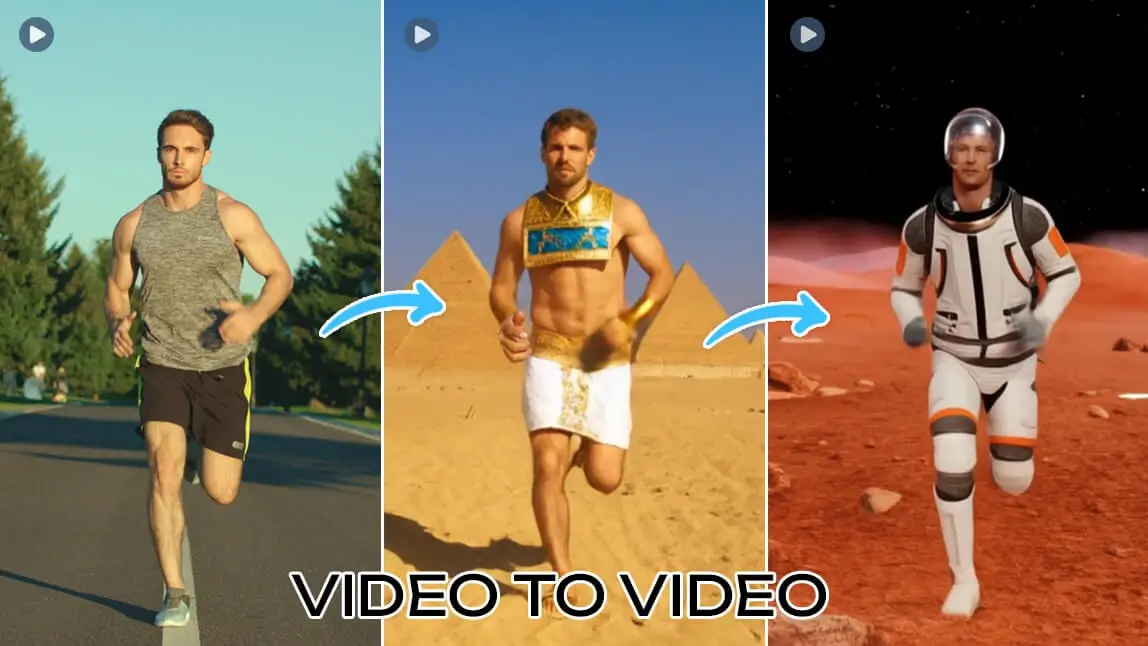
Editing video used to mean hours of tedious frame-by-frame adjustments. We’ve all been there—staring at a timeline, wishing we could just "tell" the computer to change a background or fix a camera angle.
Well, the future is finally here. Whether you are a professional filmmaker or a content creator looking to level up your social media game, AI tools are making the impossible possible.
In this guide, we’ll break down the groundbreaking Runway Aleph, a tool that is changing how we AI transform video. Plus, if you’re looking for the easiest way to start transforming your videos right now on your phone, we highly recommend you download YouCam Video to follow along!
Let’s dive into the future of editing.
What Is Runway Aleph?
Released by Runway ML on July 25, 2025, Runway Aleph isn't just another video generator—it is a sophisticated post-production powerhouse.
While famous models like Sora, Kling, or Veo focus on generating video from scratch (text-to-video), Runway Aleph specializes in video to video transformation. It takes your existing footage and uses advanced generative AI to edit, enhance, and completely transform it.
Think of it as having a Hollywood VFX studio in your browser. It bridges the gap between raw footage and the final cut without requiring complex 3D modeling or green screens.
Discover the best AI Video Generators now>>>
8 Core Features of Runway Aleph
Why is the creative world buzzing about this tool? Here are the 8 key capabilities that make Runway Aleph a game-changer for AI transform video tasks.
1. Generate New Camera Angles
Stuck with a static shot? Aleph can synthesize new perspectives from a single video clip, allowing you to simulate drone shots or side angles that weren't originally filmed.
2. Generate the Next Shot
Writer's block for video? Aleph can predict and generate the logical "next shot" in a sequence, maintaining consistency in lighting and character appearance.
3. Object Manipulation (Add, Remove, Replace)
Seamlessly erase a coffee cup from a table or swap a boring prop for something futuristic. The AI handles the lighting and shadows automatically.
4. Character Appearance Editing
Need to change an actor's outfit or hairstyle post-filming? Aleph allows for high-fidelity character modifications without losing the actor's performance or identity.
5. Recoloring and Color Swapping
Go beyond basic color grading. Aleph can intelligently identify specific elements (like a car or a dress) and swap their colors instantly while preserving texture.
6. Style Transfer and Visual Aesthetics
Turn a realistic video into a watercolor painting, a 1980s VHS tape, or a cyberpunk animation using advanced style transfer capabilities.
7. Green Screen and Background Isolation
Aleph creates studio-quality mattes instantly, allowing you to isolate subjects and swap backgrounds without a physical green screen.
8. Motion Transfer to Static Images
Take a reference video of a person dancing and apply that exact motion to a static image of a character, bringing still photos to life.
Best Runway Aleph Alternative App: YouCam Video
While Runway Aleph offers professional desktop power, sometimes you need a quick, powerful video to video solution right on your phone.
Enter YouCam Video, the ultimate AI video editor for creators on the go. It simplifies complex AI transformations into one-tap solutions.
Why YouCam Video is the perfect mobile companion:
- Massive Template Library: Huge collection of pre-set AI styles.
- Sudden Scene Change: Create viral-worthy transitions where the environment morphs instantly.
- Style Transfer: Turn your videos into anime, cartoon, or artistic styles in seconds.
- Creative Control by Prompts: Use text prompts to tell the AI exactly how to transform your clip.
Learn more about the benefits of YouCam Video>>>
How to Use the AI Video Editor on YouCam Video
Ready to create your own AI transform video masterpiece? It’s easier than you think.
Step 1. Download YouCam Video
Shared Materials by Strapi
*Adjust the size of images ONLY. Please go to Strapi to edit the materials info.
Get the YouCam Video app from your app store.
Step 2. Tap AI Video Editor Feature

Open the app and select the AI Video Editor feature on the launcher.
Step 3. Select Video Template
Choose a pre-set video template that fits your vibe (Anime, Cyberpunk, Cinematic).
Step 4. Upload Your Video

Tap the icon in the upper right to import your own footage.
Step 5. Enter Prompts

Type a description to guide the AI (or adjust the existing prompt for the template).
Learn how to write the perfect video prompt>>>
Step 6. Generate & Save

Watch the magic happen, then save and share!
Slay the Video to Video Generation with the Best Runway Aleph Alternative App
Shared Materials by Strapi
*Adjust the size of images ONLY. Please go to Strapi to edit the materials info.
The era of AI transform video technology is here, and it is reshaping how we tell stories. Whether you are using the heavy-lifting power of Runway Aleph for studio work or the creative agility of YouCam Video for social media, there has never been a better time to be a creator.
Don't let technical skills hold you back. The tools are ready—are you?
About the Editors

The PERFECT Corp. Editorial Team
We are a team of experts on photo and video editing apps. Our goal is to deliver engaging content on everything from stunning selfie edits to eye-catching video effects. We cover the latest trends and share niche tips to help you master digital creation.

![I Tested 20+ AI Video Generators and Here’s the Result [2026]](https://plugins-media.makeupar.com/smb/blog/post/2026-09-24/webp_c2169e72-46d8-46ad-8e53-efefa9b8d31a.jpg)