Author:


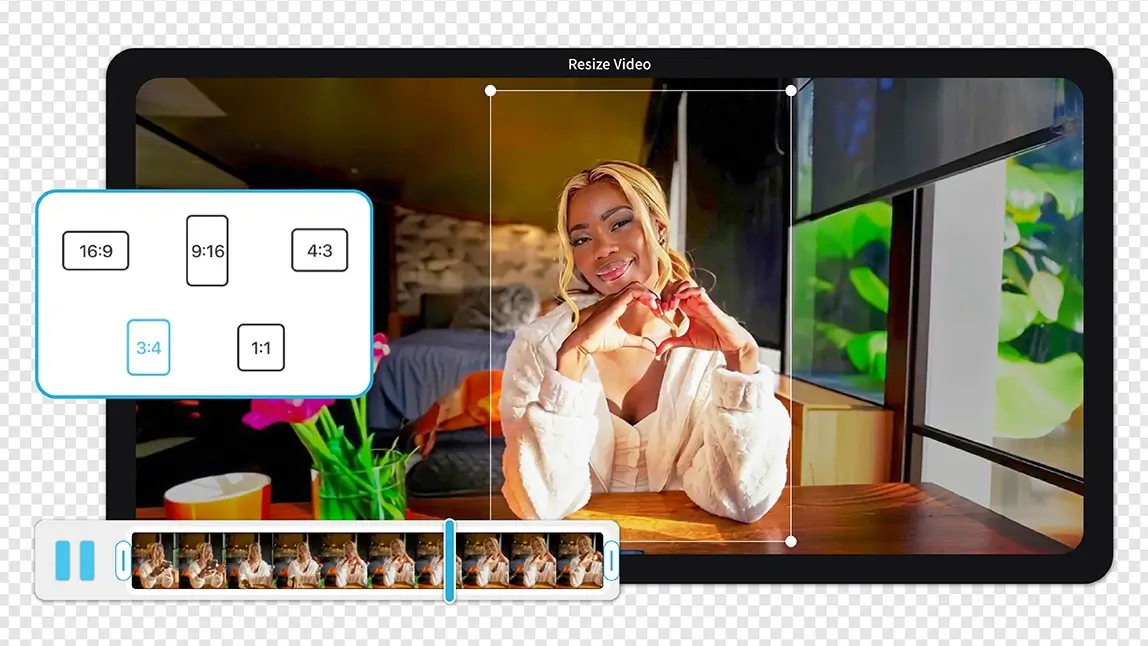
If you’ve ever struggled to resize video free without losing quality, or wondered how to change video size for different social platforms without complex editing software, you’re not alone.
I tested 11 popular video resizer tools to see which ones actually deliver — especially for creators who care about aesthetics, beauty content, and polished results. Along the way I ran the same 9:16-to-1:1 and horizontal-to-vertical conversions through every app so I could compare how each one actually handled faces and busy backgrounds, not just how their marketing pages describe it, and I added CapCut to the lineup as an eleventh pick since it keeps coming up as a free go-to for creators reframing clips across platforms.
Video Resizer Tools Comparison Chart
| Tool | Platform | Price | Best For |
|---|---|---|---|
| YouCam Video | iOS, Android | Free + Premium | Simple edits, social creators, influencers and advanced editors |
| KineMaster | iOS, Android | Free with watermark / Subscription | Intermediate editors |
| VivaVideo | iOS, Android | Free with watermark / Premium | Casual social users |
| Splice | iOS, Android | Free trial / Subscription | Minimalist editors |
| iMovie | iOS, macOS | Free | Simple edits, Apple users |
| PowerDirector | iOS, Android, Windows, macOS | Free + Premium | Advanced editors |
| Vimeo | Web | Free + Paid Plans | Business & portfolio |
| Clideo | Web | Free with watermark / Paid | Quick web resizing |
| Kapwing | Web | Free + Paid Plans | Team creators |
| Adobe Express | Web, iOS, Android | Free + Premium | Brand storytellers |
| CapCut | iOS, Android, Web, Windows, macOS | Free (no watermark) | Social creators who want fast, free auto-reframing |
YouCam Video — Best AI Video Resizer

What really sets YouCam Video apart is its Video Extender feature. Instead of zooming in or cutting off important details, the app automatically expands the background to fit new aspect ratios.
Testing note: I ran the same clip — a face-forward shot with a plant in the background — through YouCam Video's Video Extender at 9:16 and 1:1. The extended background wasn't pixel-perfect on fast pans, but it kept my subject centered instead of cropping half a face off, which is where most of the other apps on this list struggled.
Platform: iOS, Android
Price: Free version available; premium plans vary by region
Best for: Creators, influencers, short-form video content, beginners
Key highlights:
- Resize video free with platform-optimized ratios
- AI Video Extender preserves composition
- Smart background fill for vertical and square formats
- Beginner-friendly UI with professional-looking results
"The eyelashes and manual face smoothing are next level!! The features as a whole are really amazing" — BeaWit, App Store review, 4.7★

Best AI Video Editor
The Best AI Video Editor & Makeup App.
Smooth skin and edit videos easily.
How to Resize a Video Using YouCam Video
- Open YouCam Video on your mobile device
- Select the Video Expansion
- Upload Your Video
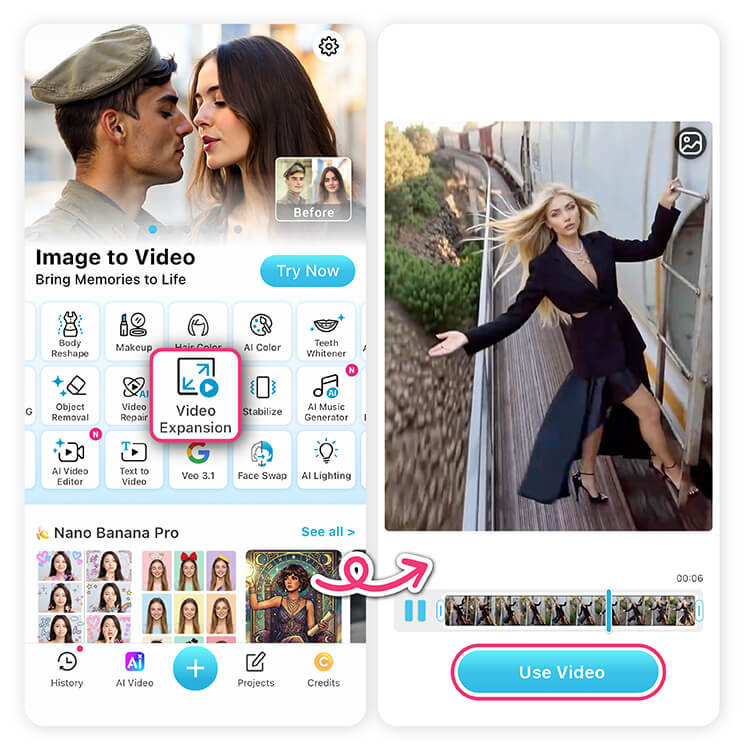
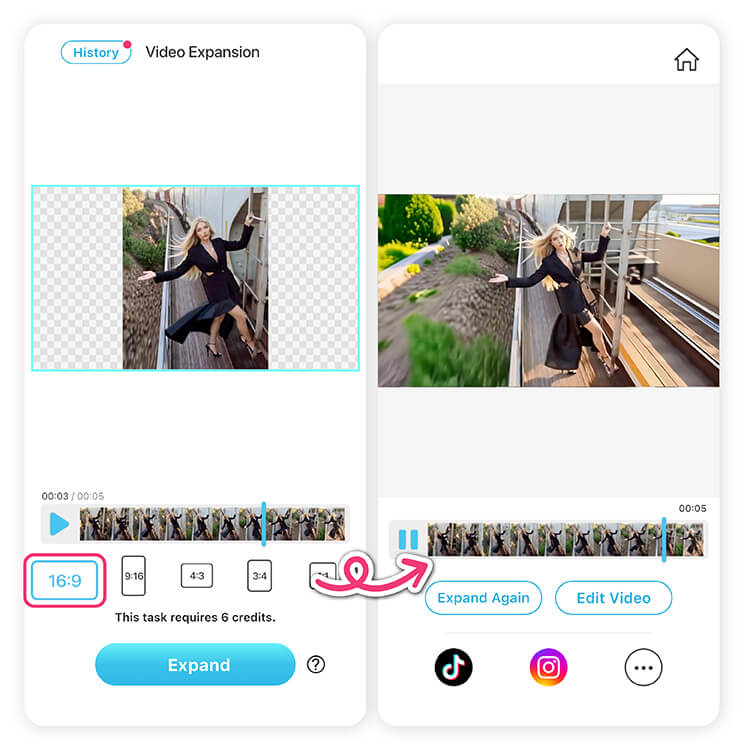
- Choose a preset aspect ratio (9:16, 1:1, 4:3, etc.)
- Generate, preview, and share


KineMaster — Advanced Editing with Manual Video Resizing

KineMaster is a powerful mobile video editor that offers manual control over video resizing. Users can adjust the canvas size, scale clips, and reposition elements frame by frame.
However, resizing in KineMaster often requires extra steps and editing knowledge. There are no AI-assisted background extensions, so users typically need to zoom, crop, or add backgrounds manually.
Testing note: KineMaster gave me the most control of any app here — I could nudge a clip a few pixels to keep a face inside frame — but it took real trial and error to line up manually, especially compared to an app that reframes automatically.

Price: Free with watermark; paid subscription required for watermark removal
Best for: Intermediate to advanced editors who want full creative control
VivaVideo — Easy Video Resizer for Casual Creators

Platform: iOS, Android
Price: Free with watermark; paid plans unlock HD exports
Best for: Casual creators and social media beginners
Splice — Clean Interface with Basic Resizing Tools

Platform: iOS, Android
Price: Free trial; subscription required for exports
Best for: Minimalist creators who value simplicity
iMovie — Free Video Resizer for Apple Users

Testing note: iMovie handled a horizontal-to-square conversion cleanly, but converting the same landscape interview clip to 9:16 just added black bars rather than filling the frame — fine for quick edits, less useful if you're posting to Reels or TikTok.
Platform: iOS, macOS
Price: Free
Best for: Basic video projects and Apple users
PowerDirector — Feature-Rich Editor with Resizing Options

Platform: iOS, Android, Windows, macOS
Price: Free version available; premium subscription required for full features
Best for: Advanced users and long-form video editors
Vimeo — Online Video Resizer for Professional Use

It’s suitable for business or portfolio videos, but less ideal for beauty creators or social-first content.
Testing note: Vimeo's resizing options felt built for a portfolio reel, not a quick social repost — I could set an output ratio, but there was no smart reframing, so busier shots needed manual cropping first.
Platform: Web
Price: Free plan available; paid plans unlock advanced features
Best for: Business, educational, or portfolio content
Clideo — Simple Online Video Resizer

Platform: Web
Price: Free with watermark; paid plans remove watermark
Best for: Occasional users and quick fixes
Kapwing — Collaborative Video Resizer for Teams

Testing note: Kapwing was the easiest to hand off — I shared a project link and had a teammate adjust the crop on a different laptop without exporting and re-uploading a file, which the mobile-only apps on this list can't do.
Platform: Web
Price: Free plan available; paid plans unlock higher resolution exports
Best for: Teams, marketers, meme creators
Adobe Express — Stylish Templates with Basic Video Resizing

It’s great for polished visuals, but not ideal for creators who need advanced resizing flexibili
Platform: Web, iOS, Android
Price: Free plan available; premium subscription for advanced featuresty.
Best for: Brand marketers and visual storytelling
CapCut — Free Auto-Reframe for Fast Social Exports
CapCut is one of the most widely used free video editors, and its Auto Reframe tool is built specifically for taking one clip and reformatting it for multiple platforms — vertical for TikTok and Reels, square for feed posts, horizontal for YouTube — without exporting three separate projects.
Unlike a manual crop tool, Auto Reframe tracks the main subject in the frame and follows it as the aspect ratio changes, so a talking-head clip mostly stays centered instead of drifting to one edge.
Testing note: Auto Reframe tracked a single subject well across a 16:9-to-9:16 conversion, but on a clip with two people it occasionally settled on whoever was talking rather than keeping both in frame — worth a manual nudge afterward if a shot has more than one subject.
Platform: iOS, Android, Web, Windows, macOS
Price: Free, no watermark
Best for: Social creators who want fast, free auto-reframing across platforms
"Seriously one of the best video/photo editor I've ever used. Super simple and easy. AND no watermarks." — Wholooo7899, App Store review, 5★
Which Video Resizer Is the Best?
After testing 11 popular video resizer tools across mobile and web platforms, one clear winner stands out for modern creators: YouCam Video.
While many apps allow you to change video size through basic cropping or scaling, YouCam Video goes further with AI-powered resizing. Its Video Extender feature intelligently expands backgrounds instead of cutting off important details.
If your goal is to resize video free, adapt content for multiple platforms, and maintain a polished, professional look, YouCam Video is the most user-friendly and creator-focused choice.
Best AI Video Editor
The Best AI Video Editor & Makeup App.
Smooth skin and edit videos easily.
Pro Tips for Resizing Video Without Losing Quality
A few things I learned across all 11 apps that make a real difference in the final result:
- Start from the highest-resolution export you have. Resizing down (e.g. 4K to a vertical crop) leaves more detail than trying to stretch a smaller file up to fill a new frame.
- Check the edges after any auto-reframe. AI tracking tools like YouCam Video's Video Extender and CapCut's Auto Reframe are good, but not perfect — always scrub through the full clip once before exporting, since a fast pan or a second person entering frame can throw off the crop.
- Match your export ratio to the platform, not just "vertical." TikTok and Reels both favor 9:16, but Instagram feed posts still perform well at 4:5 — check the platform's current spec rather than assuming one ratio fits everywhere.
- Keep a master copy before you resize. Once you've cropped or reframed a clip, going back to the original ratio means re-exporting from the source, not un-cropping the resized version.