Author:


You know the feeling: you're staring at a dress online, or at something buried in the back of your closet, trying to picture how it'd actually look on you — not the model, not the mannequin, you. Photos on a hanger never tell the real story, and dragging yourself through five fitting rooms on a Saturday isn't anyone's idea of fun.
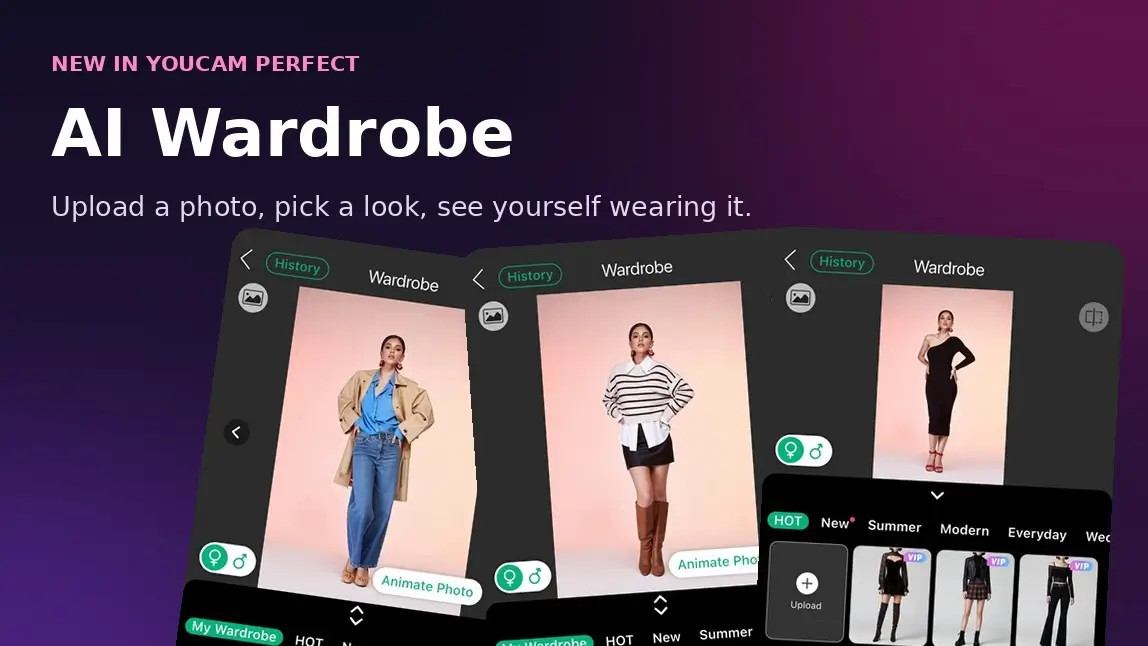
That's exactly the gap AI Wardrobe is built to close, and it just landed inside YouCam Perfect. Upload one clear photo of yourself, pick an outfit — either something you already own or one of the app's curated looks — and AI Wardrobe redraws it onto your photo, matching your pose and body so the result actually looks like you wearing it. No studio, no fitting room, no guessing.
Key Takeaways
- 👗 Full outfit swaps, not just filters — AI Wardrobe redraws an entire look onto your photo, from tops and bottoms to coats and gowns, not just a color tweak or sticker overlay.
- 📤 Try your own clothes — snap or upload a photo of something in your own closet (or a store rack) and see it on yourself before it's yours.
- 🗂️ Browse a built-in style library — curated collections like Hot, New, Summer, Modern, Everyday, and Wedding mean you don't need your own photos to start experimenting.
- 🧵 Save looks to My Wardrobe — build a running collection of outfits you've tried or uploaded, so your favorites are one tap away next time.
- 🎬 Animate your favorite result — turn a finished try-on into a short moving clip with the built-in Animate Photo option.
- ⏱️ Works in the background — kick off a look, keep browsing, and check the finished result later under History.
How AI Wardrobe works
- Open YouCam Perfect and head into AI Wardrobe.
- Upload a full-body photo of yourself. One person, standing, facing forward, in decent lighting — the same rule of thumb the app uses for outfit photos applies here too: a clear, unobstructed view gets the best result.
- Pick your outfit. Tap + Upload under My Wardrobe to use a photo of your own clothing, or browse the ready-made collections — Hot, New, Summer, Modern, Everyday, and Wedding all sit in their own tabs.
- Confirm your pick with the checkmark in the corner.
- Let it process. You'll see a "Processing…" notice — feel free to back out and keep browsing; the finished result waits for you under History.
- Compare your looks. Use the left/right arrows on a finished result to flip between the different outfits you've generated from the same photo.
- Animate it or save it. Tap Animate Photo to turn a favorite into a short clip, or use the download icon to save the still straight to your camera roll.
A peek inside the app
Good outfit photos make or break the result, and the app tells you exactly what to look for before you upload: full-body shots with one person facing the camera, and clothing that isn't blocked by bags, hair, or a second person in frame.

Build your own digital wardrobe
AI Wardrobe isn't limited to whatever the app already has on file. Under the My Wardrobe tab, the + Upload button lets you add a photo of any actual clothing item — something from your own closet, a friend's, or even a listing you're eyeing online — and every outfit you've uploaded or tried stays saved right there for next time. It's less a one-off filter and more a running digital closet you keep adding to.

From everyday basics to wedding-ready gowns
If you don't have a specific outfit in mind, the built-in library covers a lot of ground. The Hot collection alone spans mini dresses and over-the-knee boots, plaid skirts with moto jackets, wide-leg trousers, cut-out gowns, lace, florals, jumpsuits, and even a kimono-style dress — alongside dedicated New, Summer, Modern, Everyday, and Wedding tabs for when you know exactly what mood you're going for. Outerwear works too: trench coats and layered jackets render just as convincingly as a mini skirt or a slip dress.

Worth knowing: most of the curated looks in the library carry a VIP tag, meaning they're part of YouCam Perfect's premium tier rather than the free allowance.
See it in action
One photo, a whole new outfit. The same selfie that started in a simple black dress comes back wearing a completely different look — trench coat, blue button-down, wide-leg jeans — with the pose and proportions carried over from the original.

Same face, endless looks. Run the same photo through a second outfit and you get an entirely different result — here, a cozy striped knit, white collared shirt, and leather mini skirt.


AI Photo Editor & Virtual Try-On
The best all-in-one AI photo editor.
Now with AI Wardrobe for virtual outfit try-on.
Why try before you buy
- Skip the online-shopping guesswork. See a full outfit on your own body shape and pose before you commit to a purchase, instead of relying on a model photo that looks nothing like you.
- Get more mileage out of what you already own. Re-mix pieces already in your closet into new combinations you might not have tried on your own.
- Know what it's for. AI Wardrobe is a style preview, not a size chart — it's built to show you the vibe of an outfit, not to replace an exact fit check.
Try it now
Whether you're deciding what to wear tonight or just curious how you'd look in something you'd never normally pick up, AI Wardrobe turns it into a 30-second experiment instead of a whole ordeal.
AI Photo Editor & Virtual Try-On
The best all-in-one AI photo editor.
Now with AI Wardrobe for virtual outfit try-on.
FAQs
What is AI Wardrobe in YouCam Perfect?
It's a virtual try-on tool built into YouCam Perfect. Upload a full-body photo of yourself, choose an outfit — your own or one from the app's curated library — and AI Wardrobe generates a realistic image of you wearing it.
Can I use my own clothes, or only the app's outfits?
Both. The My Wardrobe tab has a dedicated Upload button for photos of your own clothing items, alongside curated collections (Hot, New, Summer, Modern, Everyday, Wedding) if you'd rather browse ready-made looks.
What kind of photo should I upload for the best result?
A full-body photo with one person standing and facing forward in decent lighting, with the outfit clearly visible and not blocked by bags, hair, or other people — the same guidance the app shows before you upload.
Can I turn my try-on result into a video?
Yes — finished results have an Animate Photo option that turns the still image into a short moving clip.
Are all the outfits in AI Wardrobe free to try?
No. Many of the curated looks in the library are marked VIP, meaning they're part of YouCam Perfect's premium tier rather than the free allowance.
Does AI Wardrobe show me exactly how an outfit will fit?
Not precisely — it's a style preview built to show you the overall look and vibe of an outfit on your body, not an exact fit, fabric, or measurement guarantee.