Author:


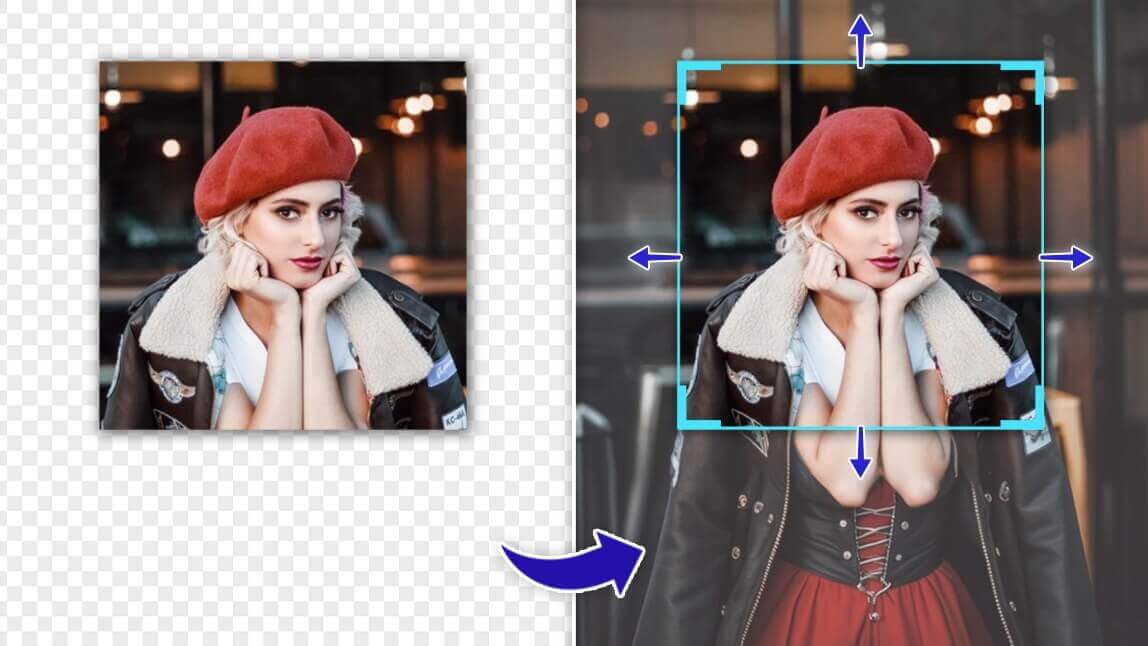
Are you looking for a way to expand an image without stretching it?
Say goodbye to distorted images with an advanced AI tool: AI Image Extender.
I ran a batch of my own photos through this — portraits, a landscape shot, and a couple of memes — to see how well the AI actually invents new background detail versus just stretching pixels. Landscapes and simple backgrounds extended the most convincingly; images with a lot of fine detail right at the edge (hair, text, patterned fabric) were where the seams occasionally showed.
In this article, we'll guide you through the best free AI image extender solutions of 2024, focusing on the revolutionary technique of AI Outpainting.
Additionally, we will guide you through the simple process of how to use an AI image extender to expand an image.
Expand Images With the Best Online AI Image Extender in 2026

Expand your images effortlessly with the best online AI image extender of 2024: YouCam AI Image Extender.
With its advanced algorithms, YouCam AI Image Extender ensures high-quality image expansion without compromising clarity or resolution, making it the ideal choice for enhancing your photos.
Top AI Features of YouCam Online Editor
- AI Image Extender (Try it Free)
- AI Image Generator (Try it Free)
- AI Object Remover (Try it Free)
- AI Background Changer (Try it Free)
Magically Expand Images With Context-Aware AI
YouCam AI Image Extender offers a magical solution for expanding images with its context-aware AI technology.
By intelligently understanding the content of the image, this tool seamlessly extends it while preserving its context and visual coherence.
Outpaint Your Images for Better Size and Visuals
Outpaint your images effortlessly with YouCam AI Image Extender, ensuring better size and visual appeal. This advanced tool intelligently extends images beyond their original boundaries, enhancing both their size and overall aesthetics.
Free-to-Use
YouCam AI Image Extender is free to use, offering 10 free credits to every user.
With these credits, users can experience the powerful image extension capabilities of YouCam AI Image Extender without any cost, making it accessible to all.
| Method | Best For |
|---|---|
| YouCam AI Image Extender | Fast, free (10 credits), no-skill-required image expansion |
| Manually extending a canvas (Photoshop content-aware fill) | Users who want full manual control over exactly what gets added, and already know the software |
Verdict: for a quick resize or uncrop, the AI tool gets you a clean result in seconds; hand-editing still wins if you need to control precisely what appears in the new space.
How to Expand an Image for Free With YouCam AI Image Extender
- Step 1. Open the Best AI Image Extender
- Step 2. Create an Account for Free Credits of AI Image Extension
- Step 3. Upload an Image and Choose an Aspect Ratio
- Step 4. Click “Generate” to Start Online AI Image Expansion
My note: the free 10 credits are enough to properly test the tool on a handful of real photos before deciding if you want more — I didn't run out mid-test.
Step 1. Open the Best AI Image Extender

Open YouCam AI Image Extender, the best AI image extender available online, by visiting the website or launching the app on your device.
Tap to utilize our app, YouCam Enhance, the AI-powered image extender available for iOS and Android.
Step 2. Create an Account for Free Credits of AI Image Extension

Create a free account to gain access to 10 credits for AI image extension. Simply sign up with your email address and follow the prompts to complete the registration process.
Step 3. Upload an Image and Choose an Aspect Ratio
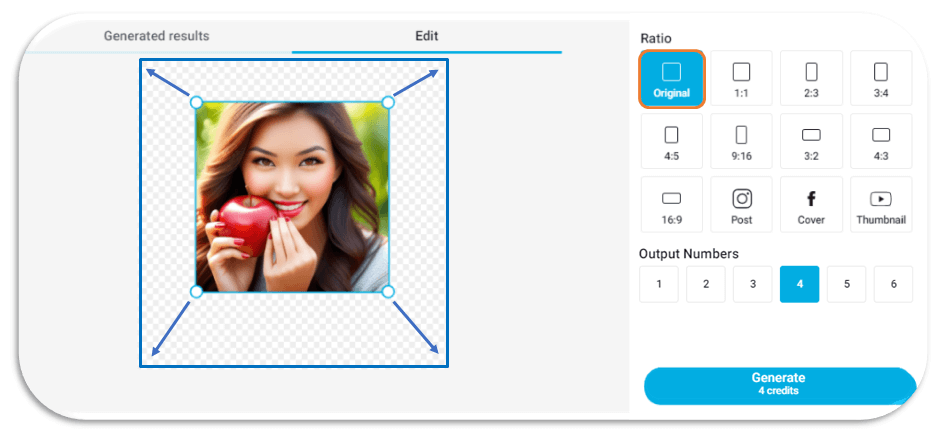
Upload the image you want to expand and select the desired aspect ratio for the final output. You can choose from various options to suit your preferences.
Step 4. Click “Generate” to Start Online AI Image Expansion
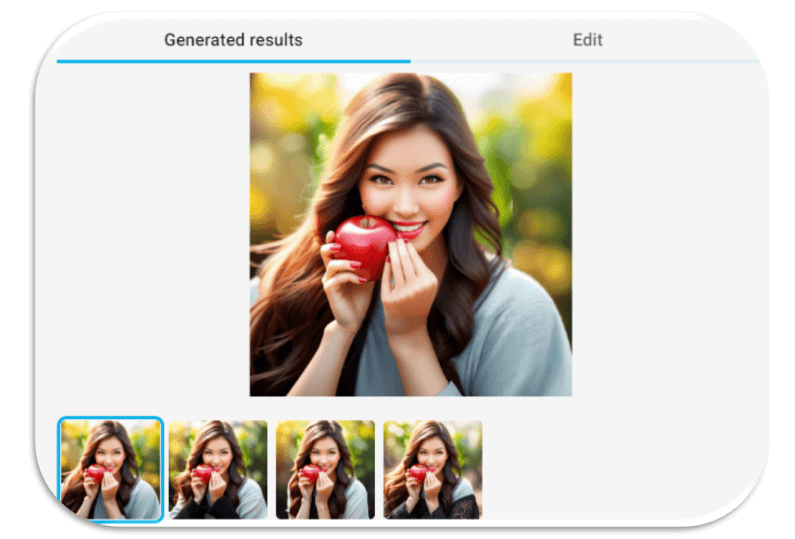
Once your image is uploaded and the aspect ratio is selected, click on the "Generate" button to initiate the online AI image expansion process.
Sit back and let YouCam AI Image Extender work its magic to deliver high-quality expanded images for free.
Why to Use AI Image Extenders: Best Use Cases and Benefits
Discover the myriad of benefits and optimal use cases for AI image extenders.
Resize Photos Through AI Image Expansion

AI image extenders offer a convenient solution for resizing photos with precision, catering to various social media platforms(Instagram, Facebook, YouTube) or any preferred aspect ratio effortlessly.
By leveraging advanced algorithms, these tools ensure that your images maintain clarity and quality even after expansion, providing a seamless viewing experience for your audience.
AI Uncrop Your Personal Photos
Additionally, AI image extenders can effectively "uncrop" personal photos, restoring lost details or expanding the composition to include omitted elements.
This capability breathes new life into old memories, allowing you to cherish moments in their entirety without compromising on visual integrity.
Edit Creative Memes Through AI Expansion
Moreover, AI expansion is particularly popular for meme images, especially on platforms like TikTok, where extended backgrounds can amplify comedic or dramatic effect.
By expanding meme image backgrounds through AI, creators can enhance the visual impact of their content and engage audiences more effectively in the fast-paced world of social media humor.
Start AI Image Expansion With the Best Free Online AI Outpainting in 2026

Are you ready to take your image editing skills to the next level easily?
Once your image is expanded, YouCam Perfect's free retouch tools are a quick way to blend the new edges further or add a final filter before you post.
Look no further than the best free online AI image extender tool of 2024.
Experience seamless image expansion with stunning results - try YouCam AI Image Extender for free now and unleash your creativity!
More Online Generative AI Tools
- AI Image Generator (Text to Image Generator)
- AI Avatar Generator
- AI Hairstyle Generator (Hairstyle Changer)
- AI Anime Generator
Pro Tips for Cleaner Extensions
- Extend in smaller increments for busy backgrounds. A huge single expansion on a detailed scene is more likely to show seams than two smaller passes.
- Pick an aspect ratio close to your final use case. Matching your target platform (e.g. 4:5 for Instagram) up front avoids a second round of cropping.
- Avoid extending right at a hard edge like text or a logo. The AI tends to guess less convincingly there than on open sky, water, or plain backgrounds.
What Real Users Say
YouCam's AI photo tools get real, mixed feedback on the App Store. Reviews on justuseapp.com echo what I found testing the image extender myself:
"Not only is YouCamEnhance less forceful with ads than Remini, the results are cleaner!" — Ziggytrade, ★★★★★
"I enhanced a photo and upon closer inspection it made things look much worse...replaced my face with some completely different faces" — Austin.cm, ★★☆☆☆
The critical review is about face enhancement rather than the image extender feature this article covers, but it's still a fair reminder to zoom in and check the full-resolution result before using any AI edit.
Free AI Image Extender FAQ
What is an AI image extender/ AI outpainting?
An AI image extender, also known as AI outpainting, is a type of artificial intelligence technology that enhances images by filling in missing or extending existing content beyond its original boundaries.
Using advanced algorithms, AI outpainting algorithms analyze image patterns and context to generate realistic and seamless extensions, effectively expanding the visual content of the original image.
What is the best AI image extender in 2024?
YouCam AI Image Extender is the best online tool to expanding images with AI in 2024
Utilizing its cutting-edge algorithms, this free tool excels in seamlessly extending the content of images while maintaining high quality and resolution.
Whether you need to fill in missing parts of a photo or simply want to expand its canvas, YouCam AI Image Extender offers unparalleled results.
Its intuitive interface ensures a hassle-free experience for users, allowing them to effortlessly extend their images in various aspect ratios with just a few clicks.
Is YouCam AI Image Extender free to use?
Certainly! YouCam AI Image Extender provides free credits to every new registered user. These credits allow you to expand images without any limitations, all free of charge.
How can I expand an image without distorting it?
To expand an image size without stretching it, we recommend 2 free AI image extenders:
These tools utilize advanced algorithms to intelligently extend images while preserving their original proportions and quality.
With their user-friendly interfaces, both options provide a seamless experience for users seeking to expand their images without distortion.