


 Author: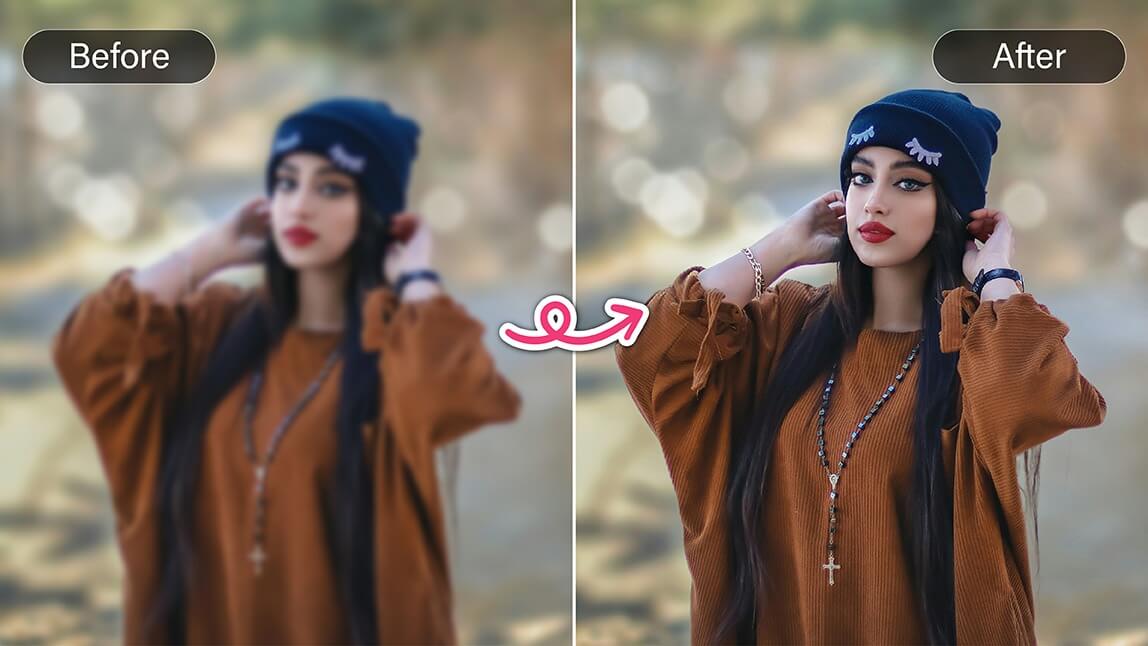
Blurry photos are one of the most frustrating photography problems. But thanks to AI photo enhancement tools, you can restore clarity to blurry images in just seconds—even directly on your phone.
Why Do Photos Become Blurry?

Before learning how to unblur an image, it helps to understand what causes blur in the first place.
Common Types of Blur
- Motion blur: Subject or camera moves during exposure
- Out-of-focus blur: Autofocus misses the subject
- Low-light blur: Slow shutter speed causes softness
- Digital compression blur: Over-compressed images lose detail
Each type of blur requires a slightly different approach. While extreme blur can’t always be fully reversed, modern AI tools can significantly improve sharpness and clarity.
How to Unblur a Photo on iPhone (Step-by-Step)
If you’re specifically searching how to unblur a photo on iPhone, you have several options.
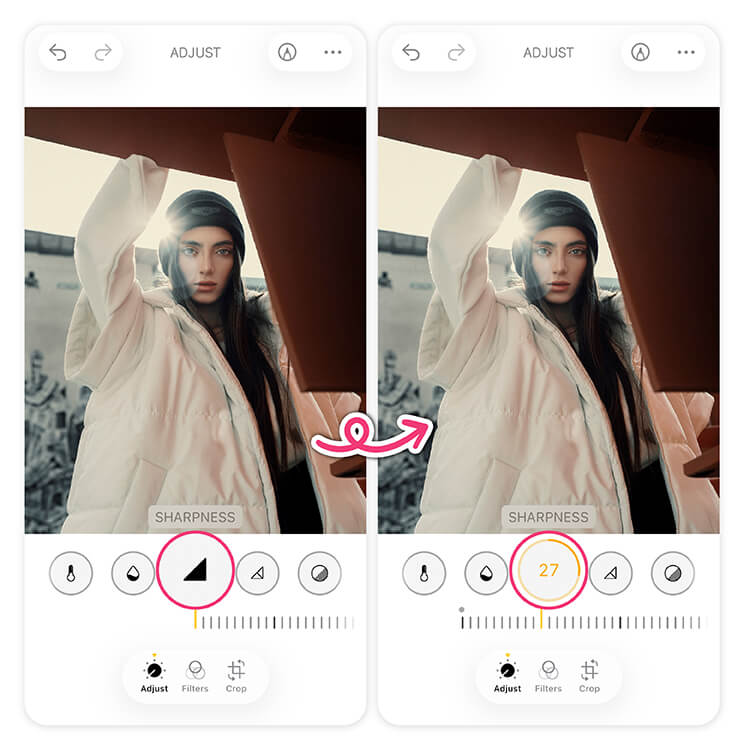
Option 1: iPhone Photos App (Limited)
- Open the photo
- Tap Edit
- Increase Sharpness and Definition
This helps slightly but won’t fix serious blur.
Option 2: Third-Party AI Apps (Recommended)
AI apps outperform built-in tools by restoring real details rather than just increasing contrast.
That’s where YouCam Enhance stands out.
How to Unblur Pictures With the Best Unblur Photo App
The good news? You don’t have to live with imperfect shots. Here’s how to unblur photos effortlessly using YouCam Enhance, one of the best AI photo enhancement apps available.
Step 1. Download the Best Unblur Photo App
Tap to Download the Best App to Unblur Photos
To start unblurring photos, download YouCam Enhance from the App Store.
Step 2. Upload Your Photo
Open YouCam Enhance, tap the photo upload icon, and select the blurry image from your gallery
Step 3. Unblur Photos With One Tap
Tap the Enhance button. The app automatically:
- Sharpens details
- Reduces noise
- Improves overall clarity
- Restores facial features intelligently
No manual sliders. No editing experience needed.
Step 4. Save Your Photo
Once you’re happy with the result, tap Save to store it in your gallery or share it directly to Instagram, TikTok, or other platforms.
How to Unblur a Photo Online
Don't want to download anything? No worries! You can use an online tool- YouCam Online Editor:
- Visit a Reliable Website: Go to a reputable online photo enhancement tool- YouCam AI Photo Enhancer.
- Upload Your Image: Drag and drop your image onto the website.
- Enhance: Click the 'Enhance' button. The online tool will process and sharpen your image.
- Download: Download the enhanced image once it's ready.
YouCam Enhance has a handy online tool- YouCam Online Editor that's quick and effective for fixing your photos on the go.
Tool Review of YouCam Online Editor's AI Photo Enhancer
John Miller, Professional Photographer
"YouCam Online Editor's AI Photo Enhancer is a fantastic option. It offers powerful AI features to unblur, sharpen, and upscale images effortlessly. The online tool is user-friendly and perfect for quick fixes."
Tips to Avoid Blurry Images
Preventing blur is always better than fixing it later. Keep these simple tips in mind to take sharper photos.
- Use good lighting – Low light causes slower shutter speeds and blur.
- Hold your phone steady – Use both hands or a tripod for stability.
- Turn on image stabilization – Enable OIS or EIS in camera settings.
- Tap to focus – Make sure your camera focuses on the right subject.
- Avoid digital zoom – Move closer instead of zooming in digitally.
- Clean your camera lens – Smudges can soften photos more than you think.
- Use burst mode – Great for capturing sharp shots of moving subjects.
Even with good habits, blur can still happen — that’s when AI tools like YouCam Enhance help unblur photos in seconds.
Unblur Your Photos in Seconds
Blurry photos no longer mean lost memories. Whether you’re learning how to unblur an image manually or want the fastest AI solution, today’s tools make photo restoration easier than ever.
For iPhone users especially, YouCam Enhance offers a powerful, one-tap way to unblur photos without technical skills—perfect for social media, personal memories, or professional use.
✨ Try unblurring your photos today, share this guide with friends, and let us know in the comments which method worked best for you.
How To Unblur an Image FAQs
Can you really unblur a photo?

Yes—to a certain extent. While extreme blur can’t be fully restored, modern AI photo enhancers can significantly improve clarity by rebuilding details, sharpening edges, and reducing noise. Tools like YouCam Enhance deliver the best results with just one tap.
What is the best app to unblur photos?
If you’re looking for an easy and effective solution, YouCam Enhance is one of the best apps to unblur photos. It uses AI to automatically sharpen images, restore facial details, and improve overall quality without manual editing.
How do I unblur a photo on iPhone?
You can unblur a photo on iPhone in two ways:
- Photos app: Use the Sharpness and Definition sliders (limited results)
- AI apps: Download an AI unblur app like YouCam Enhance for much better clarity and detail restoration.
Can I unblur photos for free?
Yes. Many AI tools offer free unblur features or free trials. YouCam Enhance provides basic photo enhancement options at no cost, making it easy to test results before upgrading.
Is it possible to unblur old or low-resolution photos?
Yes. AI tools are especially helpful for old, compressed, or low-resolution images, as they can enhance sharpness and upscale photos at the same time.



