


 Author: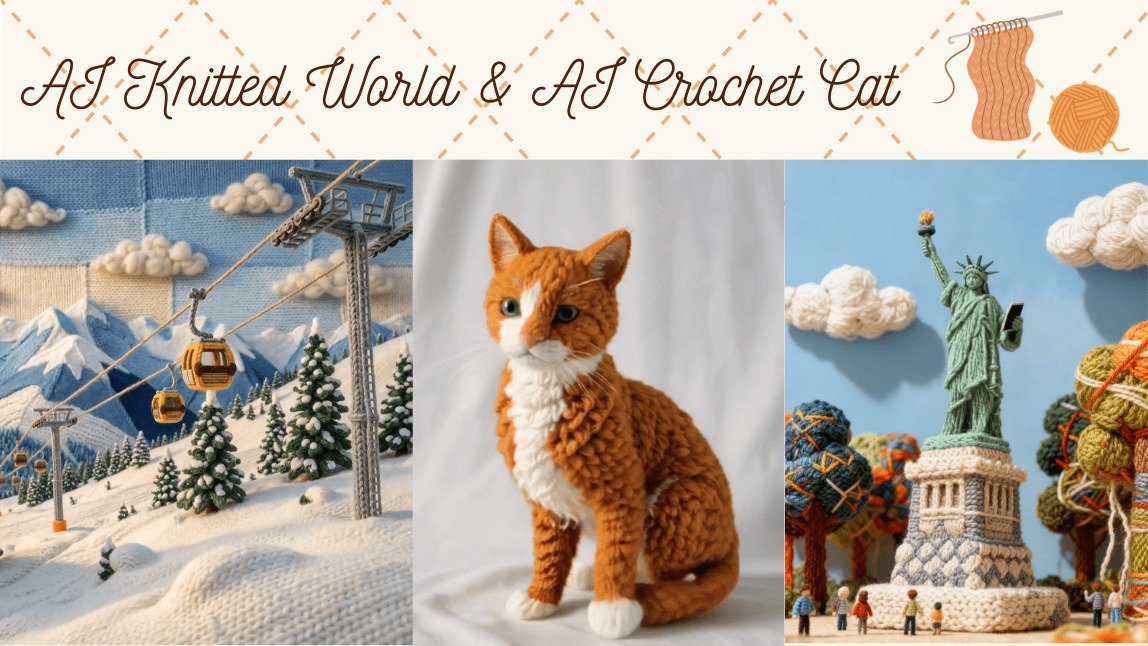
The hottest trend on social media right now is turning everyday photos into adorable handmade-style creations! Whether it’s transforming an entire scene into a cozy AI Knitted World or turning your cat into a soft, plushy AI Crochet Cat, these AI tricks make your content warm, cute, and super eye-catching.
In this article, we’ll show you how to easily create your own AI Knitted World images and videos, as well as charming AI Crochet Cat edits. Plus, we’ll share handy tips and prompts so your creations can shine on TikTok, Instagram, or wherever you post.
[NEW] AI Knitted World
What Is the AI Knitted World Trend?
The AI Knitted World trend is one of the newest and coziest aesthetics taking over TikTok and Instagram. Unlike AI Crochet, which focuses on turning pets or characters into crochet-style plush figures, AI Knitted World transforms the entire scene — people, pets, objects, backgrounds, and even lighting — into a world made entirely of yarn.
Every detail looks like it has been crafted by hand:
Soft knitted stitches
Warm, cozy color palettes
Fully yarn-made environments
The result?
A surreal, dreamlike universe where everything appears to be created from knitted fabric. It’s charming, nostalgic, and visually captivating — perfect for Reels, TikTok, and aesthetic edits.
Creative Ideas for AI Knitted World Prompts
1. Knitted Cable Car Mountain Scenery
“Create a video about a cozy knitted mountain landscape with a cable car moving across snowy crochet peaks, soft yarn trees, handcrafted wool clouds, warm winter colors, detailed knitting patterns on the cable car, gentle handmade texture, dreamy knitted world aesthetic.”
2. Knitted Animal Forest Adventure
“Create a video about a whimsical forest made entirely of knitted materials, cute crochet animals like bears and foxes exploring the yarn trees, knitted mushrooms, soft pastel palette, playful and magical vibe, high-detail fabric textures.”
3. Kids Playing in the Snow
“Create a video about two adorable knitted children playing in a snowy crochet landscape, building a yarn snowman, soft wool snowflakes falling, colorful knitted winter outfits with visible stitching, warm and playful handmade atmosphere, ultra-detailed wool and crochet textures.”
4. Knitted Cityscape at Sunset
“Create a video about a vibrant knitted city skyline at sunset, tall buildings made of colorful yarn, soft crochet clouds, warm orange and purple tones, knitted cars moving on yarn roads, cozy handmade atmosphere, ultra-detailed textile texture.”
How to Create an AI Knitted World
Want to turn your photo into a cozy, fully knitted universe? Here’s the easiest way to create the AI Knitted World effect using an AI agent:
Step 1: Select the AI Agent
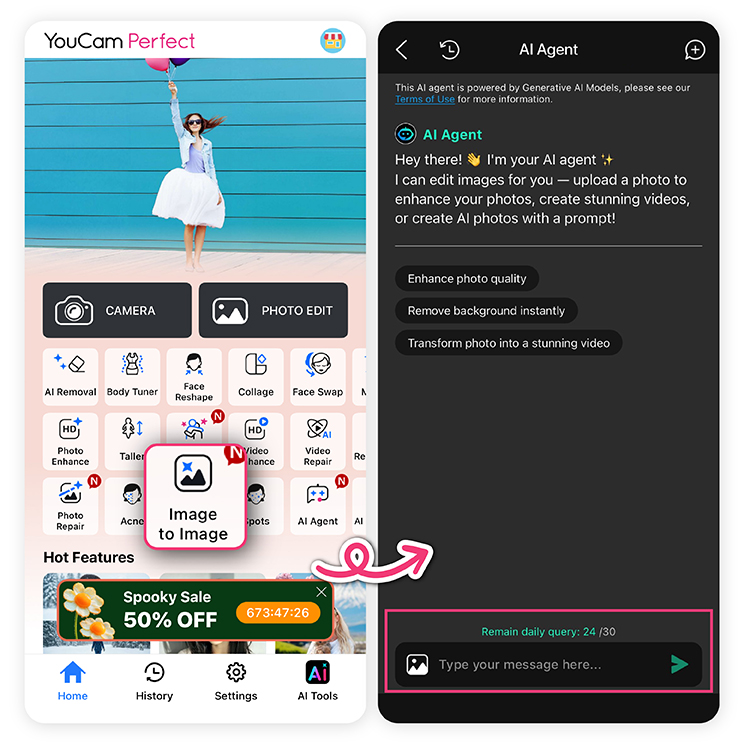
Open your editing app and choose the AI Agent feature.
This tool analyzes your photo and applies the knitted texture across the entire scene — characters, objects, and background.
Step 2: Enter Your Prompt
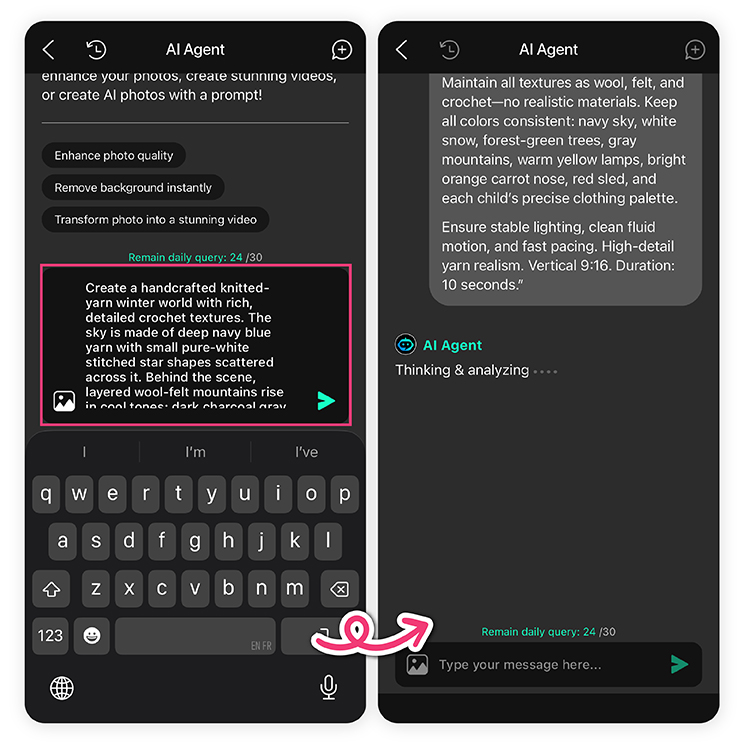 Type a clear prompt describing the knitted world style you want. Here are examples you can use:
"A knitted-world video of Times Square in New York City. The entire scene is recreated with soft wool yarn: skyscrapers, billboards, yellow taxis, street signs, traffic lights, and crowds all made from knitted and crocheted textures. Hyper-realistic yarn surfaces, visible stitches, fluffy fibers, handcrafted details, gentle volumetric lighting, smooth camera motion in a cozy wool-crafted city"
“Transform the entire photo into a knitted aesthetic with visible stitches and plush wool textures.”
Adding details such as mood, color palette, or character style will help the AI create a more polished knitted effect.
Step 3: Generate and Save Your Knitted World Video
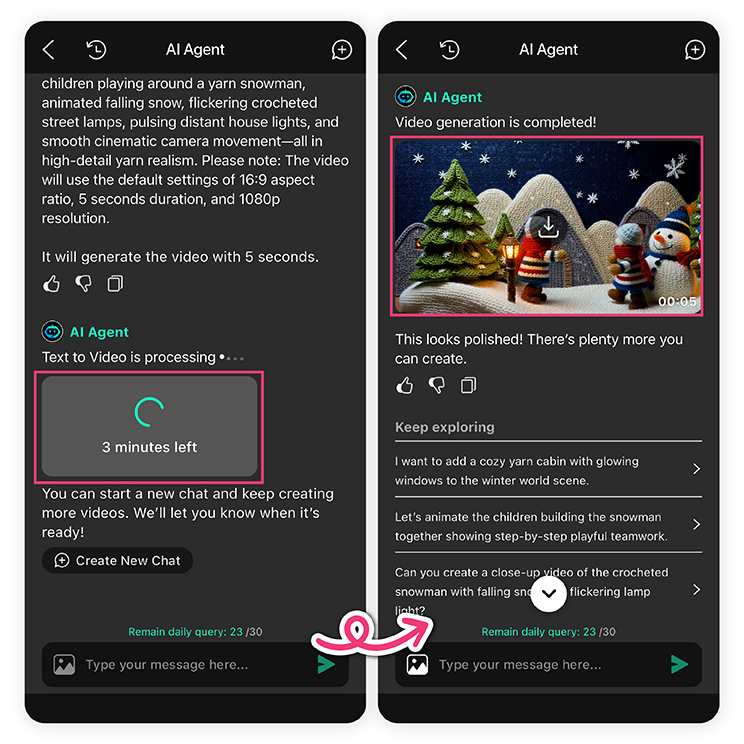 Tap Generate, and the AI will convert your photo into a fully yarn-crafted environment.
Once you’re happy with the result, simply save the output.
What is an AI Crochet Cat?
An AI Crochet Cat is a video created by AI where a cat, crafted to look like it's made of yarn, moves realistically.
Their behavior—such as walking toward the camera or lying down peacefully—looks so lifelike that they are gaining tons of attention on TikTok!

How to Create a Animated AI Crochet Cat
Step 1: Download & Open YouCam Perfect

Step 2: Find the "Image to Video" Feature

Tap on the [Image to Video] feature from the home screen.
Step 3: Choose the Templates You Like

To make your Cozypelt video stand out, can choose your favorite template:
- Pawsome
- Claw Chef
- Pup Sprint...
Or you can always use "Text to Video" to aniimate your AI Crochet Cat.

Also don't forget these tips:
- Aspect Ratio: 9:16 (ideal for TikTok)
- Length: 5–10 seconds works well for social sharing
Step 4: Generate the AI Crochet Cat Video
Tap “Generate” ad let the app do its thing. From our try, it should be less than 5 minutes. You can leave the processing window and come back to the History tab to check the final video.
Step 5: Preview and Share
If you love your AI crochet cat video, just download the video and post it on TikTok or Instagram.
Recommended Prompts for Creating Animated AI Crochet Cats
Want to get more creative with your AI Crochet Cat videos?
We have personally tried and listed out the top 10 prompt examples based on cat breeds, behaviors, and cozy environments.
If You Want to Change the Type of Crochet Cat

- Munchkin Cat: A crochet Munchkin cat with short legs and large round eyes, standing adorably.
- American Shorthair: A crochet cat inspired by an American Shorthair with silver tabby stripes across its body.
- Kitten: A tiny crochet kitten made of soft yarn, clumsily walking with baby-like movements.
- White Cat: A white crochet cat made of pure yarn.
- Black Cat: A crochet black cat with glossy yarn and shining golden eyes.
If You Want to Change the Crochet Cat's Action

- “A crochet cat walking cheerfully toward the camera with curiosity.”
- “A crochet cat playing with a yarn teaser toy, pawing energetically.”
- “A crochet cat lying on its side, looking drowsy and peaceful.”
- "A crochet cat meowing with its mouth open, looking lively and cute."
If You Want to Add Accessories to the Crochet Cat
- “A crochet cat wearing a handmade collar with a tiny silver bell.”
- “A crochet cat with a colorful collar decorated with pom-poms.”
- “A crochet cat wearing a small sweater, perfect for cold days.”

If You Want to Change the Crochet Cat’s Room Environment
- “A crochet cat sitting on a white fluffy blanket, cozy and soft.”
- “A crochet cat sitting on a tatami mat, giving off a traditional Japanese vibe.”
- "A crochet cat walking on wooden tile flooring, natural and warm."
- “A crochet cat relaxing on a carpet, looking comfortable.”

Conclusion
The popularity of AI Knitted World and AI Crochet Cat proves that AI isn’t just technology—it can also be fun, cozy, and full of personality. With just a few simple steps and some creative prompts, you can turn ordinary photos into soft, yarn-inspired scenes or make your cat look like a cute crochet toy.
Go ahead and make your own AI Knitted World and AI Crochet Cat creations—you’ll love how cozy and fun they turn out!
FAQs: AI Knitted World & AI Crochet Cat
What is AI Knitted World?

AI Knitted World is a digital art trend that turns photos into cozy, yarn-inspired scenes. Everything—people, pets, objects, and backgrounds—looks handcrafted with knitted textures and soft wool details.
What is an AI Crochet Cat?
An AI Crochet Cat transforms a photo of a cat into a cute, plush toy-like crochet figure. The AI recreates the cat with visible yarn textures, stitches, and handmade charm.
How do I make an AI Knitted World or AI Crochet Cat?
- Download YouCam Perfect
- Select an AI agent in your app
- Enter a detailed prompt describing the knitted or crochet style
- Generate your image or video
- Save and share your creation



