


 Author: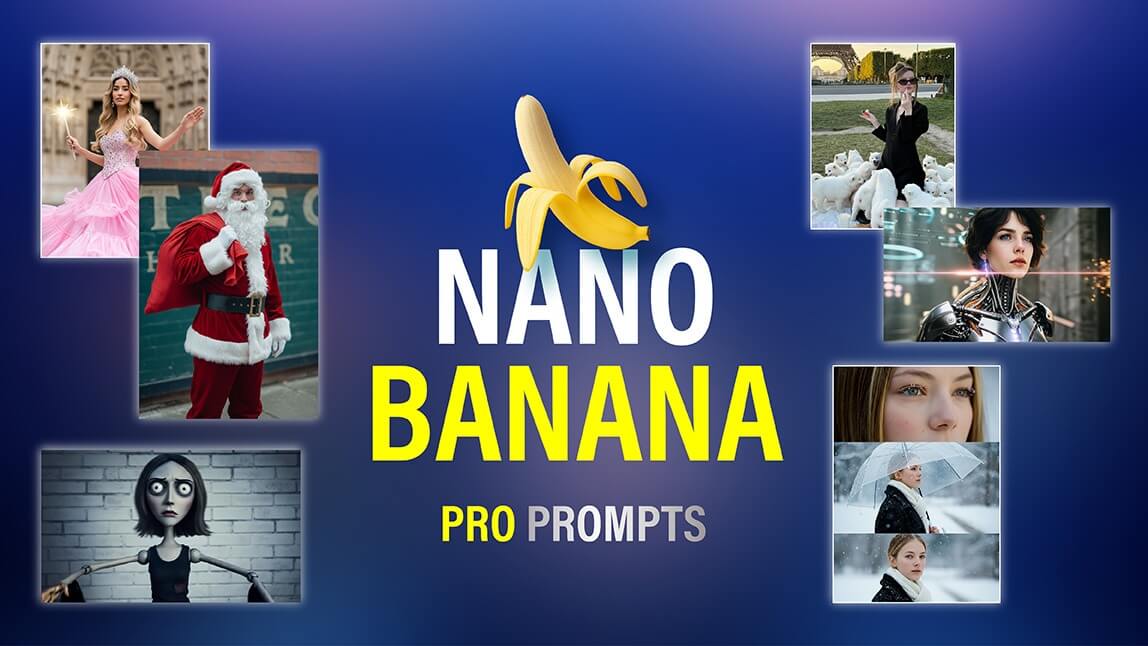
Nano Banana Pro stands out as one of the most advanced AI image-generation platforms available today. Whether you’re a content creator, designer, marketer, or social media enthusiast, Nano Banana Pro offers capabilities that can fundamentally change how you approach creative projects.
In this guide, you’ll discover copy-paste prompts for Nano Banana Pro for anime transformations, cinematic portraits, infographics, branding, and educational visuals.
What Is Nano Banana Pro?
Nano Banana Pro is a flagship tool in Google’s Gemini 3 AI suite. Unlike earlier AI generators, it excels at multi-image understanding, maintaining style consistency, and producing outputs that are context-aware and photorealistic.
Its design philosophy centers around flexibility and creative freedom, making it suitable for a wide range of tasks, and here're key strengths of Nano Banana Pro:
Multi-Image Processing
You can upload multiple images, and the AI understands relationships between them. This is ideal for generating sequences, storyboards, or multi-character interactions while keeping style and perspective coherent.
Visual Consistency Across Outputs
Earlier AI models often produced inconsistent lighting, proportions, or styles when generating multiple images. Nano Banana Pro maintains visual harmony, making your series of images feel like they belong together.
Context-Aware Creativity
The AI doesn’t just replicate instructions—it interprets context. For example, if you instruct it to “turn a daytime beach photo into a moody sunset scene,” it adjusts lighting, shadows, and reflections in a way that feels natural.
What Is The Difference Between Nano Banana Pro and Previous Versions?
| Feature | Previous Versions | Nano Banana Pro |
|---|---|---|
| Multi-Image Processing | Limited, often required separate prompts | Can process multiple images simultaneously while maintaining context |
| Prompt Understanding | Basic, needed very specific instructions | Advanced reasoning; understands complex, multi-layered prompts |
| Style Consistency | Hard to maintain across multiple images | Maintains consistent style across all transformations |
| Realism & Detail | Occasional artifacts | Enhanced realism with fine details and facial accuracy |
| Text Rendering | Limited | Supports multilingual text, precise fonts, integrated text |
| Versatility | Single-image focused | Full multi-modal capabilities: image-to-image, infographics, character design, branding |
Insight: Nano Banana Pro resolves the “fragmentation problem” of earlier models. Designers no longer need to manually tweak individual images to maintain continuity, saving hours in workflow while improving output quality.
How to Write the “Perfect Prompt” in Nano Banana Pro?
Writing a good prompt is both art and science. Community insights reveal that the most effective prompts are structured yet natural, giving the AI clear instructions while leaving room for creative interpretation. Use this formula for a high-quality prompt:
[Subject + Adjectives] doing [Action] in [Location/Context]. [Composition/Camera Angle]. [Lighting/Atmosphere]. [Style/Media]. [Specific Constraint or Text].
- Subject: A translucent glass robot barista
- Action: pouring latte art
- Location: inside a cozy cyberpunk coffee shop
- Composition: Macro close-up shot, shallow depth of field (f/1.8)
- Lighting: Neon pink and teal reflections
- Style/Media: Cinematic 8K render, Octane-style
- Constraint/Text: Chest display reads “WAKE UP” in bold LCD font
How To Use Nano Banana Pro in YouCam Perfect?
YouCam Perfect supports Nano Banana Pro in AI Agent and Image to Image feature, allowing you to generate stunning, high-quality AI images directly on your device—no advanced technical skills required.
Whether you're creating multi-character scenes, transforming your portraits into new styles, or refining visuals with precise control, YouCam Perfect gives you two powerful workflows to get the most out of Nano Banana Pro.
1. AI Agent (Image Combiner)
The AI Agent is ideal when you want consistent output across multiple photos—perfect for character sets, branding images, concept design, and multi-angle portraits.
1. Select AI Agent
2. Tap Upload Multiple Photos
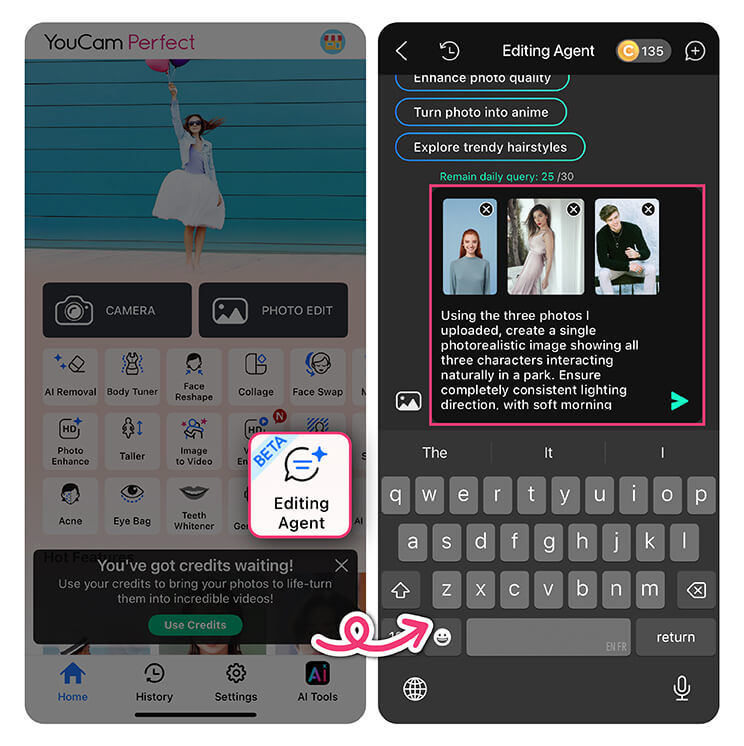
4. Generate and save your image
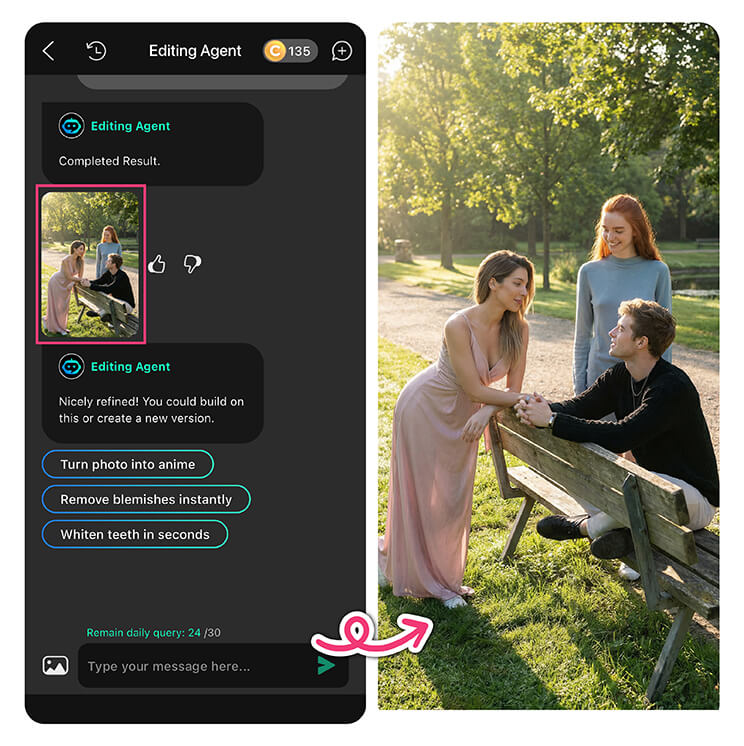
✨ Image combining ensures that characters, lighting, style, and overall visual identity stay consistent across all uploaded photos—something that’s especially valuable for creators working with series-based content or storytelling assets.
2. Image-to-Image Feature
1. Select Image-to-Image
2. Upload source image(s)
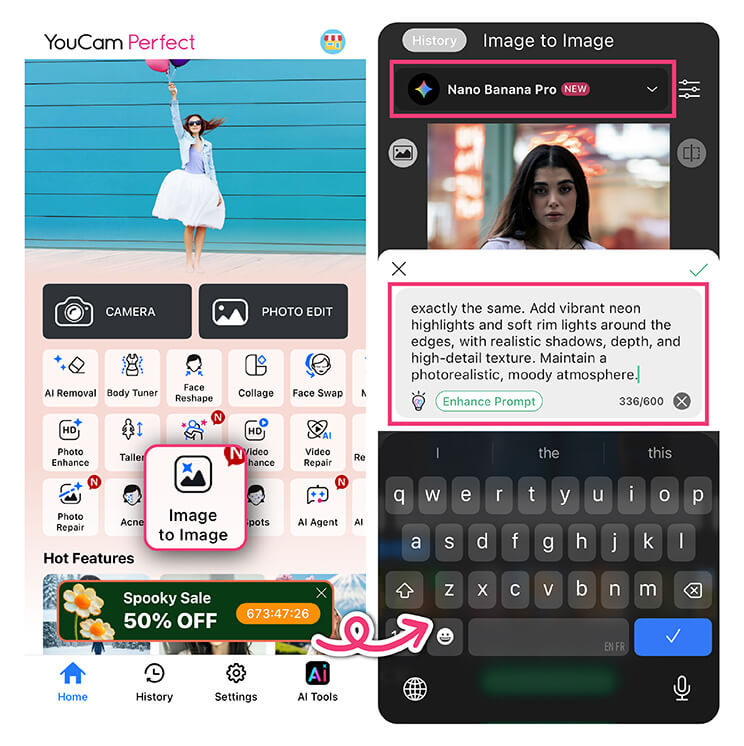
4. Genrate and Save Your Image
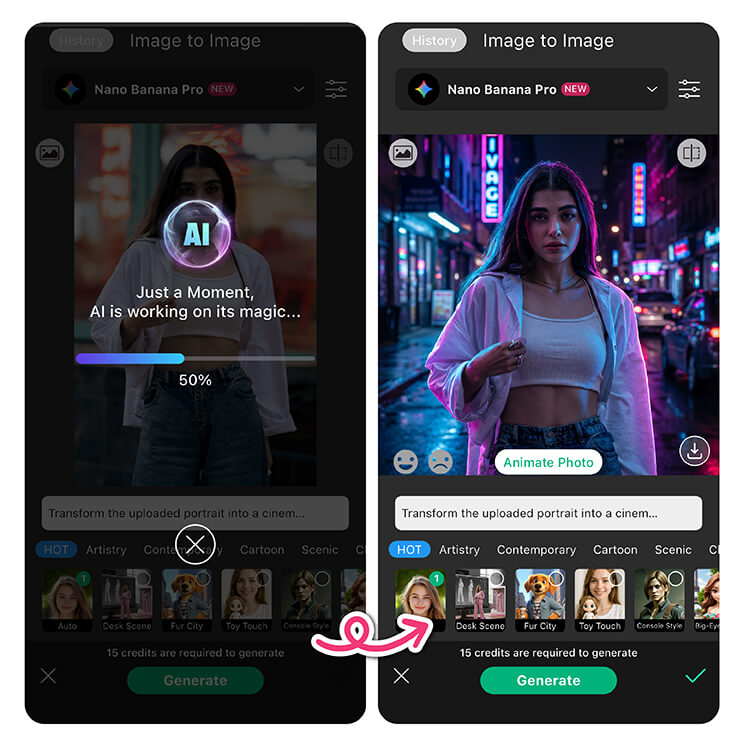
✨ This feature is great for refining details, applying artistic styles, and ensuring your final output matches your vision—especially when you already have a base image you love.
100+ Copy-Paste Nano Banana Pro Prompts Examples
Nano Banana Pro Prompt Example 1. Infographics
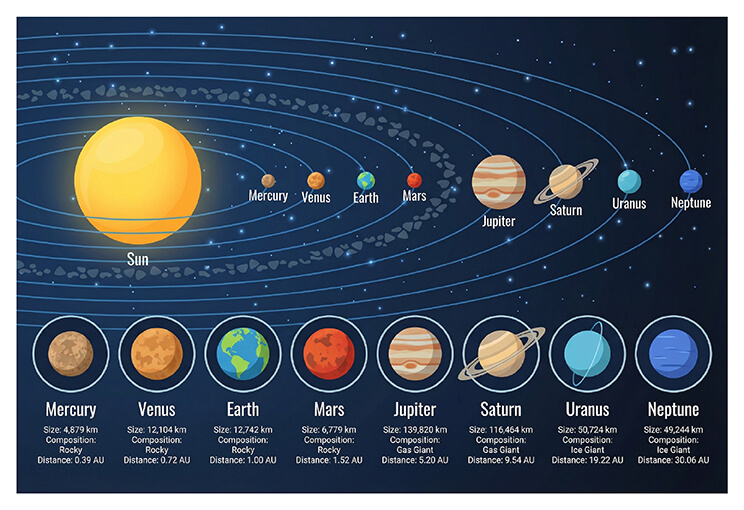
"Create an ultra-HD infographic of the solar system. Add labels and key features for each planet (size, composition, orbital distance). Use clean, modern vector icons and a soft color palette."
2. Decision Tree Diagram:
"Generate a top-down infographic explaining a decision tree in machine learning. Use arrows, labeled nodes ('root', 'branch', 'leaf'), and a small dataset example. Modern educational style, soft lighting."
3. Generate an infographic comparing iOS vs Android features (2025 edition).
Use a two-column layout, feature icons, checkmarks, and concise labels.
Apply a modern tech aesthetic with soft shadows and consistent spacing.
4. Create an environmental infographic explaining the carbon footprint of everyday activities.
Include icons for transportation, food, electricity, and shopping.
Use a green-earth color scheme, simple charts, and clear annotations.
5. Create a clean, professional infographic explaining “How AI Image Generation Works.”
Include step-by-step sections: text prompt input → model interpretation → image synthesis → final output.
Use a modern flat design style, soft gradients, minimal icons, clear typography, and a neutral background.
Ensure high readability and balanced spacing for educational use.
6. Design a health infographic titled “Daily Water Intake Guide.”
Show age groups and activity levels with icons, water glass indicators, pastel blue color palette, and clear numerical labels.
Use a vertical layout optimized for mobile viewing.
7. Business Funnel
Design a marketing funnel infographic (Awareness → Consideration → Conversion → Retention).
Use arrows, simple charts, and professional corporate styling.
8. Travel Guide
Generate a travel infographic for “3-Day Tokyo Itinerary.”
Include daily schedules, landmarks, transport icons, and map-style visuals.
9. Environmental Education
Create an eco-impact infographic showing carbon footprint by activity (transport, food, energy).
Use earth tones, simple bar charts, and clear numerical labels.
10. Finance
Design a personal budgeting infographic with income, expenses, savings, and goals.
Use friendly icons, color-coded categories, and easy-to-read typography.
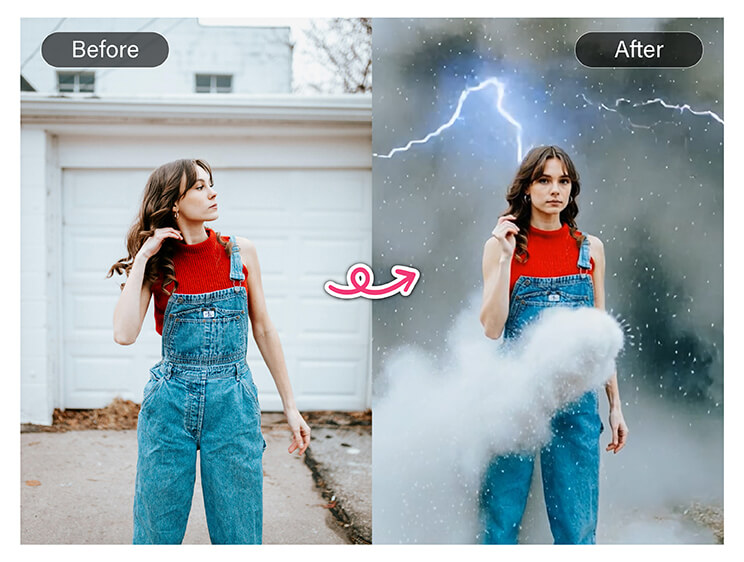
Nano Banana Pro Prompt Example 2. Scene Transformation
"Generate a photorealistic version of this person 20 years older. Keep facial structure, hairstyle, and expression while adding subtle wrinkles and skin texture."
12. Weather / Lighting Change:
"Transform this daytime photo into a snowstorm scene. Add falling snowflakes, overcast lighting, soft shadows, and maintain the original subjects."
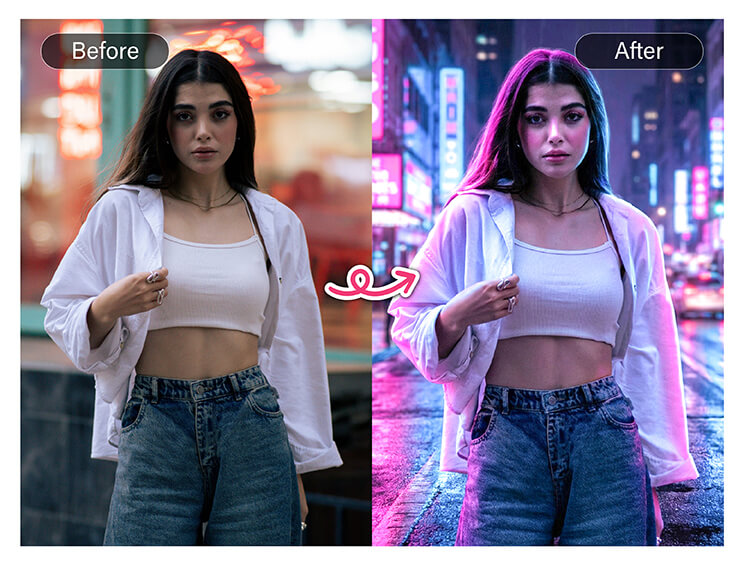
13. Transform this daytime city street photo into a cinematic cyberpunk night scene.
Add neon signage, wet reflective streets, glowing holograms, deep shadows, and dramatic rim lighting.
Maintain realistic building proportions and accurate perspective.
14. Convert this living room photo into a Scandinavian-style interior.
Replace furniture with light wood textures, neutral colors, indoor plants, and soft natural daylight.
Keep realistic shadows and consistent lighting direction.
15. Turn this ordinary portrait into a professional studio photoshoot.
Add soft key lighting, gentle background blur, accurate skin texture, and natural color grading.
Preserve facial identity and proportions.
16. Transform a summer beach scene into a winter snow landscape.
Replace sand with snow texture, add cold blue lighting, soft snowfall, and misty atmosphere.
Ensure realistic environmental interaction.
17. Location Swap
Place this subject into a Paris café scene with accurate perspective, natural shadows, and ambient daylight.
18. Mood Shift
Change this happy portrait into a dramatic cinematic mood using low-key lighting and high-contrast color grading.
19. Art Style
Transform this photo into an oil painting style with visible brush strokes and classical lighting.
20. Sci-Fi World
Convert this urban photo into a futuristic sci-fi city with holograms, flying vehicles, and atmospheric lighting.
Nano Banana Pro Prompt Example 3. Creative Design
"Design a retro 1960s–70s style logo for ‘Kaffe’ coffee brand with flowing psychedelic typography. Create mockups on a tumbler, ceramic mug, paper cup, and pouch in the same style."
22. Storyboard / Comic Sequence:
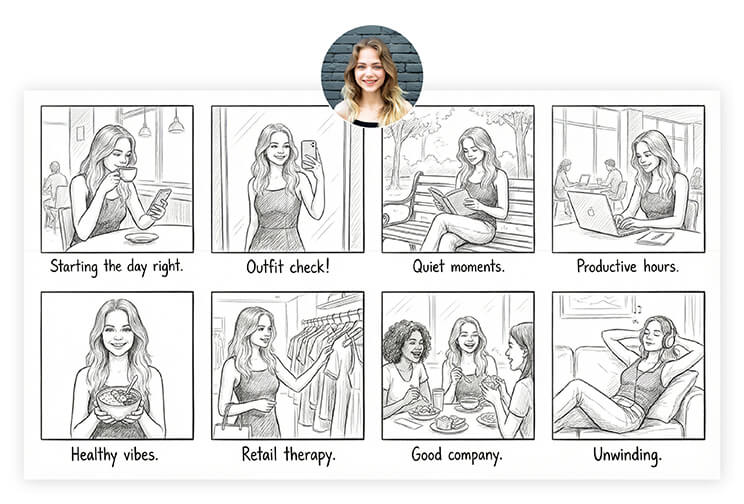
"Generate a 6–8 frame storyboard using my photo. Show cinematic everyday scenes with captions under each frame. Maintain likeness and coherent visual flow."
23. Design a modern brand logo for a sustainable coffee brand.
Use minimalist typography, leaf-inspired iconography, earthy tones, and a clean white background.
Provide a polished, professional look suitable for packaging and digital use.
24. Create a fantasy book cover illustration.
Feature a lone hero standing on a cliff, glowing sword, dramatic sky, cinematic lighting, and epic composition.
Use rich colors and high detail for print quality.
25. Generate a social media campaign visual for a fitness app launch.
Include dynamic poses, bold typography, vibrant color accents, and a modern UI overlay.
Optimize for Instagram and TikTok formats.
26. Design a concept poster for a futuristic music festival.
Use neon gradients, abstract soundwave shapes, holographic textures, and high-energy composition.
27. Social Media Template
Design a reusable Instagram post template for a beauty brand with image placeholders and text areas.
28. App UI Concept
Generate a mobile app UI concept for a meditation app with calm colors and clean layout.
29. Character Design
Create a stylized game character concept with front and side views, consistent proportions.
30. Album Art
Create album cover art for an electronic music release with abstract visuals and neon accents.
Nano Banana Pro Prompt Example 4. Logical Prompts
"Create a whiteboard-style infographic summarizing key points of the uploaded article. Include clean handwriting-style text, arrows, diagrams, and minimal color. AI should logically structure content."
32. Code Visualization:
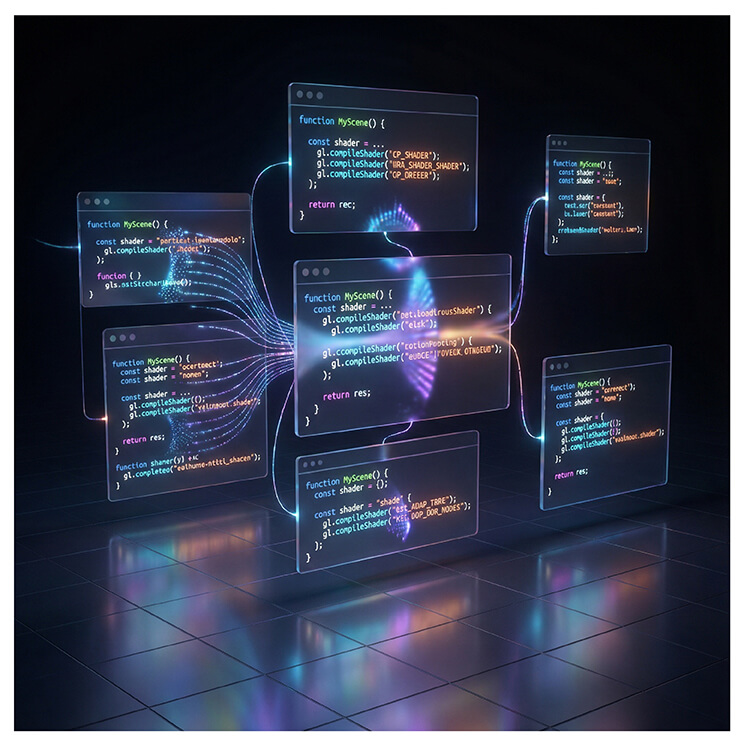
"Render uploaded React + WebGL shader code as a 3D scene: floating UI, shader effects, color gradients. Preserve code structure visually in the environment."
33. Illustrate five people sitting in a row of chairs, each wearing a different color shirt.
Rules: no two adjacent people wear similar colors, and the person in the middle wears blue.
Visualize clearly and logically.
34. Create a visual puzzle showing four boxes, each containing a different shape.
Rules: no shape repeats, circles cannot be next to squares, and triangles must be on the left side.
35. Generate a logic-based seating arrangement for a meeting room.
Show name labels, seat positions, and arrows indicating constraints.
Use a clean, diagram-style layout.
36. Visualize a step-by-step decision tree for choosing a photo editing tool.
Include yes/no branches, icons, and clear labels for each outcome.
37. Mind Map
Create a structured mind map for planning a branding campaign.
38. Comparison Logic
Visualize a logical comparison table of free vs paid AI tools.
39. Task Priority Matrix
Generate a priority matrix (urgent vs important) with labeled quadrants.
40. Educational Diagram
Create a logic-based diagram explaining machine learning basics in a simplified visual format.
Nano Banana Pro Prompt Example 5. Fusion Prompts
"Composite image showing [character A] standing next to [character B], consistent lighting across both figures from [direction], matching shadows on shared ground plane, unified depth of field, photorealistic style with identical color grading, seamless integration with no visible edges, professional photo composite quality."
42. Multi-Person Interaction Scene:
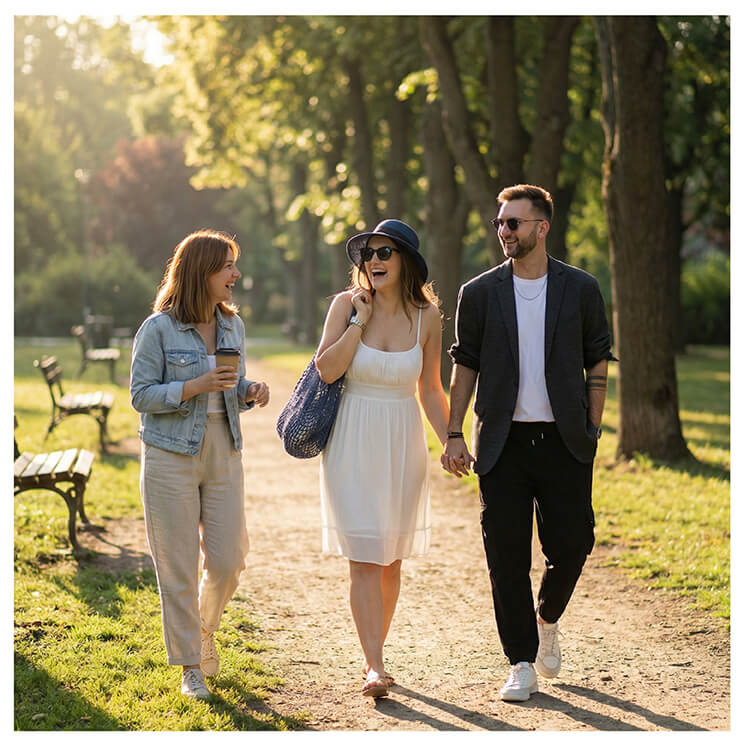
"Create a photorealistic image of three characters interacting in a park. Ensure consistent lighting direction (morning sun from left), natural shadows, unified depth of field, and cohesive color grading. Maintain identity fidelity for all characters and seamless integration."
43. Character and Environment Fusion:
"Combine uploaded character portrait into a detailed fantasy environment: castle courtyard at dusk, volumetric lighting, realistic shadows matching character pose, cinematic color grading, smooth edges and integration with environment."
44.Combine a real portrait with a fantasy illustration style.
Keep the face realistic while transforming the background into an enchanted forest with glowing particles, soft mist, and magical lighting.
45. Merge a product photo with infographic elements.
Show a smartphone alongside floating labels, feature icons, and clean annotations without obscuring the product.
46. Blend a cityscape photo with futuristic UI overlays.
Add holographic panels, data graphs, and transparent interface elements while maintaining realistic depth and perspective.
47. Fuse a hand-drawn sketch style with a photorealistic interior scene.
Furniture appears realistic, while outlines and textures have an illustrated pencil effect.
48. Character + Environment
Insert a character portrait into a cinematic fantasy environment with matching lighting.
49. Real + Anime Style
Blend a real person into anime-style rendering while preserving facial identity.
50. Branding Fusion
Combine logo, product, and lifestyle imagery into one cohesive brand visual.
Nano Banana Pro Prompt Example 6. Product Photography
51: Show this [luxury watch] on a reflective black surface with dramatic side lighting, subtle shadows, and close-up focus on the dial.
52: Place this [eco-friendly water bottle] in a minimalist kitchen setting with natural daylight, soft shadows, and textured wooden countertops.
53: Create a lifestyle shot of this [running shoe] mid-air during a sprint on a city street, capturing motion blur and realistic reflections.
54: Show this [perfume bottle] with floating floral elements, soft glowing backlight, and reflective surface highlights for a high-end ad feel.
55: Render this [coffee mug] on a rainy windowsill with water droplets, ambient reflections, and soft warm lighting from inside.
56: Create a 360° turntable visualization of this [smartphone], showing front, back, and sides in studio lighting.
57: Place this [handbag] in an urban street-style shoot with blurred pedestrians, golden-hour light, and motion shadows.
58: Transform this [skincare jar] into a laboratory-themed shot with glowing glassware, scientific props, and ambient backlight.
59: Display this [bracelet] on a macro close-up with velvety background, soft directional lighting, and detailed metal texture.
60: Show this [headphones] in a modern gaming setup with neon accent lighting, reflective desk surfaces, and RGB highlights.
Nano Banana Pro Prompt Example 7. Manga & Anime
61: Illustrate a dramatic fight scene between two characters in anime style, using dynamic camera angles, motion lines, and glowing energy effects.
62: Create a close-up portrait of a female anime character with glowing eyes, soft facial shading, detailed hair strands, and cinematic lighting.
63: Generate a chibi-style illustration of a group of friends celebrating a festival, with colorful lanterns and stylized costumes.
64: Draw a cyberpunk cityscape with anime characters interacting, neon reflections, and rain-soaked streets for cinematic effect.
65: Create a fantasy battle scene with multiple characters on flying mounts, dynamic perspective, dramatic lighting, and epic scale.
66: Ilustrate a slice-of-life school scene with detailed backgrounds, student uniforms, realistic lighting, and natural facial expressions.
67: Draw a horror anime scene inside a haunted mansion, with exaggerated shadows, eerie lighting, and suspenseful atmosphere.
68: Generate a magical girl transformation sequence, glowing costumes, dynamic particle effects, and flowing motion trails.
69: Create a sports anime action shot (e.g., basketball dunk) with motion blur, realistic anatomy, and exaggerated dynamic angles.
70: Ilustrate a steampunk-inspired anime world with mechanical airships, bustling streets, detailed architecture, and cinematic lighting.
Nano Banana Pro Prompt Example 8. AI Photo Editing
71: Replace the background with a photorealistic futuristic city skyline, matching original lighting and perspective.
72: Apply cinematic teal-and-orange color grading to an outdoor portrait, enhancing contrast, light highlights, and shadow depth.
73: Remove unwanted objects from a photo seamlessly, including wires, litter, and background clutter.
74: Convert a daytime outdoor scene into a foggy morning with diffused light and muted tones.
75: Enhance facial features: smooth skin, brighten eyes, whiten teeth, while maintaining natural texture and realistic lighting.
76: Replace the sky in a landscape with dramatic sunset clouds, realistic reflection on water, and natural shadow adjustments.
77: Turn a casual selfie into a high-fashion editorial look with professional lighting, background blur, and cinematic tones.
78: Transform a portrait into a fantasy style with ethereal lighting, glowing particles, and detailed costume overlays.
79: Apply hyper-realistic HDR effect to an interior photo, enhancing textures, color depth, and soft shadows.
80: Remix multiple images to create a composite photo showing one subject in several environments while keeping proportions and lighting coherent.
Nano Banana Pro Prompt Example 9. Branding & Marketing
81: Generate a full branding kit for a tech startup including logo variations, typography, color palette, icons, and social media templates.
82: Create high-resolution mockups showing a new fashion logo applied to t-shirts, shopping bags, and signage.
83: Design an eye-catching landing page visual for a SaaS product launch with hero banner, CTA button, and feature highlights.
84: Develop a social media campaign visual showing a product in multiple lifestyle settings with branded text overlays.
85: Create a product catalog page visual for e-commerce with consistent lighting, shadows, and product focus.
86: Generate a packaging design mockup for a gourmet food product with realistic texture, reflection, and environmental props.
87: Design a business card and stationery set for a modern consulting firm, keeping logo, typography, and color palette consistent.
88: Create a billboard design mockup for a car brand with dramatic lighting, environmental reflections, and clear logo placement.
89: Visualize a multi-channel marketing campaign with coordinated ad creatives across social media, print, and web banners.
90: Generate a 3D brand display mockup with product, logo, and environmental props for retail or exhibition visualization.
Nano Banana Pro Prompt Example 10. UI/UX & Web Design
91: Design a modern homepage for an AI productivity app with hero section, CTA button, navigation bar, and featured cards.
92: Create a high-conversion e-commerce product page for a luxury watch with hero image, price, CTA, and thumbnails of alternative views.
93: Generate a dashboard UI for an analytics platform showing charts, KPIs, notifications, and navigation menu in a clean style.
94: Design a mobile app onboarding screen sequence with illustrations, text prompts, and navigation buttons.
95: Create a dark-mode web page template for a technology blog with readable typography and highlighted content areas.
96: Generate a modern SaaS landing page showing pricing tiers, feature comparisons, and call-to-action buttons.
97: Visualize a clean UI for a food delivery app with menu, restaurant listing, ratings, and order buttons.
98: Design a travel booking app interface showing destination cards, date pickers, search bar, and clean icons.
99: Create a portfolio website template for a photographer with hero slider, gallery grid, and contact section.
100: Generate a responsive web page for a fitness brand with hero image, class schedule, trainer bios, and CTA sections.
How to Use Nano Banana Pro Prompts Online
Creating AI-generated images with Nano Banana Pro is quick and beginner-friendly. Just follow these simple steps to turn your ideas into stunning visuals.
Step 1: Open YouCam Online Editor
Go to the YouCam Online Editor and open the Text to Image feature. This is where you’ll create AI images by using nano banana pro prompts.
Step 2: Choose a Style
Select an image style that matches your creative vision.
Step 3: Customize Your Image
Adjust advanced settings to fine-tune your results:
- Aspect Ratio for different formats
- Negative Prompt to remove unwanted elements
- Output Number to generate multiple image variations
These controls help you achieve more precise and high-quality results.
Step 4: Generate & Save
Click Generate to start creating your AI images. Once the images are ready, preview them and save instantly
[Bonus] Try Nano Banana Pro on More Devices
Getting Started with Nano Banana Pro on YouCam AI Pro
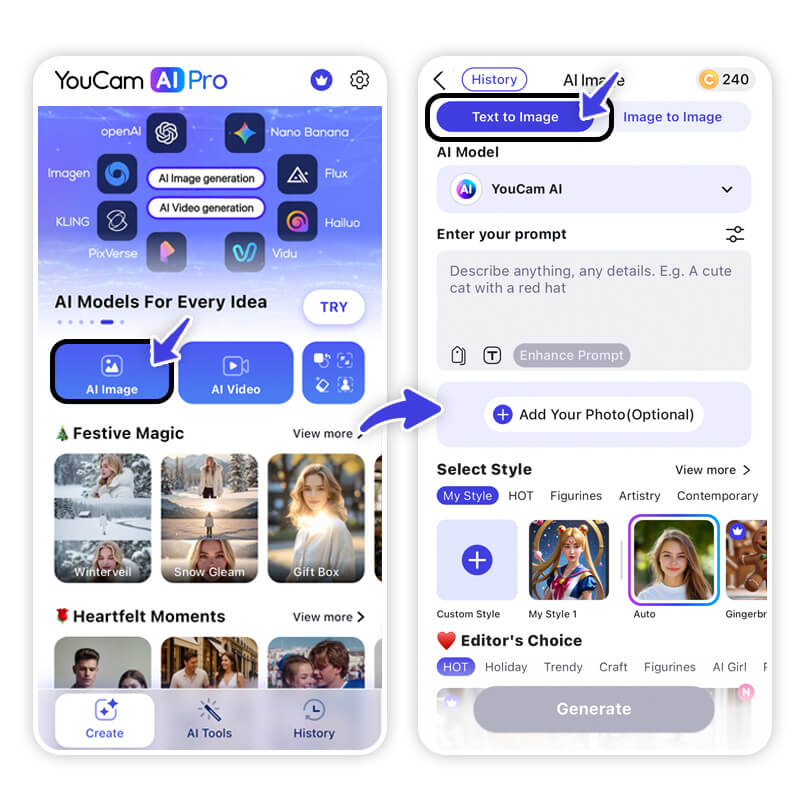
Exciting news for creators! YouCam AI Pro now integrates Nano Banana Pro, powered by the Gemini 3 Pro engine, bringing professional-grade AI image generation directly to your mobile device.
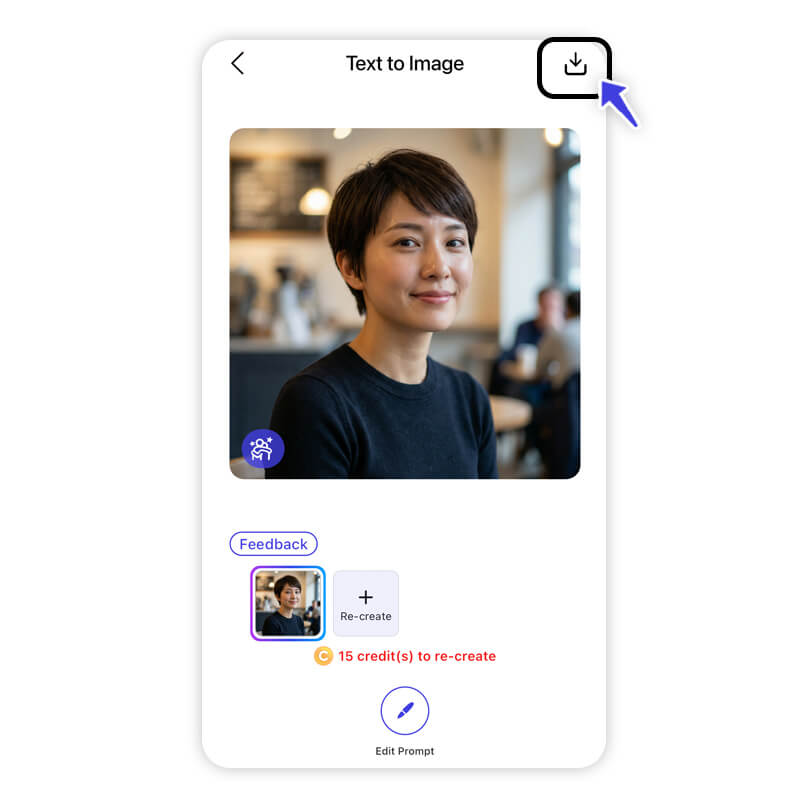
Whether creating visuals from scratch with Text-to-Image or enhancing existing photos with Image-to-Image, this model delivers stunning detail, accurate lighting, and impressive prompt adherence. Steps to Use Nano Banana Pro:
1. Select AI Image & Upload Photo – Choose Text-to-Image or Image-to-Image.
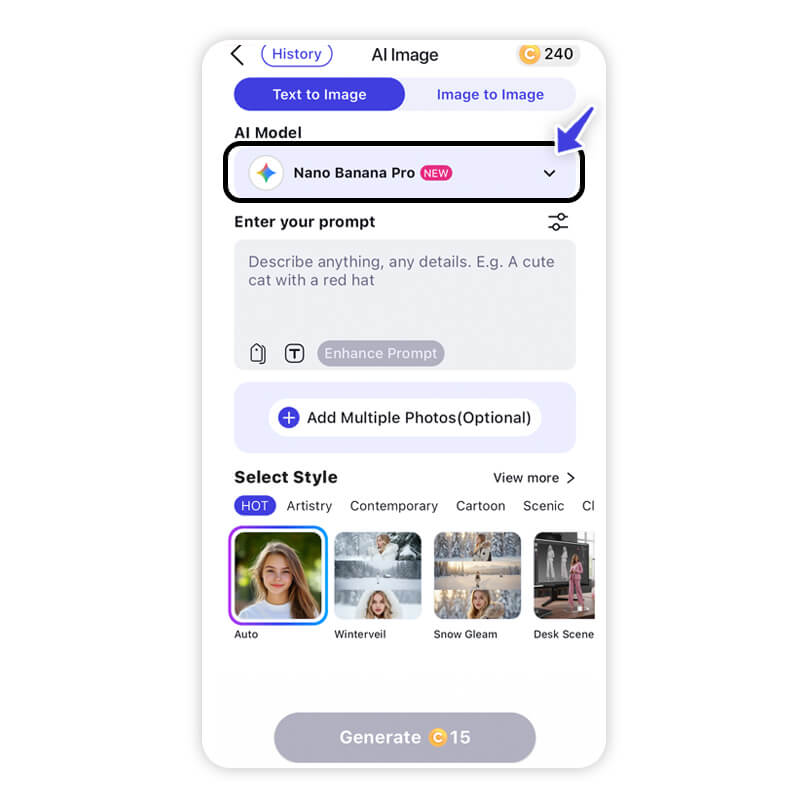
2. Choose Nano Banana Pro – Select this model for superior results.

Now YouCam Makeup AI Agent Supports Nano Banana Pro
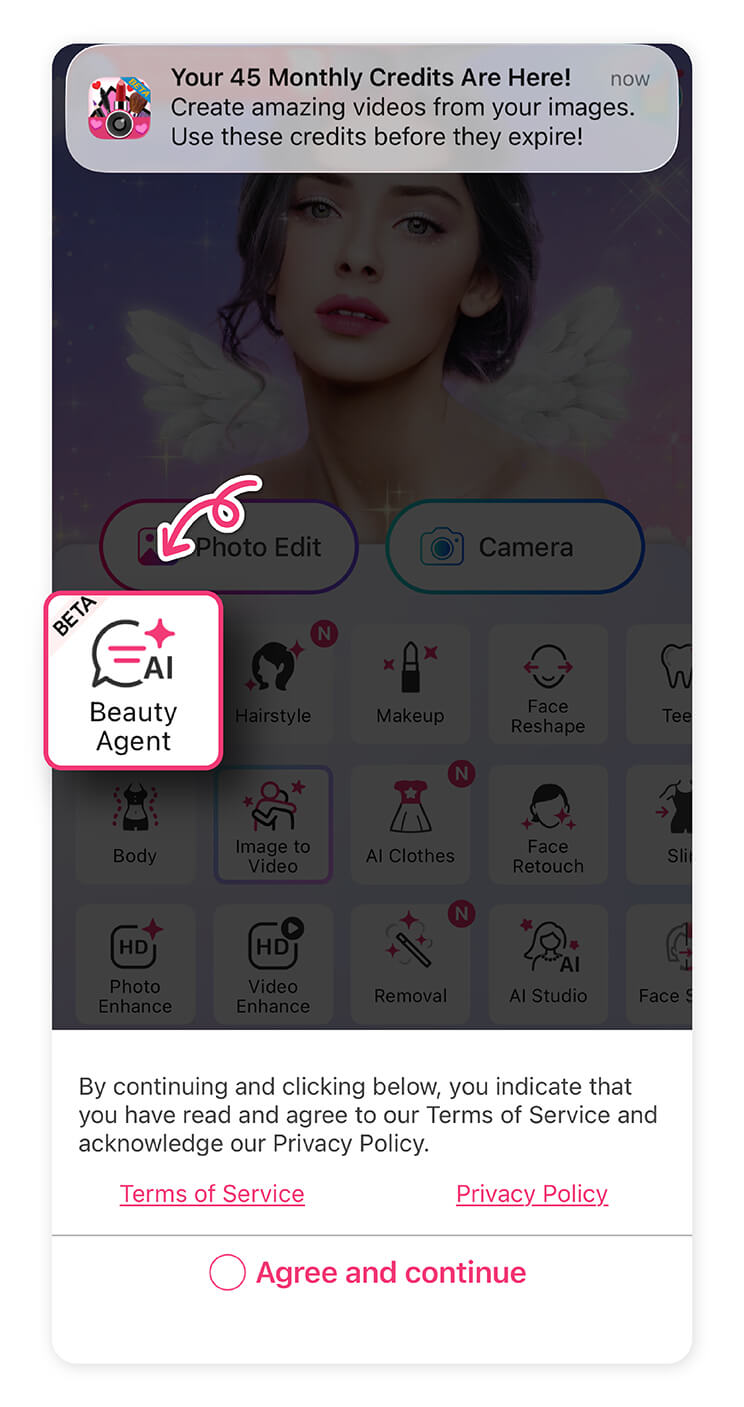
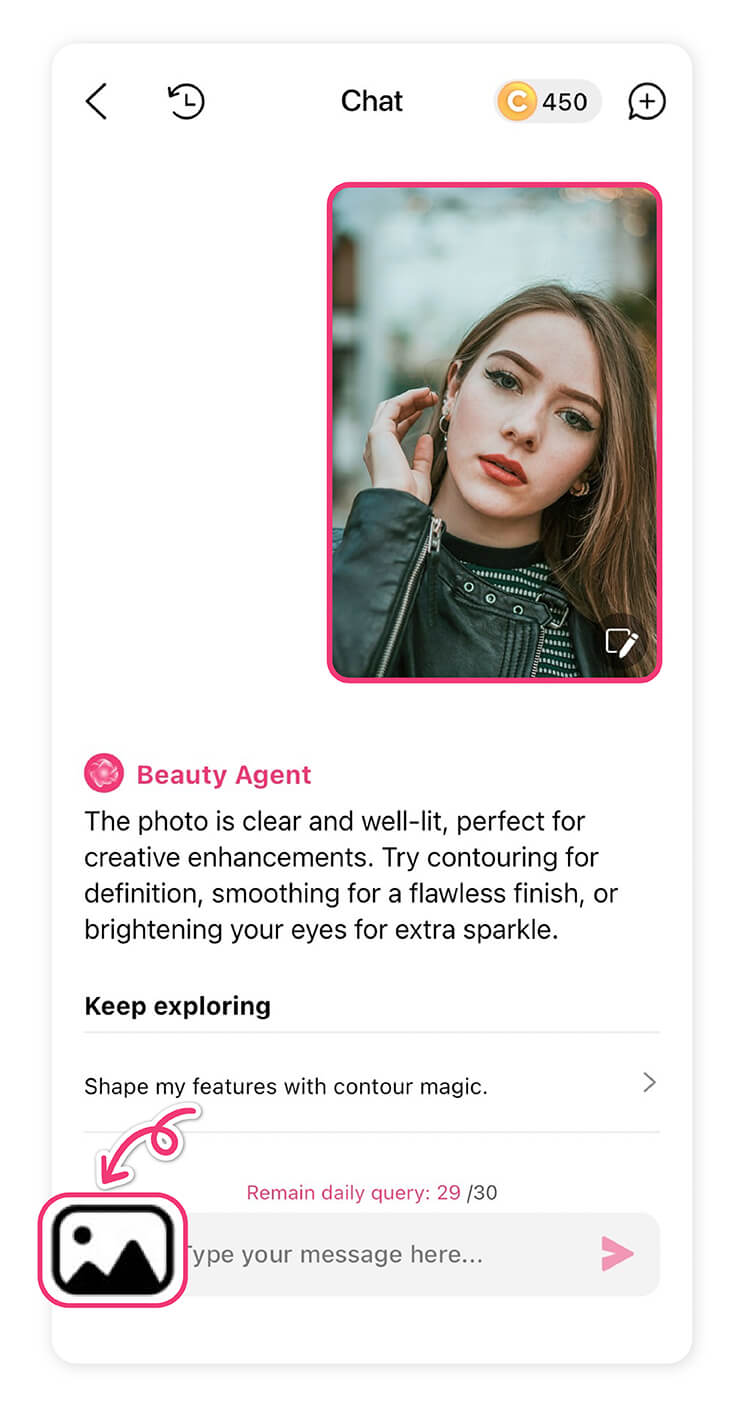
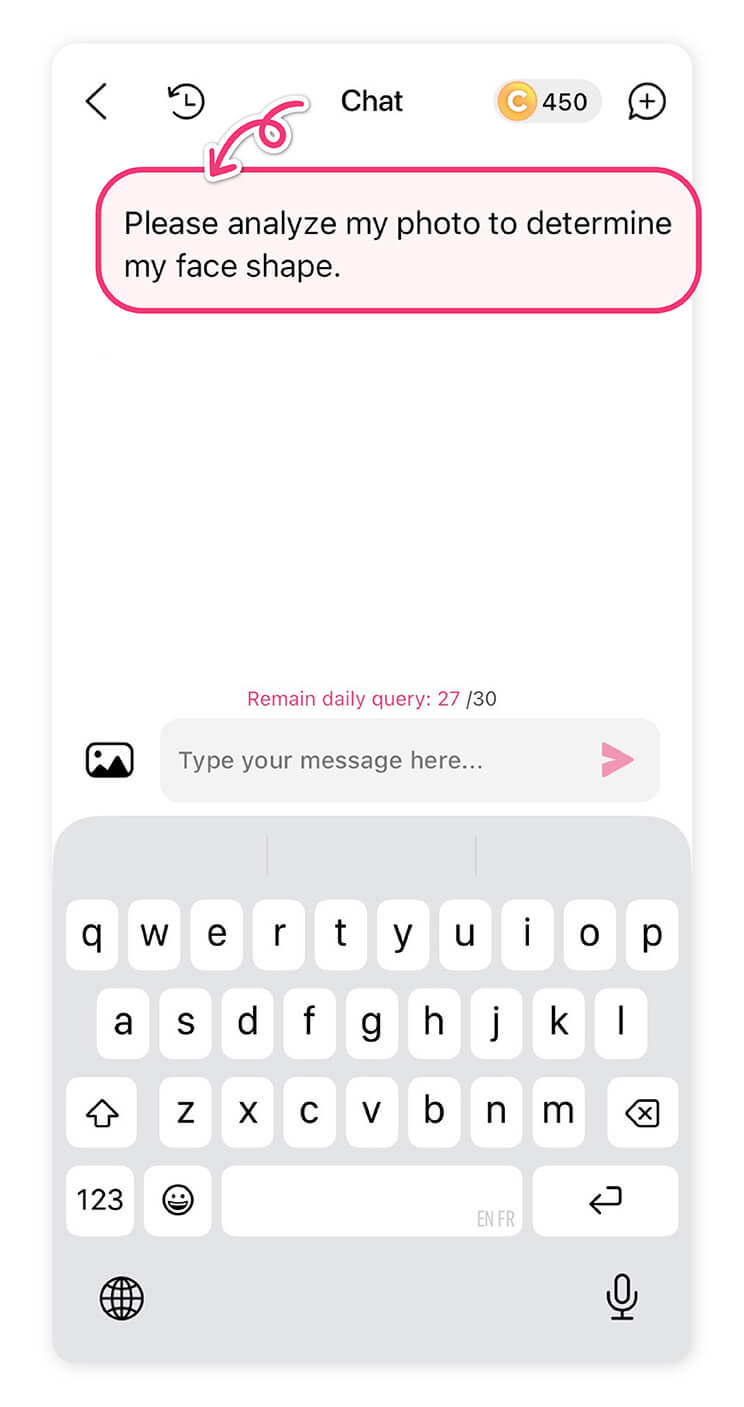
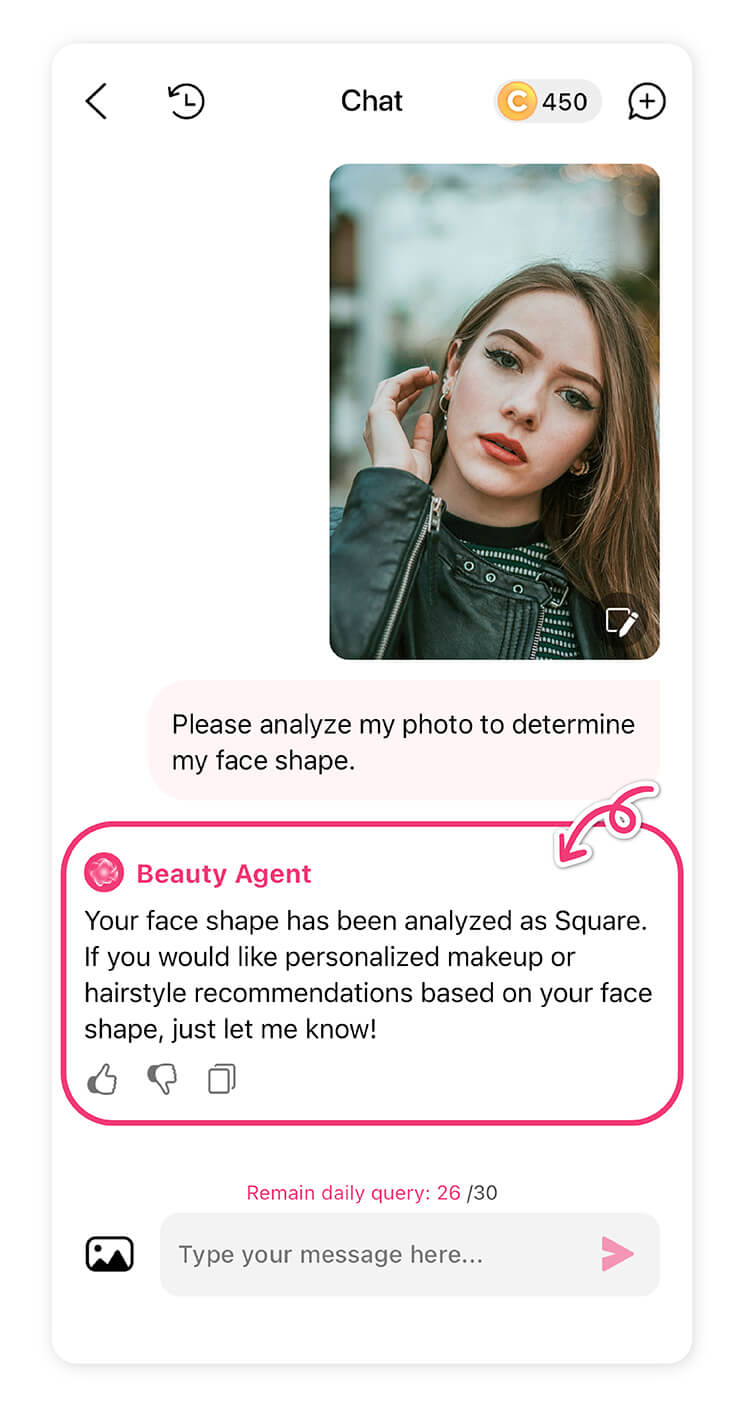
Great news for beauty creators! YouCam Makeup now lets you harness the power of Nano Banana Pro through the AI Agent, making it easier than ever to generate stunning makeup looks, style transformations, and creative edits with professional-level AI. How to Use It:
1. Select AI Agent – Open YouCam Makeup and tap the AI Agent feature.
Start Creating with Nano Banana Pro
Nano Banana Pro is a major leap forward in AI creativity. Its multi-image processing, advanced reasoning, and realistic outputs make it superior to previous versions.
With the copy-paste prompts above and the YouCam Perfect workflow, you can create cinematic scenes, infographics, localized campaigns, and imaginative character transformations. Start experimenting today, refine your prompts, and share your creations with the community!
FAQs: Nano Banana Pro Prompts
What is Nano Banana Pro?

Nano Banana Pro is an advanced AI image generation tool from Google’s Gemini 3 suite. It excels in multi-image understanding, style-consistent transformations, realistic rendering, and context-aware creativity. It’s ideal for creators, designers, and social media enthusiasts who want professional-quality outputs.
How does Nano Banana Pro differ from previous versions?
Compared to previous versions, Nano Banana Pro supports multi-image processing, understands complex prompts, maintains consistent styles, generates higher realism with fine details, renders multilingual text, and handles multi-modal projects like branding, infographics, and character des
What makes a “perfect prompt” for Nano Banana Pro?
The best prompts are structured yet natural. A common formula is:
[Subject + Adjectives] doing [Action] in [Location/Context]. [Composition/Camera Angle]. [Lighting/Atmosphere]. [Style/Media]. [Specific Constraint or Text].
Clear instructions on style, lighting, composition, and text placement yield the most consistent results.
Can I use Nano Banana Pro on mobile apps?
Yes! YouCam Perfect supports Nano Banana Pro for multi-image synthesis (AI Agent) and Image-to-Image transformations. This allows you to maintain style consistency, apply cinematic effects, and refine your creations directly from your device.
Can I combine multiple prompts or images in Nano Banana Pro?
Absolutely. Upload multiple reference images to maintain character or style consistency. You can also merge prompts for composite scenes, multi-person interactions, or character-environment fusion for complex outputs.
Can I generate AI images online using Nano Banana Pro prompts?
Yes. YouCam Online Editor offers free access to its AI tools, including text-to-image features. You can start creating AI-generated images online at no cost, with optional premium features available for more advanced results.



