


 Author:
A December dump isn’t about perfection. It’s about capturing the feeling of the month: festive chaos, quiet winter mornings, and everything in between. In this guide, you’ll discover:
- What a December dump is and why it trends every year
- Creative December photo dump ideas
- How to design a festive December collage
- The best December captions (short, cozy, funny, aesthetic, holiday-ready)
What Is a December Dump?

A December dump is a photo dump post—usually a carousel or collage—that collects highlights from throughout December. It can include photos, videos, screenshots, or even blurry moments that feel real.
Unlike a single curated post, a December dump tells a story. It reflects the warmth, reflection, and celebration that define the end of the year.
Why December Photo Dumps Perform So Well
December dumps naturally attract engagement because they combine emotion with seasonal visuals:
Holiday atmosphere: lights, decorations, candles, winter outfits
Year-end nostalgia: people love reflecting on the month—and the year
Relatable content: cozy nights, gatherings, food, quiet moments
Low-effort, high-impact: authenticity beats over-editing
December content feels personal, and audiences respond to that authenticity.
Best December Photo Dump Ideas
Mix and match these ideas to create a dynamic, scroll-worthy December dump.
1. Festive December Moments
Perfect for early to mid-December posts:
Christmas trees and ornaments
City lights and decorated streets
Wrapped gifts and bows
2. Holiday Gatherings & Celebrations
December is about connection:
Family dinners
Friends’ holiday parties
Group selfies
3. Year-End Reflections
Add emotional depth:
Quiet solo moments
Screenshots of memories
“Last time this year” details
How to Create a December Dump
Turning your camera roll into a festive December dump is easier than you think.
Step 1: Choose the Right Layout
The easiest way to begin your December dump is by using collage templates in YouCam Perfect.
Try layouts with soft borders or rounded corners to match the cozy vibe.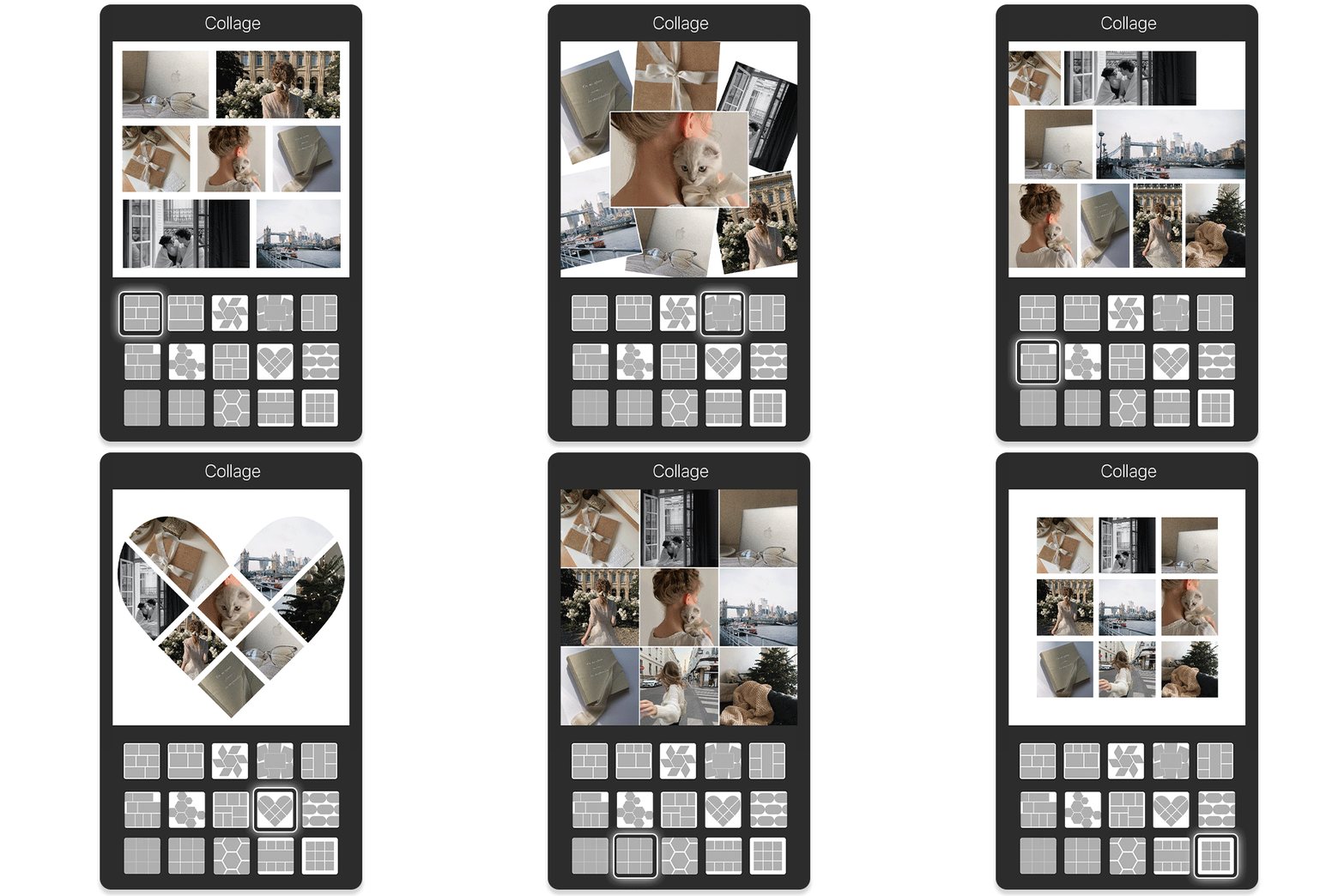
✨ Pro Tip: Customize the border thickness, shape, and radius for a polished, personal touch.
Step 2: Pick Your December Highlights
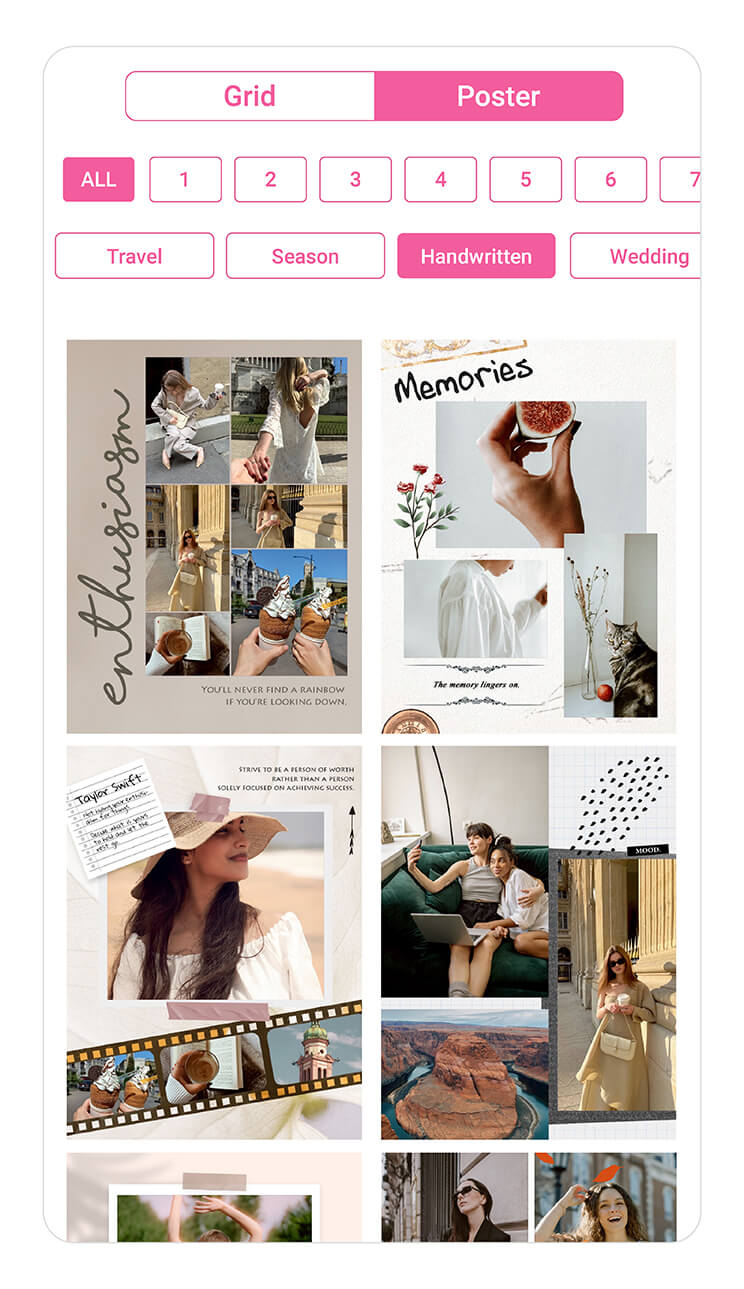
To make your December dump more visually aesthetic, try the Poster option in the Collage feature—it has pre-designed templates to give your photos a creative flow.
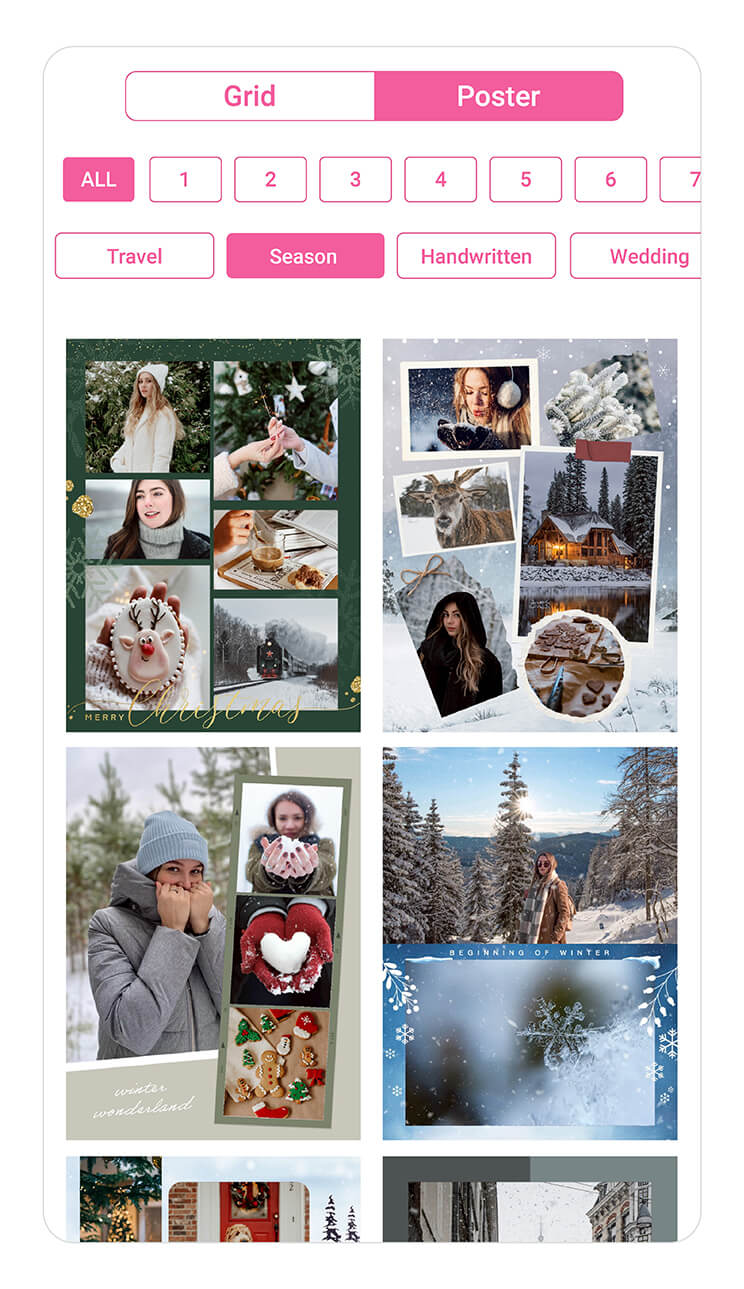
- nature
- cozy indoor scenes
- food
- candid selfies
- lifestyle
Make sure your images have varied angles—close-up, wide shot, overhead—for visual interest.
Step 3: Add December Dump Sticker
Once your collage is ready, upload it to Instagram Stories and tap Stickers → Add Yours → “December Dump.”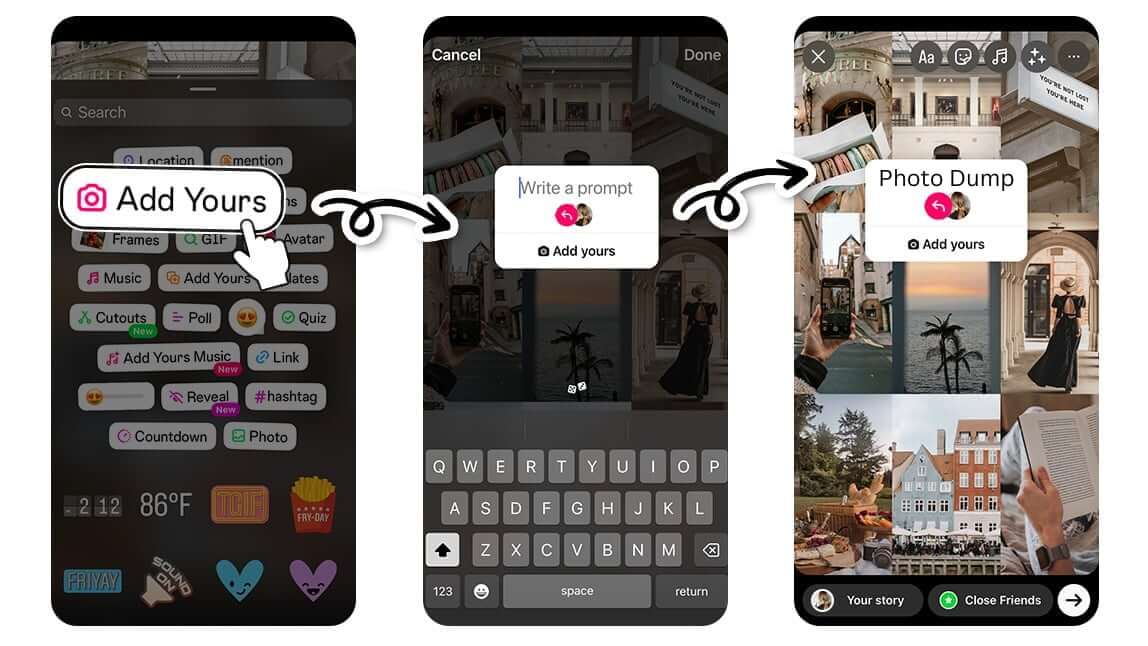
How to get the December Dump sticker on Instagram:
- Open Instagram Stories and upload your collage.
- Tap Layout to add multiple photos if needed.
- Tap Stickers → Add Yours.
- Type “December Dump” and place it on your collage.
💡 Pro Tip: Hashtags like #DecemberDump, #PhotoDump, help boost reach.
Adding the sticker not only makes your Story trendy but also encourages friends to join in and create their own December photo dumps.
Choosing the right cover photo and sequencing your images can also increase engagement—helping you get more likes and Story interactions.
40+ Best December Captions for Your Photo Dump
A good December caption can turn your dump into a cozy story. Here are a few styles to match your mood:
Short & Aesthetic December Captions
December days ✨
Winter feels
End-of-year energy
Cold air, warm moments
December glow
Cozy looks good on me
Cozy December Captions
Soft lights and slow nights
December feels like a deep breath
Staying in, staying warm
Comfort season activated
Wrapped in winter
Holiday-Themed December Captions
Festive chaos, loved every second
December, you were magic
Lights on, worries off
Holiday mode: ON
The season of togetherness
Funny December Captions
December said: no sleep, just events
Powered by cookies and coffee
I came, I decorated, I napped
December is busy pretending to be calm
Too festive to function
Reflective / Year-End December Captions
Closing the year gently
December taught me a lot
Letting go, looking ahead
Ending the year with gratitude
One last chapter before a new year
How To Make 2025 Photo Recap?
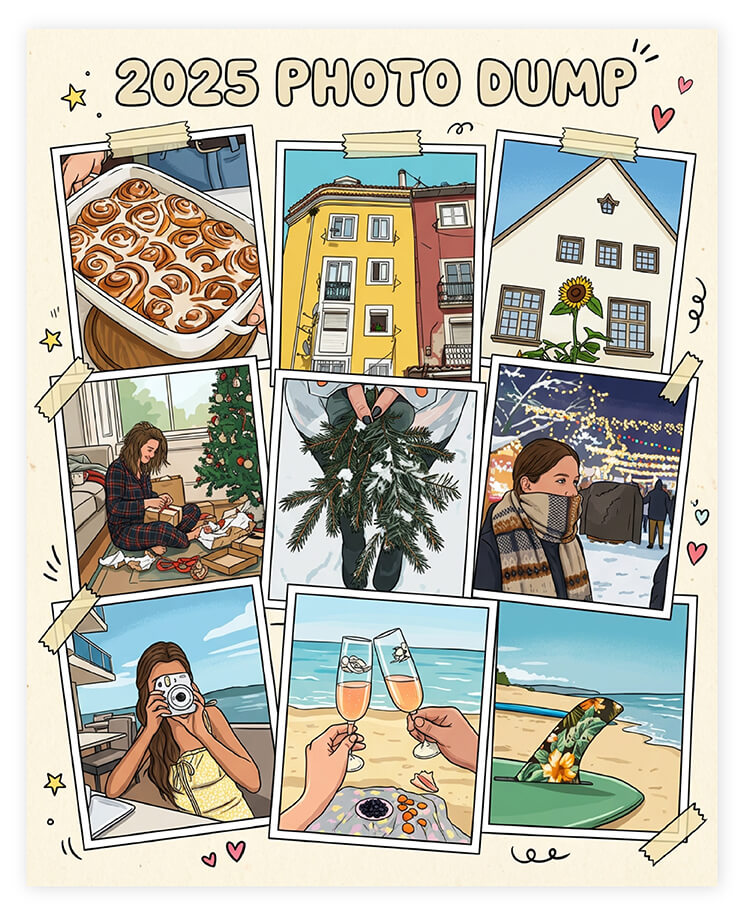
A 2025 photo recap or 2025 photo dump highlights your favorite moments—from travel and friendships to milestones and everyday memories—in a single, shareable visual format.
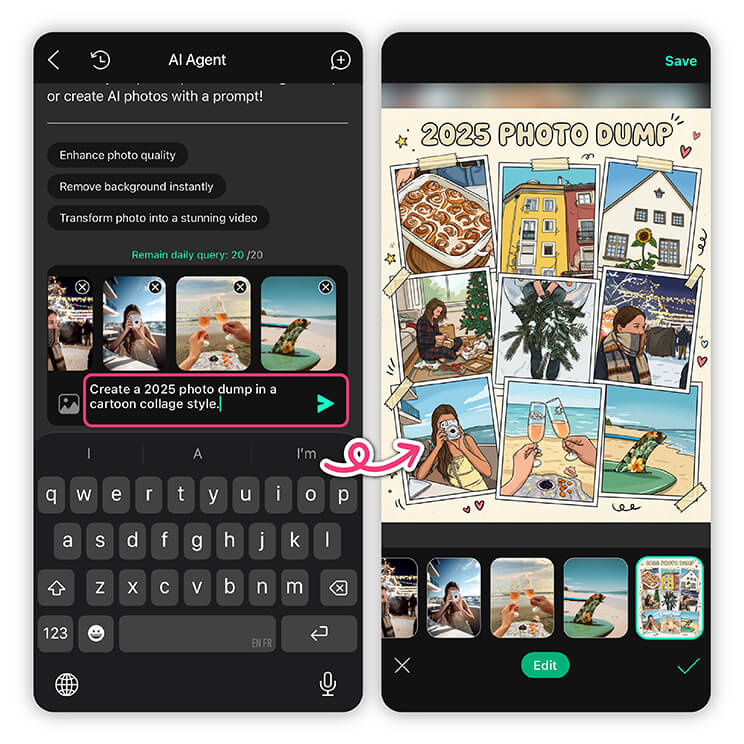
With AI Agent in YouCam Perfect, you can generate a unique 2025 photo recap or photo dump-style image in just a few taps—no manual layout, no design experience required. Just follow these 4 simple steps:
Step 1: Open AI Agent in YouCam Perfect
Launch YouCam Perfect and tap AI Agent from the home screen.
Step 2: Upload Your Photos
Upload multiple photos you want to include in your 2025 photo recap or photo dump.

Step 3: Enter Your Prompt
Describe the look and mood you want. For example:
“Create a 2025 photo dump with a minimalist aesthetic and soft lighting”
“Turn these photos into a 2025 year recap collage with scrapbook style”
“Create a trendy social-media-style 2025 photo dump with film grain and natural poses”
AI Agent will understand your intent and generate a cohesive visual automatically.
Step 4: Generate & Save
Tap Generate, review the result, and save your 2025 photo recap to share on Instagram, TikTok, or keep as a personal memory.
Your Perfect December Dump Starts Here
A memorable December dump isn’t about flawless photos—it’s about emotion, atmosphere, and storytelling. With the right mix of moments, thoughtful layouts, and the perfect December caption, your post can truly stand out.
Using YouCam Perfect, you can effortlessly design festive collages, fine-tune colors, and bring your December memories together in one cohesive look.
December Dump FAQs
What is a December dump?

A December dump is a collection of photos and videos highlighting your favorite moments in December. It often includes cozy, festive, or year-end memories shared as a carousel or collage on Instagram or other social platforms.
How is a December dump different from a regular post?
Unlike a single curated photo, a December dump is casual, candid, and tells a story. It captures multiple moments from the month, emphasizing authenticity and seasonal vibes rather than perfection.
How many photos should I include in my December dump?
Typically, 6–10 photos work well for Instagram carousels or collages. You want enough variety to showcase your month without overwhelming your followers.
What’s the best caption for a December dump?
Your caption can be short, cozy, funny, or reflective. Examples:
- “December days ✨”
- “Soft lights, slow nights”
- “Festive chaos, loved every second”
- “Closing the year gently”



