


 Author:
If you’re a fan of adorable, quirky collectibles, you’ve probably heard of POP MART’s CRYBABY series. These cute, teary-eyed characters have stolen hearts worldwide with their unique designs and emotional charm. But what if you could create your very own CRYBABY, customized to your style, with the help of AI?
In this blog, we’ll walk you through how to use a CRYBABY Generator to craft your own masterpiece, plus share a bonus tip to make your creation pop with a stunning background. Let’s dive in!

What is the CRYBABY from POP MART?
CRYBABY, created by POP MART, is a beloved line of collectible art toys known for their expressive, teary-eyed faces and whimsical designs. From characters like Stupid Cupid to Kiss Kiss – Angel Version, each CRYBABY tells a story through its unique outfits, accessories, and themes, often tied to emotions like love or nostalgia. These limited-edition figures are a hit among collectors, with some rare designs fetching high value in the global toy community. Whether you’re a seasoned POP MART fan or just discovering CRYBABY, the idea of designing your own version is super exciting—and AI makes it possible!
What is a Crybaby Generator?
A Crybaby generator is a digital tool that uses generative AI or pre-set graphic assets to help fans design custom versions of the iconic, teary-eyed characters originally created by artist Molly Yllom for Pop Mart.
Crybaby characters have become a global phenomenon, representing deep emotions through whimsical designs. Whether you are looking for a Crybaby customized website for a quick avatar or a professional AI tool for detailed art, these generators bridge the gap between fan creativity and high-end digital design.
How to Use a Crybaby Customized Website to Design Your Character
Ready to bring your CRYBABY vision to life? The website crybunnycryteddy.com offers a fun and user-friendly CRYBABY Generator to let you create your own CRYBABY. Here’s a step-by-step guide to creating your custom CRYBABY:
Step 1: Enter to Get Started
Head over to crybunnycryteddy.com and click the “Let’s Go!” button. The interface is intuitive, so you’ll be ready to unleash your creativity in seconds!
Step 2: Customize Everything from the Options
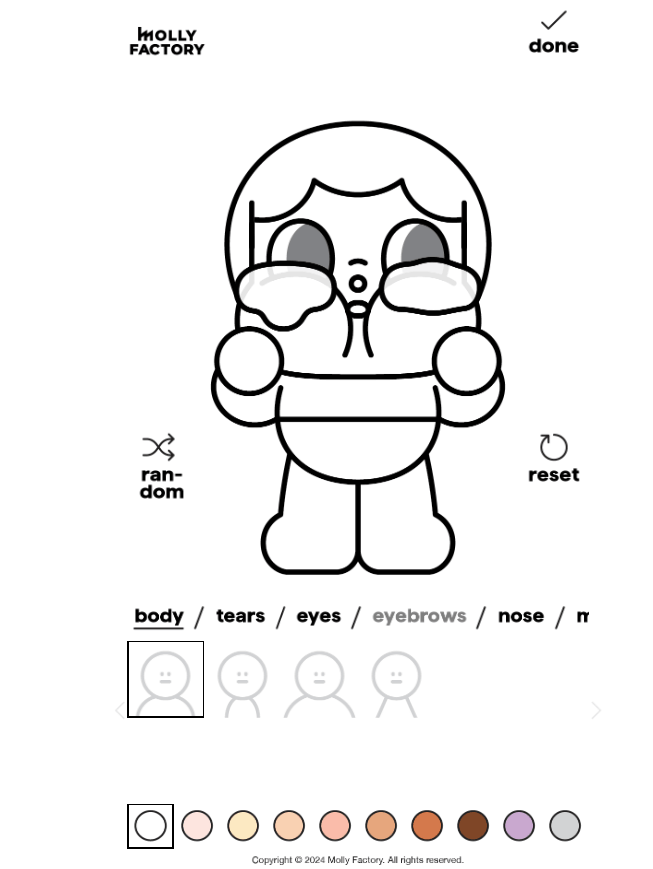
This is where the fun begins! The CRYBABY Generator lets you tweak every detail—think Face, Hairstyle, outfits, accessories, colors, and even facial expressions. Play around with the settings to match your personality or create a totally wild design!
Step 3: Generate & Save Your CRYBABY

Once you’re happy with your creation, hit the “Done” button. It will work its magic, turning your choices into a polished CRYBABY image. Download and save your masterpiece to share with friends or add to your digital collection.
Bonus Tip: Add a Background for Your CRYBABY Image
Want to take your CRYBABY to the next level? Adding a custom background can make your design stand out. The YouCam AI Pro app is perfect for this, offering powerful AI tools to create stunning backdrops. Here’s how to do it:
Step 1: Download the Best CRYBABY Generator: YouCam AI Pro
Shared Materials by Strapi
*Adjust the size of images ONLY. Please go to Strapi to edit the materials info.
Get YouCam AI Pro from the App Store or Google Play. It’s a top-rated AI art generator that’s super easy to use.
Step 2: Head to AI Background
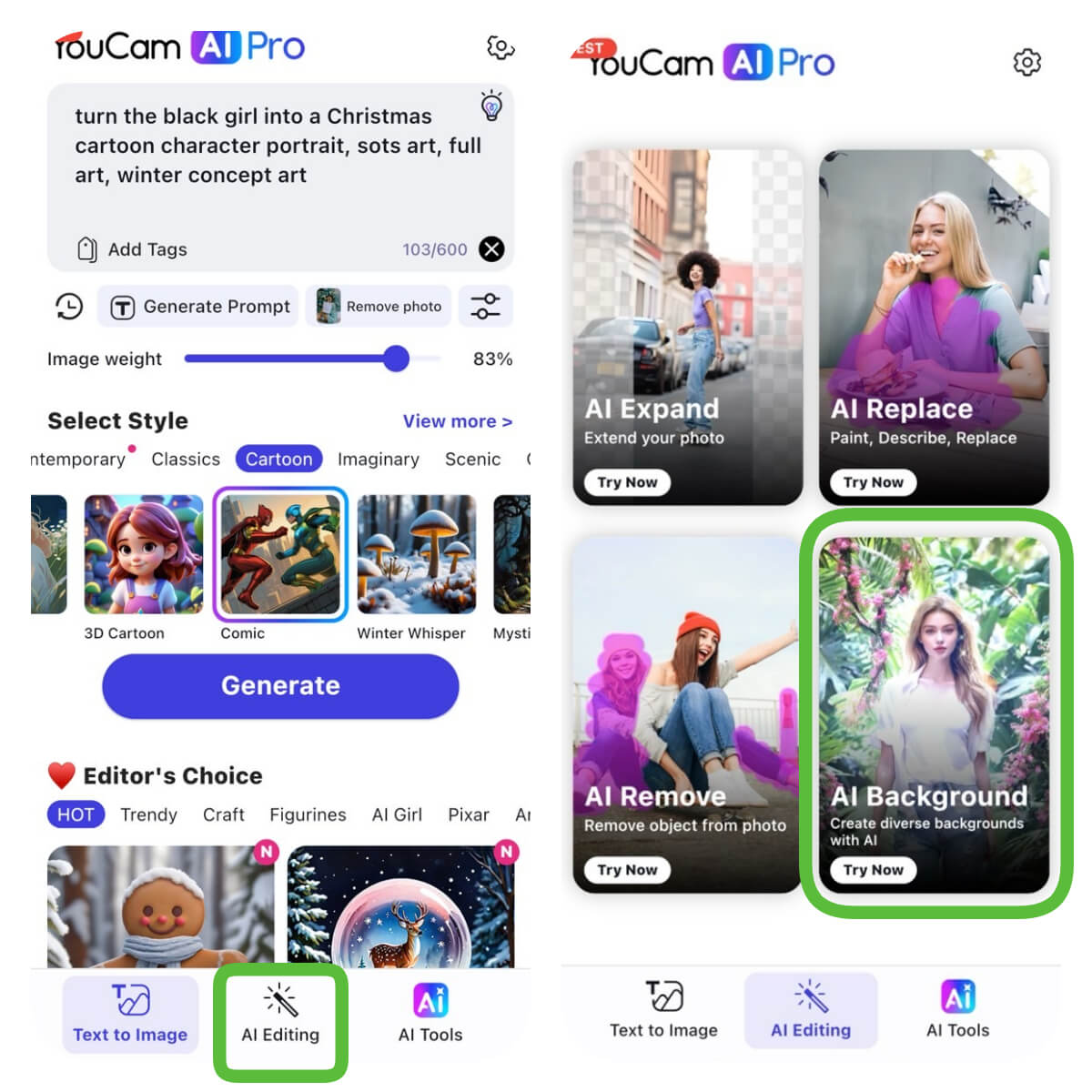
Open the app and navigate to the “AI Background” feature under AI Editing section. This tool lets you swap or create backgrounds for any image.
Step 3: Upload the CRYBABY Image
You’ve just uploaded the CRYBABY image you created on crybunnycryteddy.com. The app will automatically detect your CRYBABY character.
Step 4: Select a Background or Type Your Prompt
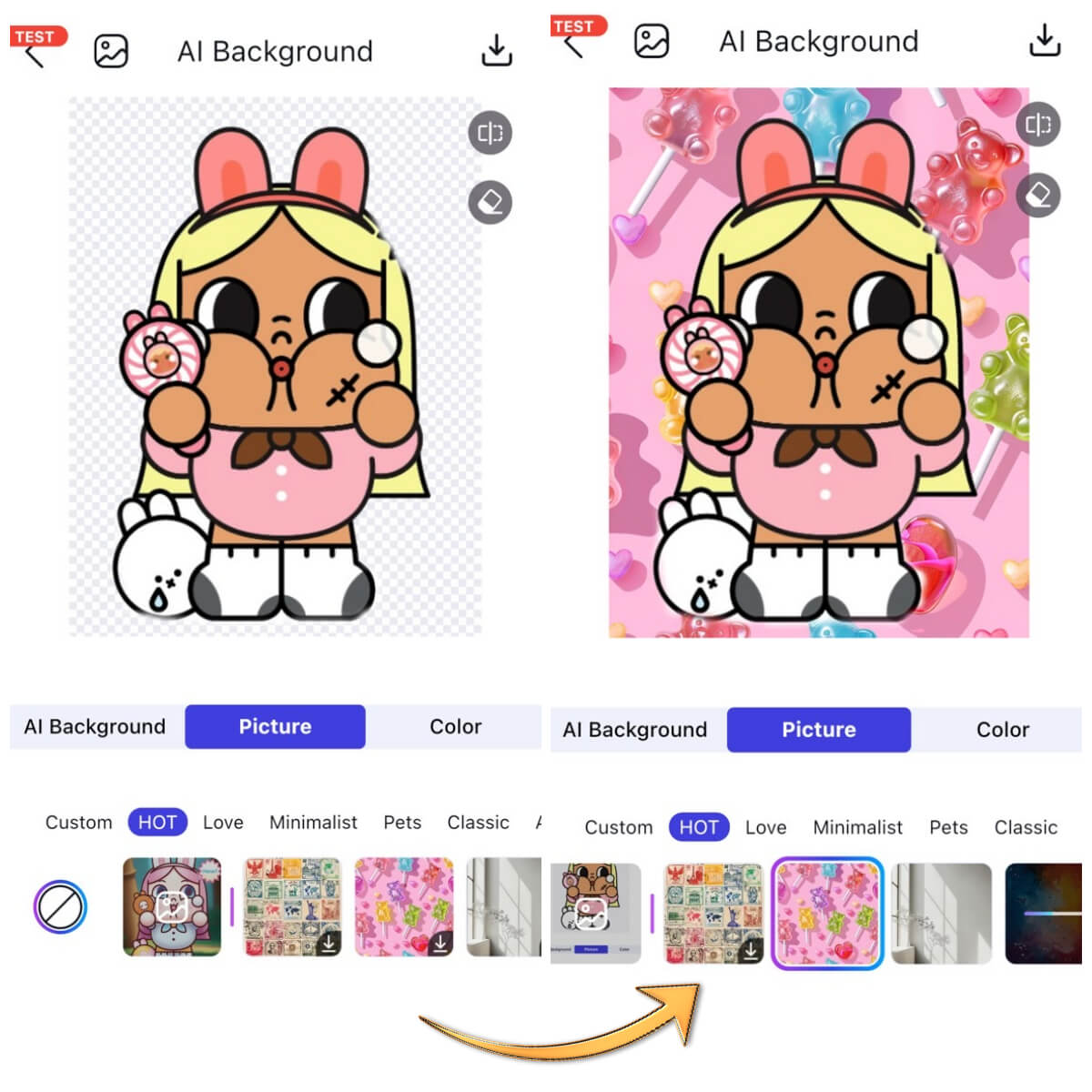
Step 5: Generate & Save Your CRYBABY Image
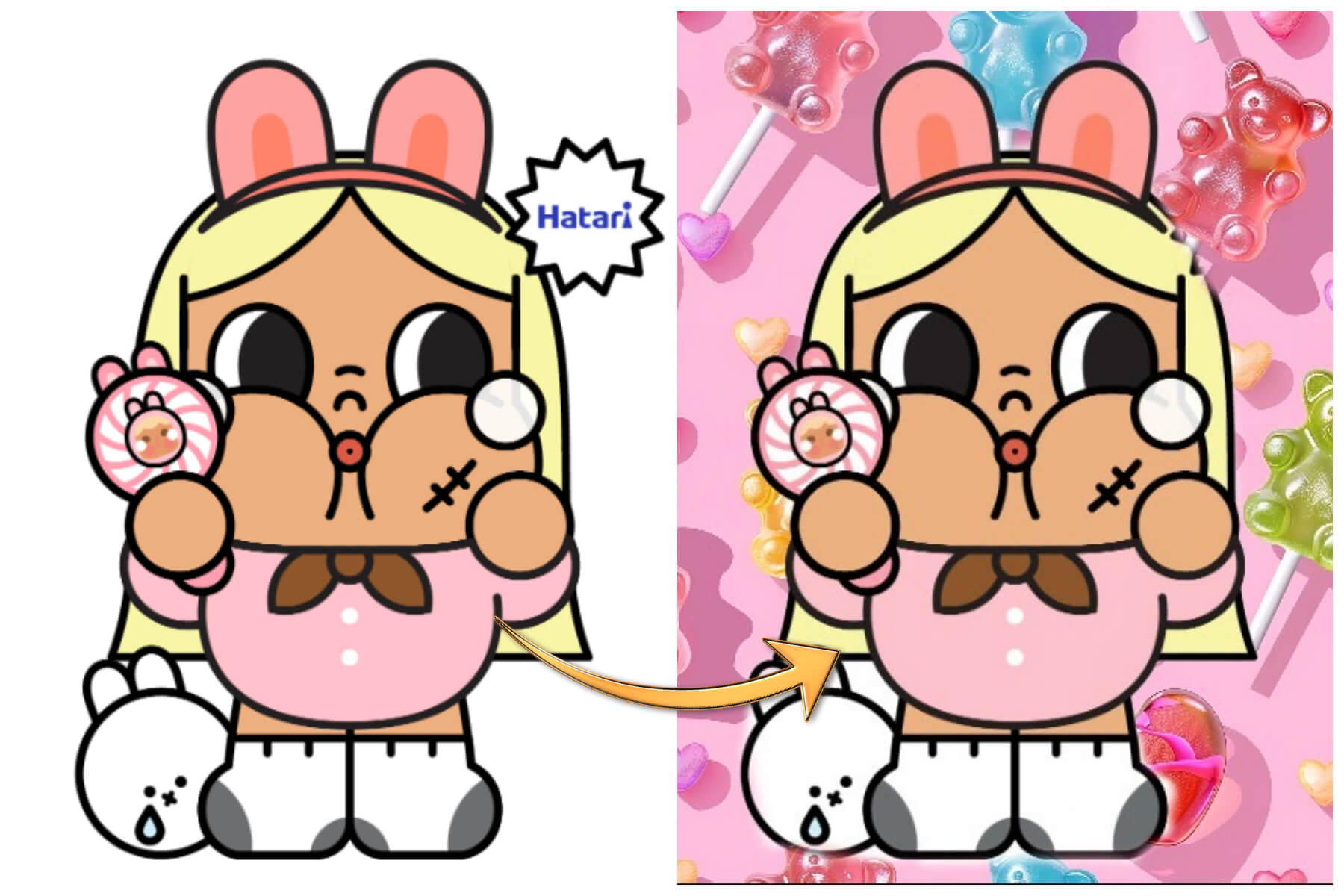
Hit “Generate,” and YouCam AI Pro will blend your CRYBABY with the new background. Save the final image to your device or share it on social media to wow your friends!
CRYBABY Maker: Create Your Own Crybaby with Advanced AI Prompts
If you want to start from scratch and design a CRYBABY without using a generator’s preset options, YouCam AI Pro is your go-to tool for crafting a fully custom CRYBABY. Here’s how to do it:
Step 1: Download the Best AI CRYBABY Generator App: YouCam AI Pro
Shared Materials by Strapi
*Adjust the size of images ONLY. Please go to Strapi to edit the materials info.
If you haven’t already, download YouCam AI Pro from the App Store or Google Play.
Step 2: Upload a Simple CRYBABY Image for Reference
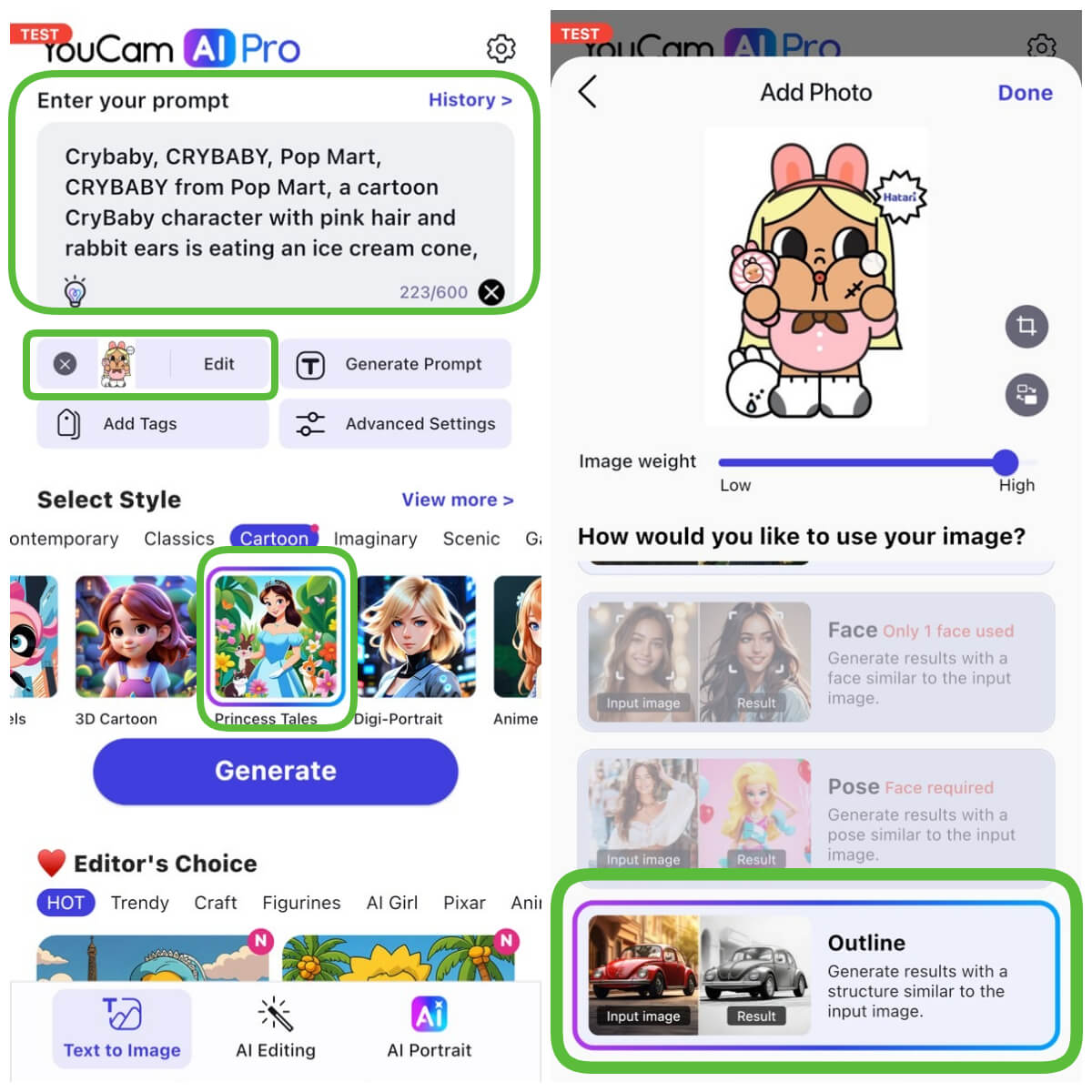
Find a basic CRYBABY image online (or use one from your collection) to guide the AI. Upload it to the app to give the AI a starting point.
Select the “Outline” option to make the structure similar to your input image.
Step 3: Enter the Prompt to Customize Your CRYBABY
In the app’s image-to-image feature, type a detailed prompt to describe your dream CRYBABY.
For example: “Crybaby, Cry Baby, Pop Mart, Crybaby from Pop Mart, a cartoon CryBaby character with pink hair and rabbit ears is eating an ice cream cone, a character portrait, lowbrow, kawaii cutest sticker ever, original chibi bunny girl.”
Step 4: Generate & Save Your AI CRYBABY

Click “Generate,” and watch YouCam AI Pro transform your prompt into a unique CRYBABY design. Save the image to your device or keep tweaking until it’s perfect.
Create Your Own CRYBABY Character with the Best CRYBABY Generator
Shared Materials by Strapi
*Adjust the size of images ONLY. Please go to Strapi to edit the materials info.
Designing your own CRYBABY is more than just a fun activity—it’s a way to express your creativity and connect with the global POP MART community. Whether you’re sharing your designs on Instagram with hashtags like #CRYBABY or #POPMART, or simply collecting digital art, AI tools like crybunnycryteddy.com and YouCam AI Pro make it easy to bring your ideas to life. Plus, with the collectible toy market booming, your custom CRYBABY could inspire your next big idea—or even a future POP MART collaboration! Ready to get started?
Download YouCam AI Pro to add professional flair. Share your creations on social media!
About the Editors
The PERFECT Corp. Editorial Team
We are a team of experts on photo and video editing apps. Our goal is to deliver engaging content on everything from stunning selfie edits to eye-catching video effects. We cover the latest trends and share niche tips to help you master digital creation.
Discover more about us:
CRYBABY Generator FAQs
What is the best Crybaby customized website?

The most user-friendly Crybaby customized website currently is crybunnycryteddy.com. It allows users to select specific facial features, accessories, and colors to create a personalized avatar in seconds without needing AI prompt knowledge.
Is there a free Crybaby generator?
Yes, there are several free options. Websites like crybunnycryteddy.com offer free basic customization, while apps like YouCam AI Pro provide free daily credits to use their advanced AI Crybaby generator for more detailed, text-based creations.
Can I create my own Crybaby for commercial use?
While you can create your own Crybaby for personal enjoyment and social media sharing, the original Crybaby character design is an IP owned by artist Molly Yllom and Pop Mart. Always check licensing terms before using generated images for commercial purposes.



