


 Author:
 ![ChatGPT Images 2.0: The Ultimate Guide & Best Alternative [Prompts Inside]](https://plugins-media.makeupar.com/smb/blog/post/2026-04-30/webp_3ff94611-60ac-49f6-bf3e-287303ea816f.jpg)
In this guide, we will make the process simple, fun, and totally achievable. If you're ready to dive in, we highly recommend downloading YouCam AI Pro, the ultimate platform that seamlessly supports this next-generation image model. Let's explore how you can bring your imagination to life!
💡 Key Takeaways
- Next-Level Text Accuracy: ChatGPT Images 2.0 can generate clear, legible, and correctly spelled text on signs, labels, and UI mockups.
- Precision Layouts: You have ultimate control over the composition, allowing for complex, multi-column designs and infographics.
- Viral-Ready Content: From digital beauty trends to scannable QR codes, it's the perfect tool for creating highly shareable social media content.
- Easy Access: You don't need a complex setup; apps like YouCam AI Pro offer the best alternative to easily access these advanced features from your phone.
What Makes ChatGPT Images 2.0 the Ultimate ChatGPT Image Generator?
The jump to this new model isn't just an upgrade; it's a complete revolution in how we create visuals. OpenAI has engineered this model to bridge the gap between "random generation" and "intentional design." Here is why this ChatGPT photo tool is changing the game:
- Flawless Text Rendering: Say goodbye to AI "gibberish." Earlier models struggled with even basic words. Now, you can render full sentences, product labels, and interface mockups with crisp, correctly spelled text.
- Functional QR Codes: Need to drive traffic? This model can actually generate functional, scannable QR codes embedded directly into your artistic images, making it a powerful tool for marketers.
- Complex, Deliberate Layouts: Whether you need multi-column magazine designs or detailed infographics, the model follows your structural prompts exactly, maintaining professional alignment and hierarchy.
- Incredible Instruction Fidelity: If you specify a headline in the top-left corner with a specific background, the model executes it. This high level of adherence means less time "rerolling" and more time creating.
- Photo-Realistic Product Shots: The model handles lighting, surface reflections, and depth of field so beautifully that the results can easily stand in for professional photography in commercial contexts.
6 Must-Try ChatGPT Images 2.0 Prompts to Spark Your Creativity
To truly see how far ChatGPT Images 2.0 has come, you need to test its ability to handle text, spatial layout, and stylistic nuance. Here are six professional-grade use cases with optimized prompts:
1. The Pro Color Analysis/ Hairstyle Analysis Grid
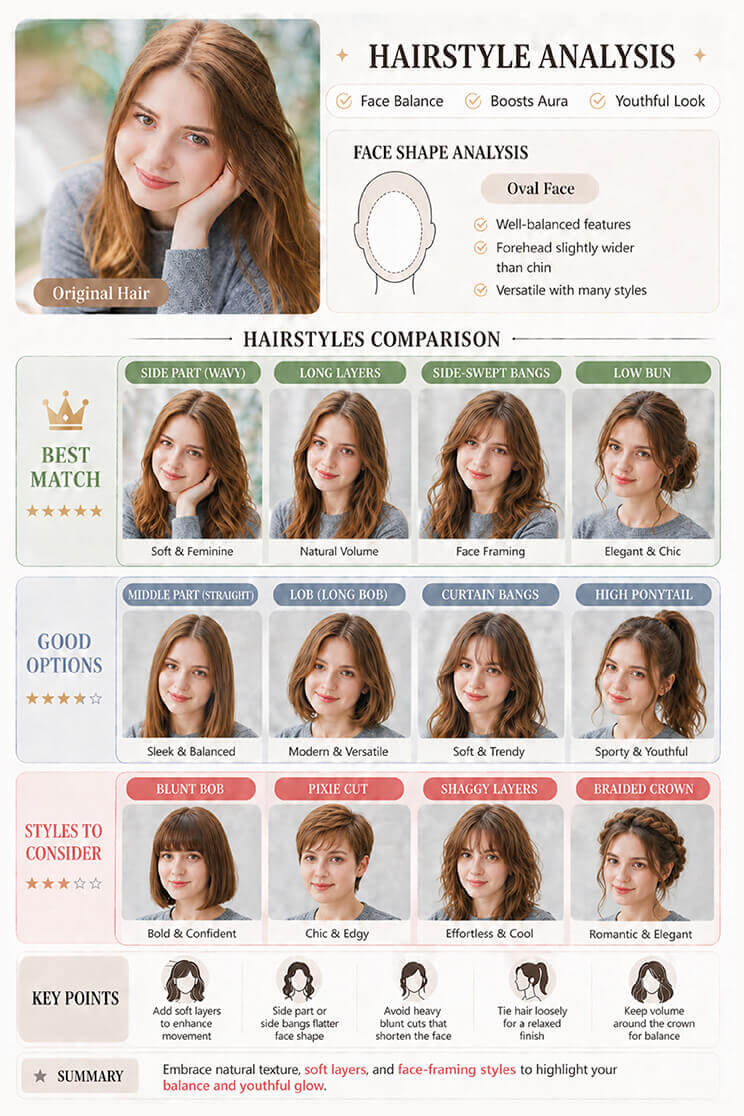
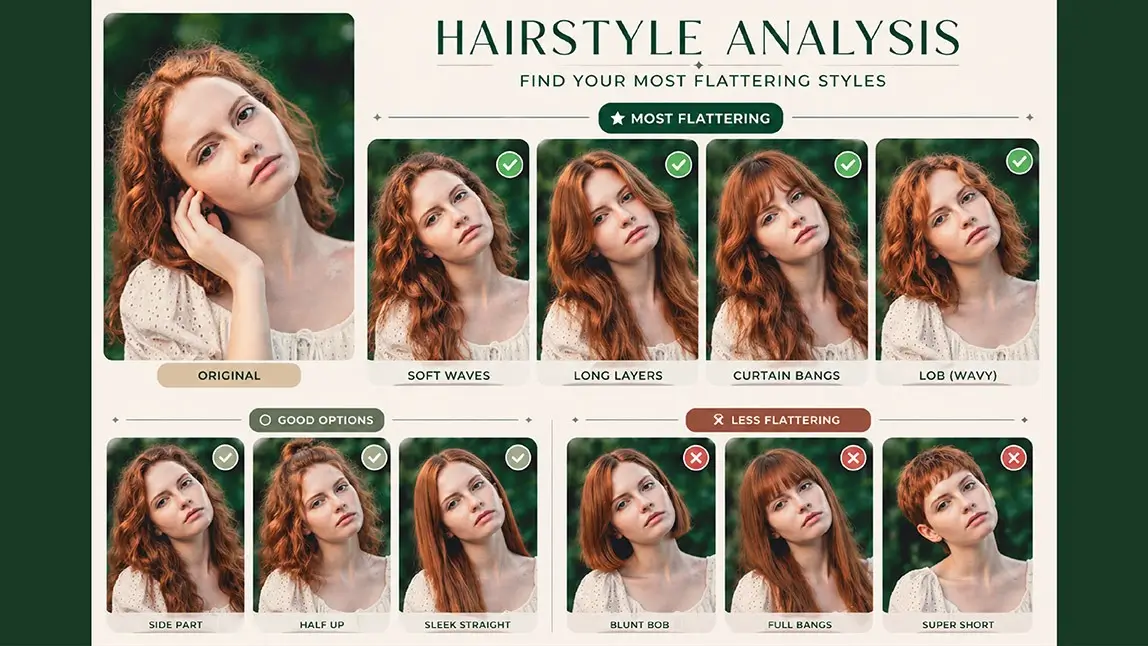
The 2.0 Advantage: Older models often blurred color boundaries or misspelled tone names. ChatGPT Image 2.0 excels here by creating a sharp, distinct comparison grid where every color swatch is clearly defined and labeled with precision, making it a perfect tool for stylists and beauty bloggers.
- Prompt: "Based on my uploaded portrait, create a high-quality personal hairstyle analysis card. Keep my original facial features and face shape. Compare multiple hairstyles and clearly categorize them into “Best,” “Average,” and “Not Recommended.” Include variations like hair length, bangs, and texture. Make it look clean and professional."
2. High-End Recipe Infographics
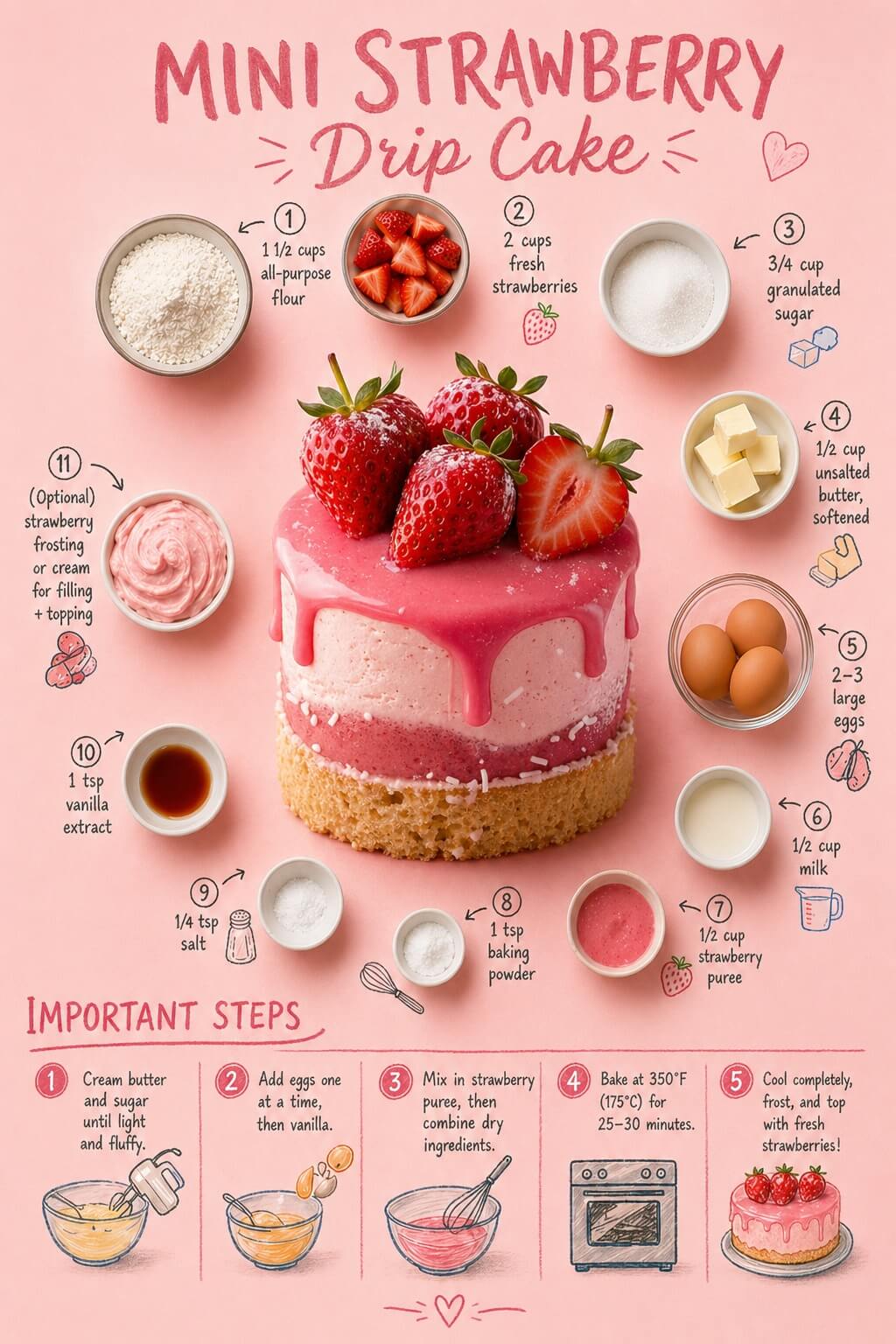
The 2.0 Advantage: Previously, "labels" on a food photo would look like messy scribbles. Now, the model uses advanced spatial reasoning to point lines at specific ingredients with readable text, resulting in a "editorial" look that mirrors high-end cooking magazines.
- Prompt: "I will provide a food name. Please automatically complete these 2 tasks: 1. RECIPE GENERATION: Act as a Chef. Create a realistic recipe for this food containing exactly 11 ingredients (with precise measurements) and 5 short, actionable cooking steps. 2. IMAGE GENERATION: Generate a flat-lay infographic poster using the recipe you just created. Strictly copy the layout of the reference image: soft pink background, main food in the center, surrounded by the 11 numbered ingredient bowls in a circle with handwritten text and cute doodles. Put a 5-step instruction panel at the bottom with hand-drawn icons."
3. Multilingual Manga/ Comic Panels
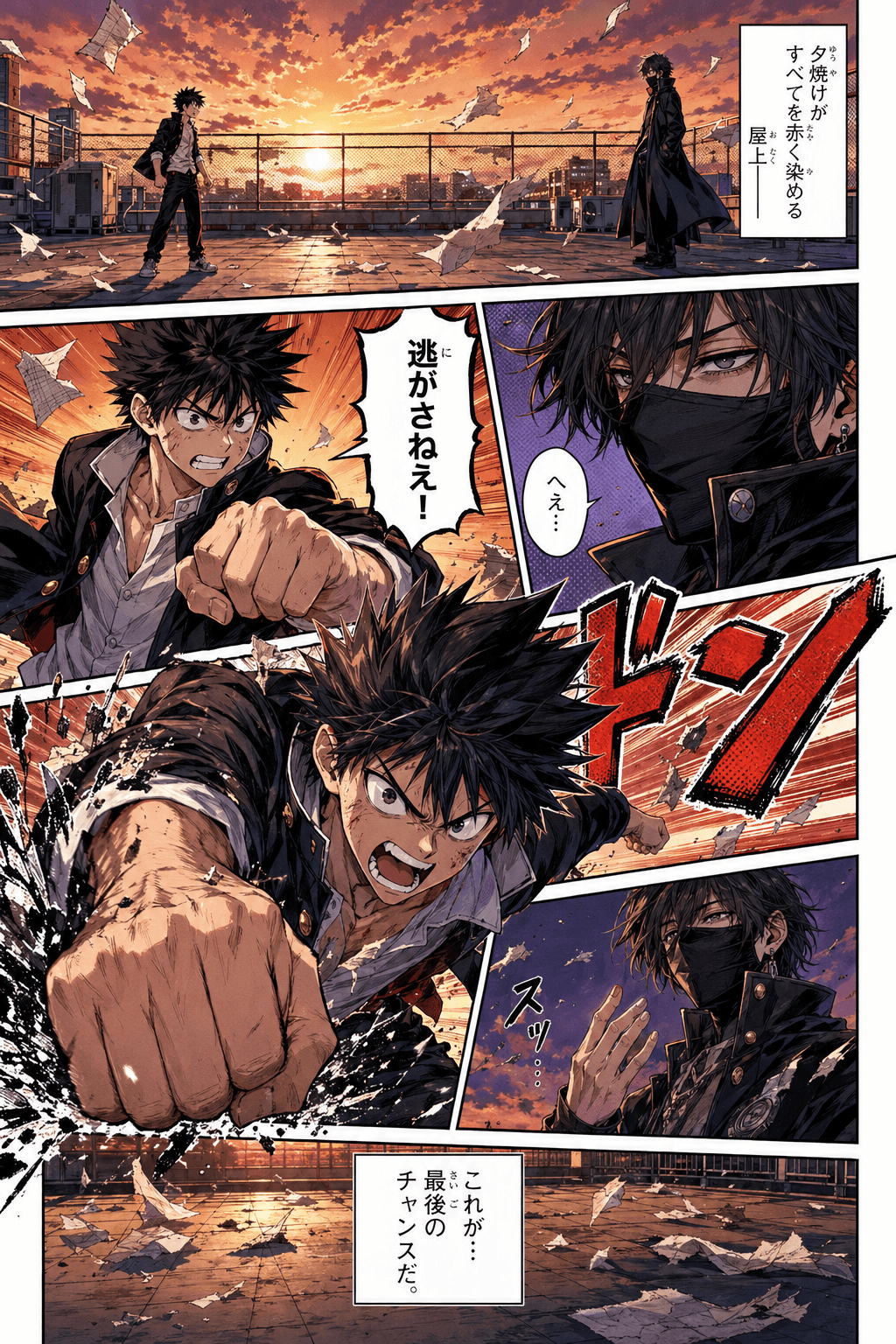
The 2.0 Advantage: This model understands the structural requirements of comic art. It doesn't just draw a "cartoon"; it renders the cross-hatching and dramatic lighting of professional manga, while finally allowing for legible Kanji and English side-by-side within dialogue bubbles.
- Prompt: "Colored Shonen Manga page, dynamic multi-panel layout based on image_5.png. A furious shonen protagonist in a black school uniform and a mysterious masked antagonist in a black cloak face each other on a dramatic sunset rooftop, with papers and debris flying in the wind. Panels feature extreme close-ups: protagonist delivering an extreme power punch with speed lines and shattering effects; masked antagonist observing calmly with a hand gesture. Traditional manga halftone dot patterns, hand-drawn ink texture. Includes specific Japanese comic text effects .'"
4. Graphic Design & Typography Posters
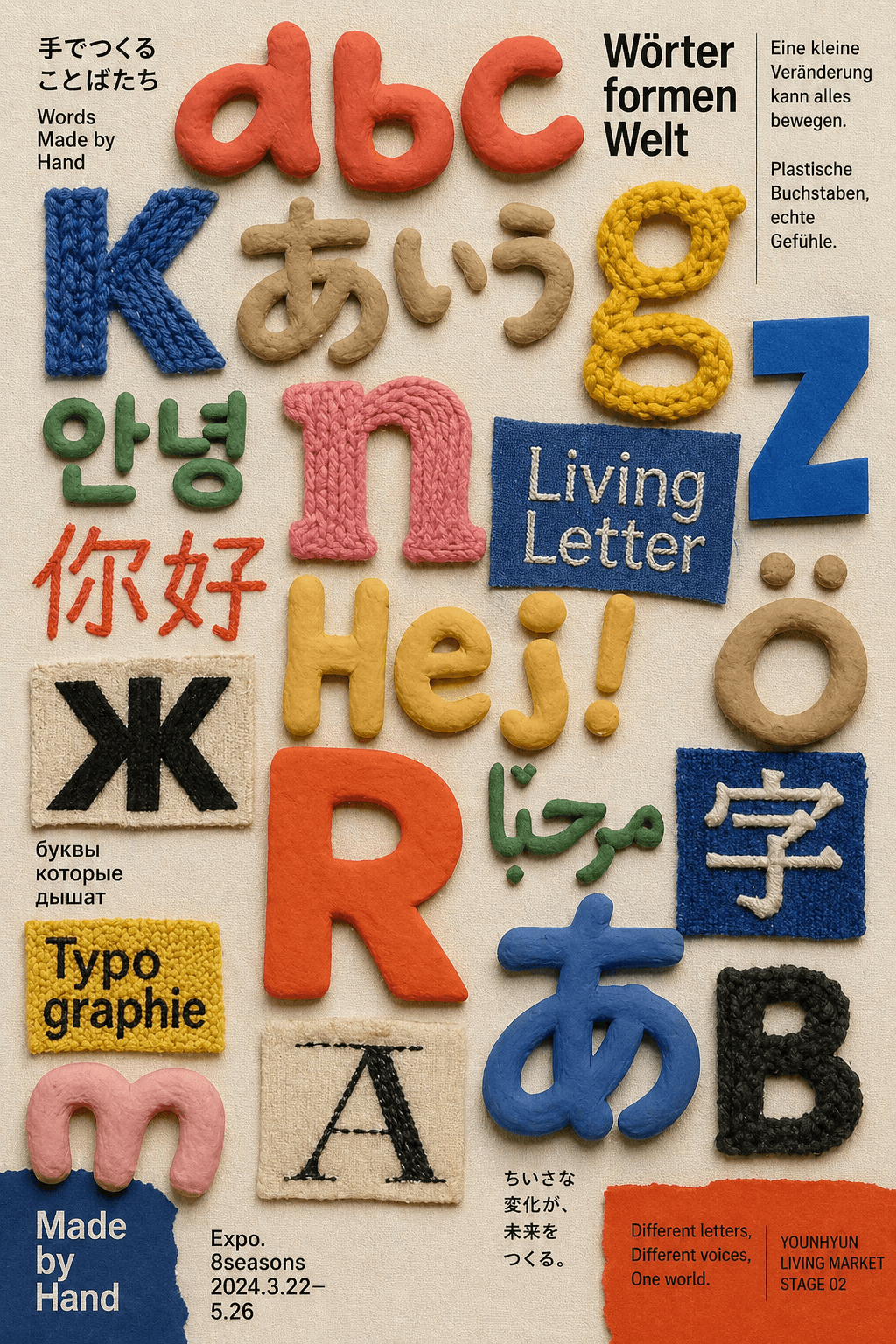
The 2.0 Advantage: This is where the ChatGPT photo generator truly shines. It treats text as a design element rather than an afterthought. The result is "Innovate" looking like a hand-crafted logo with perfect kerning and alignment, rather than just a typed word on a picture.
- Prompt: "A flat lay typography poster design featuring various 3D handcrafted letters and characters in mixed languages, scattered organically on a textured off-white canvas background. The typography is made from highly tactile physical materials: chunky knitted yarn, molded colorful clay, and embroidered stitches on fabric patches. Warm, playful color palette using primary blue, red, yellow, and earthy tones. Small minimalist printed text snippets in the corners. Soft, natural top-down studio lighting highlighting the realistic craft textures, macro photography style, craft-core aesthetic."
5. Pixel-Perfect UI/UX Mockups
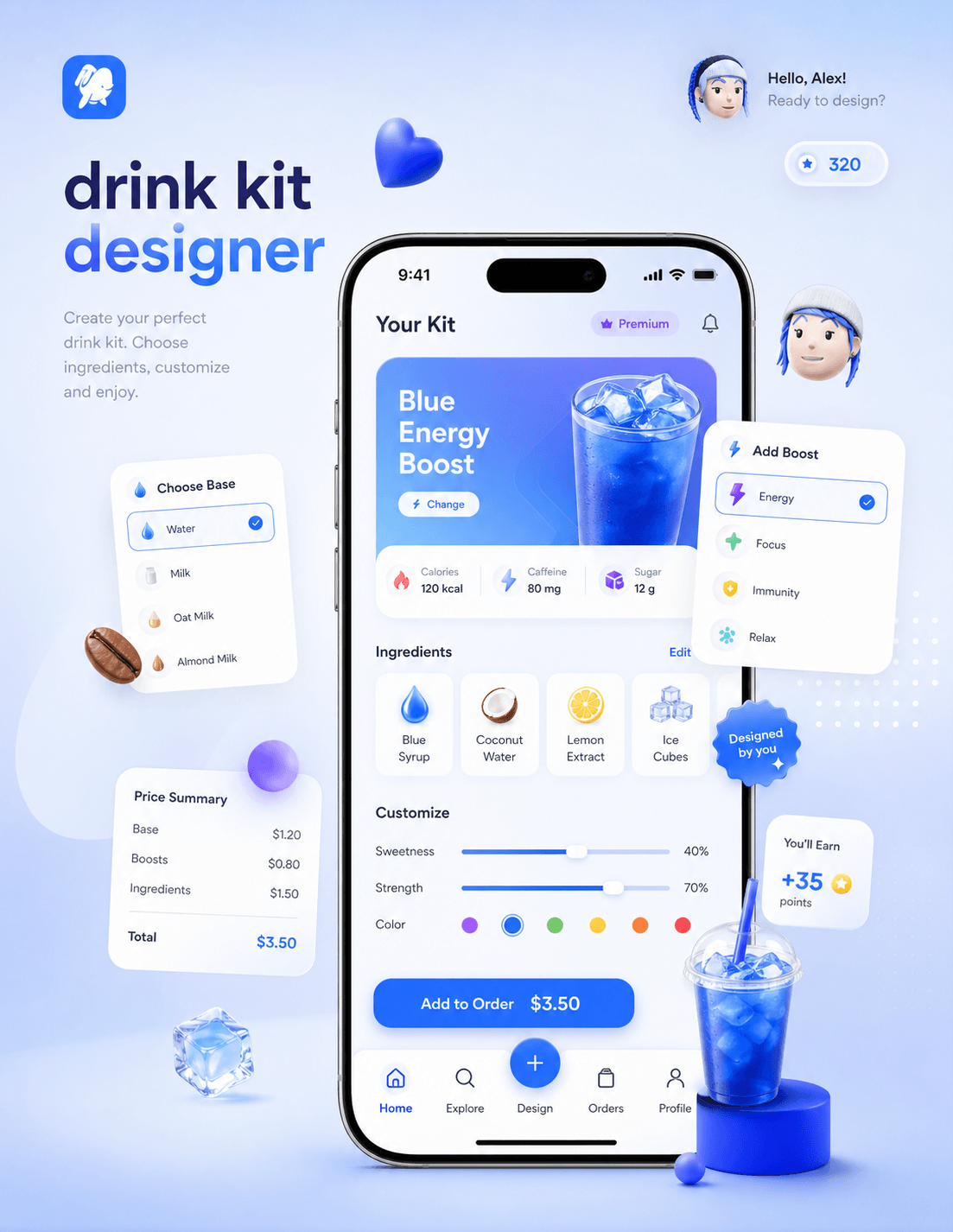
The 2.0 Advantage: Earlier AI models created "melted" buttons and nonsensical icons. ChatGPT Image 2.0 understands the logic of a user interface, placing headers, step counters, and navigation bars exactly where a human designer would, making it an invaluable tool for app prototyping.
- Prompt: "I will provide an App concept. Please automatically complete 2 tasks: 1. UI/UX DESIGN: Act as a Product Designer. Invent an App Name, a hero section, 3 data metrics, and contents for 4 surrounding floating UI cards (e.g., options, price, rewards). 2. IMAGE GENERATION: Generate a 3D presentation poster copying the exact layout of the reference image. Place a smartphone in the center showing the app UI. Surround it with the 4 floating UI cards you designed and thematic 3D objects. Use a soft gradient background, claymorphism aesthetic, realistic soft lighting, and clean English text."
6. The Viral Facial Beauty Report
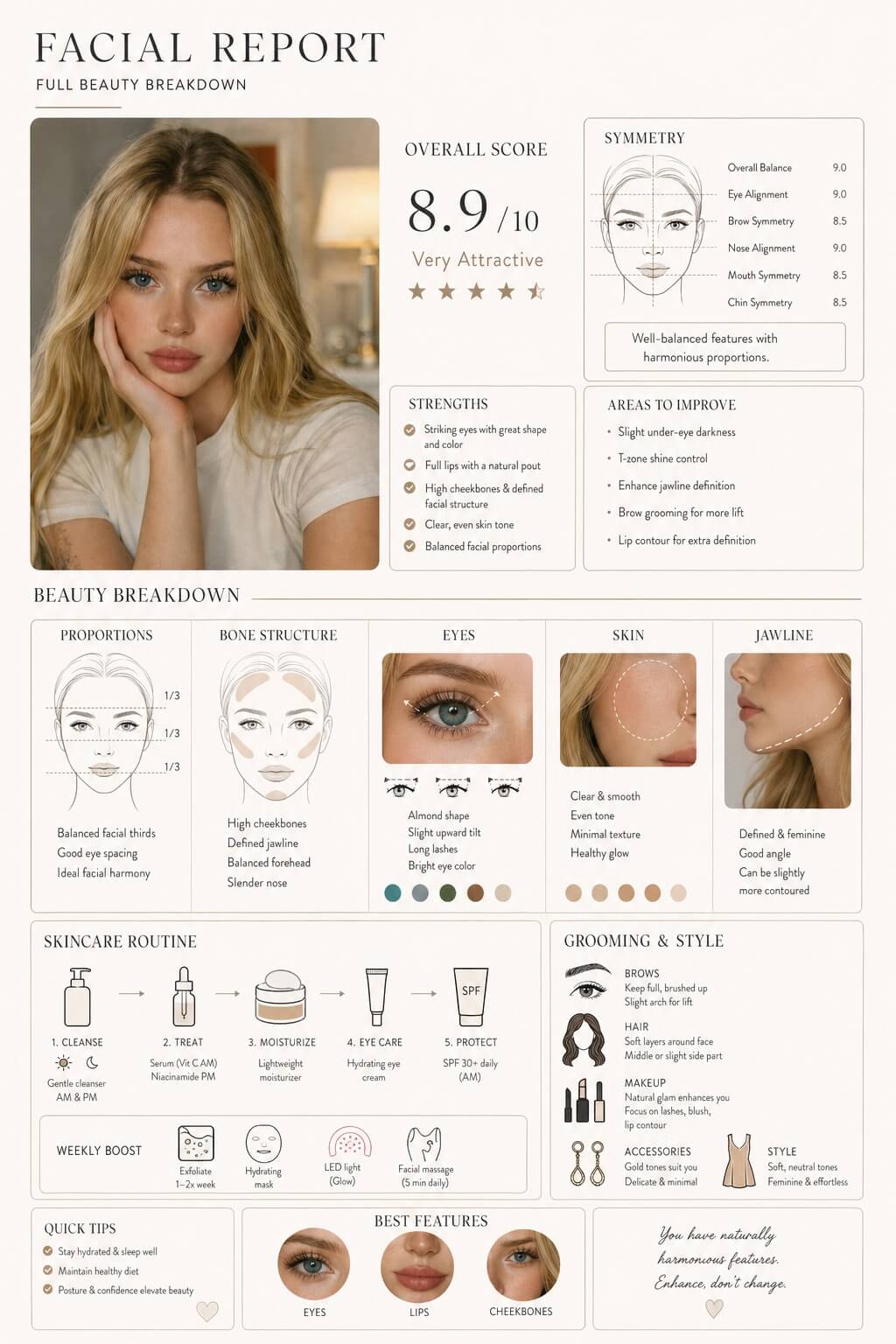
The 2.0 Advantage: This prompt tests "Instruction Fidelity." The model must render a realistic human face and a complex digital overlay simultaneously. The result is a stunning, cinematic visual where the biometric data looks integrated into the 3D space of the photo rather than just "stuck on" top.
- Prompt: "Act as an Image Consultant & Master Esthetician. I will upload a portrait photo. Please analyze my face and provide a detailed "Facial Report" in markdown. Structure your text output exactly like this: 1. OVERALL SCORE: /10, aesthetic category, 5-star rating. 2. SYMMETRY (/10): Score Balance, Eyes, Brows, Nose, Mouth, Chin. 3. STRENGTHS & IMPROVEMENTS: 4 bullet points each. 4. BEAUTY BREAKDOWN: Analyze Proportions, Bone Structure, Eyes, Skin, Jawline. 5. SKINCARE & GROOMING: Recommend a daily routine, weekly boosts, and tailored style tips. 6. CONCLUSION: Top 3 features & an empowering quote."
How To Use ChatGPT Images 2.0 on YouCam AI Pro
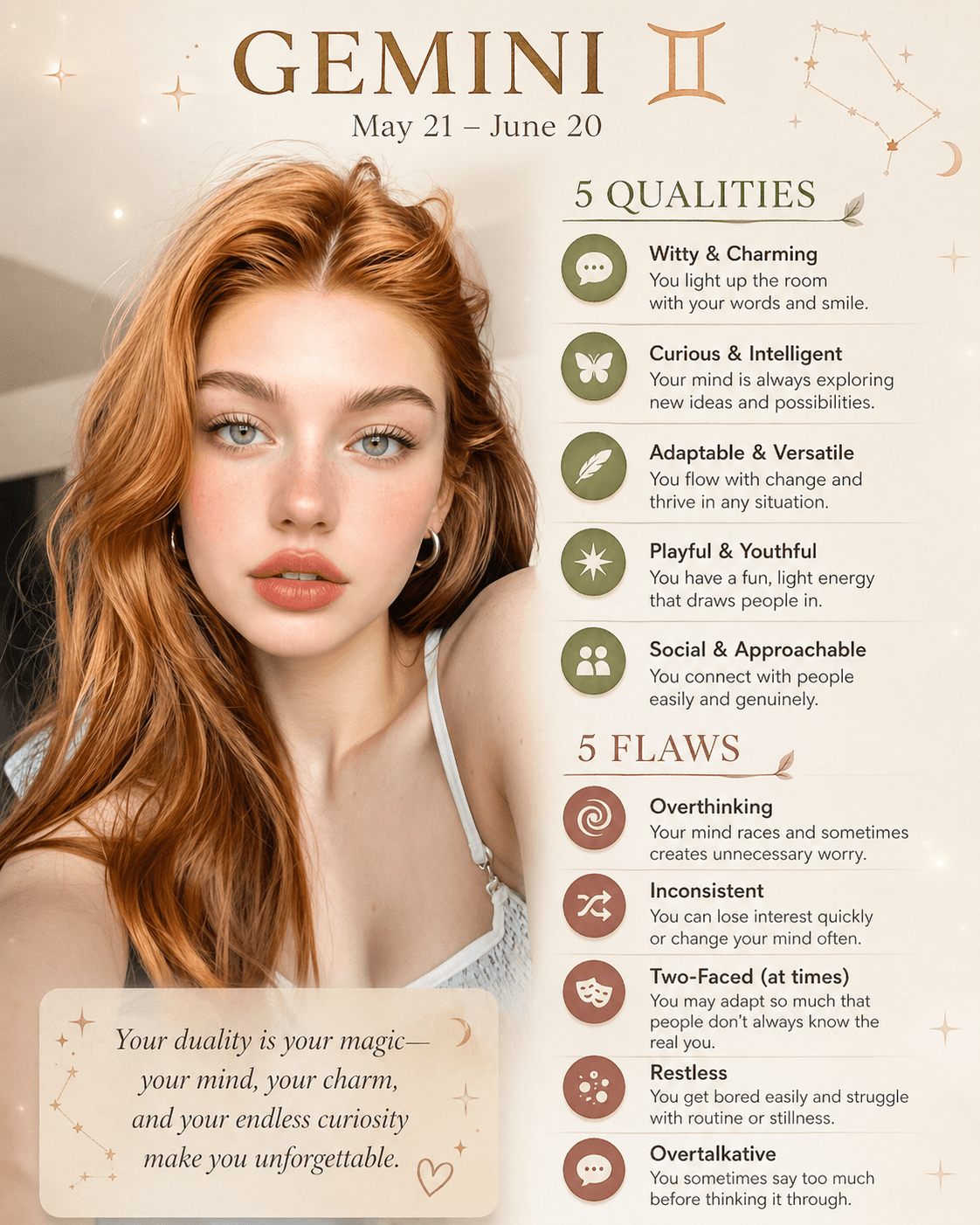
You don't need a complex setup to access these state-of-the-art features. YouCam AI Pro is the best alternative to experience ChatGPT Images 2.0, giving you the power of professional generation directly from your mobile device.
Step 1. Download YouCam AI Pro

AI Image Generator
Turn text into AI art instantly.
Supports Text-to-Image & Image-to-Video.
Get the app from your device's app store.
Step 2. Tap AI Image & Text to Image
Navigate to the image generation engine.
Step 3. Select GPT Image 2 as the AI Model
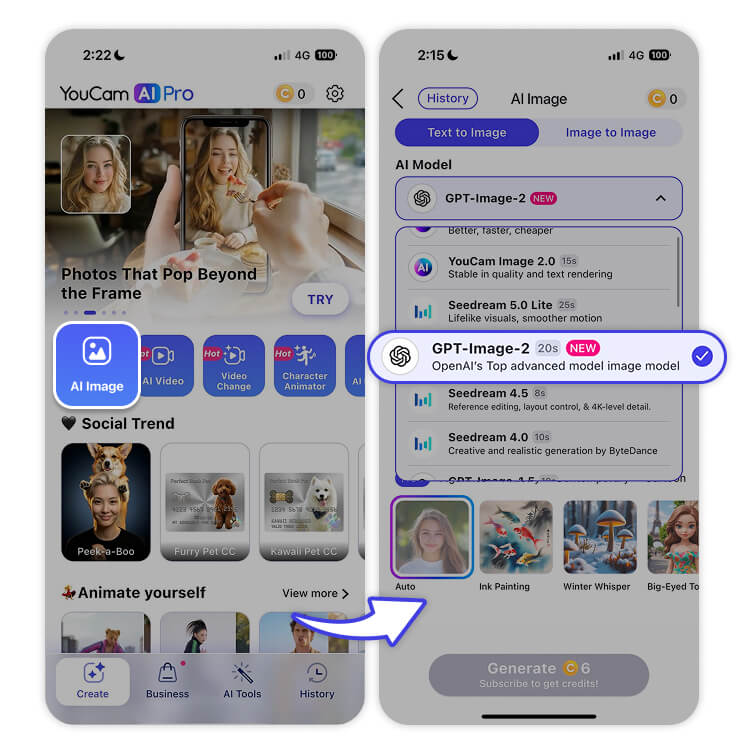
Opt for the latest model to ensure the highest text and layout quality.
Step 4. Input Your Detailed Prompt
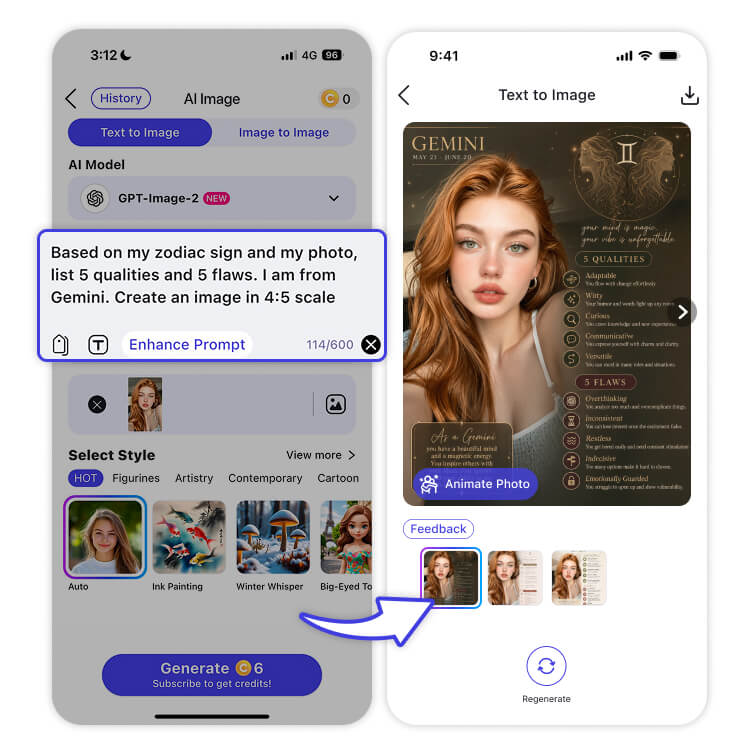
Use one of the pro-level prompts above or describe your unique vision.
Prompt:
Based on my zodiac sign and my photo, list 5 qualities and 5 flaws. I am from Gemini. Create an image in 4:5 scale
Step 5. Save & Download
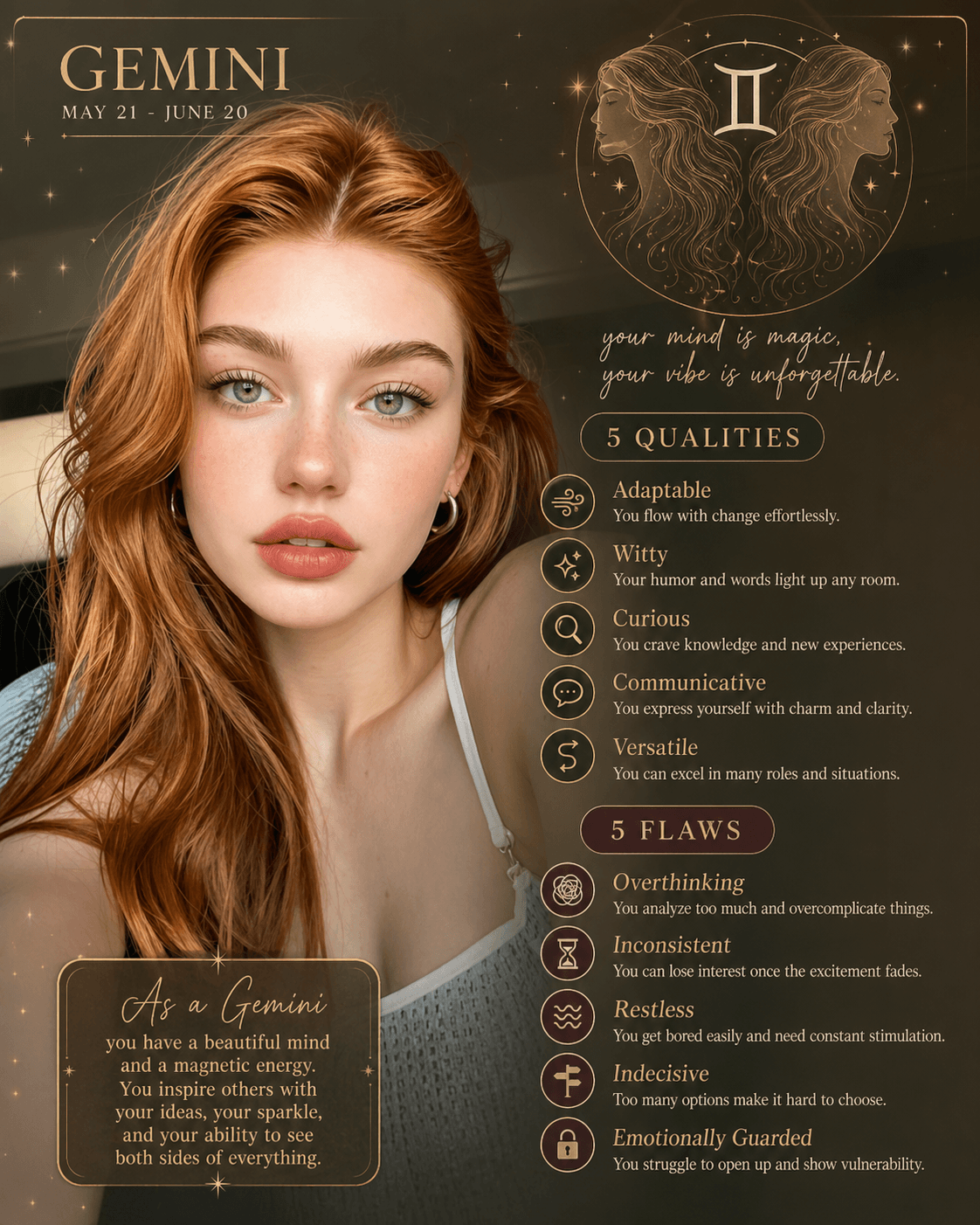
Receive your high-resolution, perfectly rendered image instantly.
Master ChatGPT Images 2.0 Now
AI Image Generator
Turn text into AI art instantly.
Supports Text-to-Image & Image-to-Video.
Mastering AI generation has never been more accessible. With the incredible text rendering, layout control, and photorealism of ChatGPT Images 2.0, your ideas can leap from your mind to the screen with zero friction. You now have the knowledge and the professional prompts to create visuals that will captivate your audience and elevate your digital presence.
It's time to stop settling for "good enough" and start creating masterpieces. Download YouCam AI Pro today and experience the future of AI image generation for yourself!
About the Editors
The PERFECT Corp. Editorial Team
We are a team of experts on photo and video editing apps. Our goal is to deliver engaging content on everything from stunning selfie edits to eye-catching video effects. We cover the latest trends and share niche tips to help you master digital creation.
ChatGPT Images 2.0 FAQs
What’s the latest ChatGPT Image 2 trend?

Digital "AI Analysis" visuals—like the Facial Beauty Report—are currently viral. Users love the "Cyberpunk" aesthetic of having data overlays on realistic portraits.
How to use GPT image 2?
Access it through an integrated platform like YouCam AI Pro. Use detailed prompts that specify not just the "subject," but also the "layout" and "text" you want to see.
How to make two photos in one frame in ChatGPT prompt?
Use spatial keywords such as "split-screen," "diptych," or "side-by-side comparison." ChatGPT Image 2.0 is specifically designed to follow these structural commands without merging the two images.
How to use the new ChatGPT image feature?
Experiment with text-heavy requests! Try creating greeting cards, storefront signs, or technical diagrams. The model's ability to render English and other languages is its most significant upgrade.



