


 Author:
A rebuilt Face Reshape engine gives YouCam Makeup users finer, more natural-looking control over facial symmetry — without the “over-edited” look older face tools are known for.
Ever taken a great photo, only to notice one eyebrow sitting slightly higher than the other, or a smile that looks a little uneven in the frame? Most people don’t need a whole new face — they just want the one they already have to look like its best, most balanced self in a photo.

AI Face Editor & Selfie Camera App
Reshape, retouch, and perfect every selfie.
Free to download, no editing skills needed.
That’s exactly what Face Reshape inside YouCam Makeup is built for. It’s not a brand-new feature, but the latest version is a meaningful jump from the tool longtime users may remember: sharper facial-landmark detection, smoother edge blending, and sliders that let you dial in exactly how much (or how little) change you want — all while keeping the photo looking like you.
Key Takeaways
- 🎯 More precise landmark detection — the AI now maps facial features more accurately, so edits land exactly where they should.
- 🪞 Built for symmetry, not transformation — Face Reshape fixes uneven eyebrows, jawlines, and smiles rather than reinventing your face.
- 🎛️ Slider-based control — every adjustment is manual and reversible, so you decide how subtle or noticeable the change is.
- 🧠 No manual selection needed — the tool automatically detects each facial feature; you just pick what to adjust.
- 📷 Works on any photo — import from your camera roll or shoot live in the app, no studio lighting required.
- 🔄 Original photo stays intact — edits are non-destructive, so you can always go back to the source image.
How Face Reshape Works
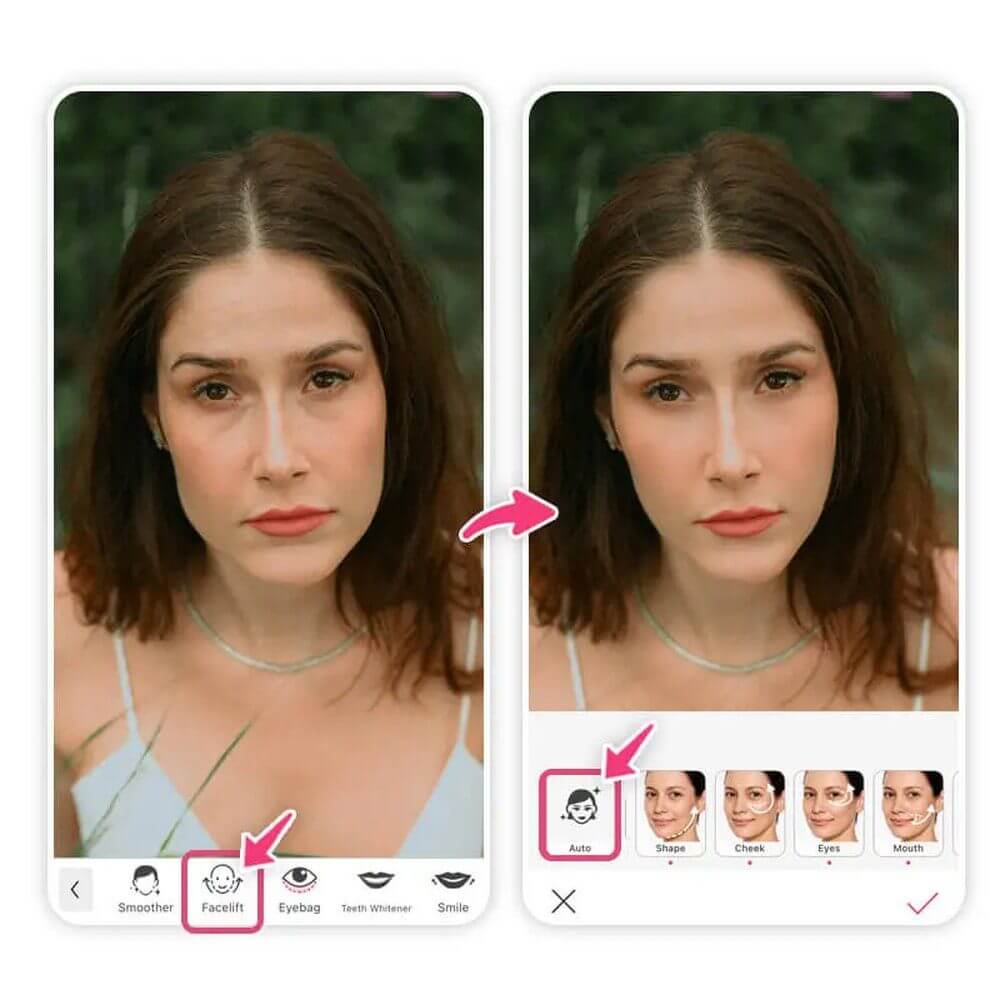
- Open your photo. Import an existing photo from your camera roll, or use YouCam Makeup’s live camera to capture a new selfie.
- Tap Face Reshape. You’ll find it in the main editing menu alongside YouCam Makeup’s other face-editing tools.
- Let the AI map your face. Face Reshape automatically detects your facial landmarks — eyebrows, eyes, nose, jawline, and more — no manual tapping or masking required.
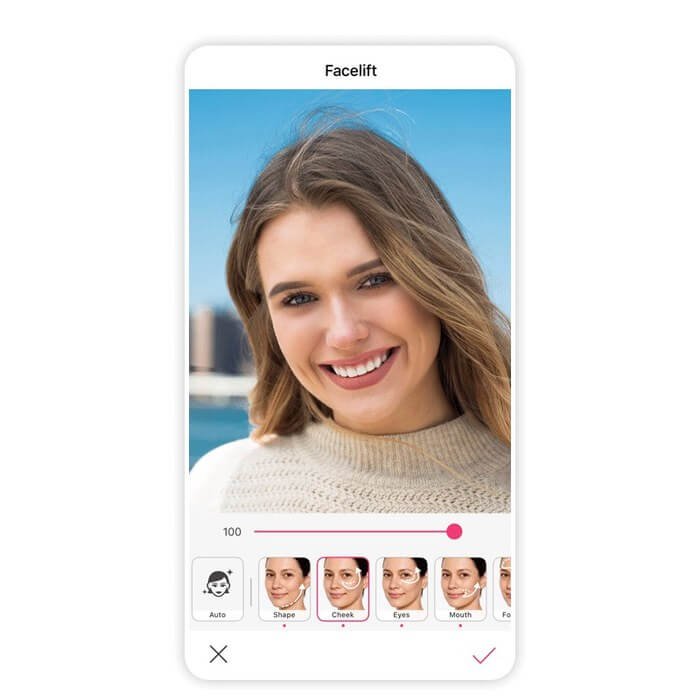
- Pick a feature to adjust. Select the specific area you want to refine, whether that’s a jawline, nose bridge, or eyebrow height.
- Fine-tune with sliders. Use the simple slider controls to nudge the feature into balance. Small movements go a long way here.
- Compare before and after. Toggle between your original and edited photo to make sure the change still looks like you.
- Save or keep editing. Save your result, or move on to YouCam Makeup’s other tools — skin smoothing, blemish removal, or makeup — to finish the photo.
Built for Symmetry, Not a New Face
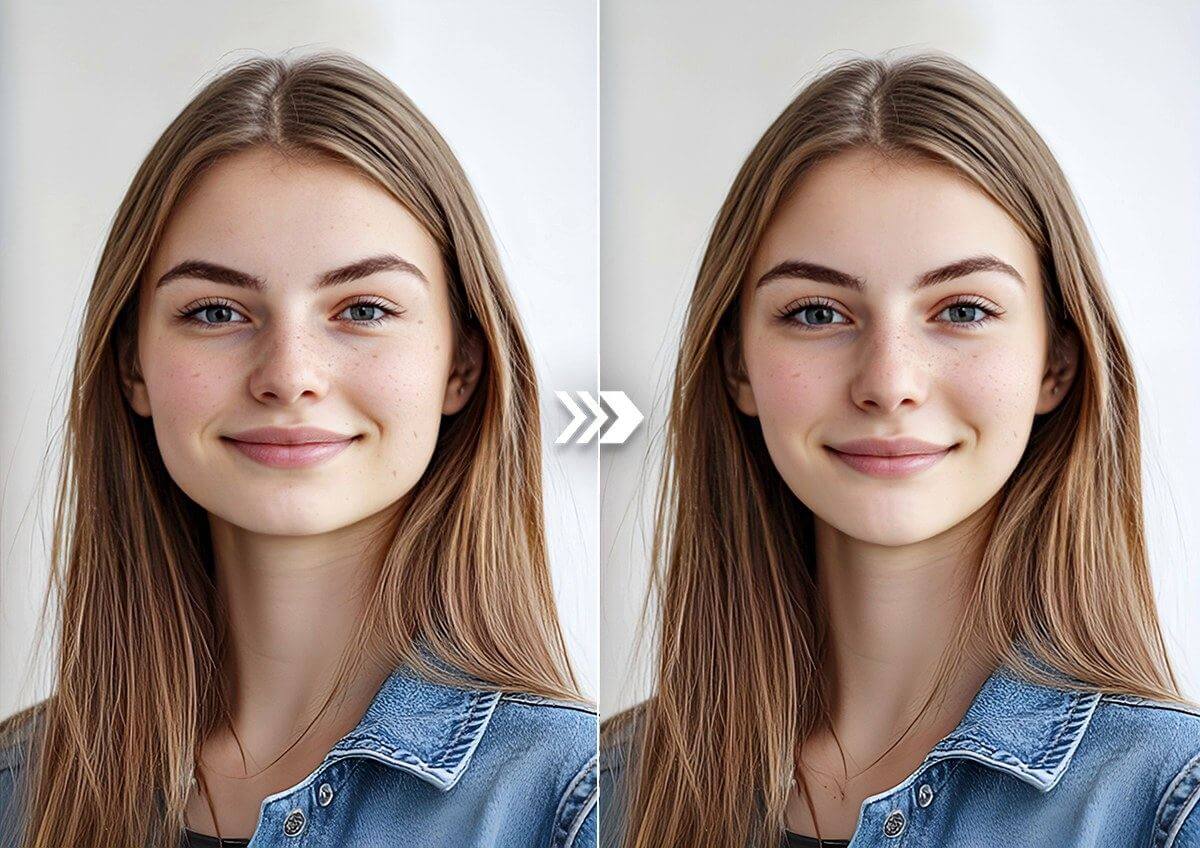
The biggest shift in this version of Face Reshape isn’t a flashy new option — it’s restraint. Earlier face-reshaping tools had a reputation for making edits that were easy to overdo. The rebuilt engine narrows the focus specifically to symmetry and balance: evening out a jawline, aligning eyebrows, or softening an asymmetrical smile, instead of dramatically resizing features.
That’s a deliberate design choice — a way to preview a subtle change, like a virtual mirror for “what if,” not a commitment to one.
Sharper Detection Means Cleaner Edges
Under the hood, the improvement that matters most is landmark accuracy. Because Face Reshape now maps facial features more precisely, the edges around an adjustment blend more naturally into the rest of the photo — hair, skin texture, and lighting all stay consistent, so an edited jawline doesn’t look pasted on. This is also what makes the “no manual selection needed” part actually reliable: the AI is doing more of the precision work, so you spend your time deciding what to change, not how to select it.
Face Reshape evens out subtle asymmetry — the kind you notice, but can’t quite name.
Beyond a Single Face
Face Reshape lives inside YouCam Makeup, which is built around single-portrait editing — but the same face-editing family extends to YouCam Perfect for group photos, where multi-face detection lets everyone in a wide-angle shot get evened out at once. If your edits usually start with a solo selfie, Face Reshape in YouCam Makeup is the right starting point.
AI Face Editor & Selfie Camera App
The #1 Virtual Makeover & Selfie Camera App.
Try the upgraded Face Reshape tool for free.
Why Try Before You Buy
- No commitment. Preview a change to your jawline, brows, or smile before you decide you even want it.
- No downtime, no cost. Unlike an actual cosmetic procedure, testing a look in Face Reshape takes seconds and costs nothing.
- No editing skills required. Automatic landmark detection means you never have to manually mask or select a feature yourself.
Try It Now
Whether you’re fixing a photo you already love or just curious what a subtly different jawline would look like, Face Reshape is a tap away inside YouCam Makeup. Open the app, pick a photo, and let the AI do the precision work.
AI Face Editor & Selfie Camera App
Reshape, retouch, and perfect every selfie.
Free to download, no editing skills needed.
FAQ
Is Face Reshape a new feature?
No — Face Reshape has been part of YouCam Makeup for a while. This latest version significantly improves the underlying facial-landmark detection and edge blending, making edits look more natural than earlier versions.
Will Face Reshape make me look like a different person?
It’s not designed to. The tool focuses on balance and symmetry — evening out a jawline or aligning eyebrows — rather than dramatically resizing or replacing features.
Do I need to manually select the area I want to edit?
No. Face Reshape automatically detects your facial landmarks. You just choose which feature to adjust and use the sliders from there.
Can I undo my edits?
Yes. Your original photo stays intact, and you can compare before/after or revert at any point before saving.
Does Face Reshape work on any photo?
It works best on clear, front-facing photos with good lighting — the same conditions that help any AI face-analysis tool perform accurately.
Is Face Reshape available on both YouCam Makeup and YouCam Perfect?
Face Reshape for single portraits lives in YouCam Makeup. YouCam Perfect offers related face-editing tools built for multi-face and group photos.



