


 原作者:
原作者: 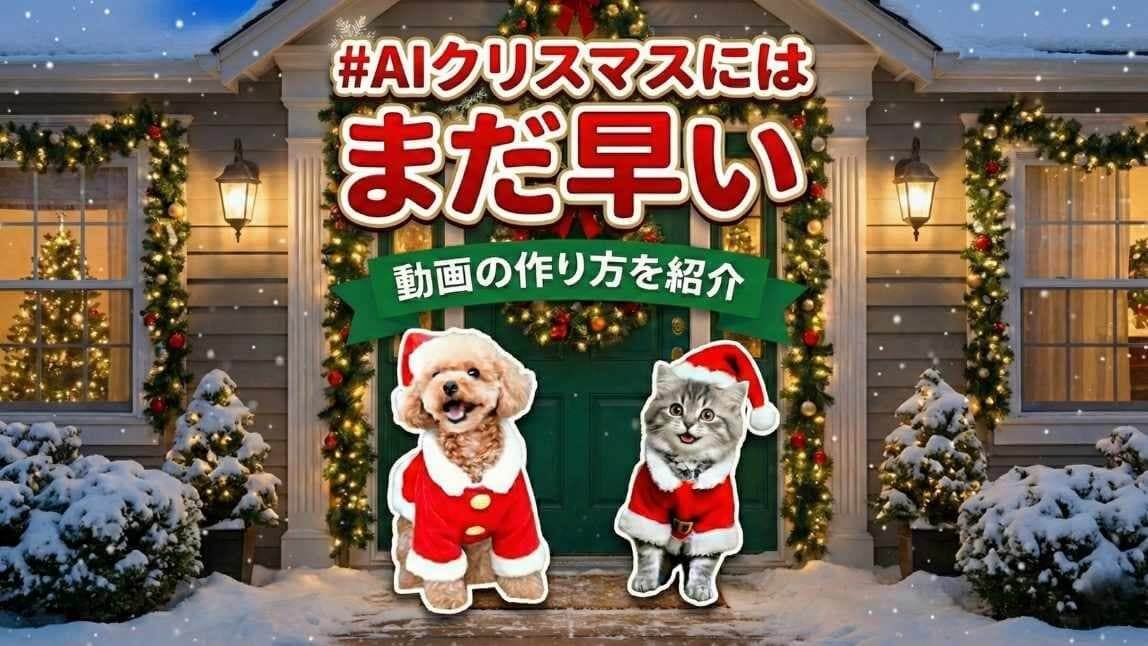
「AIクリスマスにはまだ早い」というハッシュタグとともに、ペットがサンタさんのコスプレをして玄関から出てくる可愛いAI生成動画をよく見かけますよね!

この記事では、『YouCam AI Pro』というAI画像・動画生成で人気のアプリを使って、「AIクリスマスにはまだ早い」動画の作り方を初心者にも分かるよう解説していきます!
【簡単】「AIクリスマスにはまだ早い」動画の作り方🎅
ステップ①アプリをダウンロード
まずは、『YouCam AI Pro』というAI画像・動画の生成に便利なアプリをインストールします。
ステップ②【AI動画】を選択
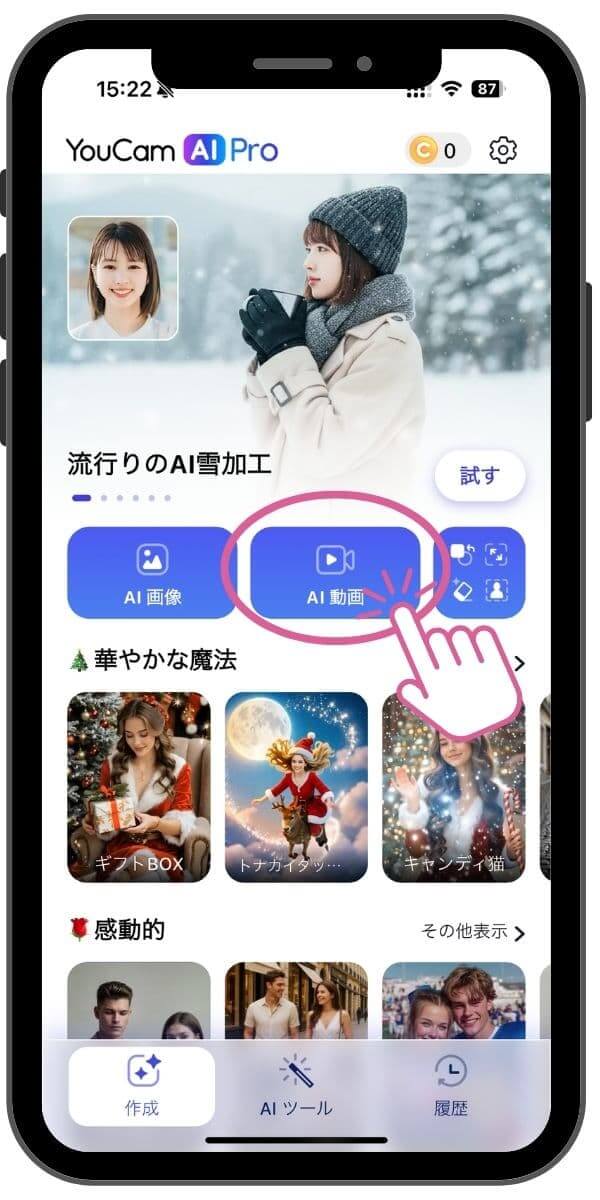

アプリトップ画面の一覧から、【AI動画】をタップします。
ステップ③ペットの写真を追加
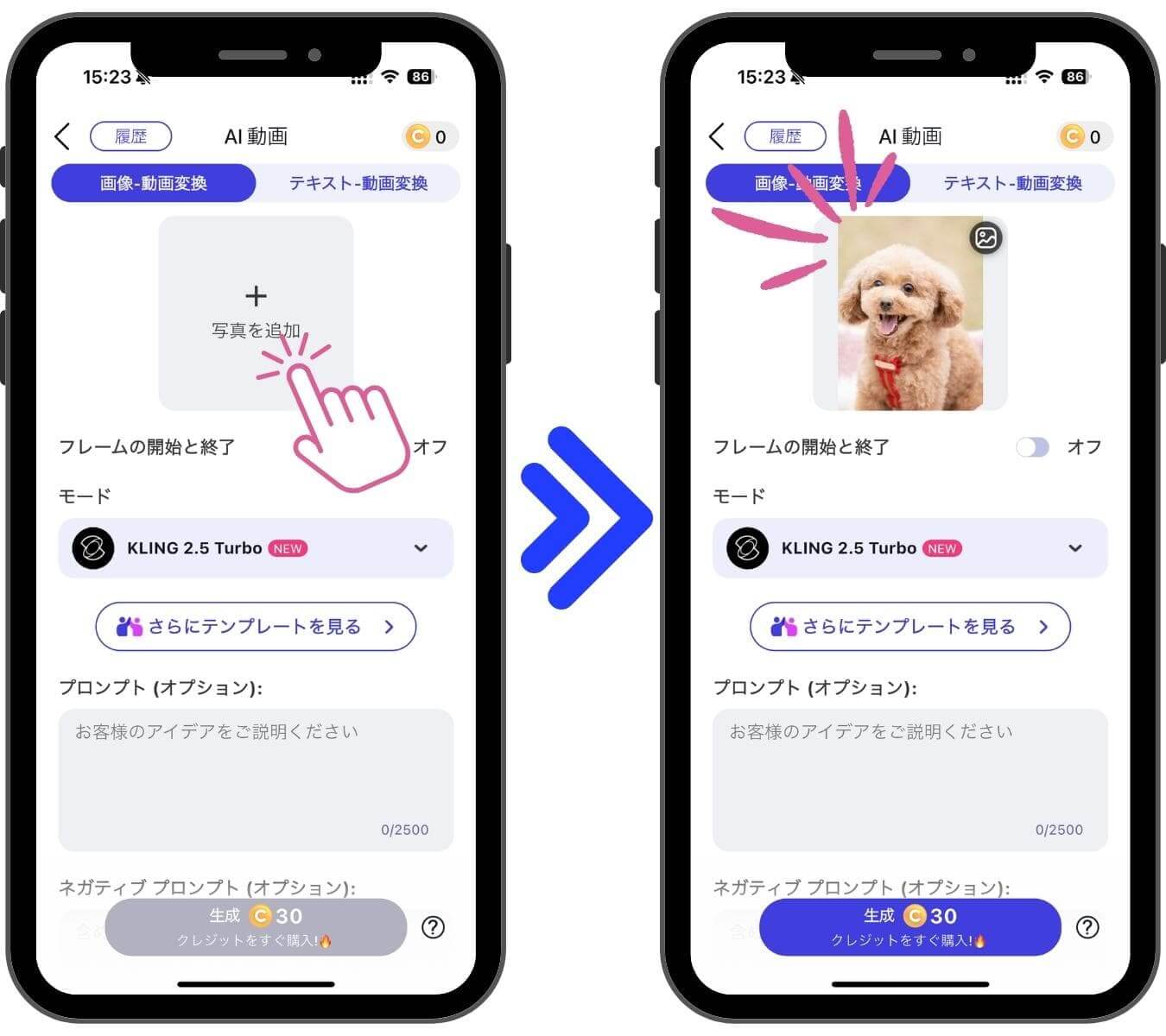
上の【写真を追加】というところをタップし、動画で使いたい可愛いペットの写真をアップロードします。
ステップ④AIモードを選択

次に、【モード】を開き、「Veo 3.1」というAIモデルを選択しましょう。
いちばん性能がよく、ペットの顔が崩れず、今流行っている「AIクリスマスにはまだ早い」のシーンをそっくり再現できるAIモデルです。
ステップ⑤プロンプトを入力
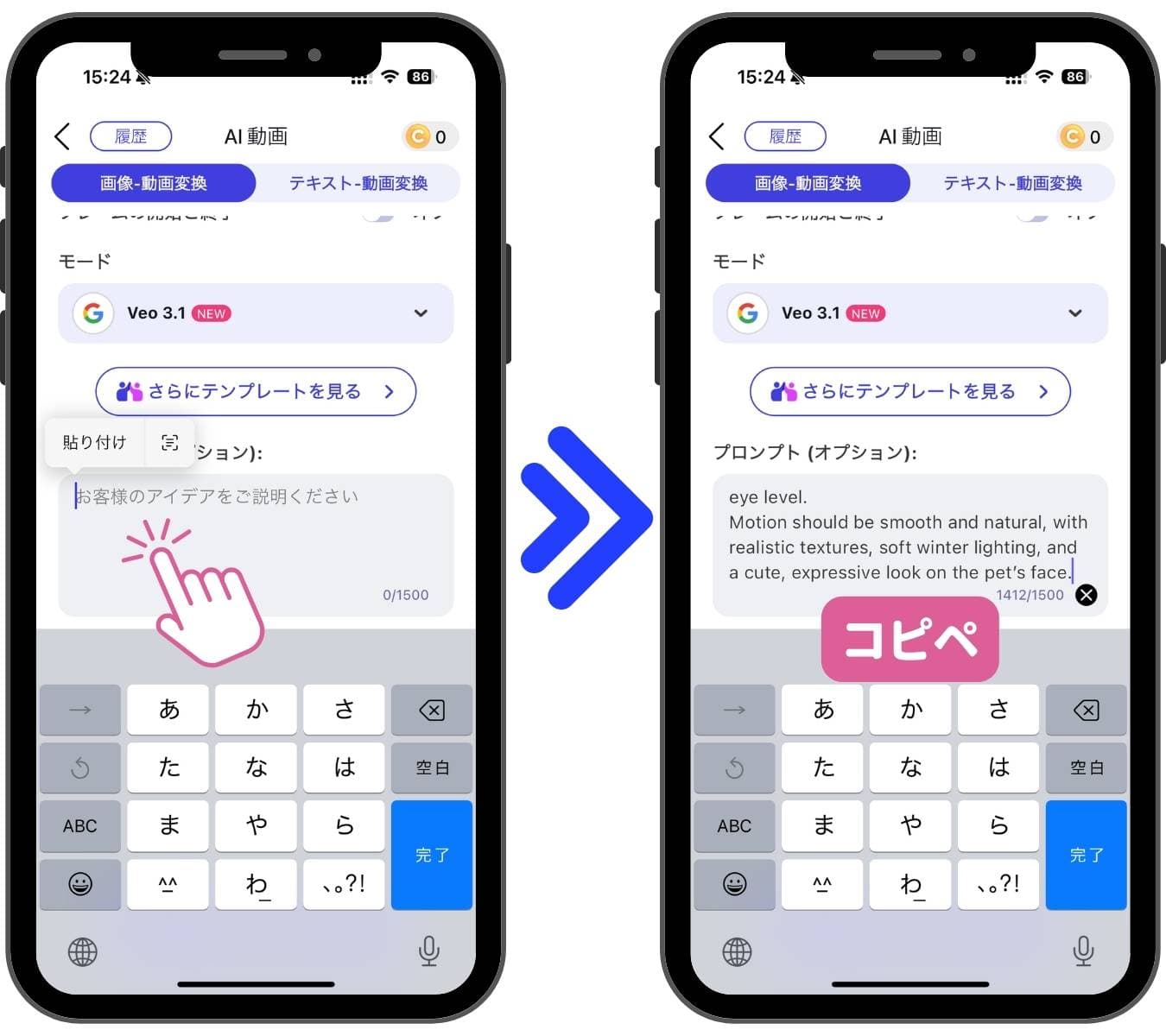
そのまま使えるプロンプト💡
「”Generate a 4-second vertical video featuring the uploaded pet as the main character, using the pet’s original face and markings exactly as in the uploaded photo. The scene takes place at the home’s entrance. The green front door is half-open at the start. As the door opens, the pet—wearing a full Santa Claus costume with a red coat, white fur trim, and a small Santa hat—stands in front of the doorway, facing the camera. The pet gives one cute bark or meow (depending on the species) while looking directly at the camera. The pet pauses with a slightly disappointed expression, then while still facing the camera, steps backward into the house, taking about 8 backward steps (a gentle retreat without turning its body or head). As the pet moves back, the green front door slowly closes. When the door fully closes, a wooden board hanging on the front of the door is clearly visible, reading: “It’s not yet for Christmas.” Above the board, a Christmas wreath with a ribbon that says “Happy Holidays” is attached. Just before the door closes completely, the hallway behind the pet is visible, decorated with warm Christmas ornaments, lights, garlands, and red-and-gold holiday decorations. The camera remains fixed in a frontal angle, at a low height close to the pet’s eye level. Motion should be smooth and natural, with realistic textures, soft winter lighting, and a cute, expressive look on the pet’s face.”」
かなり長い文章ですが、そのままコピー&ペーストで【プロンプト(オプション)】という枠に入力してください。
ステップ⑥設定後、生成開始!
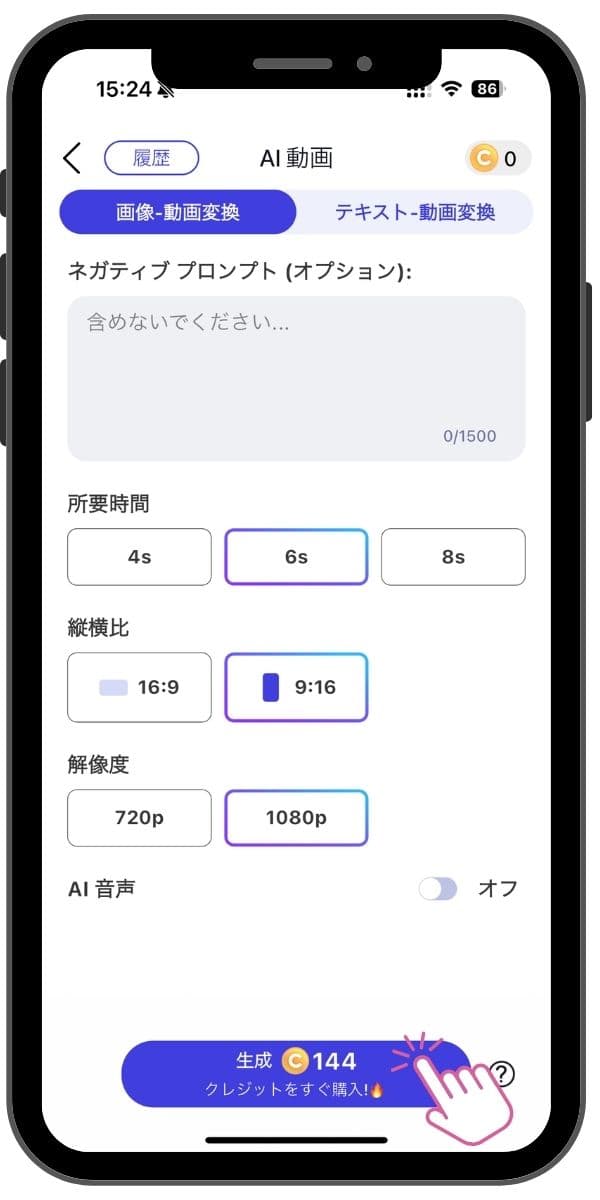
- 所要時間「4s」または「6s」
- 縦横比「9:16」
- 解像度「1080p」
残りの設定は、上のように調整します。
AI動画生成完成🎅
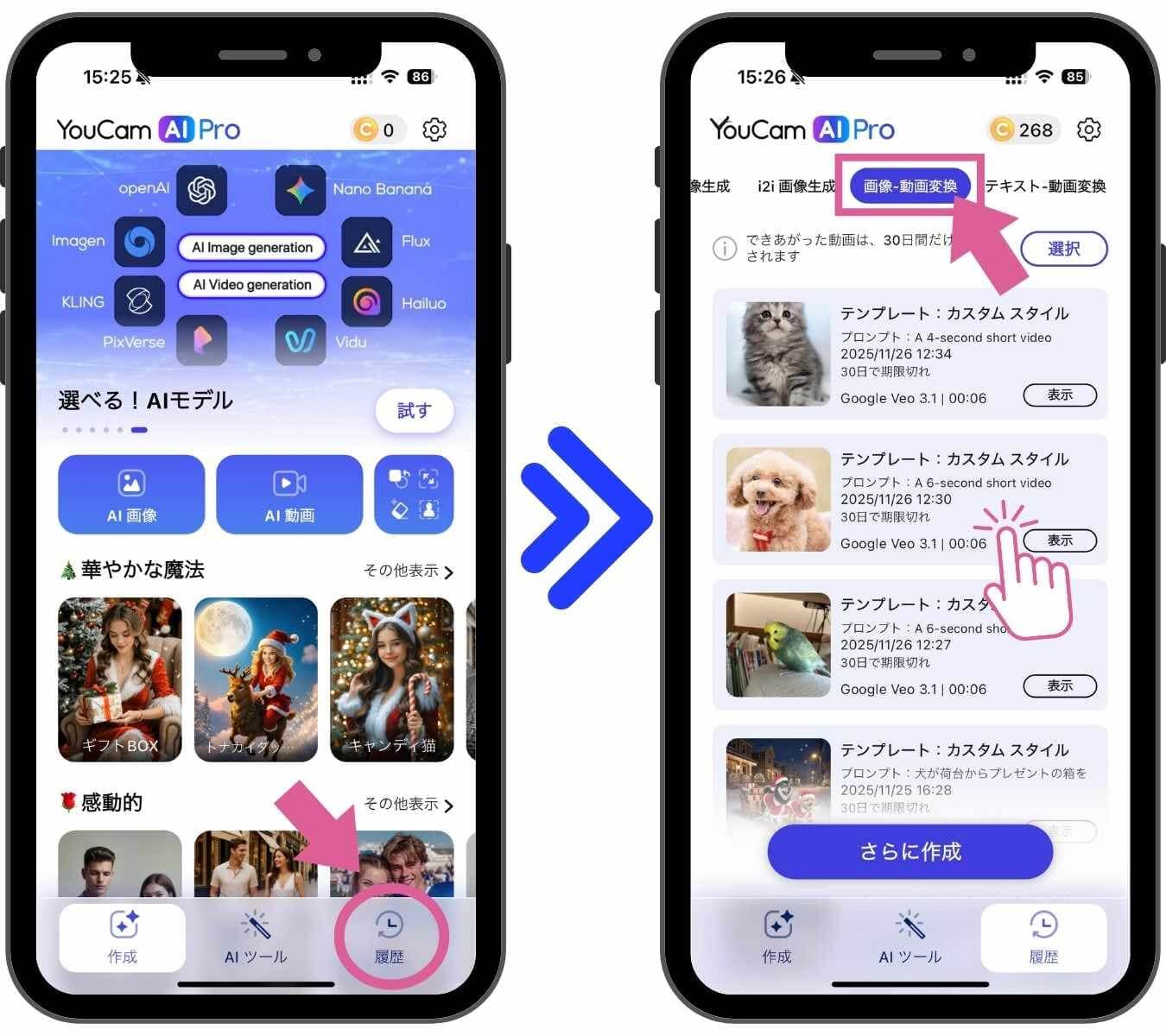
大体1分ほど待つと、動画は完成します!
アプリのトップ画面中【履歴】という部分から、完成したAI画像や動画を確認し、保存することができます。
今回作成した動画は、「画像-動画変換」というカテゴリーの中に振り分けられています。

こちらが、完成した#AIクリスマスにはまだ早いのペット動画です!
クリスマスが待ちきれない様子のサンタさん姿がなんとも愛おしいです💗
とっても簡単にできるので、皆さんもぜひ作ってみてくださいね!
注意⚠
①AI動画生成は、毎回少しずつ動画の仕上がりに差があります。
筆者が試した感じだと、3回に1回ほど下のようなちょっと違うタイプのビデオが生成されました😅
これはこれでとってもかわいいAI動画ですけどね!
AI生成での失敗はよくあることなので、動画の仕上がりがイマイチ・・・というときには、再生成してみるといいかもしれません!
以下の記事でも、可愛いペットたちの写真を使って作れるAI画像・動画の生成アイデアを紹介しているので、是非読んでみてください!
【無料】AIでクリスマスを楽しむ方法5選!【2025年最新版】
②今回紹介したAI動画の生成にはクレジットの購入が必要です。
まとめ
この記事では、今流行りの#AIクリスマスにはまだ早い動画の作り方を丁寧にご紹介しました!
皆さん『YouCam AI Pro』というアプリを使って、是非試してみてくださいね🐶🐱
それではちょっと早いですが、ハッピークリスマス!🎄🌟
この記事の監修者
PERFECT株式会社 編集部
写真加工&画像編集アプリのエキスパート。盛れる自撮り加工や映える画像&動画編集についてのコンテンツをお届け。最新の流行から少しニッチな情報まで、幅広く発信していきます。



