



 Author:
I've had a lyric sitting in my Notes app for about three months. Just two lines, no melody, nothing I could actually play on anything — I don't own an instrument and I can't read music. Every "how to write a song" guide I found assumed I already had a guitar and a chord vocabulary. What I actually wanted was simpler: describe the feeling, get an actual song back, and be done in less time than it takes to make coffee.
So I spent a weekend testing what "writing a song with AI" actually looks like right now — the free tools, the paid ones, the ones that hand you a wall of settings versus the ones that just want a sentence. (Some images in this guide may be AI-generated for illustration purposes.)
What Is an AI Lyrics Generator?
An AI lyrics generator is a tool that uses generative AI to create song lyrics from a prompt. Instead of starting with a blank document, you might enter something like: "Write a nostalgic pop song about missing your best friend after moving to another city."
The AI can then generate lyrics organized into sections such as verses, a chorus, and a bridge.
Some tools focus specifically on lyrics, while others combine an AI lyrics generator with music generation. That means you can go from an idea to lyrics, melody, vocals, and instrumentation without knowing how to play an instrument.
But there's an important distinction: generating lyrics and writing a song aren't necessarily the same thing.
An AI lyrics generator can produce a technically complete set of lyrics very quickly. Whether those lyrics actually say something meaningful to you is a different question.

AI Music Video & Song Maker
Turn any song into a music video.
No filming, no editing timeline.
AI Lyrics Generator vs. Writing Your Own Lyrics
The biggest difference comes down to speed versus personal control.
| AI Lyrics Generator | Writing Your Own Lyrics | |
|---|---|---|
| Speed | Generates ideas in seconds | Can take hours or days |
| Starting point | Prompt, topic, mood, or keywords | Your own experiences and ideas |
| Creative control | Depends on the prompt and editing | Full control over every word |
| Writer's block | Useful for getting unstuck | Can be harder when starting from zero |
| Personal details | You need to provide them | Naturally comes from your experience |
| Rhymes & structure | AI can generate them automatically | You create them yourself |
| Editing | Usually requires rewriting | You control the first draft |
| Best for | Brainstorming and fast drafts | Personal expression and storytelling |
Making your first AI song, start to finish
AI Music Video & Song Maker
Turn any song into a music video.
No filming, no editing timeline.
I used YouCam Muse's AI Song tool for this walkthrough since it's built around the same two-mode idea (fast vs. controlled) that most of the field uses, and it's genuinely just a few taps:
1. Open AI Song from the home screen. It sits right next to Music Video as one of the two primary creation entry points — no need to dig through a menu.
2. Pick Simple or Custom. Simple is one text box: describe the vibe in a sentence and go. Custom unlocks genre, mood, vocal gender, and a dedicated lyrics tab if you want to write (or paste) your own lines.
3. Describe the song. Idea chips ("Dreamy," "Energetic," "Romantic") can seed the field if you're blank, or use the Lyrics option to paste your own words. There's a 2,500-character limit either way.
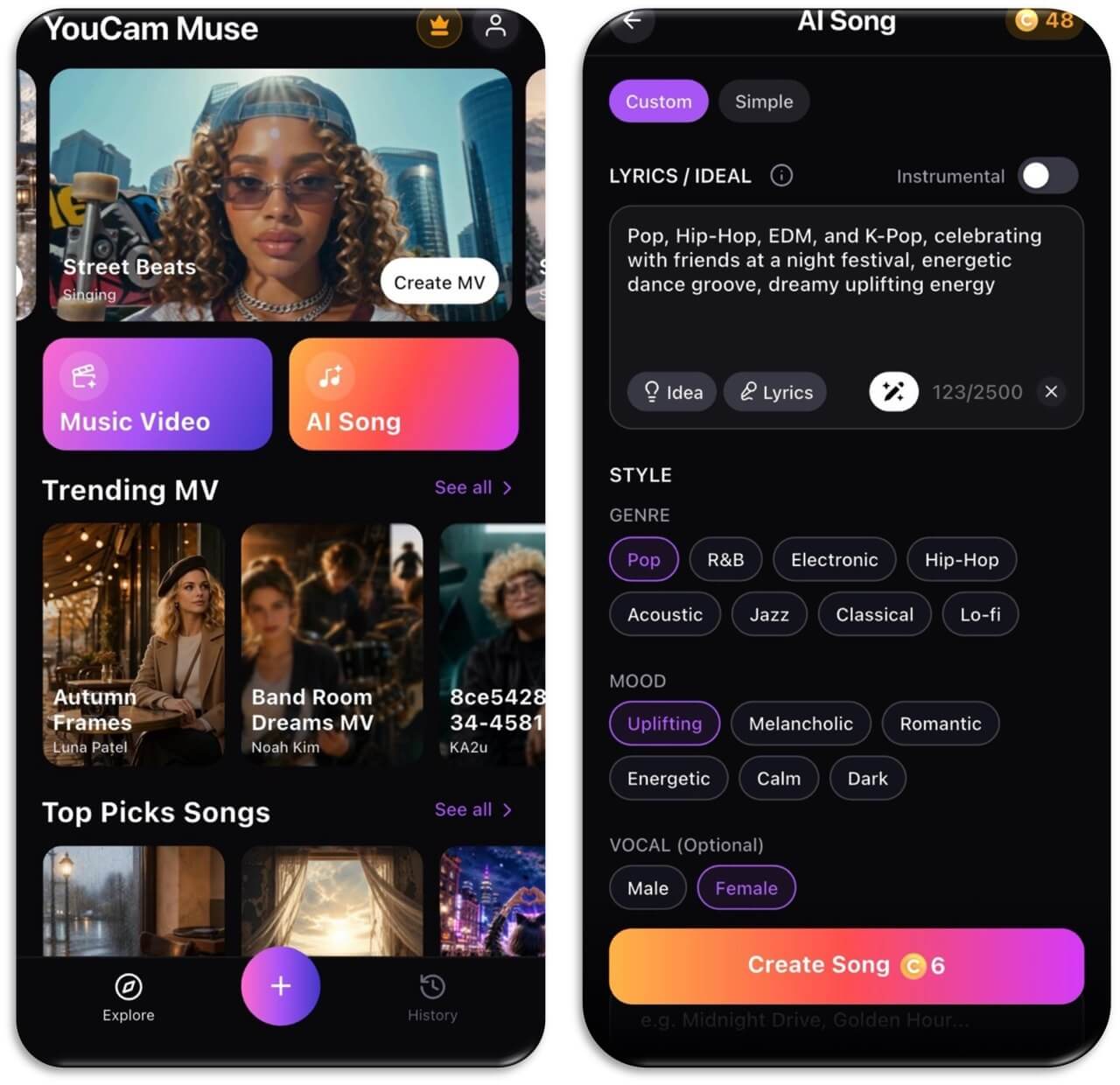
4. Choose your genre and mood tags. In Custom mode this is a grid of chips — Pop, R&B, Electronic, Hip-Hop, Acoustic, Jazz, Classical, Lo-fi for genre; Uplifting, Melancholic, Romantic, Energetic, Calm, Dark for mood — plus an optional vocal gender pick.
5. Tap Create Song. Generation is quick — the whole point of this category of tool is that it's usually done in under a minute, not the ten-plus minutes a fully custom production pass takes.
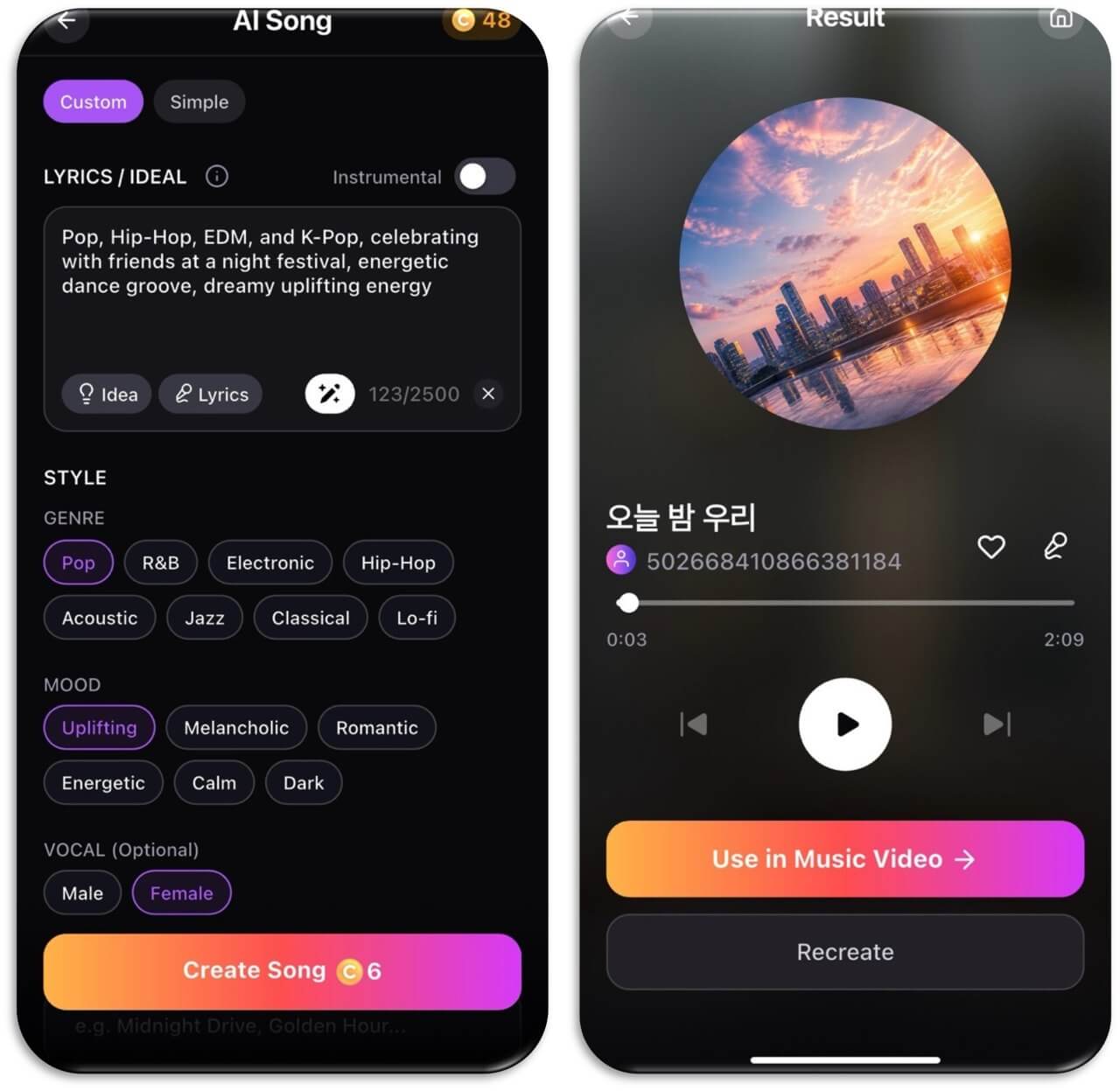
6. Preview, then decide. You land on a result screen with circular album art, playback controls, and a Like button. Free playback is typically capped at a short preview; full-length listening is usually a subscription perk across this category of app, not just here.
Once you have a song: turning it into a music video
The part most "how to write a song with AI" guides don't cover at all: once you've got a finished track, the same generation that made it can carry straight into a music video. On the Result screen, a "Use in Music Video" button routes you into the video creation flow with your new song already loaded in the song slot — no re-uploading, no re-syncing timing by hand.
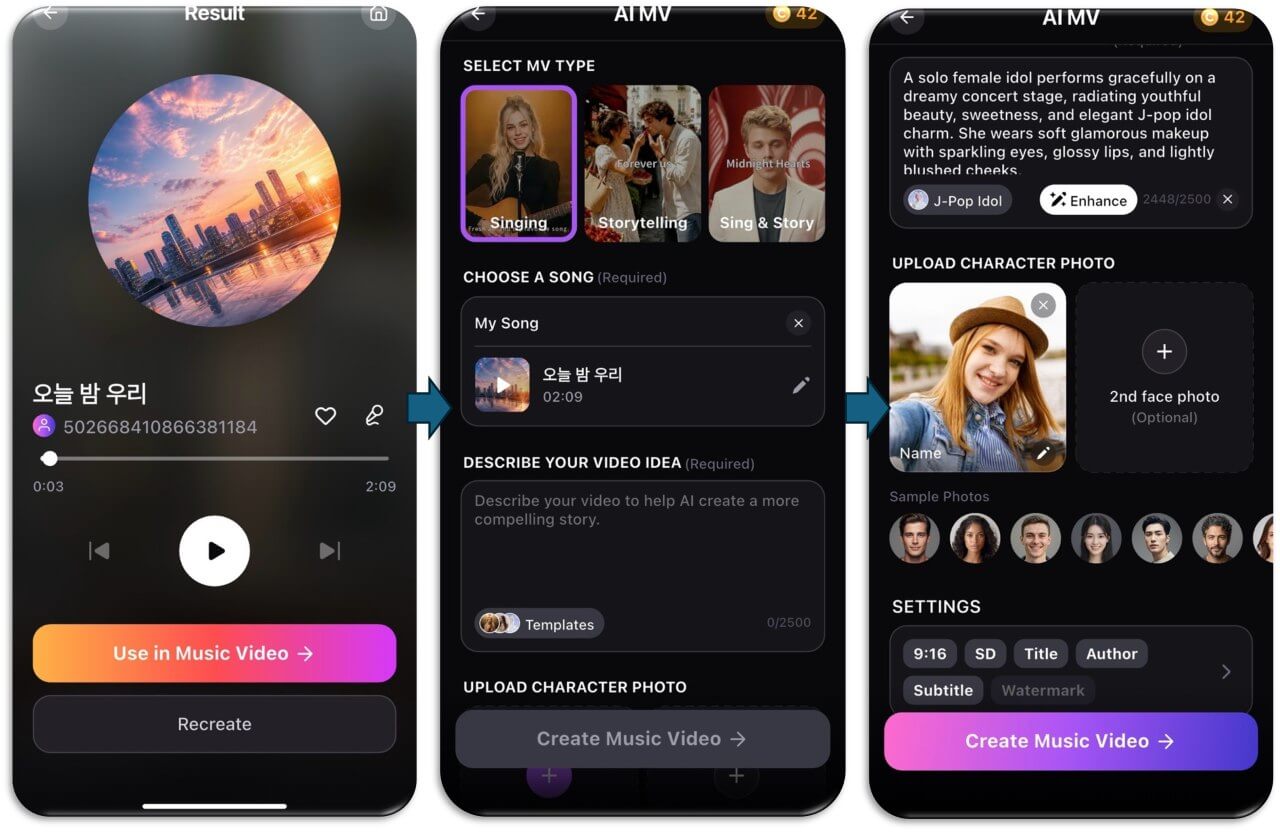
From there it's the same customization most AI music-video tools offer: pick Singing (a virtual performer lip-syncs your track), Storytelling (a narrative video with no performer), or a blend of both, describe the visual idea in a sentence, and optionally add a face photo if you want to appear as the performer yourself — or skip it and let the AI cast its own. You can pick Create Storyboard First if you want to review the scene-by-scene plan before anything renders, or generate directly if you'd rather see the finished cut immediately.
When Writing Your Own Lyrics Makes More Sense
If the song is about something deeply personal, writing your own lyrics gives you control over the details that make the story yours.
Think about the difference between:
"I miss the days when we were young."
and:
"Your red jacket's still hanging by the door / I pass it every morning like before."
The second lyric contains a specific image. It gives the listener something concrete to picture.
AI can certainly generate specific imagery when you ask for it, but you have to provide the raw material. The more personal the source material, the more you have to contribute to the process.
Writing your own lyrics can also help when you already have a particular voice, rhyme scheme, phrase, or story in mind. Instead of trying to get an AI lyrics generator to reproduce an idea you already know exactly, it may simply be faster to write it yourself.
When an AI Lyrics Generator Makes More Sense
AI becomes especially useful when the problem isn't "I have too much to say" but "I don't know how to start."
Maybe you have:
- A song title but no verses
- A melody but no lyrics
- A story you want to turn into a song
- A specific mood but no words
- A chorus idea that needs verses
- A few lines that need to become a complete song
This is where an AI lyrics generator can act as a brainstorming tool.
For example, you could start with:
"Write an upbeat indie-pop song about leaving your hometown and starting over in a new city."
The first result doesn't have to be your final song. You might keep one chorus line, rewrite the verses, change the imagery, and throw away the rest.
That's often more useful than expecting AI to produce a finished masterpiece in one click.
Can an AI Lyrics Generator Write in Your Personal Style?
This is where things get more complicated.
You can ask AI to write lyrics using characteristics such as:
- Short conversational lines
- Internal rhymes
- Repeated phrases
- Dark imagery
- Simple vocabulary
- First-person storytelling
- A specific emotional tone
But there's a difference between describing your writing characteristics and simply asking AI to copy a particular living songwriter.
A safer and more useful approach is to describe what you like about the writing rather than relying on a person's name.
For example:
"Write an intimate acoustic-pop lyric with conversational verses, understated imagery, and a repetitive emotional chorus."
This gives the AI creative direction without making the prompt dependent on a specific artist.
How to Get Better Results From an AI Lyrics Generator
The prompt makes a bigger difference than simply typing "write me a song."
Instead of: "Write a sad song."
Try: "Write a melancholic indie-pop song about watching your childhood friend move away. Use conversational lyrics, rainy-night imagery, a restrained verse, and an emotional but hopeful chorus."
You're giving the AI several useful signals:
- Topic: a friend moving away
- Emotion: melancholic
- Genre: indie-pop
- Imagery: rainy night
- Writing style: conversational
- Structure: restrained verses and emotional chorus
- Emotional direction: hopeful ending
Give the AI something personal to work with
The easiest way to make AI-generated lyrics less generic is to give the model specific material.
Instead of: "Write about heartbreak."
Try: "Write about seeing an ex at the coffee shop where we used to meet every Sunday. The narrator wants to say something but decides to leave."
The second prompt contains a story. That gives the AI much more to work with.
Ask for a structure
You can also specify a structure such as:
[Verse 1] → [Pre-Chorus] → [Chorus] → [Verse 2] → [Chorus] → [Bridge] → [Final Chorus]
This is particularly useful when you're taking AI-generated lyrics into an AI song generator afterward.
Personal Tips for Using an AI Lyrics Generator
- Start with your own idea. Even a single personal memory can make the generated lyrics more specific.
- Don't use the first draft automatically. Treat AI lyrics as raw material you can edit.
- Keep your favorite lines. If the AI generates one great chorus line, build the rest of the song around it.
- Give the AI context. A story, character, setting, and emotion usually provide more useful direction than a single genre label.
- Mix AI and human writing. You don't have to choose one approach for the entire song.
- Use your own lyrics when the story is personal. AI can help with structure and expansion while you keep the details that matter.
- Try several versions. Changing the prompt can produce completely different interpretations of the same idea.
AI Music Video & Song Maker
Turn any song into a music video.
No filming, no editing timeline.
FAQ
Do I need to know music theory to write a song with AI?
No. Describing a mood, genre, and era in plain language works better with most of these tools than technical terms like BPM or key signatures do — they're built to respond to emotional language.
What's the difference between Simple and Custom mode?
Simple is a single free-text field for a quick, one-sentence description. Custom breaks the same idea into separate genre, mood, and vocal-gender choices and adds a dedicated lyrics tab, giving you more control over the specific result.
Can I write my own lyrics instead of letting the AI generate them?
Yes — Custom mode's lyrics tab lets you write line by line, with the AI filling in timing and melody underneath your words. Keep in mind some tools still substitute their own lyrics if the custom input isn't formatted the way they expect, so check the result before assuming your exact words made it in.
Can I make an instrumental-only track?
Yes — an Instrumental toggle excludes vocals entirely and disables the lyrics tab, generating melody and instrumentation only.
How do I get a song that sounds like a specific popular artist or album?
Most generators block direct artist or song names for copyright reasons. Describe the characteristics instead — era, instrumentation, vocal style, and production feel — rather than the name itself.
Can I turn my AI-generated song into a music video?
Yes, and it's usually the fastest path to a finished video — a "Use in Music Video" option carries the finished track straight into the video generator with it already selected, skipping the upload-and-sync step entirely.



