



 Author: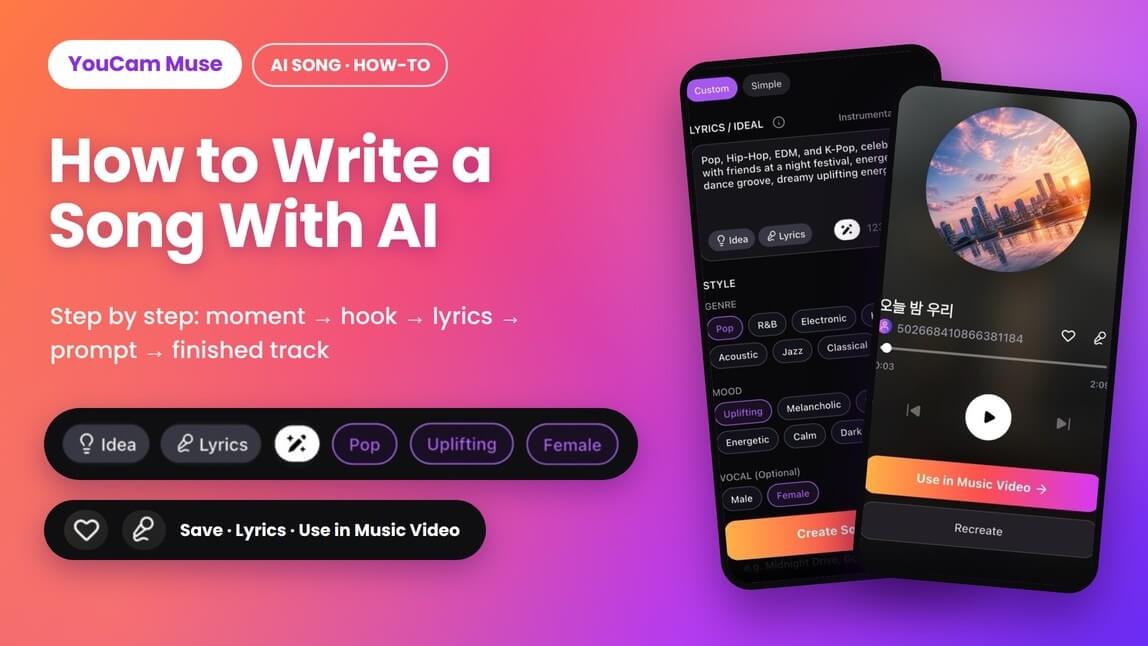
I've tried writing songs the old way: a notebook, a free chord app, and a lot of humming into my phone at 1 a.m. I'd usually end up with one decent line and no idea what to do with it. So this time I wanted to find out what writing a song with AI really looks like when you go step by step, from "I have a feeling" to "I have a track I'd actually send to a friend."
What I learned is that AI doesn't write the song for you as much as it removes the parts that used to stop me: the melody, the arrangement, the singing. You still bring the idea, the hook and the taste. Below is the exact 8-step process I use now, with the prompts, the settings I pick, trendy-sound prompt ideas you can copy, and how to turn the finished song into a music video.
(Some images may be AI-generated for illustration purposes.)

AI Song & Music Video Maker
Write your own lyrics or describe a moment.
Get a finished song in minutes.
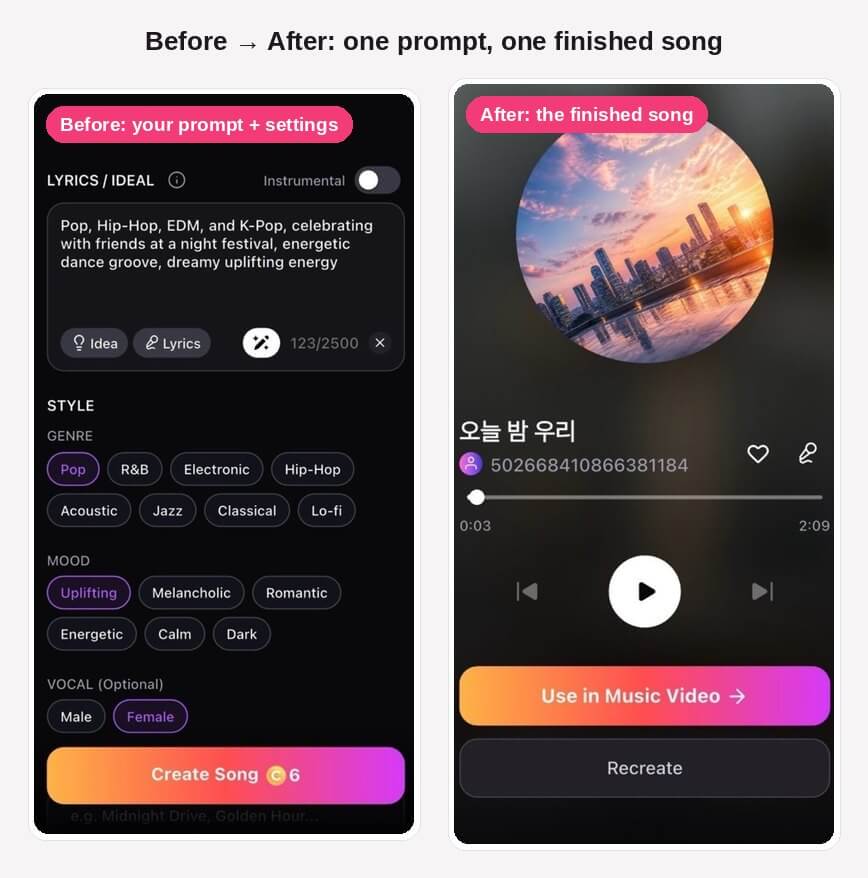
Before: the one-line prompt and settings I used. After: the finished 2:09 song it made, with vocals and lyrics.
Table of Contents
- What AI actually does when you write a song with it
- How to write a song with AI, step by step
- A real example: from one prompt to a finished song
- Prompt ideas for trendy sounds (without naming artists)
- Creative ways people are using AI songs
- What real users say about AI songwriting tools
- Bonus: turn your song into a music video
- My personal and pro tips
- FAQ
What AI actually does when you write a song with it
Most of the pages ranking for this topic are tool landing pages: type a prompt, click generate, done. That's true as far as it goes, but it skips the songwriting part, which is why so many first attempts sound like stock music. Here's how I split the work:
- You handle: the story or moment, the hook, the structure, the lyric lines that matter to you, and deciding which version is good.
- The AI handles: the melody, chords, arrangement, vocal performance and production, plus a first draft of the lyrics if you want one.
Songwriters who teach this say the same thing. Berklee Online instructor Ben Camp, who teaches a course called AI for Songwriters, points out that lyrics can look great on paper and still fall flat when they're sung. That's the real advantage of AI here: you get to hear your words sung within a minute, not after a week of learning chords. (Berklee Online Take Note)
There's a practical reason to stay involved, too. The U.S. Copyright Office's January 2025 report says AI-assisted songs can be protected when they contain meaningful human authorship (for example, lyrics you wrote), while purely AI-generated material isn't. The more of the song that's really yours, the more it belongs to you. (U.S. Copyright Office, Part 2 report)
How to write a song with AI, step by step
I used the AI Song tool in YouCam Muse for this walkthrough, but steps 1–5 work with any AI song generator. They're the songwriting part, and you do them before you tap anything.
Step 1: Pick one specific moment, not a topic
"A song about friendship" gives the AI nothing to hold on to. "Walking out of a night festival with my friends at 2 a.m., ears ringing, nobody wanting to go home" gives it a place, a time, a feeling and a picture. Write your moment in one sentence. If you can't picture it, the listener won't either.
Step 2: Write the hook line first
The hook is the line people remember, usually the chorus's first or last line. Stage and Cinema's hook-first approach to AI song generators recommends the same thing: decide what the idea should feel like before you ask for a full song. I write three candidate hooks and keep the one I'd actually send a friend in a text. For my festival moment: "Tonight is ours, don't let the city sleep."
Step 3: Sketch the structure
You don't need theory for this, just a map. A reliable pop shape is:
- Verse 1: set the scene
- Chorus: the hook, stated plainly
- Verse 2: move the story forward
- Chorus: repeat, maybe a little bigger
- Bridge: a twist, a new angle or a quiet moment
- Final chorus
Many AI generators read section labels like [Verse], [Chorus] and [Bridge] in the lyrics field. Even when a tool doesn't, putting a blank line between sections helps it hear where one part ends and the next begins.
Step 4: Draft the lyrics yourself, with AI, or both
You have three options, and all of them work:
- All you: Write every line. Best when the song is personal, like a birthday song full of inside jokes.
- All AI: Describe the moment and let the app write the words. Fastest, but the lines tend to be generic.
- Hybrid (my favorite): Write the chorus yourself, let AI draft the verses, then rewrite any line that sounds like a greeting card.
A tip that comes up again and again in the r/SunoAI community: AI tends to keep the words and lines you give it, so spell out the key lyrics, emotions or themes you want to stand out. When I rewrite a line, I use concrete details (a street name, a color, a time on the clock) instead of abstract words like "feelings" or "forever."
Step 5: Turn the vibe into a style prompt
This is where most first songs go wrong. My formula is genre + era + mood + 2–3 instruments + vocal type + one "no", which comes to about 4–7 descriptors. For example:
Upbeat 2020s K-pop dance track, bright synths and punchy 808s, confident female vocals, festival-night energy, no slow intro.
In YouCam Muse, the genre, mood and vocal chips cover part of this for you, so the text box can focus on the story, texture and energy.
Step 6: Generate your song in YouCam Muse
Here's the actual flow in the app:
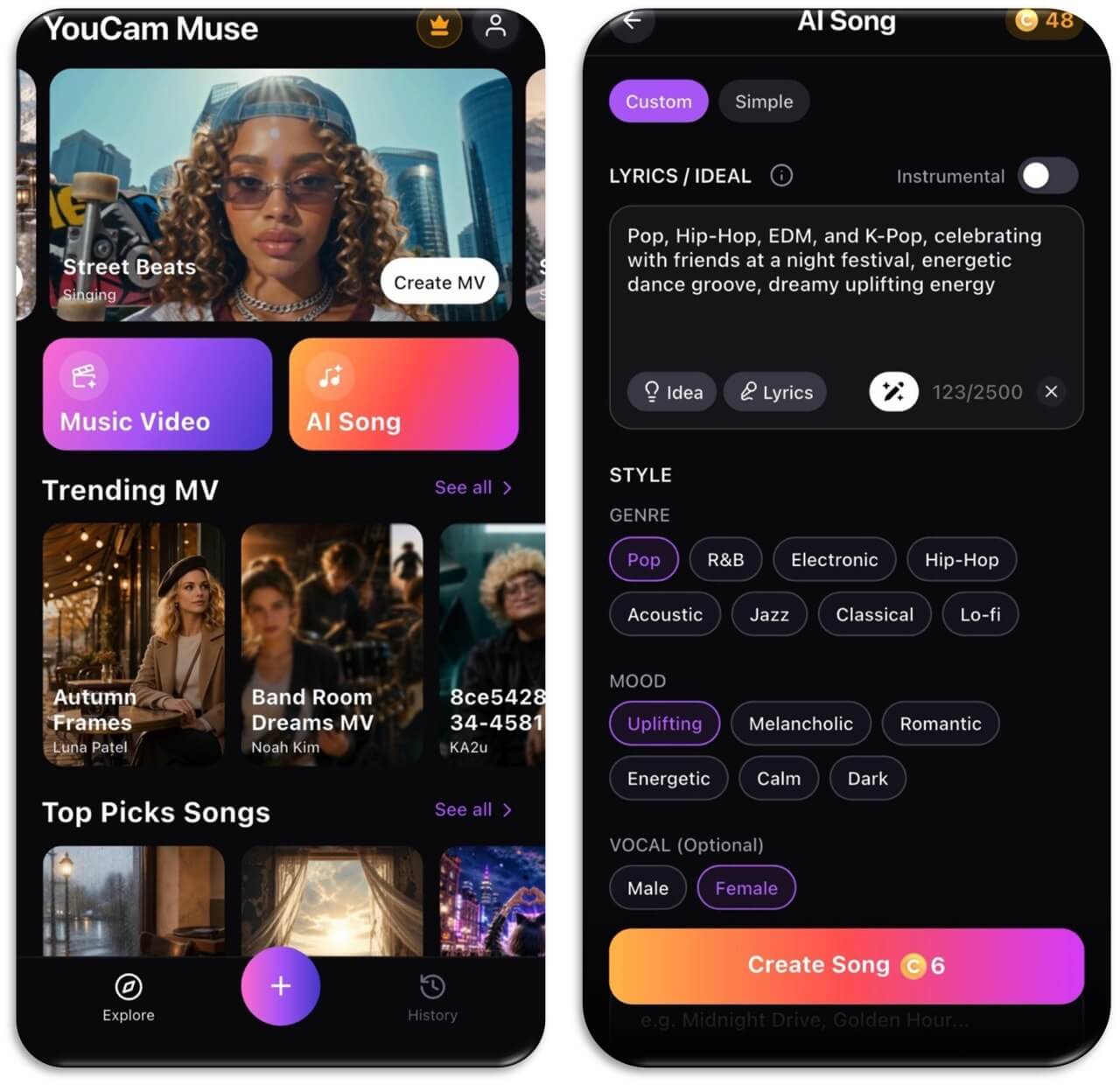
- Open AI Song. On the YouCam Muse home screen, tap AI Song. It sits right next to Music Video.
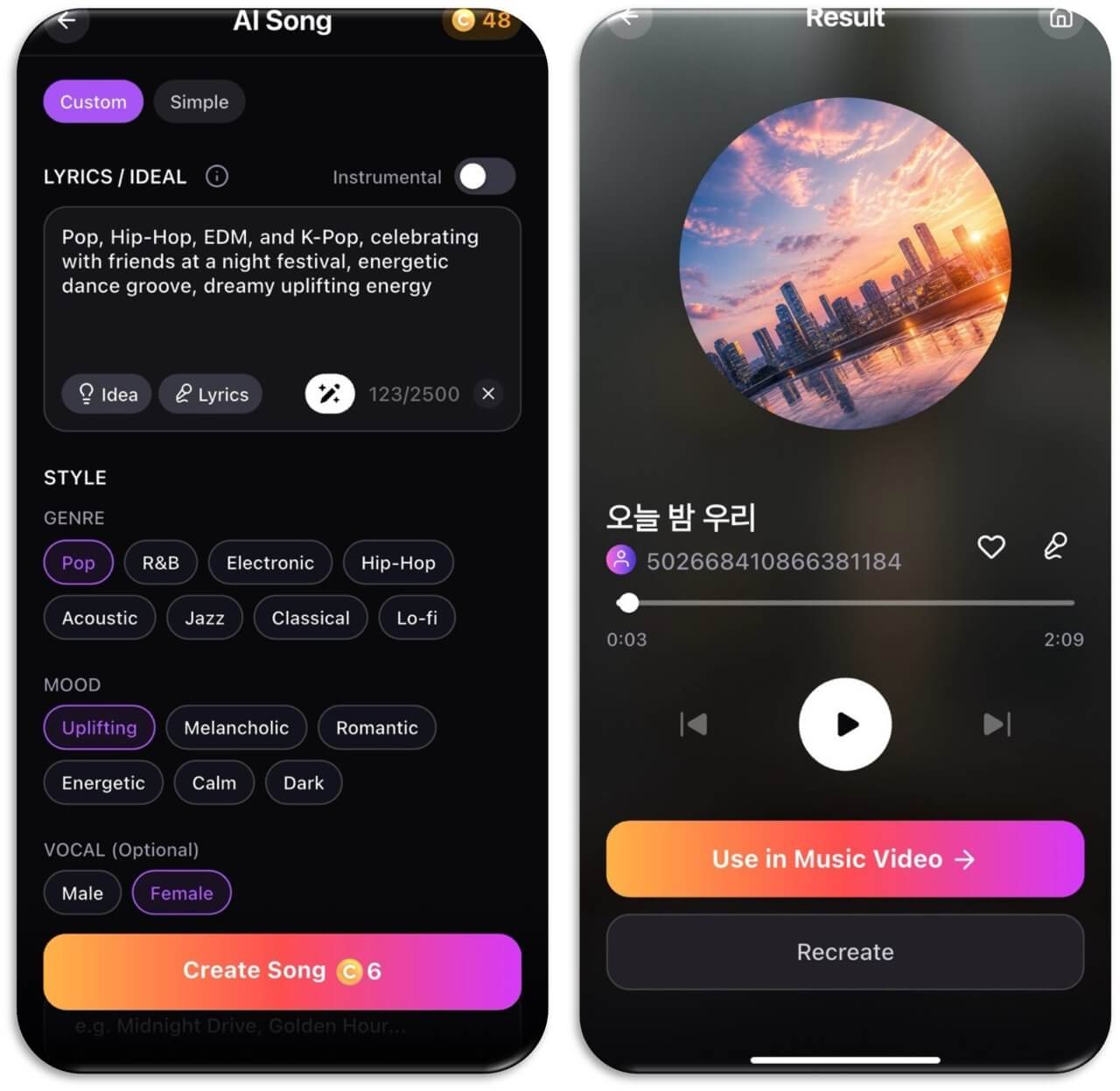
- Choose Custom or Simple. Simple is the quick route. Custom gives you the full set of controls below, and it's the one I use for anything I care about.
- Fill in the Lyrics / Idea box. Paste your lyrics (with section labels) or describe your moment and style prompt. You get up to 2,500 characters. Stuck? Tap Idea for a starting point or Lyrics to have AI write words for you, and use the magic-wand button to polish what you've typed.
- Decide on vocals. Leave Instrumental off for a sung track, or switch it on for background music.
- Pick your style. Choose a Genre (Pop, R&B, Electronic, Hip-Hop, Acoustic, Jazz, Classical, Lo-fi), a Mood (Uplifting, Melancholic, Romantic, Energetic, Calm, Dark) and, optionally, a Male or Female vocal.
- Add a title (optional), something like "Midnight Drive" or "Golden Hour," then tap Create Song. It cost 6 coins in my test.
Step 7: Listen like an editor, then recreate
Play the result all the way through before you judge it. Here's my checklist:
- Does the hook land in the chorus, and can you sing it back after one listen?
- Can you understand the words, or does the vocal blur them?
- Does the vocal tone match the mood you picked?
- Does the energy build toward the last chorus, or stay flat the whole way?
If something's off, tap Recreate, but change only one thing: the mood chip, one line of the prompt, or the vocal. Change everything at once and you'll never know what fixed it.
Step 8: Finish it and decide where it lives
Once a version clicks, tap the heart to save it and give it a real title. Then decide where it's going: a Reel soundtrack, a gift, a demo you'll build on later, or a music video (see the bonus section below).
AI Song & Music Video Maker
Write your own lyrics or describe a moment.
Get a finished song in minutes.
A real example: from one prompt to a finished song
This is the exact test run in the screenshots above. I wanted a feel-good festival track, so in Custom mode I typed:
Pop, Hip-Hop, EDM, and K-Pop, celebrating with friends at a night festival, energetic dance groove, dreamy uplifting energy
Then I picked Pop, Uplifting and a Female vocal, left the title blank and tapped Create Song. I got back a 2:09 track that the app titled 오늘 밤 우리 (roughly "Tonight, Us" in Korean). I was happy with that, since I'd asked for a K-pop flavor.
Looking back, the prompt names four genres, which is a lot. If I did it again I'd pick one lead genre and use the others as texture: "K-pop dance-pop with light hip-hop verses and an EDM drop in the final chorus, friends celebrating at a night festival, dreamy but high-energy." Same idea, but clearer directions, and a better chance of the chorus hitting as hard as I pictured.
Prompt ideas for trendy sounds (without naming artists)
A question I see a lot is how to make something that sounds like a huge album that's everywhere right now. Most AI music tools block artist and song names, and copying a specific artist isn't the goal anyway. The trick is to describe what makes that sound recognizable: era, instruments, vocal style and production feel. Here are prompts you can paste and adapt:
| The sound you're chasing | Prompt to paste | Chips to pick |
|---|---|---|
| Glossy disco-pop revival | Modern disco-pop, four-on-the-floor beat, funky bass, shimmering strings, confident vocal, dancefloor at midnight | Pop · Energetic |
| K-pop girl-group anthem | High-energy K-pop, punchy 808s, bright synth stabs, chant-style chorus hook, big dance break before the last chorus | Pop · Energetic · Female |
| Sad-girl indie folk | Intimate indie folk, fingerpicked acoustic guitar, soft breathy vocal, rainy-window lyrics about a friendship ending | Acoustic · Melancholic · Female |
| 90s R&B slow jam | 1990s R&B slow jam, warm Rhodes keys, deep bassline, layered harmonies, late-night phone-call story | R&B · Romantic |
| Y2K pop-punk comeback | Early-2000s pop-punk, fast palm-muted guitars, driving drums, bratty-but-catchy chorus about leaving your hometown | Pop · Energetic |
| Country-pop crossover | Country-pop with banjo accents over a pop beat, road-trip storytelling, sing-along chorus, golden-hour feeling | Pop · Uplifting |
| Late-night study beats | Lo-fi hip-hop, dusty vinyl crackle, mellow jazz piano chords, slow head-nod groove, no vocals | Lo-fi · Calm · Instrumental on |
| Dark cinematic pop | Dark cinematic pop, pulsing synth bass, whispered verses that explode into a huge chorus, villain-era confidence | Electronic · Dark |
If a result gets close but not quite, add the era ("2010s" vs "2020s" changes a lot) or one more instrument before you rewrite the whole thing.
Creative ways people are using AI songs
Once I got the hang of the process, I kept finding new reasons to use it. These are the ones I see most in creator communities, with a starter line for each:
- A birthday song with real names and inside jokes: "Upbeat acoustic pop birthday song for my sister Mia, who's obsessed with matcha and always late."
- Your pet's theme song: "Bouncy funk anthem about a chubby orange cat who thinks he runs the apartment."
- A custom soundtrack for Reels or TikToks: Turn Instrumental on, pick Lo-fi or Electronic, and match the mood to your video.
- Anniversary or proposal songs: Write the chorus yourself around a real memory, then let AI fill in the verses.
- Turning a journal entry into a song: Paste a few lines from your notes app and ask for a melancholic acoustic ballad. Hearing it sung back can hit surprisingly hard.
- A jingle for a side hustle or small shop: Short, catchy and repetitive. Check the app's terms before using it commercially.
What real users say about AI songwriting tools
It helps to go in with realistic expectations, so here's what real users are saying. On Trustpilot's page for Suno, one of the biggest AI music generators, reviews are sharply split. One reviewer called it "the best app I have downloaded to my phone." Another complained that the AI "routinely ignores instructions," and several recent reviewers were unhappy about download limits. (Trustpilot, Suno reviews, September 2026)
That lines up with my experience: AI is fast and often impressive, but it doesn't always follow your instructions exactly. That's why steps 1–5 matter so much. The clearer your hook, structure and prompt, the less guessing the AI has to do. As Ben Camp puts it, the payoff is being able to try lots of variations quickly, which is hard to do in a traditional writing session.
Bonus: turn your song into a music video
This is the step most "how to write a song with AI" guides skip, and it was my favorite part. Once your song is done, you can turn it into a music video without leaving the app:
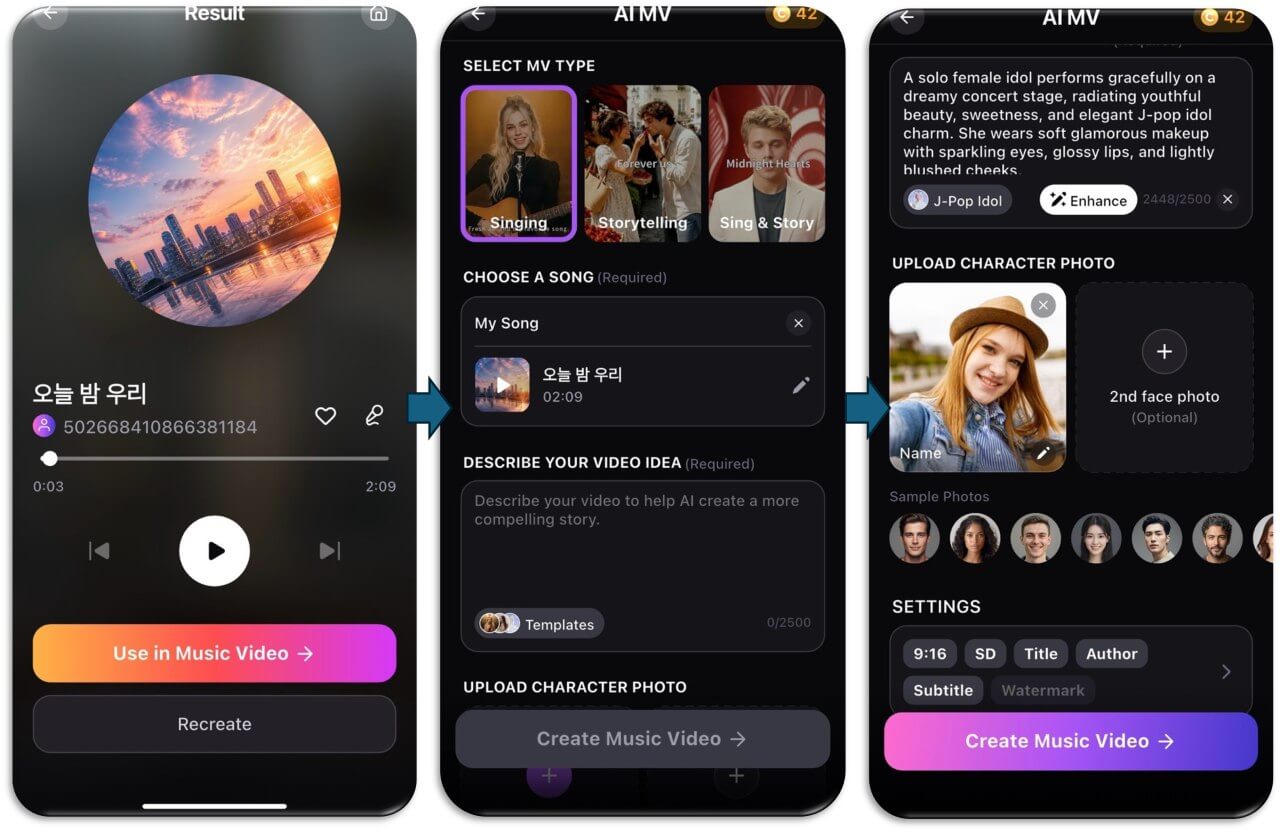
- Tap "Use in Music Video" on the song's Result screen. The AI MV screen opens with your song already loaded under Choose a Song.
- Select an MV type: Singing (a performer sings your track), Storytelling (a narrative video), or Sing & Story (a mix of both).
- Describe your video idea in up to 2,500 characters. Tap Templates for ready-made ideas, pick a style chip like J-Pop Idol, or tap Enhance to flesh out a short description.
- Upload a character photo. Use a clear, front-facing face photo, add an optional second face for a duet or couple story, or pick one of the sample photos.
- Adjust the settings: aspect ratio (like 9:16 for Reels and TikTok), quality (SD), and whether to show the title, author, subtitles and a watermark.
- Tap Create Music Video and let it render.
My tip: write the video idea the same way you wrote the song. Pick one scene and one mood ("a solo performer on a dreamy concert stage, soft pink lights, confetti on the final chorus") instead of a list of ten things you want to happen.
My personal and pro tips
- Keep a prompt log. Save every prompt that works, with its chips. A small tweak to a proven prompt beats starting from scratch.
- Write the chorus in plain words. Clever wordplay reads well but can be hard to sing. Simple, repeatable phrases make stronger hooks.
- Use Instrumental for anything with a voiceover. Vocals compete with talking, and an instrumental in the right mood doesn't.
- Say what you don't want. "No slow intro," "no autotune" or "no acoustic guitar" often fixes a result faster than rewriting the whole prompt.
- Sing along before you decide. If you can't hum the hook after two listens, try a different mood or tighten the chorus.
- Plan your retries. Recreating costs coins, so spend an extra minute on the prompt first rather than generating ten random versions.
AI Song & Music Video Maker
Write your own lyrics or describe a moment.
Get a finished song in minutes.
FAQ
Can I use AI to create a song?
Yes. With an AI song generator like YouCam Muse, you describe a moment or paste your lyrics, pick a genre, mood and vocal, and the AI produces a full track with melody, arrangement and vocals. You don't need an instrument or any music theory.
Can you tell if a song was written by AI?
Sometimes. Common giveaways are generic lyrics, vocals that sound a little smeared on certain words, and songs that stay at the same energy the whole way through. Writing your own hook, using specific details and choosing the best version (instead of the first one) makes an AI-assisted song sound much more intentional.
Is it legal to use AI to make songs?
Making songs with AI tools is generally allowed, but each app has its own terms, and copyright rules vary by country. In the U.S., the Copyright Office says human-written parts of a song, like your lyrics, can be protected, while purely AI-generated material can't. This isn't legal advice; if you're planning something commercial, check the app's terms and talk to a professional.
Can I sell music made with AI?
It depends on the app's terms and your plan or subscription. Some tools allow commercial use and others restrict it. Read the terms of the app you used before selling or monetizing a track, and keep in mind that songs with more human authorship have clearer copyright protection.
Do I need to write my own lyrics?
No. You can let the AI write them (in YouCam Muse, tap Lyrics in Custom mode), write every line yourself, or mix the two. Writing at least the chorus yourself usually makes the song feel more personal.
Can I make an instrumental track instead?
Yes. Switch on the Instrumental toggle in AI Song to generate music without vocals. It's great for Reels, vlogs, study playlists or anything with a voiceover.



