



 Author:
Yes, you can make a song with AI for free. What most "free AI song generator" pages don't tell you is what "free" covers: some let you make songs but not download them, some cap you at a few songs a day, and almost none let you use the result commercially. So before you spend an evening writing prompts, it helps to know what each free plan actually lets you keep.
Below I walk through how to make a song with AI for free, step by step, and then compare the free plans of the tools people search for most, as of September 2026.
How to make a song with AI for free (step by step)
YouCam Muse offers basic free credits for you to try make one AI Song before you buy it.
I used YouCam Muse's AI Song for this walkthrough, but the first two steps work in any app.
Step 1: Decide on one moment and one hook
AI songs get generic fast when the idea is broad. "A song about summer" gives the AI nothing to hold on to. "Driving to the beach with the windows down, singing badly with my best friend" gives it a place, a feeling and a picture. Then write one line you'd want people to sing back — that's your hook.
Step 2: Open AI Song and pick a mode
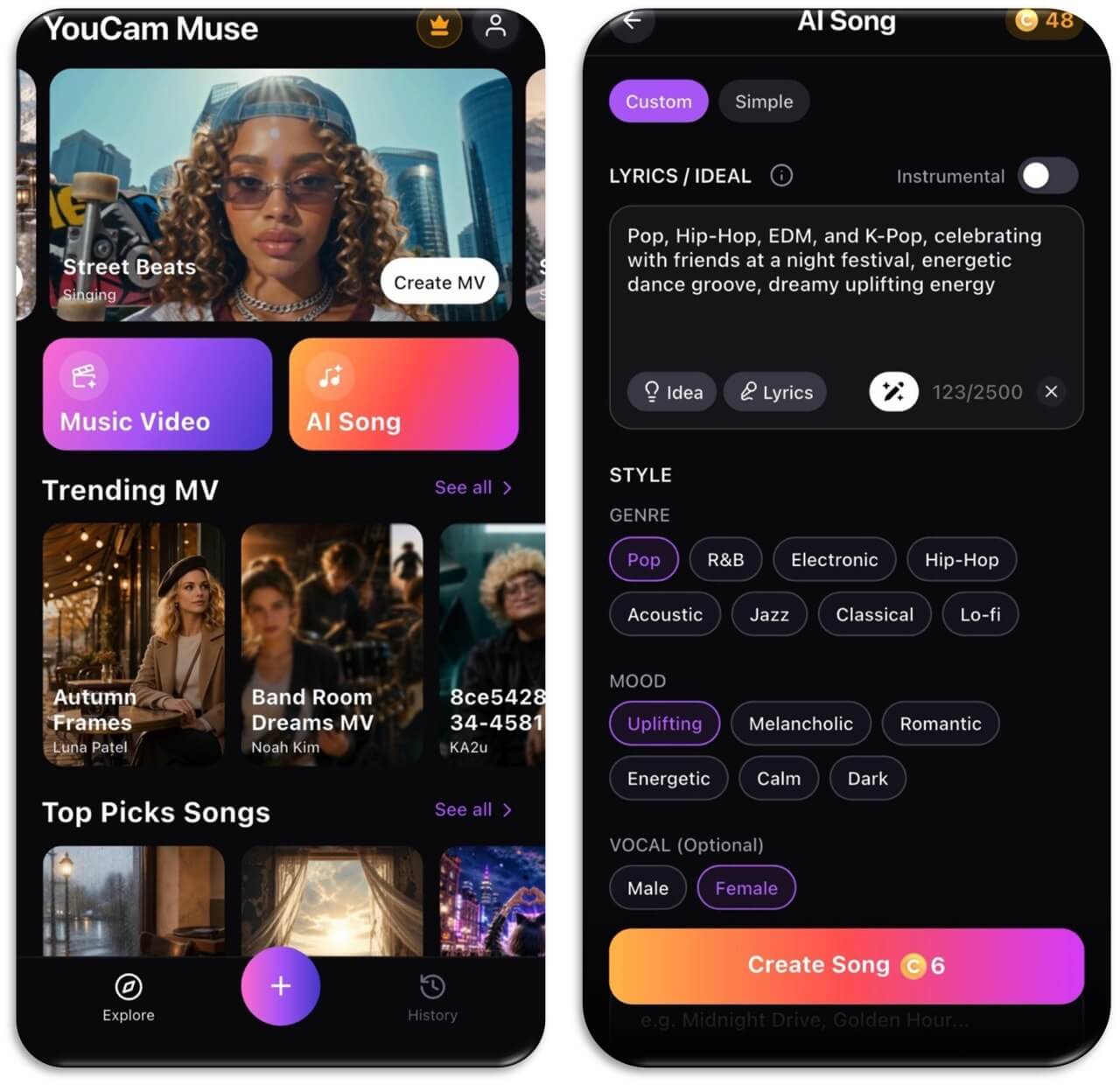
In YouCam Muse, tap AI Song on the home screen. Simple is the fastest route: describe the song and go. Custom gives you the full set of controls, and it's the one I use when I care how it turns out.
Step 3: Write your idea or lyrics
Type your moment and hook into the Lyrics / Idea box (up to 2,500 characters). Not sure what to write? Tap Idea for a prompt to start from, or Lyrics to have AI draft the words, then rewrite any line that sounds like a greeting card.
Step 4: Pick a genre, mood and vocal
Choose a genre (Pop, R&B, Electronic, Hip-Hop, Acoustic, Jazz, Classical or Lo-fi), a mood (Uplifting, Melancholic, Romantic, Energetic, Calm or Dark) and, if you want, a male or female vocal. Switch on Instrumental if you just need background music for a video.
Step 5: Create, listen, and recreate once
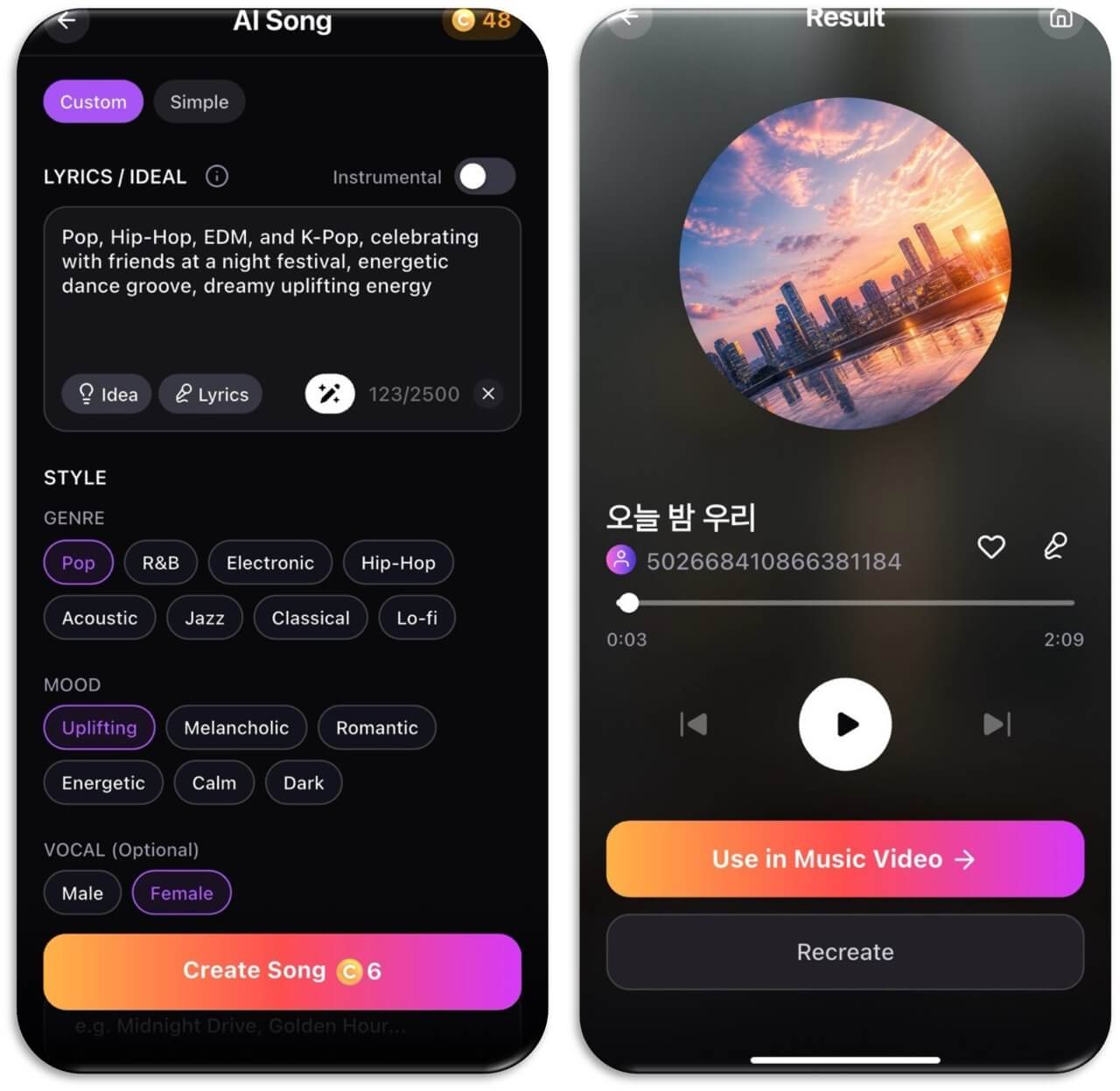
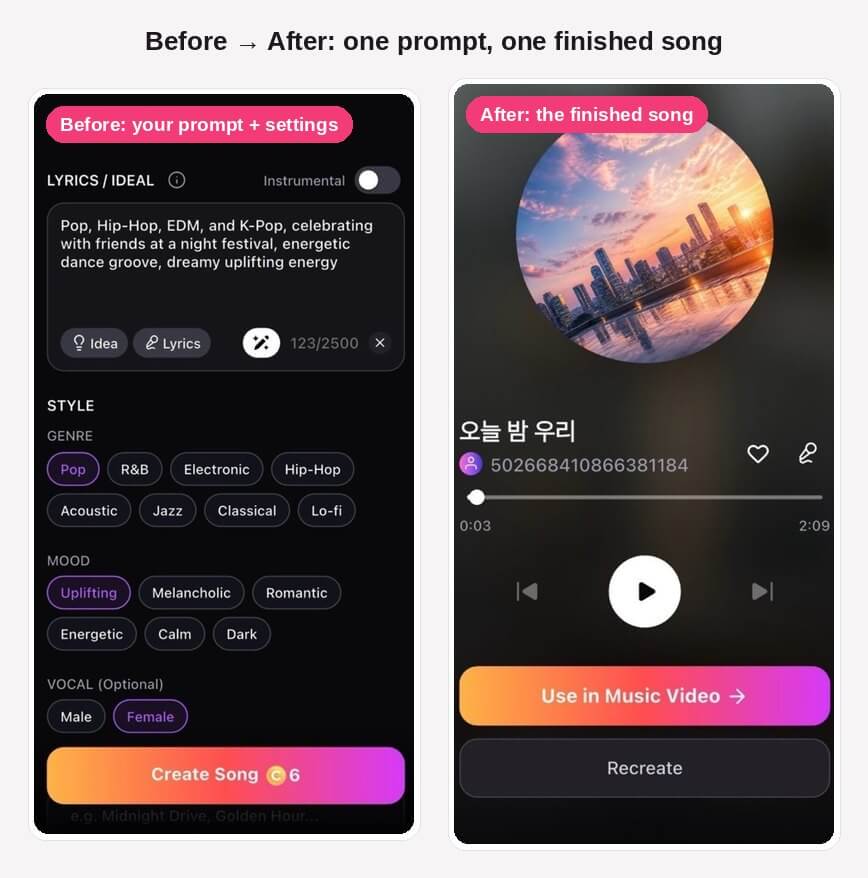
Tap Create Song. Listen all the way through before you judge it. If it's close but not right, tap Recreate and change just one thing — the mood or one line of the prompt — so you can tell what made the difference.
Step 6 (optional): Turn it into a music video
This is where YouCam Muse differs from most song generators. On the result screen, tap Use in Music Video, pick an MV style, describe the video you want and render it. You end up with something you can actually post. (Notice: AI Music Video Generation requires further credit purchase)
AI Song & Music Video Maker
Write your own lyrics or describe a moment.
Get a finished song in minutes.
Free AI song generators compared
These are the free plans as listed in September 2026. Free tiers change often, so check each app before you rely on one.
| Tool | What the free plan gives you | Can you download? | Commercial use on free? | Best for |
|---|---|---|---|---|
| YouCam Muse | One AI song making | Share or save from the app | Check the app's terms | Turn AI song into Music Video |
| Suno | 50 credits a day on the v6-mini model | No — play and share only | No | Hearing polished ideas quickly |
| Udio | 10 credits a day (up to 100 a month) | No — disabled on all plans | No | Experimenting in the platform |
| Mureka | Limited test generations | Limited | No | Trying lyrics-first songwriting |
| AIVA | Up to 3 downloads a month | Yes, within the limit | Personal use only | Instrumental and cinematic pieces |
| Boomy | Unlimited creation, limited saves and releases | Limited | Varies | Quick instrumentals |
Sources: Suno release notes, Udio plan review, ToolChase free-tier roundup.
What "free" usually doesn't include
- Commercial rights. If you want to sell a song, put it on streaming for royalties or use it in paid ads, you'll almost always need a paid plan.
- Unlimited songs. Free plans run on daily or monthly credits, so every retry counts. Spend an extra minute on the prompt instead of generating ten random versions.
- Downloads, on some tools. As of September 2026, Suno's free songs can't be downloaded, and Udio has turned off downloads entirely.
- Copyright in the AI parts. The U.S. Copyright Office says purely AI-generated material isn't protected. Lyrics you write yourself can be. (U.S. Copyright Office)
Tips for getting the most out of a free plan
- Keep a prompt log. Save every prompt that works, with the genre and mood you picked. Tweaking a proven prompt beats starting over.
- Say what you don't want. "No slow intro" or "no autotune" often fixes a result faster than rewriting everything.
- Use Instrumental for voiceover videos. Vocals compete with talking.
- Write the chorus in plain words. Simple, repeatable lines make stronger hooks than clever wordplay.
Try it now
Have a moment you'd like to hear as a song? Open YouCam Muse, tap AI Song, and make your first track — then turn it into a music video if you like how it sounds.
AI Song & Music Video Maker
From one idea to a finished song and music video.
No instrument or music theory needed.
FAQ
Can I make a song with AI for free?
Yes. Apps like YouCam Muse, Suno and Udio let you generate songs with vocals on a free plan. The limits are in how many songs you can make, whether you can download them and whether you can use them commercially.
How do I make an AI song for free?
Pick one specific moment, write a hook line, open an AI song app, describe your idea or paste lyrics, choose a genre, mood and vocal, and tap create. In YouCam Muse, that's AI Song → Custom → Create Song.
Is there a completely free AI song generator with no limits?
Not really. Every major tool limits free use with daily credits, download restrictions or personal-use-only terms. Those limits are how the apps pay for the computing power each song needs.
Can I download free AI songs?
It depends on the tool. As of September 2026, Suno's free plan is play-and-share only, and Udio has disabled downloads on all plans. Check the current terms of the app you're using.
Can I post a free AI song on TikTok or Instagram?
Personal posts are generally fine, but read your app's terms, especially if your account is monetized or you're promoting a business.
Can I make an instrumental for free?
Yes. In YouCam Muse's AI Song, switch on the Instrumental toggle to make music without vocals — handy for vlogs, study playlists and videos with a voiceover.



