


 Author:


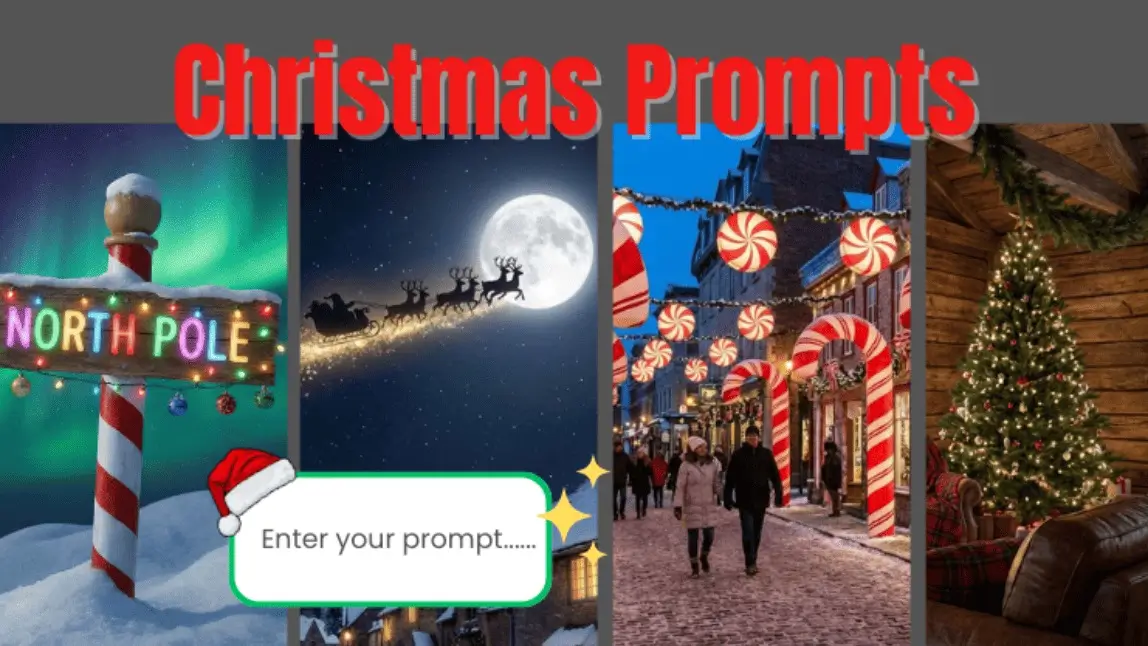
The holiday season is here, and creators everywhere are leveraging AI tools to generate festive visuals, personalized greetings, and creative social media content.
With YouCam Perfect’s Editing Agent, you can easily turn these prompts into photorealistic images, cinematic portraits, and unique holiday-themed designs!
Why ChatGPT Christmas Prompts Are Trending
AI-driven holiday prompts are gaining popularity for several reasons:
- Personalization: Users can generate custom Santa hats, winter makeup, or festive hairstyles for any photo.
- Speed & Efficiency: Chat GPT can instantly create multiple holiday-themed ideas, saving hours of manual editing.
- Creativity: From snowy landscapes to cozy Christmas interiors, the AI adapts your prompt to generate visually stunning outputs.

By combining the ChatGPT Christmas Prompt trend with YouCam Perfect’s Editing Agent, creators can bring every idea to life with consistent style, realistic lighting, and high-quality finishes.
How to Make ChatGPT Christmas Photos by Christmas Prompts
Creating your AI masterpiece is surprisingly simple. YouCam Perfect's AI Agent does the heavy lifting so you can focus on the fun:
Step 1. Download YouCam Perfect

Search for YouCam Perfect on your app store and download the application.
Step 2. Tap AI Agent on Launcher

Open the app and navigate to the "AI Agent" feature.
Step 3. Enter Prompts & Upload Photo

Upload: Choose a high-quality photo of your family.
Prompt: Enter a detailed AI prompt describing your desired style (use the ideas above!). The more detail, the better the result.
“The photo was transformed into a Christmas decoration backdrop, with everyone dressed in Christmas sweaters and hats.The photo was transformed into a Christmas decoration backdrop, with everyone dressed in Christmas sweaters and hats.”
Step 4. Save & Download
Select your favorite generated image and save the final high-resolution Christmas picture to share, print, or post!
Trending ChatGPT Christmas Prompts
AI opens up endless creative possibilities for holiday photos, moving beyond simple filters to complete stylistic transformations. Here are the top trending styles to elevate your festive content this year:
#1 Classic Christmas: Sparkling Holiday Elegance
Add a touch of holiday spirit to your everyday pictures. Perfect for social media or holiday cards.

Prompt Focus: “Cozy Christmas living room with a decorated tree, warm fireplace, soft yellow fairy lights, high-resolution photorealistic background.”
#2 Winter Wonderland: Magical Snowy Scenes
Transform your photo into a serene winter landscape, with snow-dusted trees and soft, cinematic lighting.

Prompt Focus: “Moonlit snowy landscape with twinkling stars, bright moonlight on snow, peaceful serene winter atmosphere.”
#3 Holiday Scenes: Festive Christmas Market
Experiment the seasonal scenes that match your holiday mood, from decorative streets to wooden hot coco stands.

Prompt Focus: “Outdoor Christmas market with warm lights, wooden stalls, hot cocoa stands, ornaments hanging everywhere, winter atmosphere.”
#4 Classic Cartoon: Animated Holiday Cheer
Turn your holiday photo into a fun, animated cartoon—perfect for kids or whimsical cards.

Prompt Focus: “Render the subject in a cute animated style, Pixar-like features, exaggerated joyful expressions, and festive Christmas elements.”
#5 Snow Globe Interior: High-Fashion Holiday Glamour
Transform your photo into a dreamy mini Christmas world inside a snow globe. Imagine a tiny festive village, glowing lights, and swirling snow that give a whimsical, magical holiday feeling.

Prompt Focus: “Inside a snow globe, tiny Christmas village, swirling snow, warm glowing lights, dreamy magical style.”
These prompts are easy to copy-paste and adapt for different photos, making holiday content creation faster, more fun, and fully customizable with YouCam Perfect’s Editing Agent.
40+ Chatgpt Christmas Photo Ideas
1. Christmas Light Tunnel Portrait
“Place the subject inside a tunnel of warm golden Christmas lights with glowing bokeh, cinematic depth, and soft portrait lighting.”
2. Nordic Minimalist Christmas Interior
“Create a Scandinavian minimalist Christmas scene with white wood walls, pine wreaths, neutral tones, and soft natural window light.”
3. Red & Gold Holiday Glam Studio
“Produce a high-end studio portrait with red velvet drapes, gold ornaments, shimmering makeup, and luxury holiday lighting.”
4. Christmas Baking Kitchen Scene
“Place the subject in a festive kitchen with gingerbread cookies, flour dust in the air, warm oven glow, and cozy Christmas details.”
5. Holiday Gift-Wrapping Table
“Add a wrapping station with ribbons, gift boxes, sparkles, and soft warm lighting for a festive crafting vibe.”
6. Christmas Eve Church Glow
“Set the subject inside a candlelit church with stained glass reflections, soft golden glow, and peaceful holiday ambience.”
7. Nutcracker Ballet-Inspired Portrait
“Transform the scene into a Nutcracker ballet theme with soft stage lighting, elegant pastel colors, and classical theatrical elements.”
8. Lumberjack Cozy Cabin Exterior
“Place the subject outside a wooden cabin with plaid blankets, firewood, lanterns, and warm holiday campfire lighting.”
9. Golden Hour Holiday Field
“Create a warm golden-hour Christmas field with tall grasses, soft sunlight, and subtle festive accents like pine sprigs.”
10. Holiday Train Journey
“Add a vintage Christmas train interior with warm lamps, wooden panels, snow on windows, and cinematic travel mood.”
11. Festive Red Carpet Entrance
“Produce a glamorous holiday red-carpet entrance with sparkling lights, elegant outfits, and a luxurious Christmas backdrop.”
12. Candlelight Christmas Portrait
“Use hundreds of warm candles as the light source, creating a soft glowing holiday portrait with a dreamy atmosphere.”
13. Cozy Bedtime Christmas Story
“Place the subject in a cozy bedroom with Christmas pajamas, warm blankets, fairy lights, and a soft bedtime storytelling mood.”
14. Christmas Greenhouse Scene
“Create a festive greenhouse setting with poinsettias, twinkling lights, warm reflections, and lush holiday plants.”
15. Holiday City Rooftop Night
“Set the subject on a rooftop overlooking a city skyline with Christmas lights, cool night tones, and cinematic snow flurries.
16. White Christmas Portrait
“Create a clean white Christmas portrait with falling snow, soft diffused lighting, neutral winter tones, and an elegant holiday atmosphere.”
17. Christmas Morning Window Light
“Place the subject beside a frosty window with soft morning sunlight, snow outside, warm indoor glow, and a peaceful Christmas morning mood.”
18. Elegant Black & Gold Christmas Night
“Design a luxury black-and-gold Christmas scene with subtle sparkles, elegant lighting, and a modern high-fashion holiday aesthetic.”
19. Snowy Street Christmas Romance
“Set the scene on a quiet snowy street at night with glowing street lamps, gentle snowfall, and a romantic cinematic Christmas vibe.”
20. Vintage Christmas Postcard
“Transform the image into a vintage Christmas postcard style with soft grain, warm faded colors, and nostalgic holiday charm.”
21. Christmas Fireplace Close-Up
“Create an intimate Christmas portrait near a glowing fireplace with warm orange light, cozy textures, and soft shadows.”
22. Frosted Fairy Christmas Look
“Give the subject a frosted fairy Christmas look with icy shimmer makeup, silver highlights, delicate snow effects, and magical lighting.”
23. Holiday Coffee Shop Scene
“Place the subject inside a cozy Christmas café with warm lights, mugs of cocoa, holiday décor, and a relaxed festive mood.”
24. Luxury Christmas Hotel Lobby
“Design an upscale hotel lobby decorated for Christmas with tall trees, golden lights, marble floors, and elegant holiday styling.”
25. Christmas Snowfall Silhouette
“Create a dramatic Christmas silhouette with backlighting, falling snow, glowing highlights, and a cinematic holiday atmosphere.”
26. Red Plaid Christmas Portrait
“Style the image with classic red plaid textures, rustic Christmas décor, warm lighting, and a traditional holiday feel.”
27. Midnight Christmas Snow Glow
“Set the scene at midnight with soft blue tones, glowing snowflakes, moonlight highlights, and a peaceful winter night mood.”
28. Santa’s Workshop Interior
“Place the subject inside Santa’s workshop filled with toys, wooden shelves, warm lights, and playful Christmas details.”
29. Elegant Christmas Ball Gown
“Create a glamorous Christmas portrait with an elegant gown, sparkling lights, and a luxurious holiday ballroom background.”
30. Christmas Tree Close-Up Glow
“Frame the subject close to a Christmas tree with glowing ornaments, soft bokeh lights, and warm festive lighting.”
31. Minimalist Neutral Christmas
“Generate a minimalist Christmas aesthetic using beige tones, soft lighting, simple pine décor, and modern holiday elegance.”
32. Snowy Forest Holiday Adventure
“Place the subject in a snowy forest with tall pine trees, light snowfall, cinematic depth, and an adventurous winter feel.”
33. Christmas Lantern Night Scene
“Add glowing Christmas lanterns around the subject, warm amber light, dark winter background, and cozy night ambience.”
34. Holiday Family Portrait Studio
“Create a professional Christmas family portrait with coordinated outfits, soft studio lighting, and a festive backdrop.”
35. Magical Christmas Sparkle Overlay
“Enhance the photo with subtle magical sparkles, soft glow effects, warm holiday tones, and dreamy Christmas lighting.”
36. Christmas Snowstorm Drama
“Design a dramatic snowstorm scene with strong wind effects, swirling snow, moody lighting, and cinematic holiday intensity.”
37. Candy Cane Wonderland
“Transform the scene into a candy-themed Christmas world with candy canes, pastel colors, playful lighting, and whimsical details.”
38. Cozy Christmas Pajama Night
“Place the subject in cozy Christmas pajamas with fairy lights, blankets, warm lighting, and a relaxed holiday night mood.”
39. Christmas Fairy Lights Portrait
“Surround the subject with glowing fairy lights, shallow depth of field, soft bokeh, and warm festive tones.”
40. Christmas City Street Shopping
“Create a bustling Christmas shopping street with store lights, decorated windows, holiday crowds, and festive energy.”
41. Snowy Balcony Christmas Scene
“Set the subject on a snowy balcony with city lights, winter air, warm interior glow, and a peaceful holiday atmosphere.”
42. Classic Santa Hat Portrait
“Add a classic Santa hat with realistic fabric texture, soft lighting, and subtle Christmas decorations.”
43. Winter Coat Holiday Fashion
“Produce a winter fashion Christmas portrait featuring stylish coats, scarves, soft snowfall, and editorial lighting.”
44. Christmas Night Sky Glow
“Create a holiday night sky with subtle stars, glowing snow, cool winter tones, and magical Christmas ambience.”
45. Cozy Holiday Reading Corner
“Place the subject in a cozy reading nook with Christmas books, warm lamps, soft blankets, and a calm festive mood.”
Try YouCam Perfect’s AI Agent Now
This holiday season, creating stunning Christmas visuals has never been easier. With YouCam Perfect and the right AI prompts, every photo becomes a beautifully styled, story-worthy moment filled with festive spirit.
You’re not just editing an image—you’re capturing the magic, warmth, and wonder of the holidays with effortless creativity.
Download YouCam Perfect today and start transforming your holiday snapshots into unforgettable Christmas masterpieces!


