


 Author: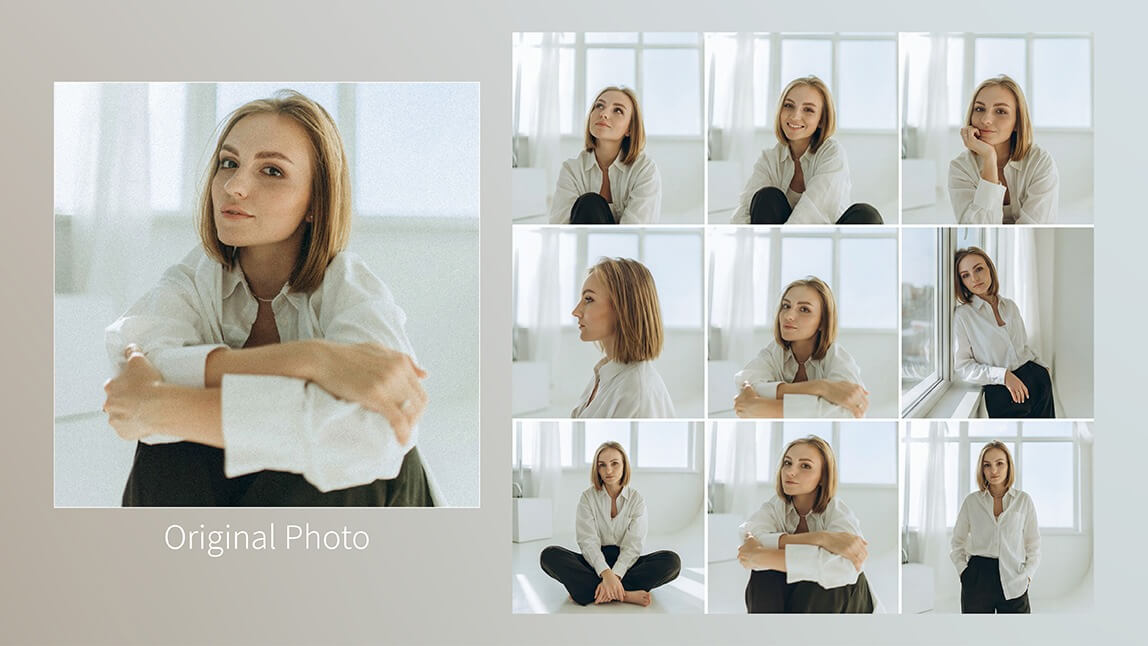
In this guide, we’ll break down:
- What makes a great Gemini Photo Prompt
- 10 advanced Gemini AI Photo Prompt examples (with real-world use cases)
- How to apply these prompts in YouCam Perfect using AI Agent and Photo Repair
- Step-by-step workflows to enhance, edit, and perfect AI-generated images
Gemini AI Photo Prompts vs. Other AI Photo Prompts: What’s the Difference?
Not all AI photo prompts are created equal. While many AI tools rely on short, descriptive prompts, Gemini AI Photo Prompts stand out for their emphasis on structure, realism, and precision.
1. Prompt Structure and Level of Detail
Gemini AI Photo Prompts are typically longer and more structured. Instead of simply describing what you want, they explain how the image should be created.
Detailed prompts reduce randomness and give you predictable, repeatable results—especially important for creators and brands.
2. Realism and Photorealistic Accuracy
One of the biggest advantages of Gemini Photo Prompts is their ability to produce highly realistic images.
3. Consistency Across Multiple Images
Consistency is where many AI photo prompts fall short. Gemini AI Photo Prompts are designed for multi-image workflows, making them ideal for series-based content, character sets, or brand visuals.
4. Control Over Editing vs. Creation
Another key difference lies in image editing precision. A Gemini Photo Prompt can change only the background while preserving the subject exactly as photographed—something short prompts often fail to do.
5. Learning Curve and Accessibility
Beginners can start with simpler prompts, then gradually adopt Gemini-style prompting for more advanced projects.
| Feature | Gemini AI Photo Prompts | Other AI Photo Prompts |
|---|---|---|
| Prompt Detail | High | Low to Medium |
| Photorealism | Very High | Medium |
| Editing Precision | Excellent | Variable |
| Multi-Image Consistency | Strong | Weak |
| Best For | Creators, brands, professionals | Casual or experimental use |
How to Use Gemini AI Photo Prompts in YouCam Perfect
The AI Agent is ideal for any kind of photo editing, especially when you want consistent output across multiple photos such as character sets, branding visuals, or storytelling content.
1. Open YouCam Perfect
2. Select AI Agent
3. Upload photo
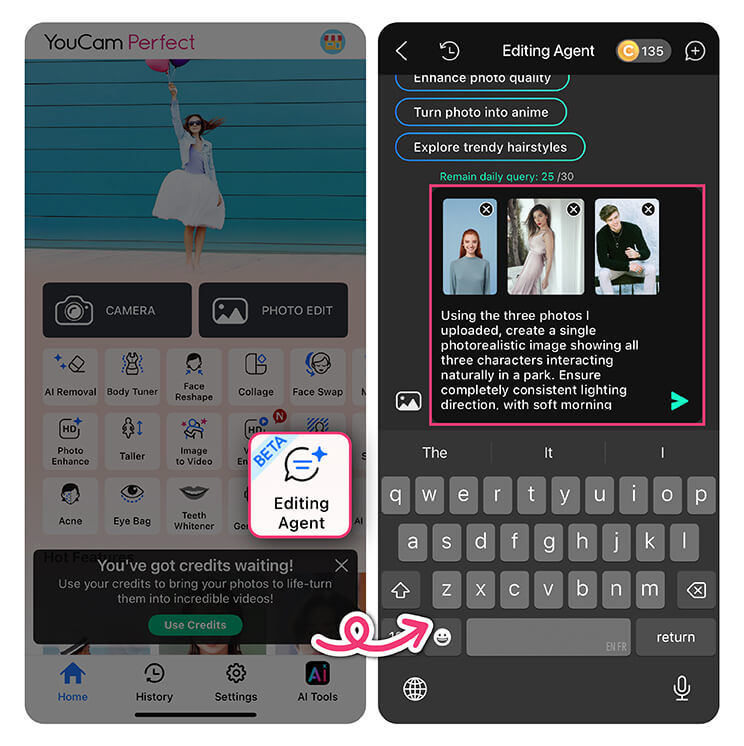
5. Generate and save your images
Top 10 Gemini AI Photo Prompt Examples
Writing effective Gemini AI Photo Prompts is all about clarity, structure, and visual intent. Below are ten advanced examples you can use or adapt in YouCam Perfect.
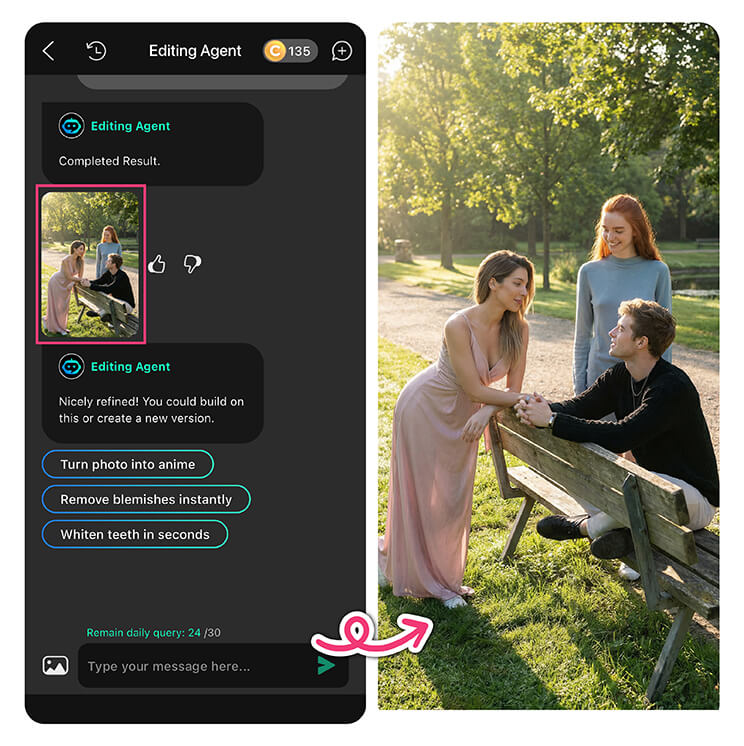
Gemini AI Photo Prompt 1. Multi-Person Interaction Scene

- A shared light source
- Natural shadow behavior
- A single depth of field
- Identity preservation for each subject
Prompt Example:
Create a photorealistic image of three characters interacting in a park. Ensure consistent lighting direction (morning sun from left), natural shadows, unified depth of field, and cohesive color grading. Maintain identity fidelity for all characters and seamless integration.
Gemini AI Photo Prompt 2. Change Background
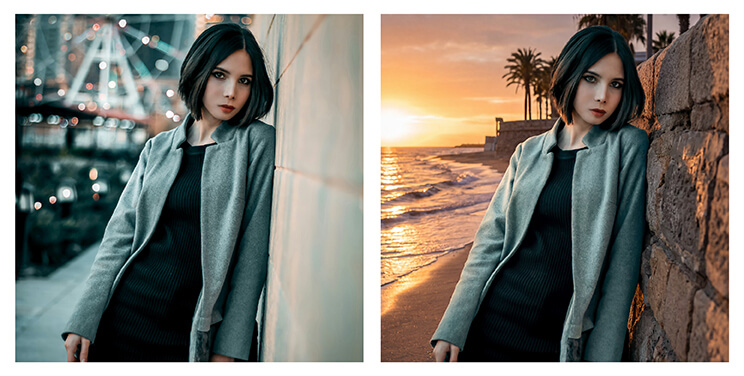
Prompt Example:
Replace the current background with a serene sunset beach with gentle waves and warm golden light, while keeping the woman in a red dress exactly as photographed. Maintain the original pose, clothing details, lighting, and sharpness.
Gemini AI Photo Prompt 3. Remove Object
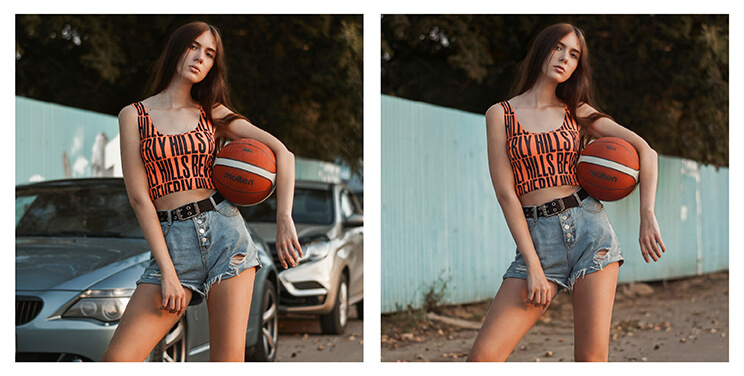
Prompt Example:
Remove the trash can on the left side completely. Fill the empty area with natural background elements that match lighting, shadows, colors, and textures.
Gemini AI Photo Prompt 4. Camera Perspective Change
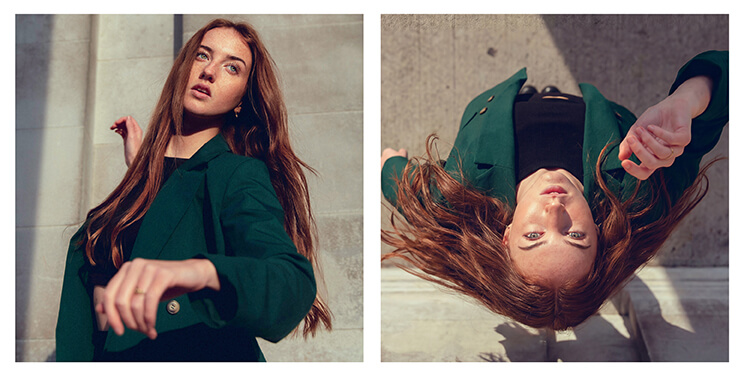
Best for: Creative compositions, cinematic shots, experimental visuals
Prompt Example:
Change the camera perspective to a bird’s-eye view while keeping all existing subjects and objects intact. Maintain consistent lighting, shadows, and textures.
Gemini AI Photo Prompt 5. Edit Text in Image
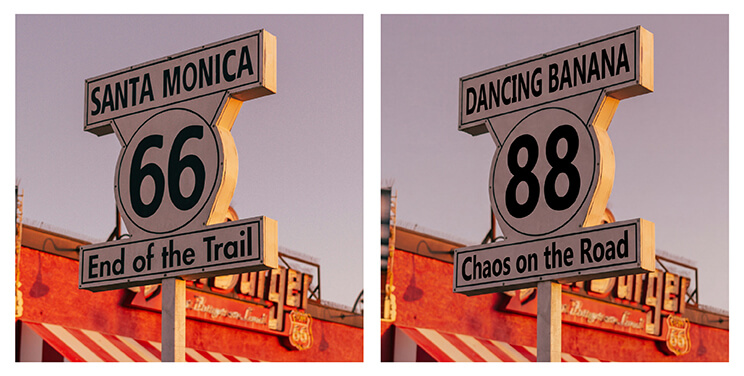
Prompt Example:
Edit the text in the image by replacing it with “Happy Birthday.” Maintain the original font style, size, color, and alignment.
Gemini AI Photo Prompt 6. Image Color Change

Prompt Example:
Change the color of the dress to pastel blue while keeping textures, lighting, and shadows intact.
Gemini AI Photo Prompt 7. Gesture Adjustment
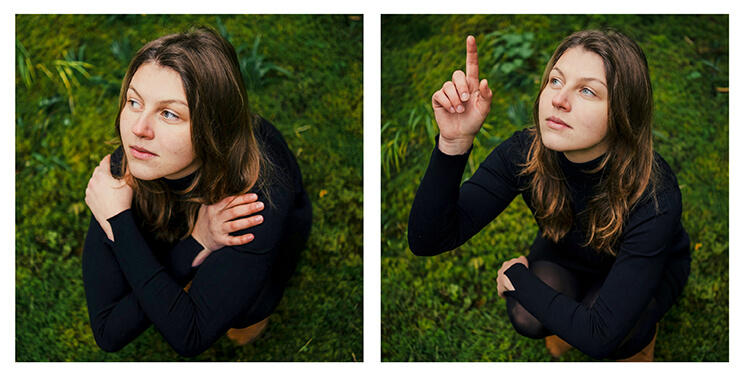
Prompt Example:
Adjust the subject’s gesture by raising the right hand while keeping facial expression and posture intact.
Gemini AI Photo Prompt 8. Virtual Clothes Try-On
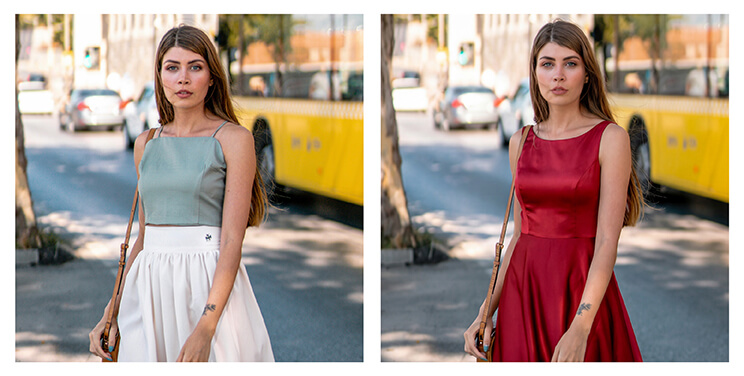
Prompt Example:
Dress the subject in a red evening gown with realistic folds, shadows, textures, and lighting.
Gemini AI Photo Prompt 9. 3×3 Photo Grid Pose

Prompt Example:
Generate a 3×3 photo grid showing different poses while keeping facial features, clothing, lighting, and background consistent.
Gemini AI Photo Prompt 10. Enhance Image
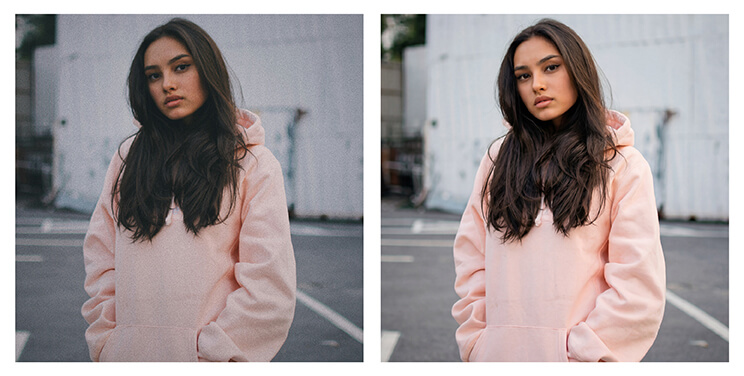
Prompt Example:
Enhance the image by sharpening details, improving colors, adjusting lighting, removing noise, and preserving a natural photorealistic look.
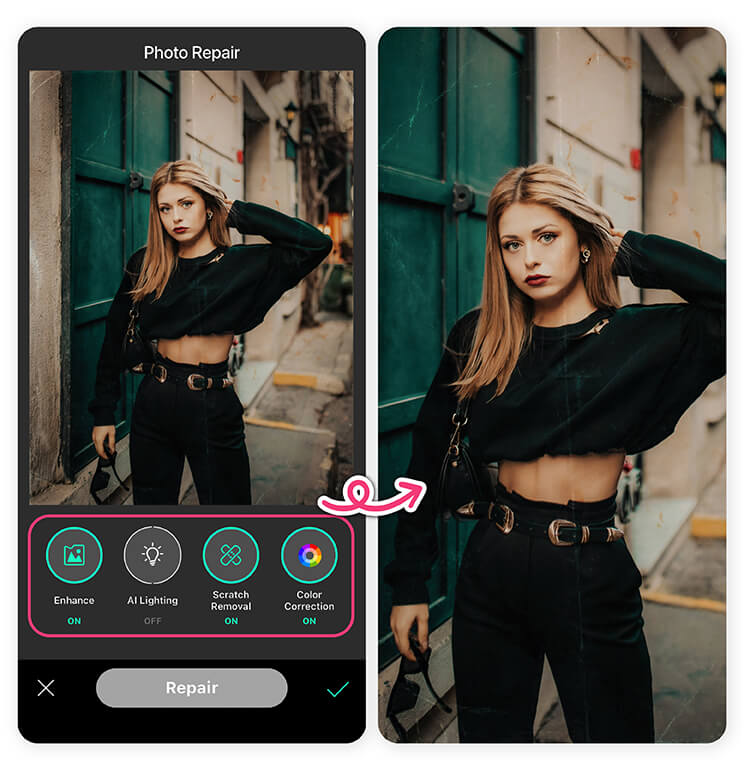
How to Enhance Images in YouCam Perfect
Even the best Gemini Photo Prompt benefits from final polishing.
1. Select Photo Repair from the YouCam Perfect home page
2. Upload your photo
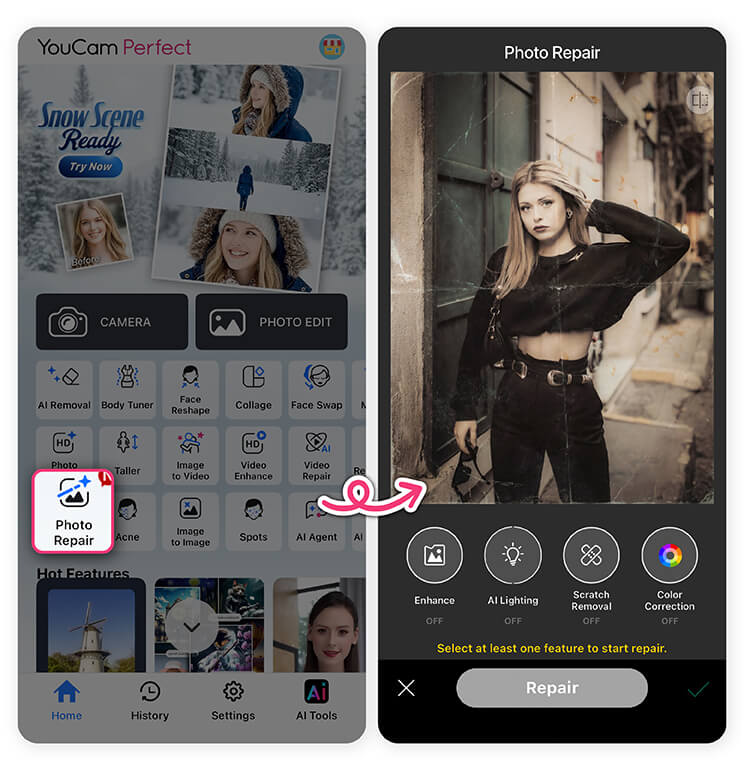
- Enhance
- AI Lighting
- Scratch Removal
- Color Correction
4. Tap Repair and save
How To Write Gemini Photo Prompts
- Always specify lighting direction: Lighting is one of the most important elements in realistic image generation and photo editing. If lighting is not defined, AI may introduce inconsistent shadows or unnatural highlights.
- Mention photorealistic style: AI can generate many visual styles, from illustration to cinematic art. If realism is your goal, you need to clearly state it.
- Include high-resolution output: Resolution plays a huge role in perceived image quality. Always instruct the AI to generate high-resolution results.
- Preserve identity and anatomy: One of the most common AI issues is unintended changes to facial features or body proportions. A high-performing Gemini Photo Prompt explicitly protects the subject’s identity and anatomy.
- Avoid vague terms like “nice” or “beautiful”: Words like “nice,” “beautiful,” “cool,” or “good lighting” are subjective and often interpreted differently by AI.
Turn Ideas into Stunning Visuals with Gemini AI Photo Prompts
Mastering Gemini AI Photo Prompts is the key to unlocking realistic, professional-quality AI images. When paired with YouCam Perfect’s AI Agent and Photo Repair tools, you gain full creative control—from concept to final polish.
Your next viral image starts with the right prompt. 🚀
Gemini AI Photo Prompts FAQs
What are Gemini AI Photo Prompts?

Gemini AI Photo Prompts are detailed instructions that guide AI image generation or photo editing with a strong focus on realism, consistency, and precision. Unlike short prompts, they specify elements such as lighting direction, shadows, textures, camera perspective, and identity preservation to produce high-quality, photorealistic results.
How are Gemini Photo Prompts different from regular AI photo prompts?
Gemini Photo Prompts are more structured and descriptive than typical AI photo prompts. They explain not only what to generate, but how the image should be created—resulting in better realism, more accurate edits, and consistent output across multiple images.
Do Gemini AI Photo Prompts work for photo editing as well as image generation?
Yes. Gemini AI Photo Prompts are especially effective for precise photo editing tasks such as background replacement, object removal, gesture adjustment, color changes, and image enhancement—without altering unrelated parts of the photo.
What types of images work best with Gemini AI Photo Prompts?
Gemini AI Photo Prompts work best for:
- Portraits and group photos
- Fashion and virtual try-on images
- Branding and marketing visuals
- Social media content
- Photo restoration and enhancement
They are ideal whenever realism and consistency matter.



