Author:



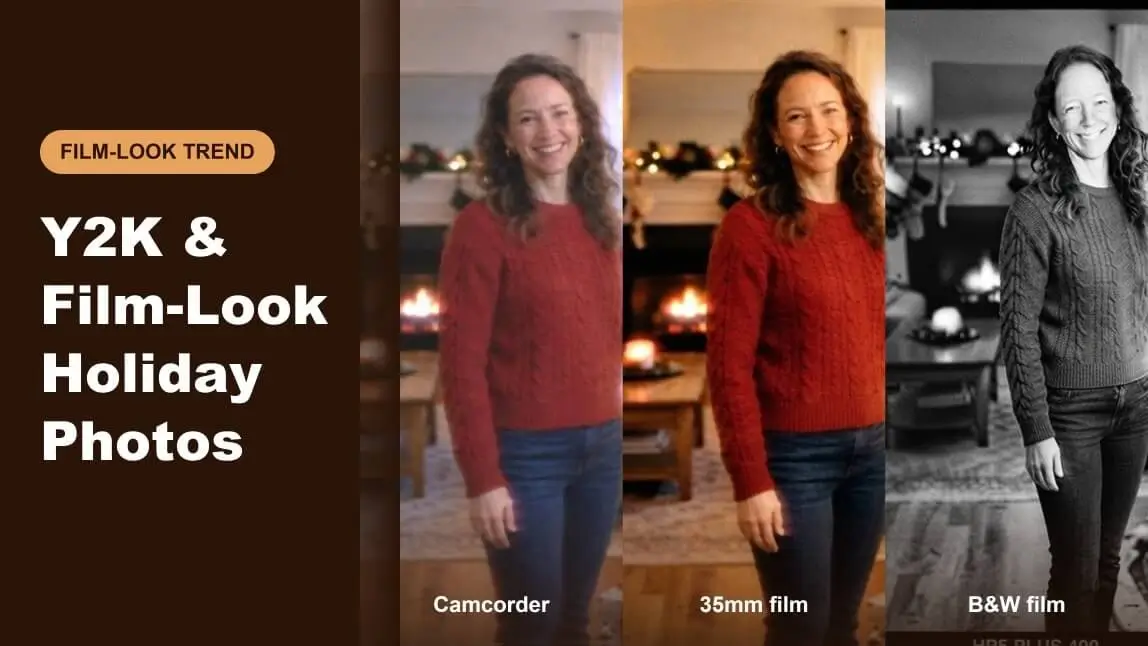
Holiday photos are heading back in time. Camcorder timestamps, grainy film and flash-lit snapshots keep showing up in December feeds, because they make an ordinary living room feel like a memory you already have.
This guide walks through seven retro edits applied to one holiday photo, explains what each look does to the light, and helps you pick the one that fits your photo and where it will be shared. 
🔑 Key Takeaways
- One look per photo: Pick a single era instead of stacking effects. Retro edits read best when they are consistent.
- Light decides the look: Warm string lights suit film and sepia. Harsh overhead light suits flash and black and white.
- Subtle beats loud: A little grain and a gentle date stamp feel authentic. Heavy glitch tends to hide faces.
- Match the format: Square and 4:5 crops suit social posts, while a full frame suits a holiday card or print.
7 Retro Edits for Holiday Photos

Y2K camcorder
Soft highlights, a faint haze and an orange date stamp, like a family tape from the early 2000s.

35mm film
Warm tones, natural grain and glowing tree lights. The easiest look to pull off and the most forgiving.

Disposable flash
Darker corners and a punchy center, as if a single on-camera flash lit the room.

Instant print
A photo that looks like a Polaroid-style print resting on a wooden table, white border included.

VHS tape
Tracking lines, a slightly washed palette and a date overlay for a rewound-home-video feel.

Black and white film
Strong contrast, deep shadows and glittering highlights. Tree lights turn into sparkle.

90s point-and-shoot
A warm sepia cast and soft edges, like a print from a drugstore envelope.
All previews above are AI-generated renders of one sample photo, made with YouCam to illustrate each look. They are not photos of real people.
Which Retro Look Fits Your Photo?
A quick guide, not a rule. Choose the mood you want and what the photo is for, and you will see a suggested look with a tip.

Y2K camcorder
Why it works: The soft haze and timestamp suggest a family tape. It works best on candid shots with warm indoor light.
How to get it: Ask for lifted blacks, gentle softness, mild color bleed and a small date stamp in an orange or white font.
Skip: Skip heavy sharpening and keep the date believable, since a wrong year can look careless.

35mm film
Why it works: Film grain and warm highlights flatter skin and make string lights glow. It is the safest choice for family photos.
How to get it: Ask for warm color balance, fine grain, a slight fade in the shadows and a gentle contrast curve.
Skip: Skip oversized grain that makes faces look noisy.

Disposable flash
Why it works: A flash look adds punch and a dark background, which fits parties and group shots.
How to get it: Ask for a bright center, deeper shadows at the edges and a slightly cool highlight.
Skip: Skip it for photos where the tree or decorations are the star, since the dark edges hide them.

Instant print
Why it works: The print frame turns a photo into an object, which suits gifts, cards and flat-lay posts.
How to get it: Ask for a white border, a soft vignette, a faint color shift and a tabletop backdrop.
Skip: Skip it when the subject is small in the frame, because the border shrinks them further.

VHS tape
Why it works: Tracking lines and a muted palette sell the rewound-tape feel, best for short, playful posts.
How to get it: Ask for light horizontal noise near the bottom, a muted palette and a small on-screen date.
Skip: Skip heavy glitching on portraits so faces stay readable.

Black and white film
Why it works: Black and white removes distracting colors and makes lights sparkle, so it suits portraits and dramatic scenes.
How to get it: Ask for strong contrast, deep blacks, bright highlights and fine grain.
Skip: Skip it when the red and green of the holiday scene are the point of the photo.

90s point-and-shoot
Why it works: Warm sepia and soft edges feel like an old print and suit cozy, nostalgic captions.
How to get it: Ask for a warm sepia tint, soft vignette, mild fade and slightly softened details.
Skip: Skip it on very dark photos, which turn muddy under a sepia tint.
A holiday card: For cards, keep the effect light and the face clear. Crop to a vertical or square frame and leave room for text.
A social post or Story: For social posts, a stronger look works. Crop to 4:5 or 9:16 and check it on a phone screen before posting.
A printed gift or album: For prints, avoid very dark edits. Choose warm film or sepia and keep a margin so the border is not trimmed.
How to Get the Film Look Step by Step
- Start with a sharp photo that has warm or mixed light. Retro effects hide blur poorly.
- Choose one era from the list above, such as camcorder, 35mm or instant print.
- Apply the look at medium strength, then compare it with the original and lower it if faces look flat.
- Add a date stamp only if it fits the era, and place it in the lower right corner.
- Crop for where it will be used and export at full resolution.
Tips for a Believable Retro Holiday Photo
Retro edits look best when they follow how real cameras behaved. A few habits help:
- Keep light sources glowing. Film and camcorder footage handles string lights with soft halos, so avoid clipping them to flat white.
- Limit the palette. Warm reds and golds suit the season. Heavy cyan or green casts can look accidental.
- Use consistent details. If you add a 2003 timestamp, skip modern UI elements in the same photo.
- Say it is edited. A short caption such as “edited with a film filter” avoids confusion on social feeds.
If you want to see how real film effects work in more depth, this guide on how to add old film photo effects covers the basics.
Tip: Edit a copy and keep the original. Retro looks are easy to overdo, and you may want the clean version for printing later.

AI Photo & Video Generator
Try retro and film-style photo edits on your own holiday pictures.
FAQ
What is the Y2K camcorder look?
It imitates early 2000s home video: soft detail, slightly washed color and an orange date stamp in a corner.
Which retro look is best for family photos?
35mm film is the most forgiving. It keeps skin tones warm and adds grain without hiding faces.
Should I add a date stamp?
Only when it suits the era you chose. Keep it small, in a lower corner, and make sure the date is plausible.
Will a retro filter lower photo quality?
Effects like grain and softness are intentional, but export at full resolution so the result stays sharp enough to print.
Are the example images real photos?
No. The previews are AI-generated renders of a sample scene, made with YouCam to show each look.
How many edits should I apply to one photo?
Usually one. Stacking several eras, such as VHS plus film grain plus a flash vignette, tends to look messy.