


 Author:
 ![10 Travel Vlog Ideas You Can Create with AI in Minutes [2026]](https://plugins-media.makeupar.com/smb/blog/post/2026-05-13/webp_7c09b783-31d2-4228-bad8-bd295f770665.jpg)
If you’ve ever filmed a beautiful sunset, a dreamy train ride, or a chaotic airport moment and thought, “this would make such a good vlog,” you’re definitely not alone.
The problem is, recording clips is easy. Turning those clips into a travel vlog people actually finish watching is the hard part.
Apps like YouCam Video are changing the game for creators who want fast, polished content without spending hours editing. One feature getting attention lately is AI Auto Clips, which automatically turns your raw travel footage into short, engaging highlight videos.
10 Travel Vlog Ideas That Perform Well Right Now
1. Airport to Destination Transformations
These videos start with chaotic airport clips and end with stunning destination reveals.
Use quick transitions between:
- Packing
- Security lines
- Plane windows
- Hotel check-ins
- First destination reactions
AI Auto Clips in YouCam Video can automatically detect highlight moments and create smooth transitions, which saves a ton of editing time.
2. “Spend a Day With Me” Travel Vlog
Day-in-the-life travel content feels personal and authentic.
You can film:
- Morning coffee runs
- Local transportation
- Street food
- Outfit transitions
- Tourist attractions
- Night market adventures
3. Budget Travel Challenges
People love realistic travel content.
Try filming:
- “24 hours in Paris on $50”
- Cheap street food tours
- Hostel experiences
- Budget airline reviews
- Public transport hacks
These videos naturally encourage comments and shares.
4. Cinematic Travel Montage Videos
Short cinematic edits are still huge for travel creators.
Focus on:
- Slow motion walking shots
- Drone clips
- Nature scenery
- Coffee pours
- Ocean waves
- City lights
Pairing these visuals with emotional music can dramatically increase watch time.
5. Hidden Gems and Local Spots
Instead of filming only famous tourist locations, show places people haven’t seen 1000 times already.
Examples:
- Local bookstores
- Quiet beaches
- Small family-owned cafes
- Vintage markets
- Secret viewpoints
This makes your travel vlog feel more unique.
6. Travel Food Vlogs
Food content and travel content are basically best friends online.
Popular travel food vlog ideas include:
- Trying convenience store snacks
- Rating street food
- “Everything I ate in Tokyo” videos
- Cafe hopping
- Local dessert tours
7. Solo Travel Diaries
Solo travel content feels emotional and relatable.
Many creators are now sharing:
- Anxiety before traveling alone
- Making friends abroad
- Peaceful solo moments
- Safety tips
- Confidence-building experiences
This type of travel vlog creates strong audience connection.
8. Travel Fails and Funny Moments
Perfect travel content can feel staged.
Funny moments make your videos memorable.
Examples include:
- Missing trains
- Bad weather
- Translation mistakes
- Packing disasters
- Getting lost
Some of the most viral travel vlog clips are actually imperfect moments.
9. Packing and Preparation Videos
Pre-travel content often performs just as well as destination content.
Try creating:
- Packing routines
- Carry-on essentials
- Travel skincare
- Outfit planning
- “What’s in my bag” videos
These clips are easy to film and work great as filler content between trips.
10. Travel Recap Reels
People love quick highlight recaps.
This is where AI Auto Clips becomes especially useful.
Instead of manually sorting through hundreds of travel videos, YouCam Video can automatically generate short recap edits using your best footage.
That means you can create:
- Weekend trip recaps
- Vacation summaries
- Festival highlight reels
- Adventure montages
- Monthly travel memories
In just a few minutes.
How AI Auto Clips Makes Travel Editing Easier
Editing travel content used to take forever.
You’d spend hours:
- Trimming clips
- Choosing transitions
- Syncing music
- Rearranging footage
- Finding highlights
Now creators are using AI-powered tools to speed everything up.
What Is AI Auto Clips?
AI Auto Clips is a smart editing feature inside YouCam Video that automatically analyzes your footage and creates short, polished videos.
It helps by:
- Selecting highlight moments
- Removing awkward pauses
- Creating smoother pacing
- Matching clips to music
- Generating social-ready edits
For travel creators, this is especially helpful because travel footage usually includes hundreds of random clips.
Instead of manually editing everything, AI helps organize the best moments into a cohesive travel vlog.

How to Use AI Auto Clip for Travel in YouCam Video
Here’s a step-by-step guide to create travel short clips using AI video cut technology.
Step 1: Download YouCam Video
Download YouCam Video on your mobile device.
Step 2: Access 'AI Auto Clip' Feature
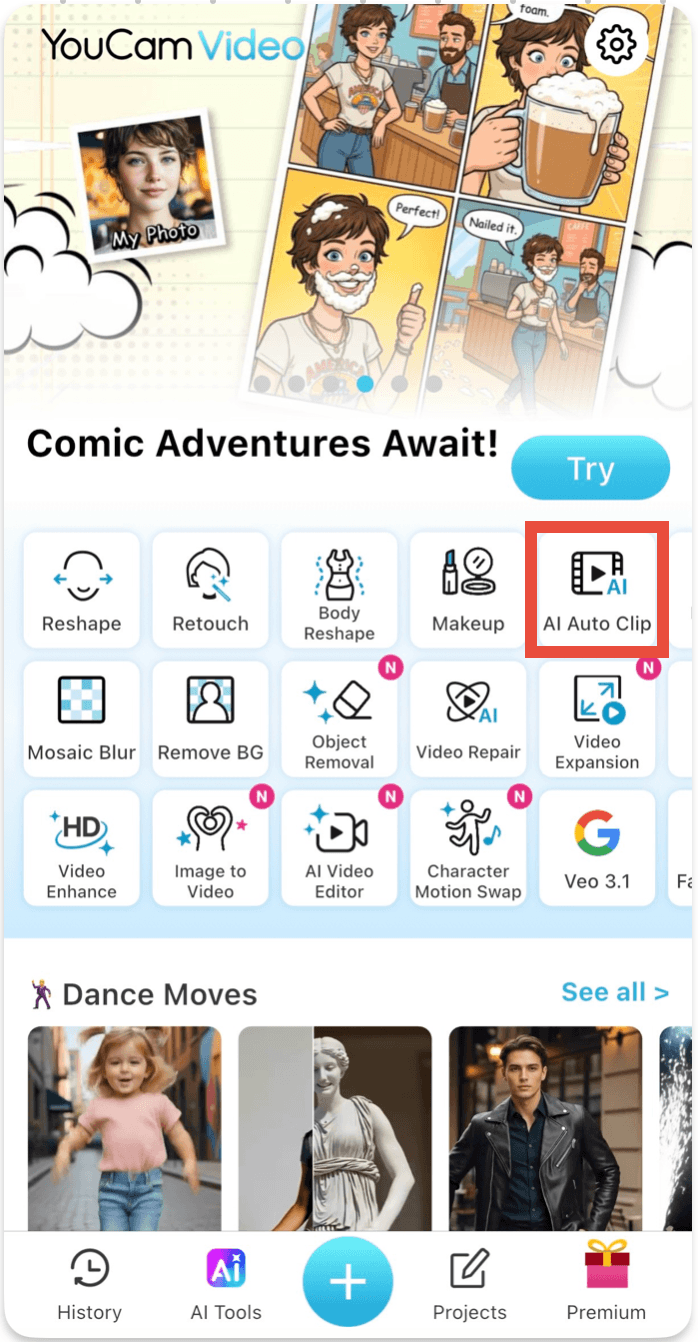
Tap 'AI Auto Clip' on the home page.
Step 3: Select Your Travel Videos
Import your travel videos. AI will automatically scan your footage and identify moments that work well as short clips.
Step 4: Enter a Prompt
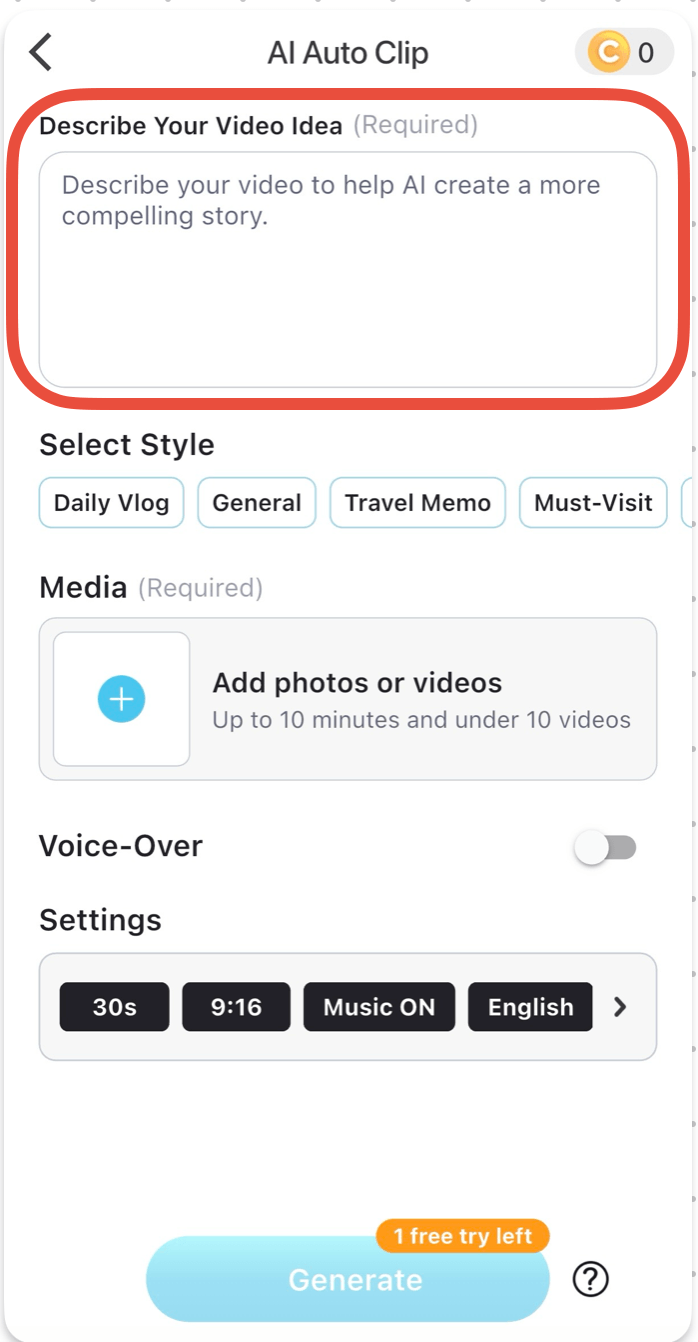
Enter a prompt to describe your travel video idea.
Step 5: Review and Save the Clips
Export your finished clip and upload directly to social media.
Final Thoughts
Travel vlog content is evolving fast.
Audiences still love beautiful destinations, but they also want personality, emotion, and authenticity.
The creators growing the fastest right now are combining relatable storytelling with fast, polished editing.
If editing has been slowing you down, tools like YouCam Video and its AI Auto Clips feature can make creating travel videos dramatically easier.
Instead of spending hours editing every tiny detail, you can focus more on capturing experiences and sharing moments people genuinely connect with.
About the Editors

The PERFECT Corp. Editorial Team
We are a team of experts on photo and video editing apps. Our goal is to deliver engaging content on everything from stunning selfie edits to eye-catching video effects. We cover the latest trends and share niche tips to help you master digital creation.
FAQs
What is the best type of travel vlog to start with?

Day-in-the-life travel vlogs and short cinematic recap videos are beginner-friendly and perform well on TikTok and Reels.
How long should a travel vlog be?
Short-form travel vlog content between 15 to 60 seconds performs especially well on TikTok, Instagram Reels, and YouTube Shorts.
What app is good for editing travel vlogs?
YouCam Video is popular for creators who want AI-powered editing features like AI Auto Clips for faster travel video creation.
How can I make my travel vlog more engaging?
Use fast pacing, emotional storytelling, trending music, and authentic moments instead of only polished shots.
Are AI editing tools good for travel creators?
Yes. AI tools help speed up editing, organize footage, and create highlight clips quickly, which is especially useful for travel vlog creators filming large amounts of video content.



