


 Author:
Mother's Day is just around the corner, and what better way to show your appreciation and love for your mom than with a heartfelt video message?
All you need is your mobile and a little creativity, and you'll be on your way to creating a Mother's Day video that will warm your mom's heart.
In this blog post, we'll give you some video editing ideas, then guide you through the process of making a Mother's Day video using the best video filter app, YouCam Video.
Read on to get Mother's Day video editing inspiration and create a special video for mom this year. 💌🌹
Best Mother’s Day Video Editor for iPhone and Android in 2026
YouCam Video is an easy to use video editing app that goes above and beyond traditional video editing, following these key features:
✔️ AI Group Photo/ Video
✔️ Creative animated effects
✔️ Cute stickers
✔️ Add text & music
Whether you're near or far from your mom, a video can be a perfect way to make her feel special and let her know how much she means to you. And the good news is, you don't need fancy equipment or editing skills to make a beautiful video that your mom will treasure.
Read on to discover 5 ways to edit a special Mother's Day video.
5 Video Ideas for Happy Mother's Day Wishes
- AI Group Video
- Mother's Day Filters
- Happy Mother's Day Stickers
- Happy Mother's Day Wishes
- Happy Mother's Day Music
From filters and stickers, to text and music, there are tons of ways to edit your special video for mom.
1. AI Group Video: A Warm Reunite with Mom
▲ Show mom how much you miss her with a heart-filled video
Make your Mother’s Day message extra heartfelt with an AI Group Video!
Whether you’re far away or just want to add an emotional touch, this feature lets you create a warm, animated reunion using just photos. Simply upload a picture of you or your mom, and let AI generate a sweet scene that says “I love you” without words.
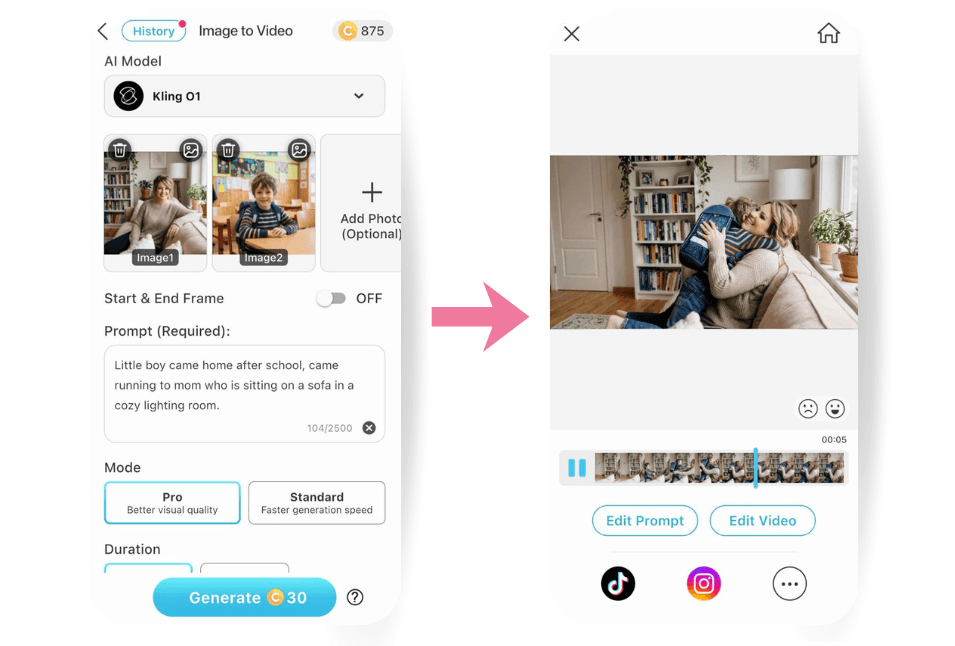
For me, I prefer the Kling 01 AI model (which provides you to upload 1-7 photos), and try prompts like: "Little boy came home after school, running to mom who is sitting on a sofa in a cozy lightning room."
Hit generate and see how this video is the perfect way to turn a simple greeting into a meaningful memory.
2. Mother's Day Filters
▲ Show mom your love with a heart-filled animated filter
A great way to easily add a special something for Mother's Day to your video is with a heart filter. Try a wide range of sweet filters with YouCam Video including:
- Heart filters
- Sparkle filers
- Colorful rainbow filters & more
Besides Mother's Day filters, YouCam Video also has a wide variety of filters including:
- Special Birthday Filters
- Seasonal Filters
- Holiday filters & much more
▲ Add springtime filters and effects to your video with YouCam Video
3. Happy Mother's Day Stickers
▲ Add some sweet stickers to your videos for mom
Create a special video for mom this Mother's Day by using YouCam Video's wide range of stickers. From butterflies and flowers, to hearts and cute animals, there is a wide variety of stickers that suits Mother's Day.
Besides Mother's Day stickers, YouCam Video has:
- 450+ stickers
- Holiday stickers
- Seasonal stickers & more
Go try them out and create your one and only videos! 🌸⭐🫧
▲ YouCam Video has a wide range of stickers for your videos
4. Happy Mother's Day Wishes With Add Text
▲ Add text with YouCam Video for a happy Mother's Day message
YouCam Video also has ways to write your own Happy Mother's Day wishes to mom on you video. The text feature includes:
- 41 color options
- 40 fonts
- Alignment
- Change text length & more
Here are some Mother's Day wishes to add in your video, see if any fits your taste!
| Warm & Touching | Family |
|
|
| Short N' Sweet | Poetic |
|
|
5. Happy Mother's Day Music
▲ Choose from a wide range of Songs for your Mother's Day video
To make your videos extra special, YouCam Video also lets you add music to your videos. Edit your Mother's Day videos with:
- A library of 750+ royalty-free songs
- Your Mom's favorite music
- Choose the length and part of the song to add
How to Edit Mother’s Day Video in 2026
With an All-In-One Video Editor like YouCam Video, just follow these simple steps:
- Step 1. Download YouCam Video
- Step 2. Upload Your Video
- Step 3. Edit Your Mother's Day Video
- Step 4. Save & Share!
Now you have some inspiration for your Mother's Day videos, check out this step-by-step guide to creating your video.
Step 1. Download the Best Video Filter App for a Special Mother's Day Video
Shared Materials by Strapi
*Adjust the size of images ONLY. Please go to Strapi to edit the materials info.
Firstly, it's time to download a video editing app that will let you easily edit a special Mother's Day video like the free YouCam Video app. You can download the app from the App Store or Google Play store.
Step 2. Upload Your Video
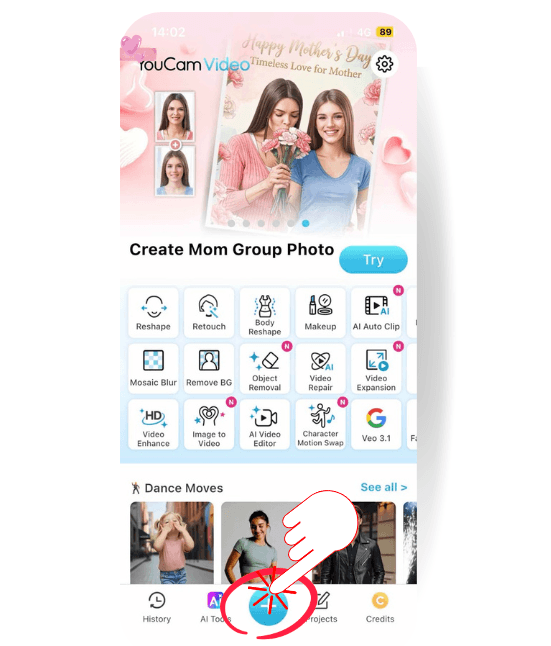
Once you've downloaded the app, it's time to choose the video you want to edit. There are a couple of ways you can edit your videos with YouCam Video, including:
- Tap the plus icon on the home screen to go to the camera roll
- Choose the video you want to edit
Step 3. Edit Your Mother's Day Video
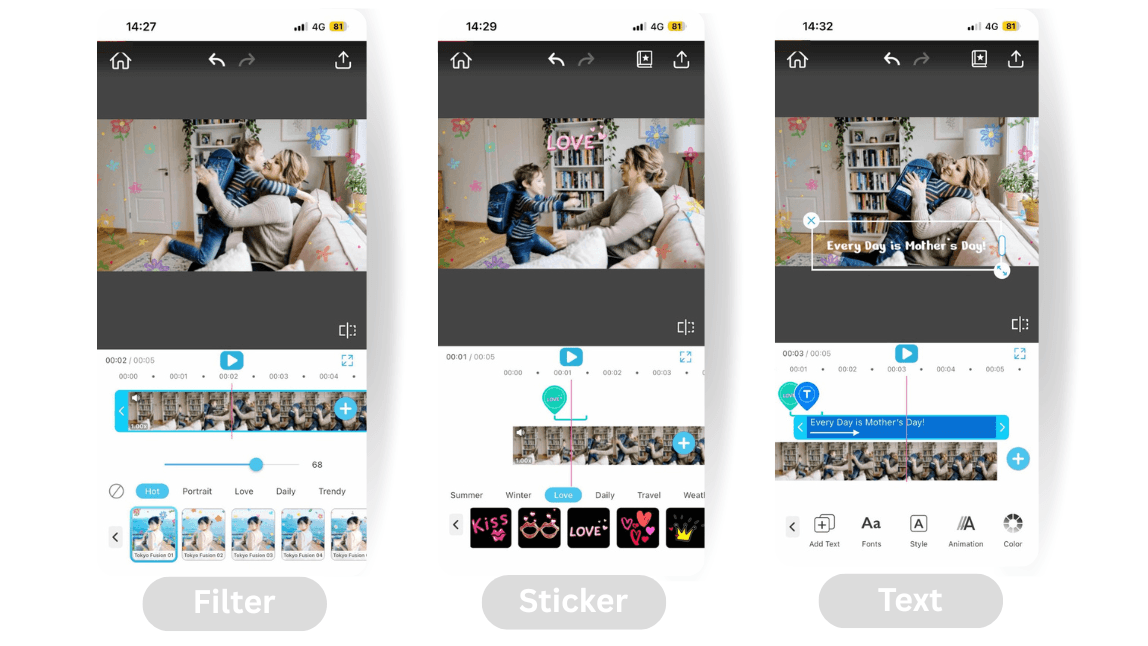
Now you can choose from the wide array of video filters, effects and stickers to apply to your video. Choose from:
- Animated video filters
- Text & music
- Stickers
- Makeup, hair color filters & more
Step 4. Save & Share!
Once you've edited your video as you like, it's time to save and share. Choose to:
- Save in HD, 4K, 2K, 1080p, and 720p
- Frame rate & bitrate
- Send it with your preferred messaging app—Whatsapp, iMessage & more
- Share to your favorite social media sites, including TikTok, Instagram, YouTube and more
Other Video Editing Ideas You Can Try
Happy Mother’s Day Video Ideas FAQ
How to make a Mother’s Day Video?
It's easy to make Mother's Day video that your mom will love with the help of a mobile app like YouCam Video. Choose from a wide range of creative and sweet filters, stickers, add text, music and more to create a highly personalized happy Mother's Day video for your mom. Download the app on iPhone or Android for free now!
How do I make a Mother's Day video with song?
YouCam Video is an easy-to-use video editing app that lets you add songs and music to your videos. Create a special video for mom this Mother's Day by adding her favorite song to a sweet video message. Besides music, you can also add filters, stickers, animated effects, and more.
What do you put in a Mother’s Day Video?
A Mother's Day video can be anything you want. Some ideas to put in your video include:
- A special moment you shared with mom
- Your appreciation for your mom
- A special message you know she'll love
- Create a new memory with your mom to share
If you create a new memory with mom, you can edit a sweet video for her with a video editing app like YouCam Video. The app lets you add filters, stickers, text and more to make your video with mom extra special.
Send a Happy Mother's Day Message With a Special Video
Shared Materials by Strapi
*Adjust the size of images ONLY. Please go to Strapi to edit the materials info.



