


 Author: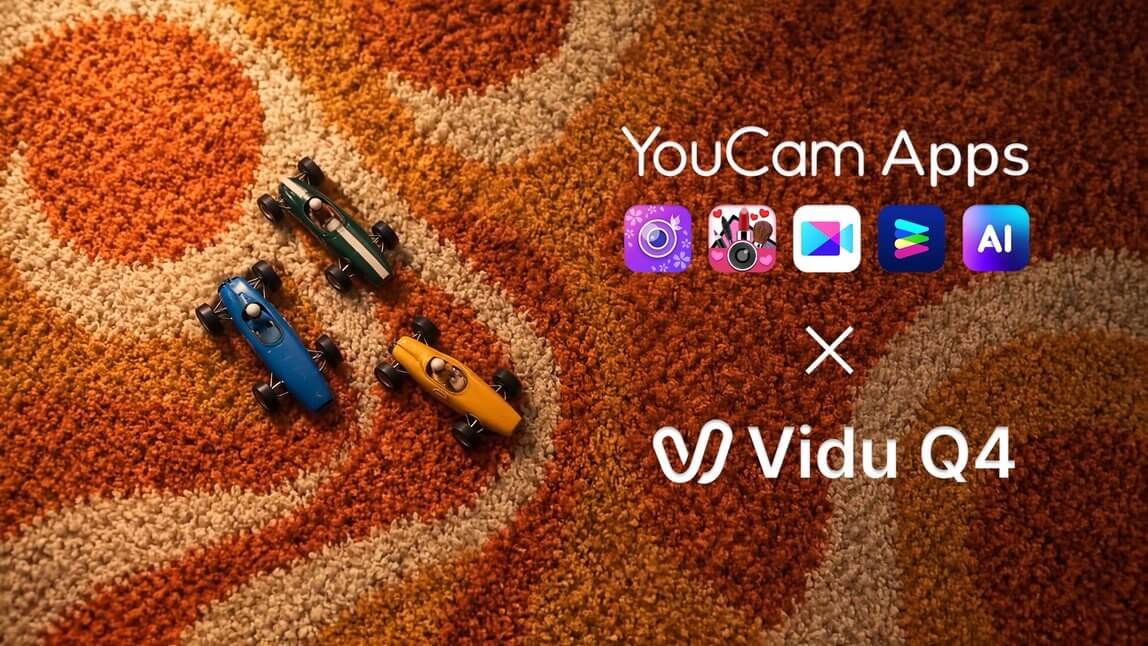
A great photo captures one moment — but these days, the feed rewards motion. Turning a still image into a video that actually looks cinematic used to mean wrestling with desktop video software, or settling for stiff, wobbly "AI animation" that falls apart the moment anything moves fast.
Vidu Q4 Preview changes that. It's the latest video generation model from Vidu (by Shengshu Technology), and it's now available across the YouCam app family — YouCam Perfect, YouCam Makeup, YouCam Video, YouCam Enhance, YouCam Online Editor, and YouCam AI Pro. Pick a photo, choose Vidu Q4, describe the scene you want, and the model brings it to life with natural lighting, smooth camera movement, and output up to 4K — complete with AI-generated audio.

AI Video Editor
Turn stills into cinematic clips and keep editing in the same app.
Now with Vidu Q4 — up to 4K with AI audio.
"We have always been committed to turning the most advanced AI technology into highly immersive creative experiences for consumers. By being among the first to integrate Vidu Q4's powerful video generation model, we are breaking through the boundaries of static visuals — bringing still moments to life and turning them into vivid video stories. This partnership will greatly unleash creators' imagination and let them create moving digital imagery with unprecedented efficiency."
— Alice Chang, Founder & CEO, Perfect Corp.
Key Takeaways
- 📱 Five YouCam apps, one model — Vidu Q4 Preview is available in YouCam Perfect, YouCam Makeup, YouCam Video, YouCam Enhance, and YouCam AI Pro.
- 🖼️ Up to 4K, 10-bit color — Vidu Q4 Preview adds 2K and 4K output with 10-bit color depth for smoother gradients and richer color.
- 🎥 Master-level camera moves — Push, pull, pan, and tilt with smoother, more stable motion and cuts.
- 🏎️ Stable high-dynamic motion — Fast action like the race cars above stays sharp instead of smearing or warping.
- 🔊 AI Audio built in — Vidu Q4 Preview is tagged with AI Audio in the model picker, so your clip isn't silent.
- 🧠 Follows your direction — Upgraded semantic understanding means complex, multi-shot prompts are followed more precisely.
Which YouCam Apps Support Vidu Q4 Preview?
Vidu Q4 Preview isn't tied to a single app. Whatever you already use YouCam for — photo editing, virtual makeup, video editing, enhancement, or AI generation — you can now finish by turning the result into a cinematic video. Pick the app that fits your workflow:

AI Photo Editor
Edit, retouch, and restyle your photo — then bring it to life with Vidu Q4.
Now with Vidu Q4 — up to 4K with AI audio.

Virtual Makeup & Beauty Camera
Try on a full look, then animate it with Vidu Q4 in Image to Video.
Now with Vidu Q4 — up to 4K with AI audio.
AI Video Editor
Turn stills into cinematic clips and keep editing in the same app.
Now with Vidu Q4 — up to 4K with AI audio.

AI Photo & Video Enhancer
Sharpen and restore a photo first, then animate it with Vidu Q4.
Now with Vidu Q4 — up to 4K with AI audio.

AI Photo & Video Generator
Generate AI images and videos with the latest models, including Vidu Q4.
Now with Vidu Q4 — up to 4K with AI audio.
Online AI Photo & Video Editor
Edit, enhance, and reimagine any photo in seconds. Upload a photo, pick a tool, and let YouCam's AI handle the rest, right in your browser.
How to Use Vidu Q4 Preview (Example: YouCam Video)
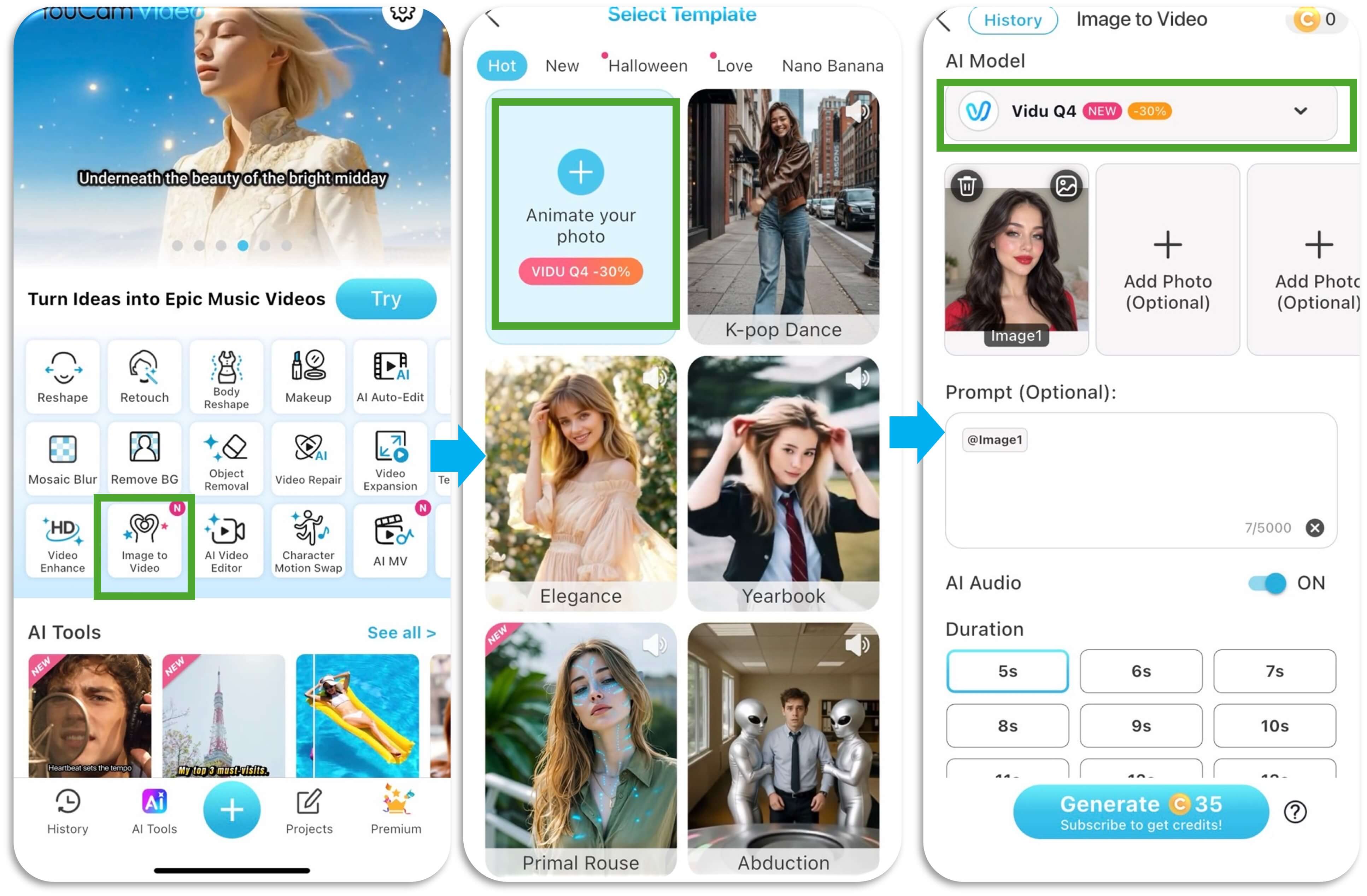
Menus differ slightly from app to app. Here's the full flow in YouCam Video:
- Open YouCam Video and tap Image to Video on the home screen.
- On the Select Template screen, tap Animate Your Photo to start from your own image (or browse the HOT, New, and Love tabs for ready-made ideas).
- Choose the photo you want to bring to life.
- Open the AI Model dropdown and select Vidu Q4 — look for the NEW tag and "Up to 4K, fluid motion & rich detail."
- Describe the motion or scene you want in the prompt box. Leave Enhance Prompt on if you'd like the app to enrich a short idea into a more detailed direction.
- Pick a Duration — 5s, 10s, or 15s.
- Tap Generate. Your finished clip is saved to History, where you can find it again any time.
A Peek Inside the App
What Makes Vidu Q4 Different
Realistic lighting and true-to-life skin
Vidu Q4 Preview reworks how light behaves — from big, scene-level lighting down to fine light-and-shadow detail — with physically plausible lighting and naturally detailed textures. Watch the wet asphalt and car paint in the clip above: reflections and highlights stay believable as the camera moves. For portraits, that same realism keeps makeup, hair color, and skin tone true-to-life instead of turning waxy or flat.
Ultra-HD: up to 4K with 10-bit color
The model adds new 2K and 4K output alongside 540p–1080p, plus what Vidu calls industry-leading 10-bit color depth. In practice that means smoother color transitions and more detail held in shadows and highlights — so gradients like a sunset sky or a soft blush don't band.
Camera work that feels directed
Long camera moves and shot transitions are noticeably smoother, closer to the feel of live-action footage. Push-ins, pull-outs, pans, and tilts look natural, and characters stay more consistent across angles and cuts.
Big motion that stays stable
Turns, head whips, chases, dancing, even group movement — Vidu Q4 Preview is built to keep large, fast motion stable instead of smearing or warping the subject mid-move.
Emotion, performance, and sound
Characters act with more nuance: richer micro-expressions, layered emotion, and better dialogue and lip-sync accuracy in multi-character scenes. Paired with AI Audio, a single portrait can become a short scene with real presence.
Styles beyond photorealism
Vidu Q4 Preview supports a range of artistic styles — pixel art, clay, Y2K, game CG, anime, and photorealism — so the same photo can become a glossy fashion clip or a playful stylized animation, depending on your prompt.
Ideas to Try with Vidu Q4
- Product hero shot — Restyle a product photo in YouCam Perfect, then add a slow, cinematic orbit with Vidu Q4.
- Glam reveal — Finish a full-glam look in YouCam Makeup and animate a slow push-in with soft studio light shifting across your face.
- Old photo, new life — Restore a blurry or faded photo in YouCam Enhance, then let Vidu Q4 add gentle, natural motion.
- Mini movie scene — In YouCam Video or YouCam AI Pro, direct a short multi-shot scene like the race-track and turntable clips above.
- Stylized edit — Turn a portrait into a clay, anime, or Y2K-style animated clip for something fun to post.
Why Try Vidu Q4 Preview in YouCam Apps
- No editing skills needed — Photo in, cinematic clip out, all from your phone.
- Pro-level output — Up to 4K and 10-bit color means clips that hold up on any screen.
- Use the app you already love — Edit, try on, enhance, or generate in your favorite YouCam app, then animate the result without switching tools.
Try It Now
Your photos already tell a story — Vidu Q4 Preview lets them move. Open YouCam Perfect, YouCam Makeup, YouCam Video, YouCam Enhance, YouCam Online Editor, or YouCam AI Pro, choose Vidu Q4, and see what one still frame can become.
FAQ
What is Vidu Q4 Preview?
Vidu Q4 Preview is the latest video generation model from Vidu (Shengshu Technology). It upgrades lighting and visual aesthetics, adds 2K/4K output with 10-bit color, and improves camera direction, motion stability, prompt following, and character performance.
Which YouCam apps support Vidu Q4 Preview?
YouCam Perfect, YouCam Makeup, YouCam Video, YouCam Enhance, YouCam Online Editor, and YouCam AI Pro.
Where do I find Vidu Q4 Preview?
Vidu Q4 is available in YouCam Perfect, YouCam Makeup, YouCam Video, YouCam Enhance, YouCam Online Editor, and YouCam AI Pro. In YouCam Video, for example, tap Image to Video on the home screen, choose Animate Your Photo (or a template), then open the AI Model dropdown and select Vidu Q4.
What resolution does Vidu Q4 Preview support?
Vidu Q4 Preview supports output up to 4K, and it's labeled 4K in the YouCam apps model picker.
How long can my video be?
In YouCam apps you can choose 5, 10, or 15 seconds before generating. Available lengths may vary by app.
Does Vidu Q4 Preview add sound to my video?
Yes — Vidu Q4 Preview is tagged with AI Audio in the model picker.
Can I use other models too?
Yes. In YouCam apps, the AI Model dropdown also lists other options, including earlier Vidu models (such as Vidu Q3 Pro and Vidu Q3 Turbo) and Wan 3.0, so you can compare results.
Is Vidu Q4 Preview free to use?
In YouCam apps, generating a video uses YouCam coins; the cost is shown on the Generate button before you confirm.



