Author:



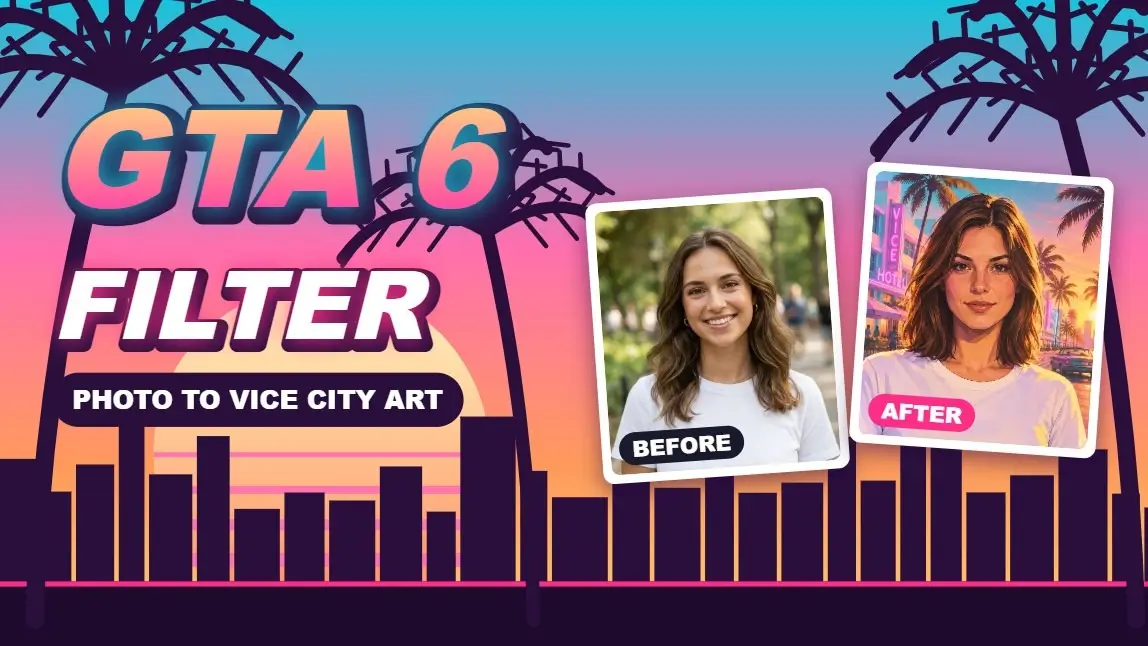
GTA 6 is out, and the fastest way to join the fun is to turn your own photos into Vice City game art: pastel art deco hotels, neon-soaked streets and a backlit sunset behind you. A GTA 6 filter is simply an AI style transfer that restyles a photo with that look.
This guide shows how to make a GTA 6 style photo with the AI Image to Image feature in YouCam AI Pro on your phone, or in the YouCam Online Editor on desktop. It also gives you six copy-paste prompts that open with the prompt already filled in, so you never have to write one yourself. Want the classic loading-screen portrait trend instead? Read our GTA filter guide.

Example: a demo portrait (left) and its GTA 6-style result (right) made with the AI Image to Image feature.
Key Takeaways
- 🎮 The look: turquoise, pink, orange and gold light, neon spill, humid haze and strong silhouettes.
- 📱 On mobile: use AI Image to Image in YouCam AI Pro. 💻 On desktop: use the YouCam Online Editor links below.
- ✍️ No typing: six ready-made GTA 6 style prompts, each with a one-click link.
- 🧑 Best input: a clear, front-facing, well-lit photo of one person.
- ⚠️ Fan-style effect: not affiliated with or endorsed by Rockstar Games or Take-Two.
What makes a photo look like GTA 6?
Coverage of the trailers keeps coming back to the same ingredients: a saturated palette of turquoise, pink, orange and gold, scenes backlit by sunsets, neon-soaked nightlife and sun-bleached suburbs, as Creative Bloq's trailer analysis describes. The game's fictional Florida, Leonida, also gives you easy scene ideas, from Vice City's pastel hotels to the Leonida Keys and the Grassrivers wetlands.

Another demo portrait before and after the GTA 6-style transformation.
| Element | What the style looks like | Words to put in your prompt |
|---|---|---|
| Palette | Saturated turquoise, pink, orange and gold | turquoise, pink, orange and gold color grading, bold saturated colors |
| Light | Low sun behind the subject, glowing edges | golden-hour backlighting, backlit sunset |
| Night | Neon signs reflecting on wet streets | neon spill, rain-slick asphalt, cobalt sky |
| Mood | Hazy air, strong silhouettes | humid haze, strong silhouettes, cinematic |
| Setting | Art deco hotels, palm trees, docks, wetlands | Vice City, Leonida Keys, Grassrivers |
How to turn your photo into GTA 6 style with YouCam AI Pro
- Open YouCam AI Pro on your phone and choose the AI Image to Image feature.
- Upload a clear, front-facing photo of yourself.
- Paste one of the prompts from the table below, and add: keep my face, hair and outfit the same.
- Generate the image, then compare it with your original.
- Try another prompt, then save or share your favorite.

A third demo portrait, restyled with a Leonida Keys prompt.
On desktop, the prompt links in the next section open the YouCam Online Editor's AI Art Generator with the prompt already filled in. Those links generate a new image from the prompt, so use the mobile steps above when you want to restyle your own photo.
6 copy-paste GTA 6 style prompts
| Style | Prompt | Try it on desktop |
|---|---|---|
| Vice City Sunset | Stylized video game key art of a stylish young person leaning on a pastel pink convertible on a neon-lit Vice City beachfront boulevard, golden-hour backlighting, turquoise sky fading to orange and gold, palm tree silhouettes, art deco pastel hotels, humid haze, bold saturated colors, GTA 6-inspired cover art, cinematic composition | Open this prompt |
| Neon Night Drive | Stylized video game key art of a person at the wheel of a sky-blue muscle car on a rain-slick Vice City street at night, cobalt sky, pink and cyan neon signs reflecting on wet asphalt, headlight glare, strong silhouettes, neon spill, humid haze, saturated cinematic color grading, GTA 6-inspired promotional art | Open this prompt |
| Leonida Keys Beach Day | Stylized video game key art of a carefree person on a sun-bleached Leonida Keys dock, turquoise shallow water, speedboat, palm trees, pink art deco beach bar, backlit golden sun with lens flare, sun-bleached colors, glamorous summer mood, GTA 6-inspired loading screen artwork, bold saturated palette | Open this prompt |
| Loading Screen Poster | GTA 6-inspired loading screen poster: a confident stylish character posed in the foreground with a Vice City skyline, palm trees and a pink-orange sunset behind them, bold graphic outlines, high contrast, vibrant saturated colors, painterly digital illustration, dramatic backlighting, no text | Open this prompt |
| Social Media Selfie | Stylized video game character taking a selfie on a Vice City boardwalk at golden hour, phone-camera framing, social-media style, neon storefronts, pastel art deco hotels, sunset haze, flashy streetwear, saturated turquoise pink and gold color script, GTA 6-inspired in-game cinematic look | Open this prompt |
| Grassrivers Airboat | Stylized video game key art of a person on an airboat gliding through Leonida Grassrivers wetlands at dusk, humid olive-green sawgrass, dark mangrove shadows, hazy orange sun backlighting, silhouettes, birds, cinematic haze, expressive lighting, GTA 6-inspired promotional art | Open this prompt |
Tips for better GTA 6 filter results
| Tip | Why it helps |
|---|---|
| Start with a sharp, front-facing photo | A clear face gives the AI more to hold on to, so the result still looks like you. |
| Say what must stay the same | Adding keep my face, hair and outfit the same reduces unwanted changes to clothes and pose. |
| Pick one setting per prompt | Vice City, the Keys and the Grassrivers each have their own palette, so mixing them muddies the look. |
| Always compare with your original | AI edits can re-render a slightly different face or expression, so check every result before sharing. |
Try the GTA 6 filter now
Pick a prompt, run it, and share your Vice City version.

AI Image & Video Generator
Turn text into GTA Character instantly.
Supports Text-to-Image & Image-to-Image.
GTA 6 Filter FAQs
What is a GTA 6 filter?
It is an AI effect that restyles a photo with the look of GTA 6: saturated colors, golden-hour light, neon and Vice City scenery.
Is this the official GTA 6 filter?
No. It is a fan-style effect inspired by the game's look and is not affiliated with or endorsed by Rockstar Games or Take-Two Interactive.
Can I make a GTA 6 style photo on desktop?
Yes. The prompt links in this guide open the YouCam Online Editor's AI Art Generator with the prompt filled in. To restyle your own photo, use AI Image to Image in YouCam AI Pro on mobile.
What kind of photo works best?
A clear, well-lit, front-facing photo of one person. Avoid heavy filters, sunglasses and very small faces.
Can I change the prompts?
Yes. Swap the setting, time of day or colors, for example Neon Night Drive for a night-time look, and keep the instruction to preserve your face.