Author:


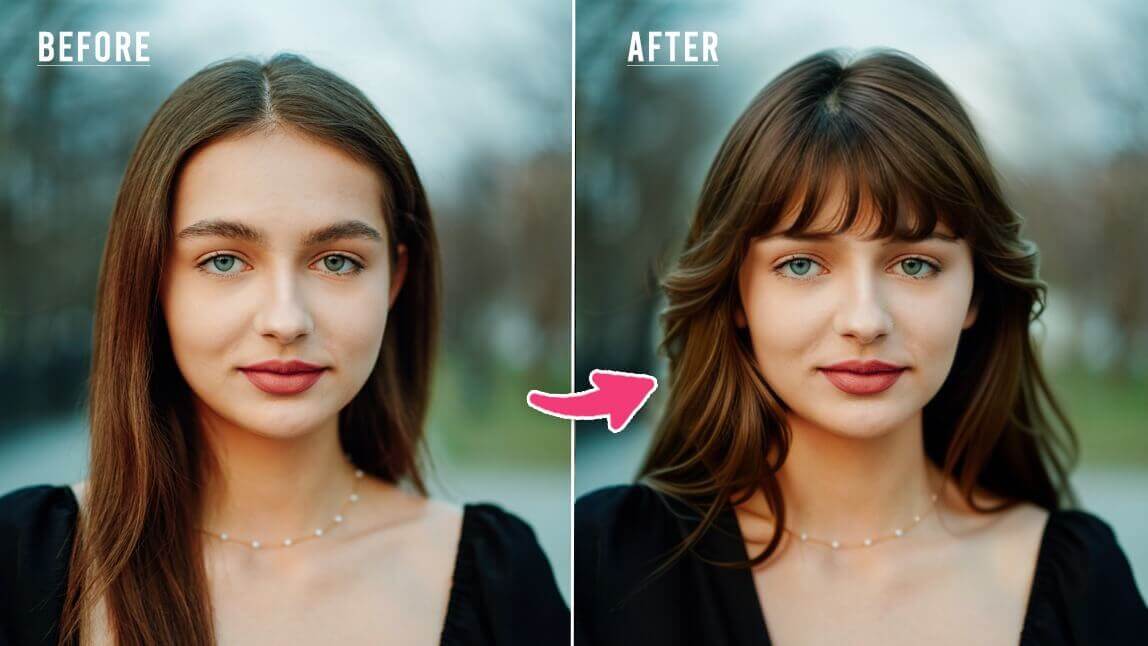
For a free, realistic hairstyle try-on, YouCam Makeup came out on top of the 12 apps compared in this guide. It is AI-powered, covers 60+ men's and women's styles on iOS and Android, and lets you try hair colors too. If you would rather not install anything, the YouCam Online Editor does the same job in your browser.
Changing your hairstyle no longer has to be a gamble.
With AI hairstyle apps, you can try on hairstyles with your picture for free. Hair try-on apps like YouCam Makeup use advanced AI and AR technology to simulate a realistic hairstyle and hair color change so you can see what suits you before committing.

▲ YouCam Makeup is one of the best apps for virtual hairstyle try-on ▲
What Makes a Great Virtual Hairstyle Try-On Experience?
Not all AI hairstyle try-on tools deliver realistic results. Some simply place a wig-like filter on your selfie, making the haircut look unnatural and difficult to imagine in real life.
The best virtual hairstyle simulators use advanced AI technology to create seamless, realistic previews so you can confidently explore new styles before visiting the salon. Here are the key features that make a great AI haircut simulator:
Realistic AI Hair Simulation
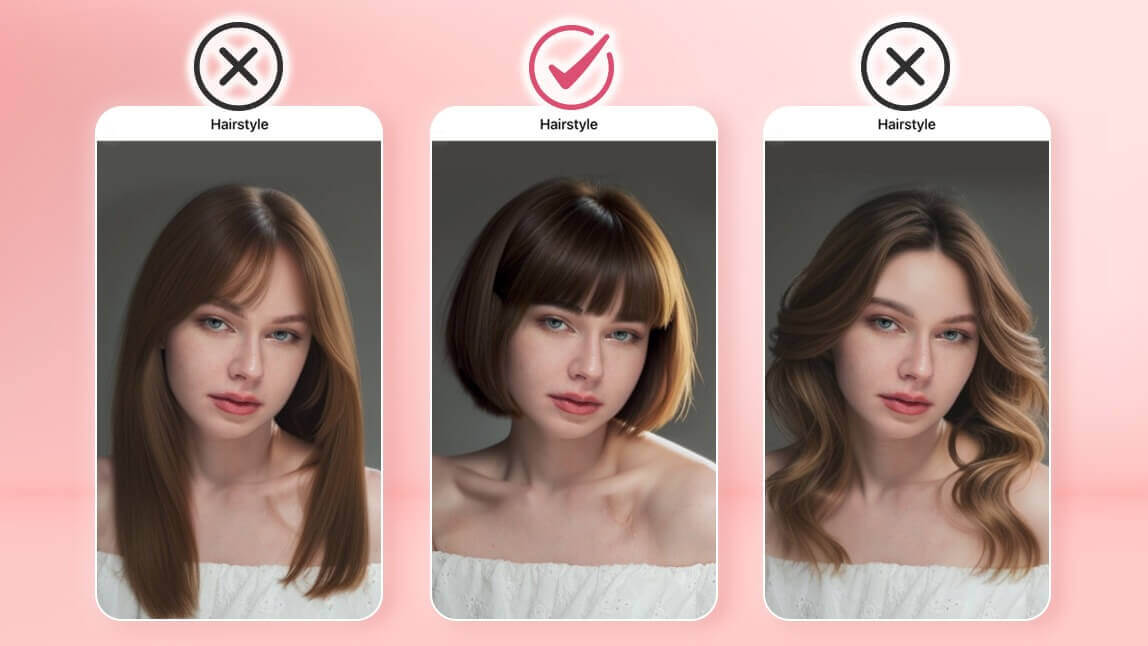
The most important feature of a good AI hairstyle changer is realism. A high-quality tool should adjust the haircut to match your face shape, natural hair texture, and lighting conditions. The hairstyle should blend naturally with your photo, without awkward edges or obvious overlays, so the result looks like a real haircut rather than a digital wig.
Easy and Intuitive to Use
A great virtual hairstyle try-on app should make experimenting with haircuts simple. Whether you're uploading a selfie or using a live camera mode, the process should take only a few taps. A clean, user-friendly interface allows you to quickly browse and try different styles without dealing with complicated editing tools.
Wide Range of Hairstyles and Hair Colors
The best haircut simulator apps offer plenty of options to explore. From trendy pixie cuts and layered shags to sleek bobs and long waves, variety helps users find a style that suits them. Color options are equally important, letting you test balayage, highlights, or bold shades like platinum blonde before making a real change.
Boosts Confidence Before Your Salon Visit
A high-quality AI hairstyle try-on experience should leave you feeling confident about your next haircut. When the results look natural and accurate, you can easily decide which style suits you best—making your salon appointment less stressful and more exciting.
How I Tested These Hair Try On Apps
To find the best hairstyle simulator, I tested 12 popular hair try on tools across iOS, Android, and online platforms. I uploaded clear front-facing selfies, side-angle portraits, and different hair types to see how each app performed in real-world scenarios, and evaluated each hairstyle app based on four key criteria:
Style Variety:
I checked how many hairstyles and lengths were available, including short, medium, long, bangs, and trendy cuts.
Accuracy and Flexibility:
I tested how well the AI mapped hairstyles onto my head shape, adjusted to different angles, and handled complex hairlines or messy hair.
Visual Quality:
I compared how realistic the hairstyles looked, including texture, shadows, and blending with lighting in the original photo.
Hair Color Realism:
I tried multiple hair colors in each app to see how natural the shades looked and whether highlights and depth were preserved.
I also reviewed real user feedback from app stores, forums, and review platforms to validate my hands-on experience and identify common pros and cons reported by users.
Comparison of Top Free Hairstyle Apps (iOS, Android, Online)
| App | OS | AI Powered | Available Hairstyles |
| YouCam Makeup🥇 | iOS / Android | ✅ | 60+ (female/male) |
| PhotoDirector | iOS / Android | ✅ | 60+ (female/male) |
| Hairstyle Try On | iOS | ❌ | 800+ (female/male) |
| Hairstyle Try On: Bangs & Wigs | Android | ❌ | 600+ (female/male) |
| Your Perfect Hairstyle for Men | iOS | ❌ | 400+ (male) |
| FaceApp 🥉 | iOS / Android | ✅ | 20+ (female/male) |
| Perfect365 | iOS / Android | ❌ | 30+ (female) |
| Hair Makeover - Modiface | Android | ❌ | 600+ (female/male) |
| BeautyPlus | iOS / Android | ✅ | 8+ (female) |
| YouCam Online Editor🥈 | Online Tool | ✅ | 60+ (female/male) |
| Fotor | Online Tool | ✅ | 10+ (female/male) |
| Style My Hair | iOS / Android | ✅ | Color-focused (L’Oréal shades) |
Which hairstyle app is best for what?
- Realistic AI try-on (men and women): YouCam Makeup, with 60+ styles and hair colors on iOS and Android.
- No install needed: YouCam Online Editor, an AI try-on in your browser.
- The biggest style library: Hairstyle Try On on iOS (800+ styles), though it is not AI-powered.
- Men-only styles: Your Perfect Hairstyle for Men on iOS (400+ styles, not AI-powered).
- Color-focused try-on: Style My Hair, built around hair color shades.
Best Apps to Try On Hairstyles with Your Picture for Free
If you're on the lookout for apps to try hairstyles on your picture, here are the 10 best tools that stood out:
- YouCam Makeup (Android & iOS)
- PhotoDirector (Android & iOS)
- BeautyPlus (Android & iOS)
- FaceApp (Android & iOS)
- Hairstyle Try On (iOS)
- Hairstyle Try On: Bangs & Wigs (Android)
- Your Perfect Hairstyle for Men (iOS)
- Hair Makeover - Modiface (Android)
- Perfect365 (Android & iOS)
- Style My Hair (Android & iOS)
YouCam Makeup

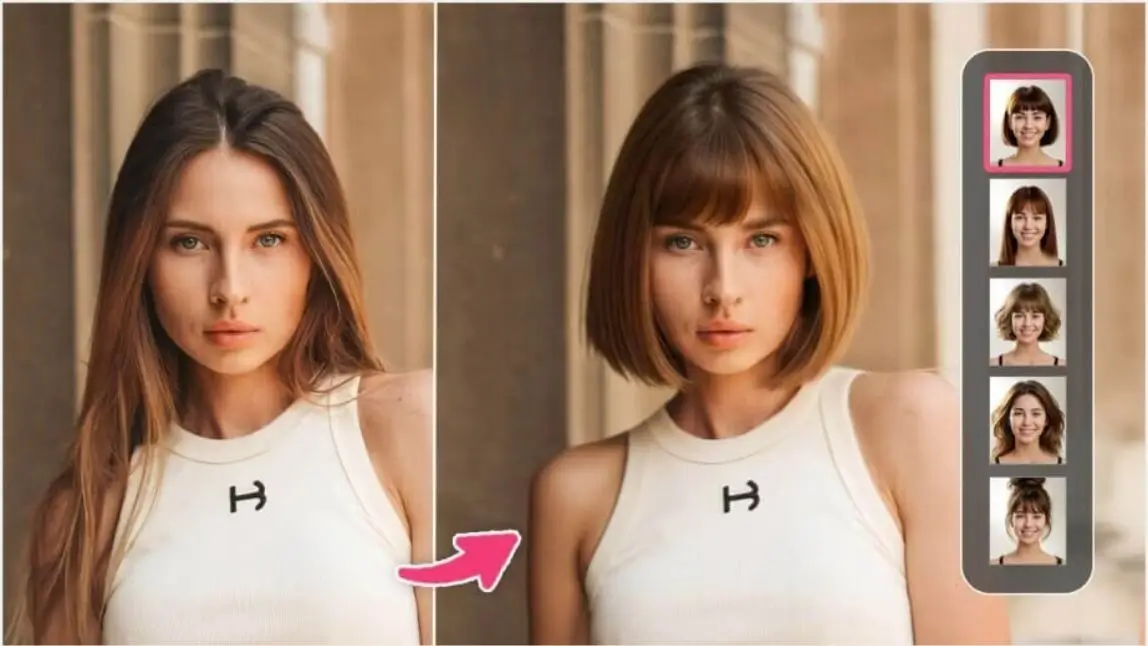
YouCam Makeup is one of the best free hair try on apps I tried offering 60+ hairstyles for women and men. You can test hairstyles on your face for free after sign up and explore trendy looks including long and short hairstyles, bob cuts, pixie cuts, and bangs.

▲ YouCam Makeup also comes with more than 150 hair color filters to try on.
Style Diversity: ★★★★☆
YouCam Makeup offers a solid range of hairstyles including long waves, straight cuts, bobs, and layered looks. There are also trendy options like curtain bangs and bold color styles.
Accuracy & Flexibility: ★★★★★
The app adjusts styles with impressive accuracy, even when your original hairstyle is complex. It maps hair naturally around the face and works well at different angles.
Visual Quality: ★★★★★
Hair textures look crisp and blend beautifully with the lighting in your photo. The result feels lifelike, with sharp detail and realistic depth that enhances overall photo quality.
Color Application: ★★★★☆
Hair colors appear vivid and well-placed, with good balance in tone and shadow. Some lighter hues may soften fine detail, but overall the color matching is strong.
✨Pro Tips: Using YouCam Makeup for the Most Realistic Hair Try-On
For the best results in YouCam Makeup, take or upload a clear selfie with good lighting and a simple background. This helps the AI detect your face shape and hairline more accurately, making the virtual hairstyle look more natural.
✍️ User Reviews
Reddit users often mention YouCam Makeup when looking for a quick and easy way to test out new hairstyles. Many find the hairstyle try on feature fun to use and a helpful starting point for exploring different cuts and colors without the commitment of a salon visit.
PhotoDirector
PhotoDirector is a comprehensive photo editing app that harnesses the power of AI technology to enhance your selfies. Instantly try on over 50 hairstyles using built-in templates, or switch to the custom section to create your ideal look — length, color, bangs, and style are all fully customizable!
Style Diversity: ★★★★☆
PhotoDirector offers a variety of hairstyles, ranging from classic bobs to trendy layered cuts, allowing users to change their hairstyle however they like.
Accuracy and Flexibility: ★★★★★
No matter your face shape, the hairstyle fits perfectly and completely replaces your original hair without any visible residue.
Visual Quality: ★★★★☆
The AI-generated hairstyles look natural, with smooth textures and a realistic, healthy shine.
Color Application: ★★★★☆
You can freely choose your hair color—each shade is vivid and designed to match popular trends.
✍️ User Reviews
According to PicWish, PhotoDirector is an AI-powered hairstyle changer that lets you experiment with multiple looks, explore diverse avatar styles, and enhance your photos effortlessly with natural, lifelike results.
BeautyPlus
While BeautyPlus isn’t a dedicated hair try on app, it still offers stylish options like side bangs, straight bangs, and even tools to edit your hair part and hairline.
Style Diversity: ★★★☆☆
While not built solely for hair editing, BeautyPlus offers solid hairstyle tools including options for bangs, part adjustments, and hairline reshaping. However, its variety is more limited than dedicated hairstyle apps.
Accuracy and Flexibility: ★★★★☆
The hairline and part tools work impressively well on most face types and angles. The app responds to detailed touch adjustments, making it flexible for precision edits.
Visual Quality: ★★★★☆
Hair effects appear smooth and clean, blending nicely into selfies. The strands don’t always appear individually detailed, but the overall image looks polished and cohesive.
Color Application: ★★★☆☆
There is no dedicated hair color tool, but color filters can adjust the overall tone of the image. For subtle hair tone changes, it can be useful, but it's not ideal for specific hair dye simulations.
✍️ User Reviews
While not a dedicated hairstyle try-on app, BeautyPlus earns praise from Reddit users for its sleek, user-friendly editing tools ike filters, bangs placement, and hairline adjustments. These features blend smoothly into photos and offer a fun way to play with new looks. However, users warn of performance issues, sudden paywalls on initially free templates, and inconsistent support for textured or curly hairstyles.
FaceApp
FaceApp is an advanced photo editing app, available for Android and iPhone. It allows you to enhance selfies and portraits using various filters and tools, including beard filters, makeup filters, acne removal, and more.
The app offers a hairstyle feature with 12+ female and 9+ male hairstyle options, including bangs styles, options for more volume, long hairstyles and even a hairstyle transfer option.
Style Diversity: ★★☆☆☆
FaceApp includes a handful of standard hairstyles with a mix of long, short, and bangs options. While it covers the basics for both men and women, the variety is limited.
Accuracy and Flexibility: ★★★☆☆
The AI works well on symmetrical, front-facing photos. More complex hairstyles or side angles can result in minor misalignments or less natural looks.
Visual Quality: ★★★★☆
Results are fairly realistic for most styles. FaceApp excels at soft blending and maintaining facial proportions, but some hairstyles can appear slightly artificial.
Color Application: ★★☆☆☆
Hair color filters are limited and occasionally look flat. Highlights and depth are not always accurate, which can reduce realism for bold or unusual colors.
✍️ User Review
FaceApp can be a creative tool but according to Trustpilot reviewers, its hairstyle try-on capabilities have taken a hit in recent updates. Longtime users report that features like face swapping and morphing have disappeared, while the updated hairstyles now appear “cheap” and unconvincing. While FaceApp may still offer fun hairstyle experimentation, but for smooth, reliable results, Trustpilot users suggest it falls short.
Hairstyle Try On
- App Store Rating: 4.1
- Available for: iOS
Hairstyle Try On is a virtual hairstyle app that lets you test different haircuts, colors, and styles on your face before making a real change. It offers 36 free hairstyles in various lengths, plus optional style packages with over 800 hairstyles to explore.
Style Diversity: ★★★★☆
This app gives users access to over 800 total hairstyles through paid packs, with a solid 36 available for free. It covers a wide range of lengths and styles, though some may feel outdated.
Accuracy and Flexibility: ★★☆☆☆
The hairstyles are applied like static overlays rather than adaptive AR. You’ll need to manually position and resize each style, which limits realism and flexibility.
Visual Quality: ★★☆☆☆
Since the app doesn't use smart blending, hairstyles can appear pasted on or out of place. Resolution and detail are decent, but integration with your real hair is minimal.
Color Application: ★★★☆☆
Hair color options are diverse, but results depend on how well you position the hairstyle overlay. Colors sometimes lack shading depth or may not blend well with the base photo.
✍️ User Review
A comment from the Ditchnet forum delivers a candid verdict on popular AI hairstyle try-on apps like YouCam Makeup, Facelab, and the clunkier Hairstyle Try On. The app, though fast and less visually alarming with its color overlays, feels outdated and more like entertainment than a serious stylist tool.
AI Hairstyle Try On・Bangs・Wigs
- App Store Rating: 4.2
- Available for: Android
If you're specifically interested in bangs or wigs, AI Hairstyle Try On: Bangs & Wigs is the perfect app for you.
This app can map bangs or wigs onto your photo or live camera feed, providing a realistic preview of your potential new look. The hair try on app also offers customization options, enabling you to adjust the color, length, and style of the bangs and wigs.
Style Diversity: ★★★☆☆
Focused on wigs and bangs, the app provides a variety of synthetic and natural-looking options. It’s perfect for users who want to try fringe styles or longer wigs.
Accuracy and Flexibility: ★★★☆☆
Hair overlays are placed fairly accurately, especially in front-facing shots. Manual adjustments are needed for best results, and the app lacks smart adaptation to lighting or motion.
Visual Quality: ★★★☆☆
Visuals are clear and usable, but not as high-end as AI-powered apps. Bangs and wigs look good in static images but can appear flat or mismatched under strong lighting.
Color Application: ★★★☆☆
Users can adjust wig or bang color manually, with a decent palette available. That said, shades may sometimes appear less vibrant or too blended depending on the base photo.
✍️ User Review
According to the Chrome-Stats website, the AI Hairstyle Try On – Bangs & Wigs app offers a fun and intuitive way to experiment with hairstyles and color. However, recent user ratings have taken a sharp decline, with the average score falling to 2.5/5. The app also delivers limited hairstyle variety and forces users into manual adjustments rather than leveraging real AI for accurate fitting.
Your Perfect Hairstyle for Men
- App Store Rating: 4.2
- Available for: iOS
Your Perfect Hairstyle for Men offers 300 different male hairstyles to try, letting you experiment with various looks before your next haircut. The app also includes easy-to-use photo editing tools, allowing you to adjust color, contrast, brightness, and saturation for a polished finish.
Style Diversity: ★★★★☆
This app includes an extensive selection of over 300 hairstyles designed for men, from classic fades to trendy undercuts and long styles. It offers plenty of variety to suit different preferences.
Accuracy and Flexibility: ★★☆☆☆
Manual placement tools allow for decent customization. However, styles are not automatically mapped to your head, so achieving a natural fit can take time.
Visual Quality: ★★☆☆☆
The image quality is good, and hairstyles look sharp. However, without auto-blending, hair can sometimes feel pasted on rather than integrated into your photo.
Color Application: ★★★☆☆
You can change hairstyle color, but shades may not adapt dynamically to lighting or original hair tones. Some results look overly tinted or unrealistic.
✍️ User Review
According to a roundup of the 9 Top Free Hairstyle Apps of 2025 by Women Love Tech, Your Perfect Hairstyle for Men earns a solid 4.2 out of 5 rating based on 746 iOS reviews. The app is described as a versatile styling tool tailored for men, featuring over 300 hairstyle options. It caters to a wide range of needs from experimenting with fresh cuts and colors to helping parents find a trendy look for their teen.
Read More: Best Hairstyle App For Men: Discover Virtual Hairstyles & Beard Styles
Hair Makeover
- App Store Rating: 4.5
- Available for: Android
Hair Makeover - Modiface is a hair makeover app that offers a wide variety of short, medium, and long hairstyles. You can test them on a stock model or upload your photo to try hairstyles.
If you want to try hairstyles with your photo, make sure to tie your hair up because the app can't remove your original hair.
Style Diversity: ★★★★☆
Offers a balanced mix of short, medium, and long hairstyles. While there’s no real-time AR, the selection is broad and includes both modern and classic styles.
Accuracy and Flexibility: ★★☆☆☆
Hairstyles don’t adjust automatically to face size or shape. You’ll need to manually fit each style, which can be time-consuming and sometimes imprecise.
Visual Quality: ★★★☆☆
Visuals are clean but basic. Hair overlays lack depth and texture, making them look more like digital stickers than real hairstyles.
Color Application: ★★★☆☆
The color tool offers some flexibility, but results are hit or miss. Colors may not align well with lighting or may appear washed out on lighter hair.
✍️ User Review
According to Women Love Tech, Hair Makeover – ModiFace offers a comprehensive and user-friendly platform for experimenting with various hairstyles. While it provides an extensive library and customization options, the need for manual adjustments and the inability to remove original hair may limit its realism.
Perfect365
Perfect365 is a popular photo editing app with a hairstyle feature offering 28+ styles. Simply open the app, select a photo, and tap "Hair" to explore different cuts, colors, and accessories. Experiment with various lengths and styles to find your perfect look.
Style Diversity: ★★★★☆
With over 28 hair options, Perfect365 balances quantity with quality. It leans toward longer, stylish cuts with some accessories, though short styles are less represented.
Accuracy and Flexibility: ★★★★☆
The AI does a good job of aligning hair to facial features. It works well with most angles and skin tones, with tools available to fine-tune style placement.
Visual Quality: ★★★★☆
The hair effects look polished and detailed, especially on front-facing photos. Hair strands appear soft, and blending with your real features is smooth and natural.
Color Application: ★★★☆☆
Hair color filters apply well, but like many apps, they sometimes lack shading or dimension. Some lighter shades may appear flat or overly bright.
✍️ User Review
With Perfect365, The Right Hairstyles website says that the app is ideal for users looking to experiment with new hairstyles and colors quickly and share their results with friends. While it may not offer the most realistic simulations, its ease of use and social sharing features make it a fun tool for casual experimentation.
Style My Hair (by L'Oréal Professionnel)
Style My Hair is a 3D hair-color virtual try-on app from L'Oréal Professionnel, built specifically for previewing hair color changes rather than full cuts — it's a useful pick if you're deciding on a shade before a salon visit rather than a whole new style.
Style Diversity: ☆☆☆☆☆
This one is color-first: it's light on cut and length options compared to dedicated hairstyle changers, but leans on L'Oréal's own professional color library for shade variety.
Accuracy and Flexibility: ☆☆☆☆☆
Real reviewers report inconsistent performance, including crashes and glitching color previews on some devices — worth keeping expectations modest here.
Visual Quality: ☆☆☆☆☆
Results are strongest on close-up, front-facing selfies; wider shots and side angles are less reliable.
Color Application: ☆☆☆☆☆
This is where the app earns its place on this list — color rendering draws on L'Oréal Professionnel's own shade formulas, a genuine edge over general-purpose hairstyle apps.
✍️ User Review
App Store reviewer PaigeMarM gave it 4 stars: "I'm dying my hair darker next week and I wanted a sneak peak of what it would look like- this app delivered!" Other reviewers were more mixed — MJODAWG reported the app "crashed almost 7 times within the first 10 minutes" while testing color previews, a reminder to save your progress often.
Best AI Hairstyle Changers to Try Hairstyles Online
If you prefer testing hairstyles online or you don't have enough storage space on your phone to download an app you can still try on hairstyles with an online haircut simulator.
YouCam Online Editor AI Hairstyle Changer

- Available for: Online
Want to try on hairstyles for free without downloading an app? YouCam Online Editor lets you virtually try on different hairstyles online from your web browser.
Style Diversity: ★★★★☆
YouCam Online Editor offers a wide variety of over 60 hairstyles for both men and women. From trendy cuts and classic looks to different hair lengths and textures, it provides plenty of options for experimenting with your next style.
Accuracy and Flexibility: ★★★★☆
The AI technology behind YouCam Online works the same as YouCam Makeup and does an excellent job of blending hair features naturally. The hairstyle simulator handles different lighting conditions well and adapts the hairstyle smoothly on your photo.
Visual Quality: ★★★★☆
Hairstyles in YouCam Online Editor look highly realistic, with clear strands and detailed textures. The hair blends seamlessly with the photo’s lighting and shadows, creating a polished and natural appearance.
Color Application: ★★☆☆☆
The online hairstyle changer doesn't have a dedicated virtual hair color try-on tool but it does include a variety of hairstyle options with hair color applied.
✨Pro Tips: Getting the Best Results with YouCam Online Editor
When using YouCam Online Editor, start with a high-resolution photo to ensure the AI can generate clean and detailed hairstyle results. Use the AI hairstyle or hair editing tools to quickly test different cuts, lengths, and colors.
If you're comparing styles, save multiple versions so you can easily see which look suits you best. This makes it simple to visualize different hair transformations and pick the one that complements your face shape and personal style.
✍️ User Review
According to CyberLink, YouCam Online Editor is a valuable tool for those looking to experiment with new hairstyles virtually. Its realistic rendering and user-friendly interface make it a popular choice among users.
Fotor Online Hairstyle Changer
- Available for: Online
Fotor’s AI hairstyle changer is a simple and convenient way to try on new hairstyles right from your browser. You do not need to install anything or sign up to get started. Just upload a photo and let the AI generate different hairstyle looks based on your face.
Style Diversity: ★★★★☆
Fotor offers a good mix of trendy and classic hairstyles to try, including short, medium, and long options. While the number of styles is smaller than some app-based tools, it includes both male and female styles and works well for casual experimentation.
Accuracy & Flexibility: ★★★☆☆
Fotor’s face detection does a decent job with standard selfie angles and well-lit photos. However, it can struggle slightly with messy backgrounds, extreme angles, or elaborate hairstyles. It's best suited for clear, front-facing portraits.
Visual Quality: ★★★☆☆
The hair overlays look soft and smooth but may lack high-detail texture. In some cases, the hairline may appear slightly blurred or misaligned depending on the lighting and original hair.
Color Application: ★★★☆☆
Color options are available, but application can appear flat or overly blended in some areas. Bold shades come through better than softer hues, and details like highlights or depth may be lost in lighter colors.
✍️ User Review
The Data Scientist tried Fotor and had a positive experience with its AI hairstyle feature. But while some users appreciate its ease of use and variety of styles, it's important to be aware of potential inconsistencies in results and to carefully manage subscription settings to avoid unexpected charges.
Best Free AI Hairstyle App for Virtual Hair Try On
With YouCam Makeup, you get more than just hairstyle try-on. You can get a true virtual salon experience powered by advanced AI.
Unlike other virtual hairstyle apps, YouCam Makeup combines hairstyle try on, hair color change, and beauty filters all in one easy to use platform. Try it for yourself and discover your ideal hairstyles.