


 Author: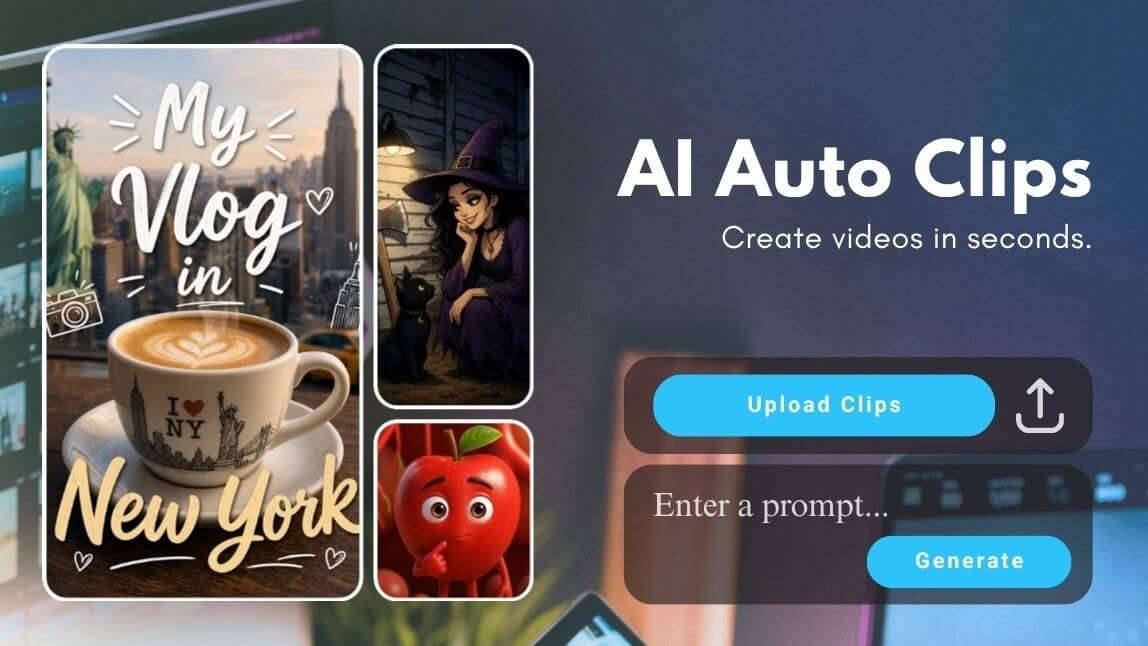
Video editing is often the most time-consuming part of content creation. If you've ever spent hours trimming footage, choosing highlights, adding music, and arranging clips, you're not alone.
Fortunately, today's AI-powered auto video editors can handle much of the editing process automatically. Instead of manually piecing together every scene, an automatic video editor can analyze your footage, select key moments, add transitions, generate narration, and create a polished video in minutes.
One of the newest tools leading this trend is YouCam Video and its AI Auto Clips feature, designed to transform raw footage into ready-to-share videos with minimal effort, which can automatically edit footage, generate narration, and add background music based on your chosen style and prompt.
What Is an Auto Video Editor?
An auto video editor uses artificial intelligence to automate repetitive editing tasks such as:
- Selecting the best clips
- Arranging scenes into a logical sequence
- Trimming unnecessary footage
- Adding transitions
- Generating captions
- Creating voiceovers
- Matching background music
- Optimizing videos for social media formats
Instead of starting with a blank timeline, creators can upload footage and let AI build a first draft automatically. This is especially useful for vlogs, travel videos, family memories, event recaps, and even social media content.
Why Creators Are Switching to Automatic Video Editors
Auto Video Editor vs Manual Editing
| Feature | Traditional Editing | AI Auto Video Editor |
| Editing Time | May Take Hours | In Minutes |
| Learning Curve | Steep | Beginner-friendly |
| Clip Selection | Manual | Automatic generation |
| Music Selection | Manual | Automatic generation |
| Narration | Manual | Automatic generation |
| Story Structure | User-created | AI-assisted |
| Social Media Optimization | Requires editing skills | Easy content repurposing |
Traditional editing can take hours for a single short video. For most casual creators and social media users, automatic video editing offers the fastest path from raw footage to published content. Benefits include:
#1 Save Hours of Editing Time
Instead of editing for hours, creators can upload one long video and let AI pull out the best moments automatically. AI automatically organizes clips, removes repetitive work, and creates a cohesive story from raw footage.
#2 No Professional Skills Required
Not everyone knows how to use advanced editing software. AI video cut apps simplify editing so even beginners can create polished videos without learning advanced editing software.
#3 Consistent Content Creation
Most creators struggle with consistency because editing burns them out. For influencers, marketers, and small businesses, automatic editing helps maintain a steady stream of content.
#4 Better and Faster Storytelling
Modern AI editors analyze scenes, pacing, and video structure to create more engaging narratives. Research into automated video highlight extraction shows AI systems can identify important moments and meaningful events from long videos.
Best Use Cases for an Auto Video Editor
If you want a beginner-friendly AI video cut app that works fast and doesn’t feel overwhelming, YouCam Video is one of the easiest options to start with. The standout feature for creators is AI Auto Clip.

Here are some situations when you can try it out:
#1 Travel Memo
Travel videos often consist of dozens of clips captured throughout a trip—from breathtaking landscapes and local cuisine to unforgettable adventures. While these moments are worth sharing, manually organizing and editing them into a cohesive story can be time-consuming.
Using an auto video editor like YouCam Video's AI Auto Clips, you can instantly transform scattered travel footage into a polished vlog. The AI automatically selects highlights, arranges scenes in a logical sequence, and adds narration and music to create a compelling travel story ready for social media.
#2 Daily Vlog
Graduation marks a major milestone filled with emotional moments, memorable celebrations, and achievements worth preserving. However, turning hundreds of photos and videos into a meaningful recap often requires significant editing effort.
An automatic video editor can simplify the entire process. With AI Auto Clips, you can upload graduation footage and let AI organize key moments into a cinematic highlight reel, helping you create a professional-looking keepsake without advanced editing skills.
#3 Must visit Destination Guides
Family vacations, birthdays, anniversaries, and holiday gatherings create memories you'll want to revisit for years to come. Unfortunately, many of these precious moments remain scattered across phones and cloud storage without ever being compiled into a video.
With AI video editing, you can quickly turn family photos and clips into a beautifully edited montage. AI Auto Clips automatically creates smooth transitions, organizes footage into a story, and adds suitable background music, making it easy to preserve and share your favorite memories.
#4 Event Recaps
Large events often generate hours of footage that can be difficult to review and edit manually. Weddings, conferences, corporate gatherings, sports events, and school celebrations all require significant effort to turn into engaging recap videos.
AI Auto Clips functions as a powerful video highlight generator, automatically identifying memorable moments and organizing them into a polished event recap. The result is a professional-quality highlight video that can be shared with attendees, clients, or online audiences in just a few clicks.
#5 Content Creator Highlights
For creators, producing engaging content consistently can be challenging when editing takes longer than filming. Whether you're creating lifestyle content, tutorials, behind-the-scenes footage, or product reviews, editing can quickly become a bottleneck.
An AI video maker like AI Auto Clips helps accelerate content production by automatically transforming raw footage into ready-to-publish videos. Instead of spending hours on the editing timeline, creators can focus on recording while AI handles the storytelling and video assembly.
How to Use AI Auto Clip in YouCam Video
Follow these steps to create your videos in seconds!
Step 1: Download YouCam Video
Download YouCam Video on your mobile device.
Step 2: Access 'AI Auto Clip' Feature
Tap 'AI Auto Clip' on the home page.
Step 3: Select and Upload Your Videos
Import your videos. AI will automatically scan your footage and identify moments that work well as short clips.
Step 4: Add a Prompt, Pick a Voice & Adjust Settings
Describe the story you want AI to create. For example:
Create an inspiring travel vlog showing the highlights of my trip to Japan.
You could also pick a voice-over for narrative (can be turned off).
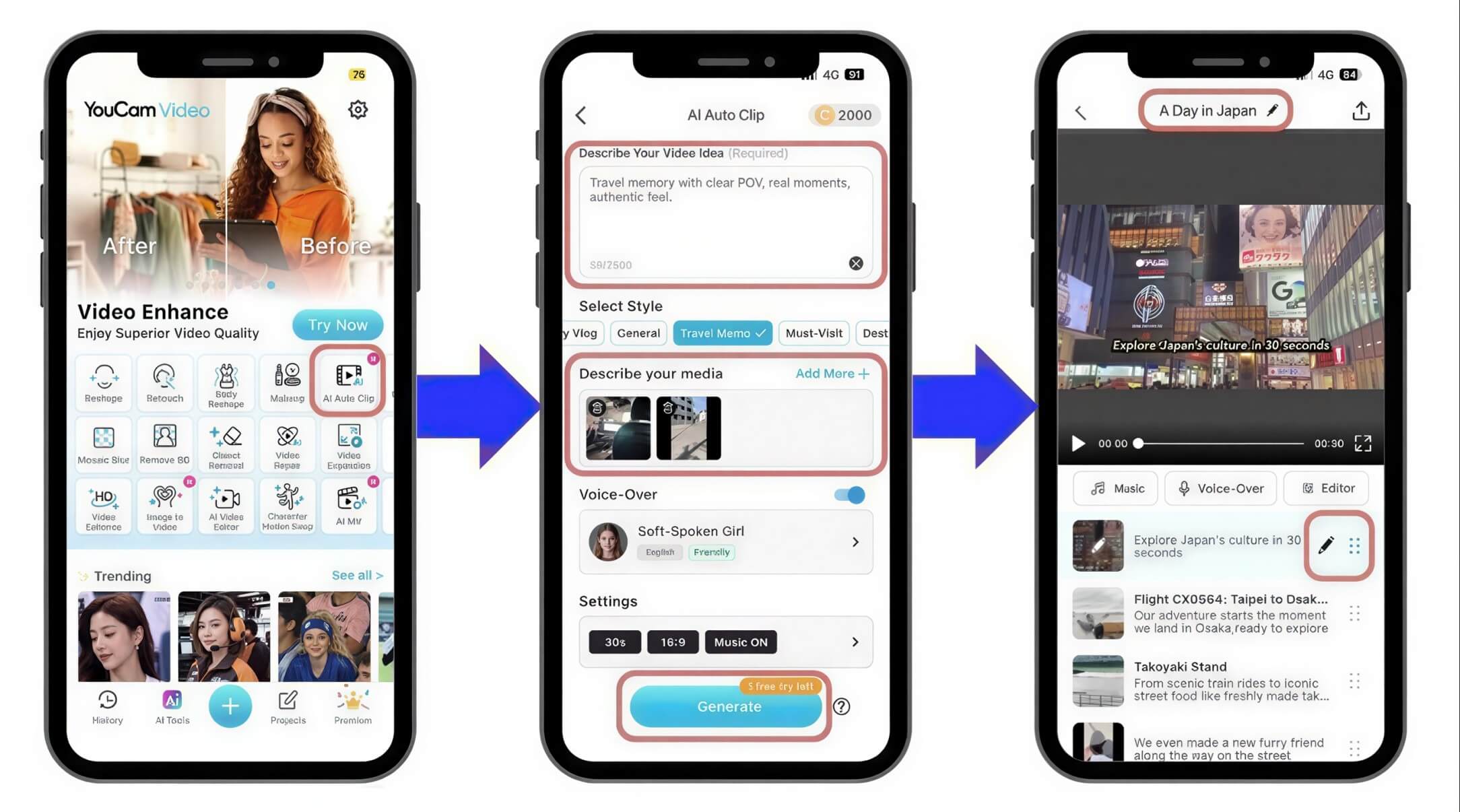
Step 5: Review and Save the Clips
Export your finished clip and upload directly to social media.
Final Thoughts for YouCam Video AI Auto Clips
AI video cut technology is changing the way creators edit content. For beginners especially, tools like YouCam Video make the process much less intimidating. Its AI Auto Clip feature helps simplify short-form editing so creators can focus more on ideas and storytelling instead of spending hours inside editing timelines.
Go try making high production videos now!
What is the best auto video editor?

The best auto video editor depends on your workflow, but tools that can automatically edit footage, create narratives, generate voiceovers, and add music provide the most complete experience. YouCam Video's AI Auto Clips feature combines all of these capabilities into a single workflow.
Can AI edit videos automatically?
Yes. Modern AI video editors can analyze footage, select highlights, arrange scenes, generate captions, create voiceovers, and add music automatically.
Are automatic video editors good for beginners?
Absolutely. Automatic video editors eliminate many technical editing tasks, making video creation accessible to users without professional editing experience.
Can AI create a vlog from raw footage?
Yes. AI Auto Clips in YouCam Video is specifically designed to transform raw videos and photos into polished vlog-style content automatically. Users simply upload media, choose a style, and enter a prompt.
Are AI video cut tools good for TikTok?
Absolutely. AI video cut apps are especially popular among TikTok creators because they help speed up short-form editing.



