



 Author:
If you've spent any time with Suno, you already know why people ask whether something better exists. It's fast, the vocals are good, and v6 made the output more polished. But 2026 also changed what you actually get: free Suno songs can be played and shared but not downloaded anymore, Udio has shut off downloads on every plan, and the label lawsuits are still going. "Better" now depends on what you're trying to finish.
I compared Suno with the three alternatives people mention most — Udio, Mureka, and YouCam Muse — on the things that matter once the novelty wears off: sound quality, how much control you get, what the free tier really lets you keep, and what you can do with a song after it's made. Here's where I landed.
Is there an AI Suno Alternative?
For pure audio quality on a one-shot prompt, not really — Suno is still the most consistent generator I've used, and most roundups rank it first for good reason. But "better than Suno" usually means "better for what I need," and there are three cases where another tool wins:
- You want a video, not just a song. Suno stops at audio. YouCam Muse takes the same song and directs a music video around it.
- You write your own lyrics and want the melody to follow them closely. Mureka's lyrics-first workflow is built for that.
- You mostly create on your phone. Suno has a mobile app, but YouCam Muse is designed phone-first, with genre, mood and vocal chips instead of a long prompt.
Suno vs. Udio vs. Mureka vs. YouCam Muse at a glance
Pricing and features below are what each company listed as of September 2026. They change often, so check the official pricing page before you subscribe.
| Tool | Free plan | Paid plans | Downloads | Stand-out strength | Best for |
|---|---|---|---|---|---|
| Suno (v6) | 50 credits/day, non-commercial; play and share only | Pro $10/mo, Premier $30/mo | Paid plans only, with a monthly allowance | Most polished full songs; Suno Studio for editing | Best overall song quality |
| Udio | 10 credits/day (up to 100/mo) | Standard $10/mo, Pro $30/mo | Disabled on all plans since Oct 2025 | Interesting textures and remixing inside the platform | Exploring ideas you don't need to export |
| Mureka (V9.5) | Limited free generations for testing | Basic ~$8/mo, Pro ~$24/mo (billed annually) | Yes, on paid plans | Lyrics-first control; commercial rights on paid plans | Songwriters who start from their own words |
| YouCam Muse | Free credits to make one AI Song | In-app coins / credits | Share or download from the app | Song + AI music video in one flow | Creators who want something to post, not just a file |
Sources: Suno release notes and pricing, Udio and Mureka plan pages, and independent reviews (see links in the sections below).
1. Suno: still the one to beat
Suno's v6 generation arrived on September 9, 2026, in three flavors: v6 (the reliable flagship), v6-wild (more experimental) and v6-mini (faster, and the only one on the free tier). The headline additions are partial song editing, mashups and audio isolation, and it follows v5.5's Voices and Custom Models features from March 2026, which let Pro and Premier users build songs from their own voice or catalog. (Suno release notes)
The catch is the free tier. Since the Warner Music settlement and the move to licensed models, free users can play and share songs but can't download them. Paid plans come with a monthly download allowance. If you were used to grabbing a free MP3 and dropping it into a video editor, that workflow is gone.
My take: if you care most about how the song sounds and you're happy to pay, Suno Pro is still the safest bet. If you're on the free plan, it's now more of a sketchpad.
2. Udio: great ideas, nowhere to take them
Udio's sound has always had its fans, especially for textured, less "radio-ready" results. But after its settlements with Universal Music Group (October 2025) and Warner Music Group (November 2025), Udio disabled audio, video and stem downloads on every plan while it rebuilds as a licensed platform. (Music Business Worldwide)
My take: fun to explore on the free credits, but I wouldn't pay for Udio right now if you need a file you can use somewhere else.
3. Mureka: the lyrics-first alternative
Mureka, from Kunlun Tech, released its V9.5 model on August 31, 2026, with a focus on smoother vocal phrasing and more consistent song structure. Its paid plans include commercial rights, and its workflow leans toward people who arrive with lyrics already written. (Mureka V9.5 announcement)
My take: the strongest "Suno alternative" if you're a songwriter first and a prompt-writer second.
4. YouCam Muse: the alternative for when you need a music video too
YouCam Muse approaches the problem from the other end. Its AI Song tool writes a full track from a short idea or your own lyrics, and then — this is the part Suno doesn't do — the same song goes straight into AI Music Video, which casts a performer, builds scenes and cuts them to the beat.
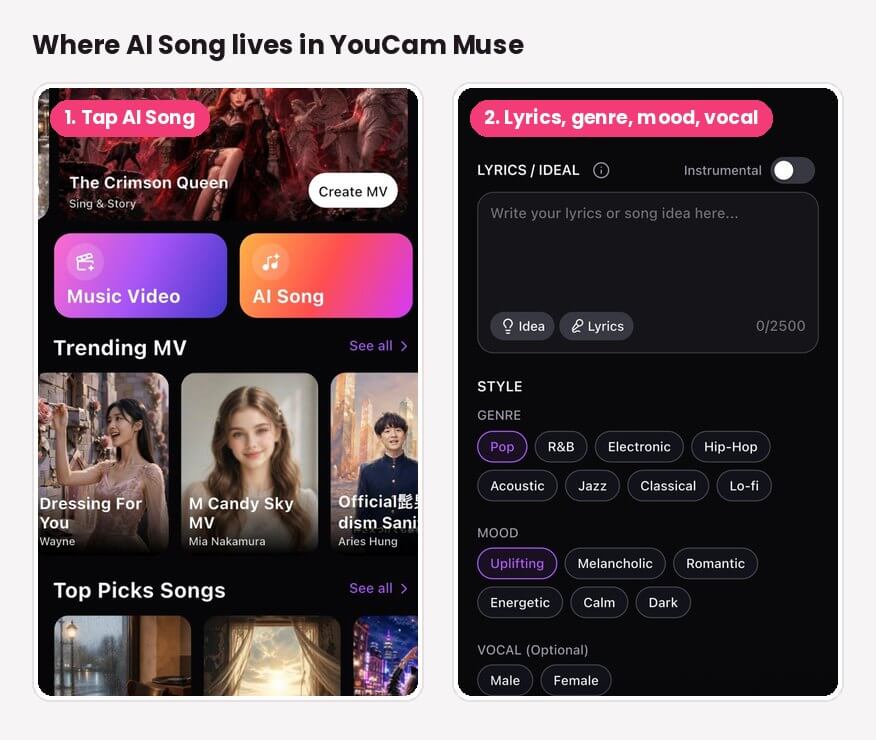
Here's how the song side works:
- Open AI Song from the home screen and pick Simple (one quick description) or Custom (full controls).
- Write your idea or lyrics in the Lyrics / Idea box — up to 2,500 characters. Tap Idea for a starting point or Lyrics to let AI draft the words.
- Pick a genre, mood and vocal with one tap each, or switch on Instrumental for background music.
- Tap Create Song, listen, and tap Recreate if you want another take.
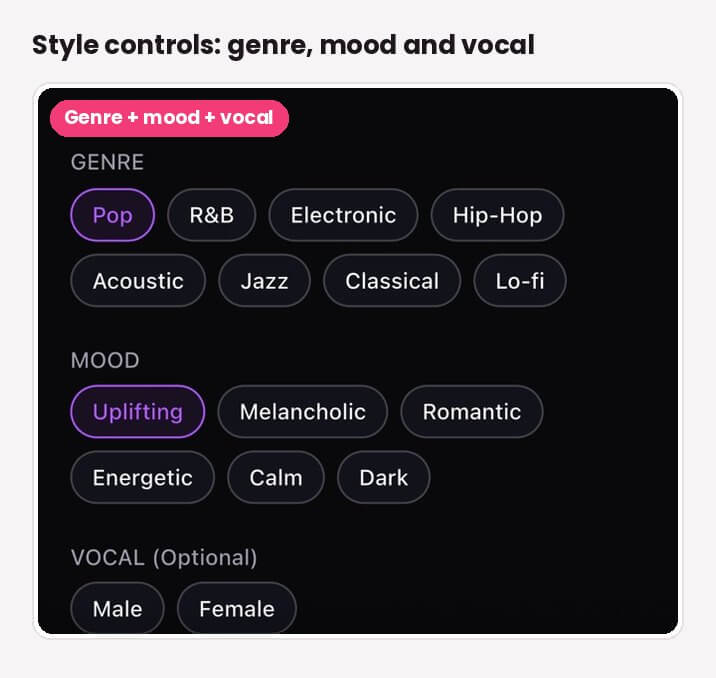
The genre list is shorter than Suno's open prompt box — Pop, R&B, Electronic, Hip-Hop, Acoustic, Jazz, Classical and Lo-fi, plus six moods — but that's the point. On a phone, tapping three chips is faster than writing a paragraph of style tags, and you can still add detail in the text box.
Once a song clicks, Use in Music Video opens the AI MV screen with your track already loaded. Choose Singing, Storytelling or Sing & Story, describe the video, optionally add a face photo, and let it render.
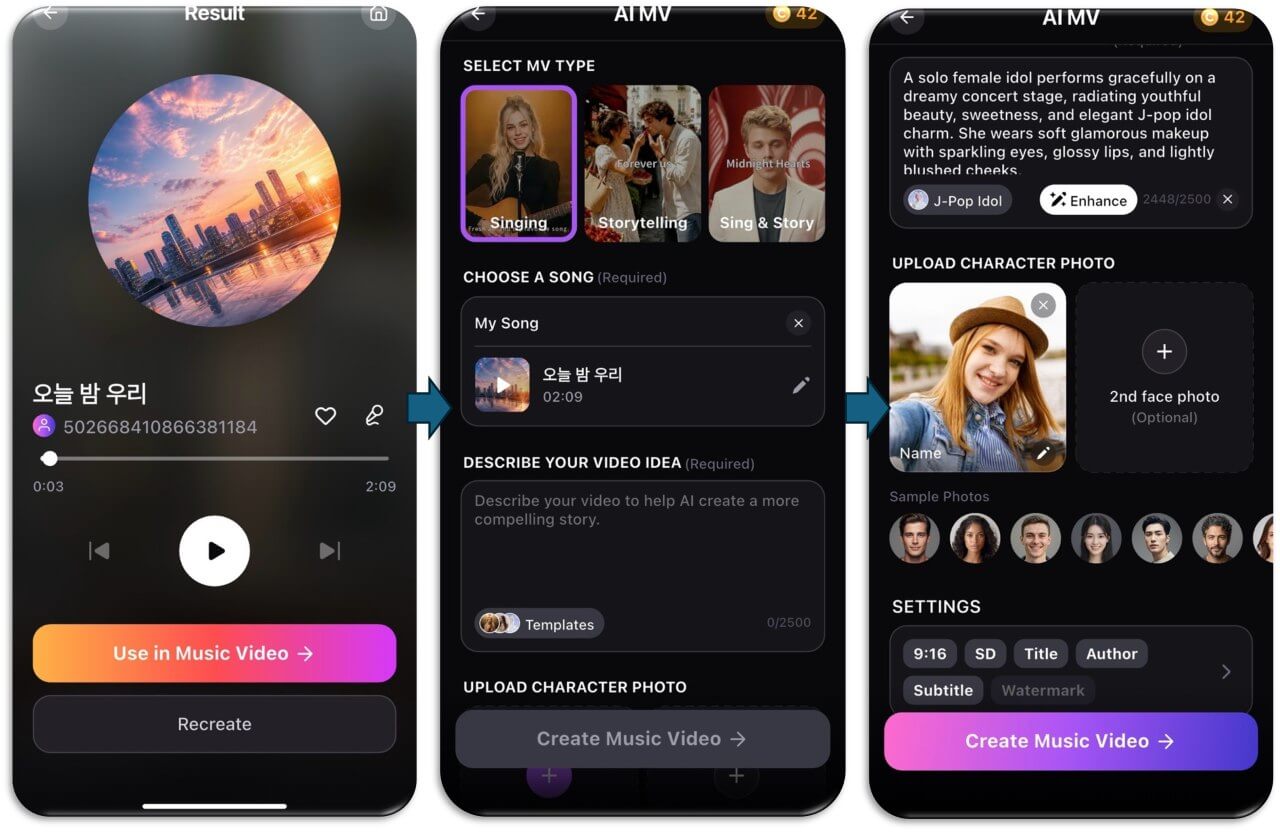
My take: if your goal is a Reel, a TikTok or something you can post, YouCam Muse gets you from idea to a finished video faster than stitching Suno and a separate video tool together.

AI Song & Music Video Maker
Write your own lyrics or describe a moment.
Get a finished song in minutes.
Which Suno alternative should you pick?
| If you want… | Pick |
|---|---|
| The best-sounding full song and you'll pay for it | Suno Pro |
| To experiment for free without needing a file | Udio or Suno free |
| Melodies built around lyrics you already wrote | Mureka |
| A song and a music video from one app on your phone | YouCam Muse |
Before you switch: what to check on any AI music tool
- Downloads on your plan. Several tools have restricted downloads in the past year. Make sure the plan you pick lets you export.
- Commercial rights. Free plans are almost always personal-use only. Paid plans vary, and some rights only apply to songs made while you're subscribed.
- Copyright. The U.S. Copyright Office says purely AI-generated material isn't protected, but human-written parts, like your own lyrics, can be. Writing your own words helps. (U.S. Copyright Office)
- Platform rules. Spotify, for example, bans unauthorized AI voice clones and is adding AI-credit disclosures to track metadata.
Try it now
If you've been using Suno and keep wishing your songs came with visuals, YouCam Muse is worth a try. Make one song in AI Song, tap Use in Music Video, and see what it builds around your track.
AI Song & Music Video Maker
From one idea to a finished song and music video.
No instrument or music theory needed.
FAQ
Is there an AI better than Suno?
For raw song quality, Suno is still the benchmark in 2026. Other tools are better for specific jobs: Mureka for lyrics-first songwriting, and YouCam Muse if you want the song turned into an AI music video in the same app.
Is Suno better than Udio?
For most people right now, yes, mainly because Udio has disabled downloads on all plans since October 2025. Udio can still be fun for exploring ideas, but you can't export what you make.
Can I still download Suno songs for free?
No. After Suno moved to its licensed v6 models in September 2026, free users can play and share songs but not download them. Paid plans include a monthly download allowance.
What is the best free alternative to Suno?
It depends on whether you need a file. Most free tiers are personal-use only and several limit downloads. YouCam Muse lets you try AI Song and AI Music Video in the app before you pay, which is useful if you want to see a finished video, not just hear a clip.
Can YouCam Muse make a music video from a Suno song?
YouCam Muse's AI Music Video can use audio you import as well as songs made in its own AI Song tool. If you import a track made elsewhere, check that tool's terms to make sure your plan allows that use.
Which AI music generator lets me sell my songs?
Paid plans on Suno and Mureka include commercial rights under their terms, while free plans generally don't. Terms change, so read the current terms of whatever app you use before selling or distributing a song. This isn't legal advice.



