



 Author:
I write lyrics. I can't really sing them. For years that meant a notes app full of verses nobody would ever hear, because the step between "words on a page" and "a song someone can play" needed a singer, a mic, and usually a producer too.

AI Song & Music Video Maker
Paste your lyrics, pick a genre and mood.
An AI singer performs your song.
That's what sent me looking for an AI singer app. It turns out the search results mix together three very different kinds of apps, and most "best of" lists are written for music producers on desktop, not for someone with a phone and some lyrics. So this guide sorts out what an AI singer app actually does, which type you need, what to check before you use one, and exactly how I get an AI vocalist to sing my own lyrics on my phone with YouCam Muse.
Some images may be AI-generated for illustration purposes.
Table of Contents
What is an AI singer app?
An AI singer app uses AI to produce a sung vocal without you having to sing it. Depending on the app, that means an AI vocalist performing lyrics you typed, a clone of your own voice singing new songs, or your voice swapped onto an existing track. The best AI singer app for you depends on which of those you actually want, so start there rather than with a ranking.
The 3 types of AI singer apps (and which one you need)
| Type | What it does | Good for | Examples |
|---|---|---|---|
| Text-to-song (AI vocalist) | You give lyrics or an idea plus a style; the AI writes the music and an AI voice sings it | Lyric writers, content creators, anyone who wants a finished song without recording | YouCam Muse, Suno |
| Voice cloning | You record samples of your own singing; the app builds a model of your voice that can then sing other material | Singers who want "their" voice on more songs, demos, harmonies | AI Singer: Voice Clone, Kits AI |
| Voice swap / AI covers | You upload an existing vocal or song and the app replaces the singer with a different voice model | Covers, experiments, producers testing vocal ideas | Controlla Voice |
Desktop tools like ACE Studio and Synthesizer V sit in a fourth, more technical group: you draw melodies note by note and assign a virtual singer. They're powerful, but they expect you to already work in music software.
My rule of thumb: if you have lyrics but no voice, you want text-to-song. If you have a voice and want more of it, look at cloning. If you want to hear a track sung differently, that's voice swapping.
What to check before you pick one
- Can you control the lyrics? Some apps only take a vibe prompt. If you've written words, make sure there's a place to paste them.
- Can you choose the voice? At minimum you want to steer male or female vocals, or switch vocals off for an instrumental.
- Genre and mood controls. Named options for both are much easier on a phone than describing a sound from scratch.
- What happens after the song. A song is easier to share with visuals. Check whether the app can turn the track into a video or post it anywhere.
- Cost model. Many apps use credits or coins per song. Check how many a song costs before you start rewriting lyrics ten times.
- Rights. Read the terms on who can use the output and whether commercial use needs a paid plan, especially if you plan to release the song.
How to make an AI singer sing your lyrics, step by step
This is the flow I use YouCam Muse, an AI song and music video TOOL. It's a text-to-song app: I bring the words, pick the style, and an AI vocalist sings it.
Step 1: Open AI Song
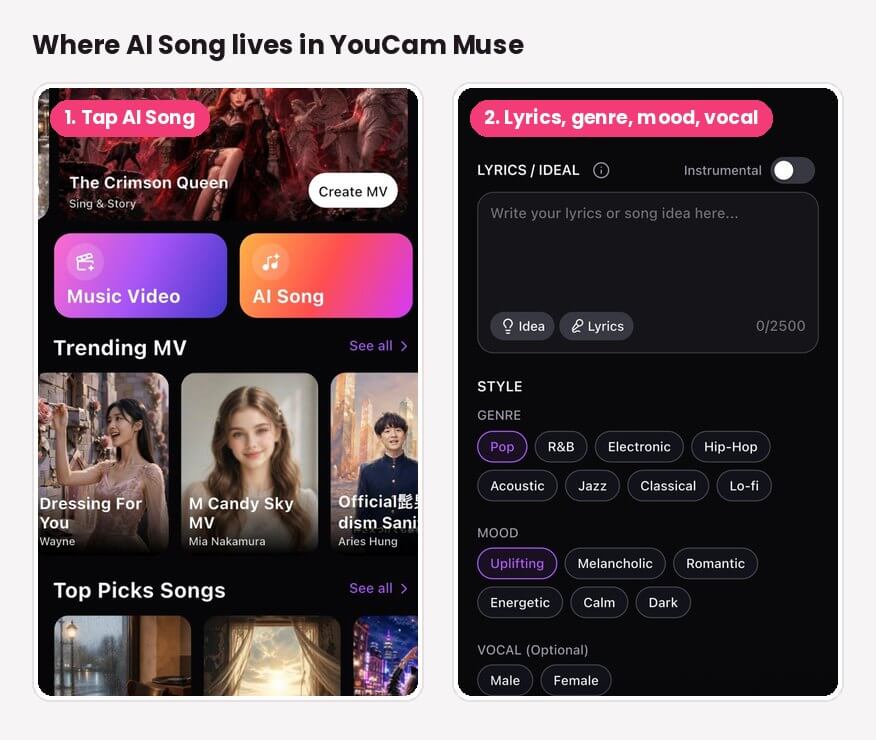
On the YouCam Muse home screen, tap the orange AI Song button (next to Music Video). If you want a feel for what's possible first, scroll the Top Picks Songs rail on the same screen.
Step 2: Choose Custom (your lyrics) or Simple
At the top of the AI Song screen there are two modes. I use Custom whenever I've written lyrics, because it gives you the full set of style controls. Simple is there for when you'd rather describe a vibe and let the AI handle more of it.
Step 3: Paste your lyrics (or an idea)
The Lyrics / Idea box takes up to 2,500 characters, which is plenty for a full song with verses, a chorus and a bridge. Stuck? The Idea and Lyrics buttons under the box are there to help you get a starting point instead of a blank page. Here's the kind of thing I paste in, with section labels so the structure is clear:
[Verse]
Headlights on the freeway, counting every mile
You said call me when you land, I haven't called in a while
[Chorus]
So I'm driving through the static, singing to the dark
Every song on the radio still sounds like where we are
If you want a backing track with no singer at all, flip the Instrumental switch on.
Step 4: Pick a genre, a mood and a vocal
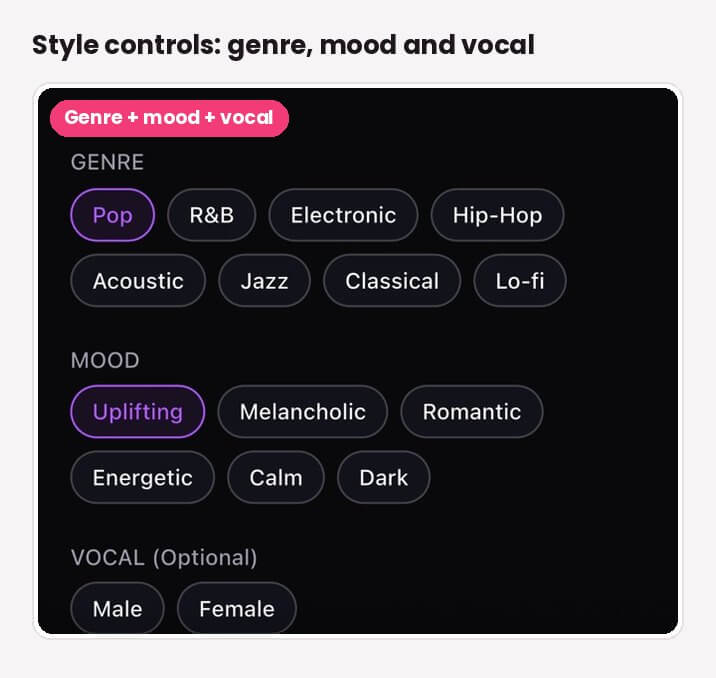
Under Style you tap your choices instead of typing them:
- Genre: Pop, R&B, Electronic, Hip-Hop, Acoustic, Jazz, Classical, Lo-fi
- Mood: Uplifting, Melancholic, Romantic, Energetic, Calm, Dark
- Vocal (optional): Male or Female
Step 5: Name it and tap Create Song
Give the song a title (the app's own examples are things like "Midnight Drive" or "Golden Hour"), then tap Create Song. In the version I'm using, the button shows a cost of 6 coins per song. YouCam Muse is built to have a song ready in under a minute, then you can preview it and save it.
Step 6: Give your AI singer a music video
This is the part most AI singer apps skip. Your saved song can go straight into YouCam Muse's Music Video feature, where you pick an MV type (Singing, Storytelling or Sing & Story), describe the video, and optionally add a face photo so "you" appear as the performer. The finished video can be shared to the YouCam Muse community feed or exported to your social platforms.
AI Song & Music Video Maker
Paste your lyrics, pick a genre and mood.
An AI singer performs your song.
Genre and mood pairings that work
Because genre and mood are separate choices, the combination does a lot of the work. These are the pairings I'd start with for common kinds of lyrics:
| Your lyrics are about... | Genre | Mood | Vocal |
|---|---|---|---|
| A breakup or missing someone | R&B or Acoustic | Melancholic | Either; try both |
| A crush, a wedding, an anniversary | Pop or Jazz | Romantic | Female or Male |
| Hype, confidence, a workout | Hip-Hop or Electronic | Energetic | Male or Female |
| A study or late-night vibe | Lo-fi | Calm | Off (Instrumental) |
| Something moody or villain-coded | Electronic or Classical | Dark | Either |
| A birthday or a thank-you song | Pop or Acoustic | Uplifting | Either |
If the first version doesn't feel right, change only one thing at a time (just the mood, or just the vocal). It's the fastest way to learn what each setting really changes.
Tips for better AI vocals
- Label your sections. [Verse], [Chorus] and [Bridge] tags help the song come out with a clear structure instead of one long verse.
- Keep lines singable. Short lines with a similar number of syllables are easier for any singer, human or AI, to phrase naturally.
- Repeat your chorus word for word. Repetition is what makes a hook stick.
- Read it out loud first. If a line trips you up when you say it, it'll probably sound awkward sung.
- Try the same lyrics with both vocals. A male and a female version of the same song can feel like two completely different records.
- Save the words, not just the song. Keep your final lyrics in a note so you can reuse them in a video caption or description.
A quick word on voices, cloning and rights
Voice-cloning and voice-swap apps are fun, but they raise a question text-to-song apps mostly avoid: whose voice is it? A few practical rules I follow:
- Only clone your own voice, or a voice you have clear permission to use.
- Don't publish songs that imitate a real artist's voice. Laws are catching up: Tennessee's ELVIS Act (2024) treats a person's voice as a protected right, and a federal NO FAKES Act has been proposed in the US. Streaming platforms also remove tracks that use unauthorized vocal clones.
- Check the app's terms for commercial use before you release a song or use it in paid content.
This isn't legal advice, just the common-sense version. When in doubt, use an app's own AI vocals, or your own voice.
AI Song & Music Video Maker
Paste your lyrics, pick a genre and mood.
An AI singer performs your song.
FAQ
What is the best AI singing app?
It depends on what you want the AI to do. If you have lyrics and want an AI vocalist to sing them, a text-to-song app like YouCam Muse or Suno is the right fit. If you want your own voice on more songs, look at a voice-cloning app. For swapping voices on existing tracks, use a voice-swap tool like Controlla Voice.
Is there an AI that can sing my lyrics?
Yes. In YouCam Muse, open AI Song, choose Custom, paste your lyrics (up to 2,500 characters), pick a genre, mood and optional male or female vocal, and tap Create Song. The AI composes the music and sings your words.
Is there an AI that can sing in my voice?
Voice-cloning apps can. They typically ask you to record yourself singing so they can build a model of your voice. Text-to-song apps like YouCam Muse use AI vocals instead, where you choose male or female rather than cloning your own voice.
Is there a free AI singer app?
Many AI singer apps are free to download and then use credits for each song. In YouCam Muse, songs are made with in-app coins; in the current version, Create Song shows 6 coins per song. Check the app for current plans and any free coins.
Can I make an instrumental without vocals?
Yes. In YouCam Muse's AI Song screen, turn on the Instrumental switch before you tap Create Song and you'll get a track without a singer.
Can I turn my AI song into a music video?
Yes. Save your song, then open Music Video in YouCam Muse, choose the song from the Song Library, describe your video idea and optionally add a face photo. The app generates a music video for your track.



