



 Author:
What ChatGPT can plan, what it cannot render, and a five-step way to turn its plan into a finished video.
Not on its own. ChatGPT can plan a music video: the concept, a shot list, scene text and prompts. Producing the finished footage needs a video generator, so the practical route is to plan in ChatGPT and render elsewhere, for example in YouCam Muse.
The video side of this has been moving quickly, so this guide stays specific about what is confirmed and what to check yourself before relying on it.
Key Takeaways
- ✍️ Planning: ChatGPT is strong at concepts, scene-by-scene breakdowns and prompt wording.
- ⚠️ Rendering: OpenAI announced it is shutting down the Sora app and API, and reports differ on video inside ChatGPT, so verify what is offered today.
- 🎬 Making the video: paste your plan into a generator that works from your own song, such as YouCam Muse.
- 🧩 Control: Storyboard First lets you edit every scene before the video renders.
- 📲 Result: download or share to Instagram, TikTok, WhatsApp and X.
What can ChatGPT do for a music video?
Think of ChatGPT as your pre-production team. It can turn a song’s theme into a concept, break the lyrics into scenes, suggest a visual style, and write the descriptions a video generator needs. It cannot hear your track the way an audio-aware generator does or export a finished file for you.
| Stage | ChatGPT | Needs a video tool |
|---|---|---|
| Concept and theme | Yes: brainstorm several directions | — |
| Shot list and scene breakdown | Yes: one scene per verse or chorus | — |
| Prompt wording for a generator | Yes: rewrite for clarity and style | — |
| Syncing visuals to your audio | No | Yes |
| Rendering the video | Check current availability | Yes |
| Exporting and sharing | No | Yes |
Can ChatGPT generate video right now?
Check this before you plan around it. On March 24, 2026, OpenAI announced it was saying goodbye to the Sora app, and TechCrunch reported that the Sora API was closing too. Coverage since then disagrees about whether any video generation remains inside ChatGPT, so open ChatGPT and see what it actually offers on the day you read this. Either way, the plan you write there carries over to any generator.
How to plan in ChatGPT and make the video in YouCam Muse
- Write a one-paragraph brief. Tell ChatGPT the song’s mood, genre, who is in the video and the look you want.
- Ask for a scene for each chorus and verse. A line or two per scene is enough, with a consistent visual style.
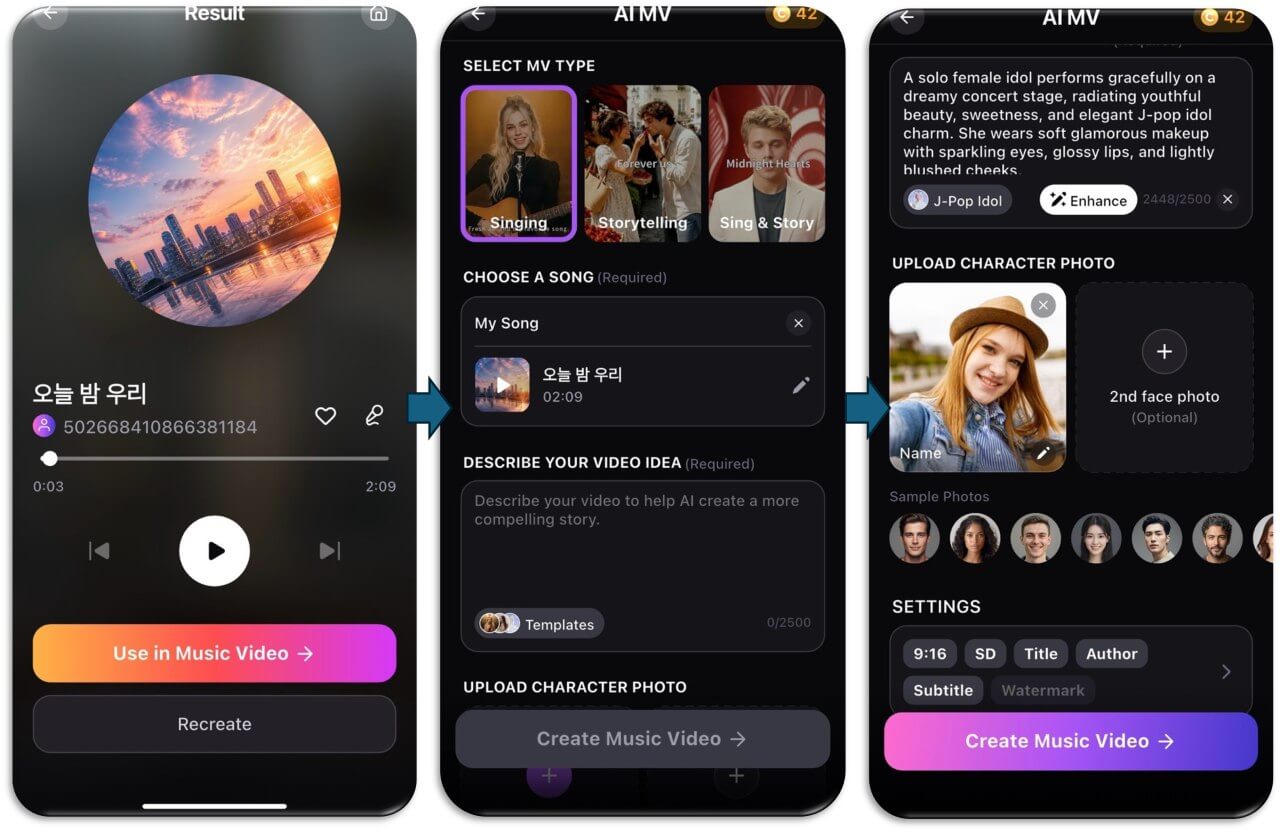
- Ask for one combined description under 2,500 characters, which is the limit of the video idea box in YouCam Muse.
- Paste it into YouCam Muse. Choose your MV type and song, paste the description, and tap Enhance to tighten the wording.
- Pick Storyboard First and edit any scene that does not match your plan before rendering.
A prompt you can adapt
I have an upbeat indie-pop song about driving home at night. Write a music video concept with one short scene per verse and chorus, a warm retro film look, and one recurring character. Keep the whole description under 2,000 characters.
Swap in your own genre, setting and look. If the first answer is generic, ask ChatGPT to make each scene more specific: where it happens, what the character does, and what the camera sees.
AI Music Video & Song Maker
Turn any song into a music video.
No filming, no editing timeline.
What does the storyboard step add?
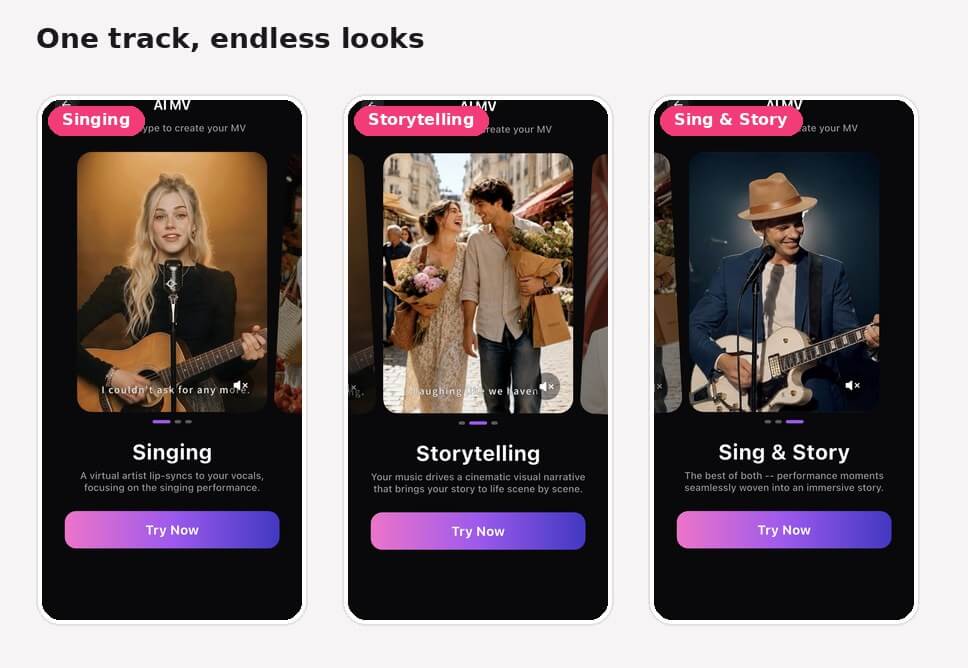
This is where the plan and the generator meet. After you create, YouCam Muse analyzes your audio and drafts a storyboard in which each scene has its own synopsis. You can change the visual style and each scene’s text, so a ChatGPT idea that did not translate cleanly gets fixed before you spend credits on rendering.
Common mistakes
- Writing a plan that ignores the song’s pacing; keep scene count in line with the number of verses and choruses.
- Pasting a very long brief; keep it inside the 2,500-character limit and prioritize the look and the story.
- Skipping the storyboard on the first try; reviewing scenes costs a minute and can save a failed render.
- Using a song you do not have rights to; see is AI music legal?.
Want a tool-by-tool comparison? Our AI music video generators, tested roundup covers the field, and how to make an AI music video is the full beginner guide.
Try it now
Write your brief in ChatGPT, then bring the scene list into YouCam Muse and choose Storyboard First to see your plan turn into scenes.
AI Music Video & Song Maker
Turn any song into a music video.
No filming, no editing timeline.
FAQ
Can ChatGPT make a music video?
Not on its own. It can plan the concept, scenes and prompts, but you need a video generator to produce the finished video from your song.
What happened to Sora?
OpenAI announced on March 24, 2026 that it was shutting down the Sora app, and TechCrunch reported the API was included. Reports differ on what video generation remains inside ChatGPT, so check ChatGPT directly.
What should I ask ChatGPT to write?
A concept, one short scene for each verse and chorus, a consistent visual style, and a combined description under the 2,500-character limit of the YouCam Muse video idea box.
Can ChatGPT sync visuals to my song?
Planning text does not sync to audio by itself. A generator that takes your audio file does that: in YouCam Muse the app analyzes your song before building the storyboard.
Do I need to edit the ChatGPT plan?
Usually a little. Use the Enhance button and the storyboard editor in YouCam Muse to fix any scene that does not match your plan.
Does making the video cost credits?
Generating in YouCam Muse uses credits, with the amount shown before you confirm. Check the app for current pricing.



