



 Author:
A song had been sitting on my phone for weeks. My nephew and I put it together on Suno one afternoon, more as a joke than anything else, but it was catchy enough that I actually wanted to do something with it — post it, share it, make it look like a real music video instead of a waveform on a black screen. I don't own a camera rig, I've never opened a proper video editor, and I definitely wasn't going to storyboard fifteen scenes by hand.
So I went looking at how people are actually turning tracks into music videos with AI in 2026: the DIY tool-stack way that most tutorials still walk you through, and the newer all-in-one apps that promise to skip the stitching-and-syncing part entirely. I tried both. Here's what each one actually takes. (Some images in this guide may be AI-generated for illustration purposes.)
Key Takeaways
- 🎬 There are two real routes: stitch together clips from a rhythm-syncing AI video generator yourself, or use an app that runs the whole thing — song to storyboard to finished video — in one flow.
- ✂️ The DIY route still means editing: most generators only output 5–10 second clips, so you're assembling them, syncing cuts to the beat, and covering watermarks yourself in something like DaVinci Resolve or CapCut.
- 🧭 The all-in-one route trades some control for speed: pick a track, describe the story, and let AI handle the scene-by-scene generation and the final render.
- 🎭 Three finished looks from one song: a lip-synced performance, a pure cinematic narrative with no performer, or a blend of both.
- 👀 A storyboard review step — not just a blind render — is what actually separates a good AI music video from AI slop set to music.
- 🎵 No song yet? AI song generators can write one from a mood or lyric idea in under a minute, ready to drop straight into a video.
What people mean by "AI music video" right now
Search around for an AI music video generator and you'll land on a crowded field of tools — Neural Frames, OpenArt, Freebeat, Solmi, Plazmapunk, SunoMV, and a handful of others, most of them ranking for almost identical queries. Strip away the branding and the pitch is the same everywhere: upload an MP3 or WAV, or paste a link from Suno or Udio, and the tool analyzes the beats-per-minute, the rhythm, and the song structure — verse, chorus, drop — before generating visuals that cut and pulse in time with the track. You pick a style or write a prompt, the AI renders beat-synced clips, and you export in a format sized for YouTube, TikTok, or Instagram.
A few questions come up constantly around these tools. Can ChatGPT make a music video? Not on its own — you still need a dedicated video generator, ChatGPT can help you write prompts or lyrics at most. Is there a free option? Usually, but with a catch: most free tiers cap the clip length, add a watermark, or both. How much does it cost to remove those limits? It varies by tool, but the pattern is consistent — a free tier to try the idea, then a paid or credit-based tier for longer clips, higher resolution, and no watermark.
The DIY route: stitching AI clips into a video
The traditional path looks like this: format your audio (a clean MP3 or WAV, ideally around three to four minutes), map out where the beats and lyric changes fall, and decide on a visual style before you touch a generator. Then, scene by scene, you write prompts, generate short clips, and tweak the settings until the motion and mood match the track. Some tools differentiate themselves on fairly technical grounds here — frame rate (30fps versus the more common 24fps, for smoother motion on fast cuts), how well they simulate physics versus just layering visual effects, and how long a single continuous generation can run before you need to start a new clip.
The part every tutorial glosses over is what happens after generation. Most tools cap a single clip at somewhere between five and ten seconds, so a finished three-minute video means assembling a dozen or more separate renders in an actual editor — DaVinci Resolve or CapCut are the usual recommendations — then adding subtitles, smoothing transitions, and timing everything back to the beat by hand. It works, and plenty of people are shipping genuinely impressive results this way. But the common thread in AI-creator communities is the same: getting a song and a video generator to cooperate cleanly still takes several separate tools, a lot of prompt trial-and-error, and a real editing pass at the end before anything is postable.
The one-app route: making a video without leaving one app
The alternative is an app that treats "song in, video out" as one continuous flow instead of a handoff between separate tools. YouCam Muse's AI Music Video Generator is built around exactly that idea, so I'll walk through what the flow actually looks like end to end:
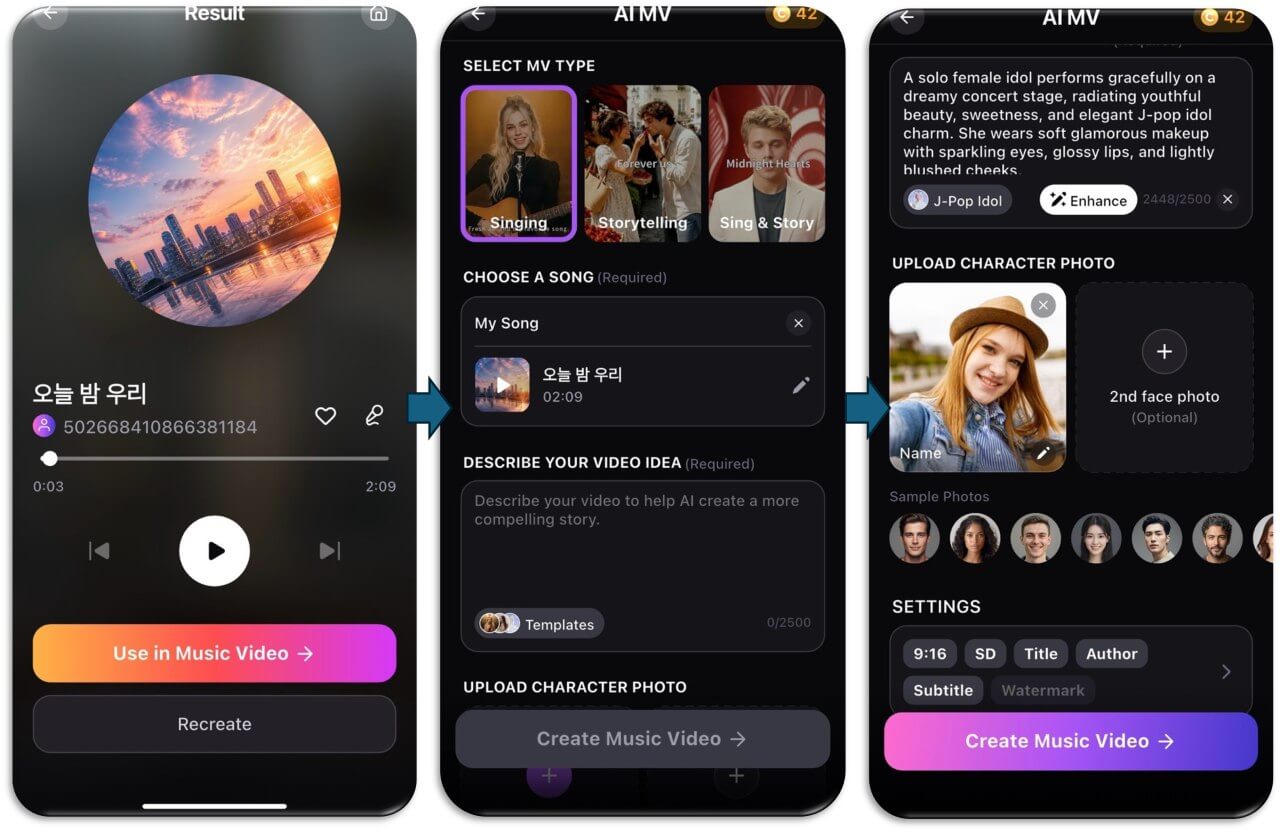
- Pick or make a track. Choose a song from your library, import an audio file, or generate an original one with AI Song Generation first if you don't have one — describe a mood or paste in lyrics and it writes a track in under 60 seconds.
- Choose your MV type. Singing casts a virtual artist who lip-syncs your vocals. Storytelling turns the music into a cinematic narrative with no performer on screen. Sing & Story cuts between both.
- Describe your video idea. A short text description of the story, mood, or aesthetic you're after — the more specific, the more the AI has to work with.
- Add a character photo, if you want one. Up to two face photos to cast yourself (or someone else) as the performer; skip it and AI casts its own virtual performer instead.
- Choose how you want to create. Create Storyboard First writes the scene-by-scene storyboard and stops there so you can review and edit it. Create MV Directly skips that pause and renders the finished video in one step.
- Let it render. It analyzes the track's rhythm and mood, builds the visual narrative scene by scene, and renders the final cut in the background — you can back out of the app and get a notification when it's done. A music video costs 200 credits to generate, and credits are refunded automatically if a render fails.
- Share it. Publish straight to the Community Feed, download it, or send it to Instagram, TikTok, WhatsApp, or X.
Why the storyboard-review step matters
This is the part that actually explains the gap between the DIY route and the one-app route. With Create Storyboard First, the AI still writes every scene synopsis automatically, but it stops before rendering anything: you land on an Edit Storyboard screen where you can preview the song, read the AI-written scene descriptions and lyrics with their timestamps, rewrite the visual style prompt, and open any individual scene to rewrite its synopsis — there's a built-in AI Prompt Enhancer if you want help sharpening the wording. Nothing renders until you're satisfied with the story on paper.
Compare that to the DIY stack, where the AI's read on your track is invisible until a clip actually finishes generating. If a generator misreads the mood of a verse, you find out after spending render time and credits on it, not before. A review step between the AI's first draft and the final render is a small thing on paper, but it's the difference between re-rolling a whole video and just rewriting a paragraph.
One track, endless looks
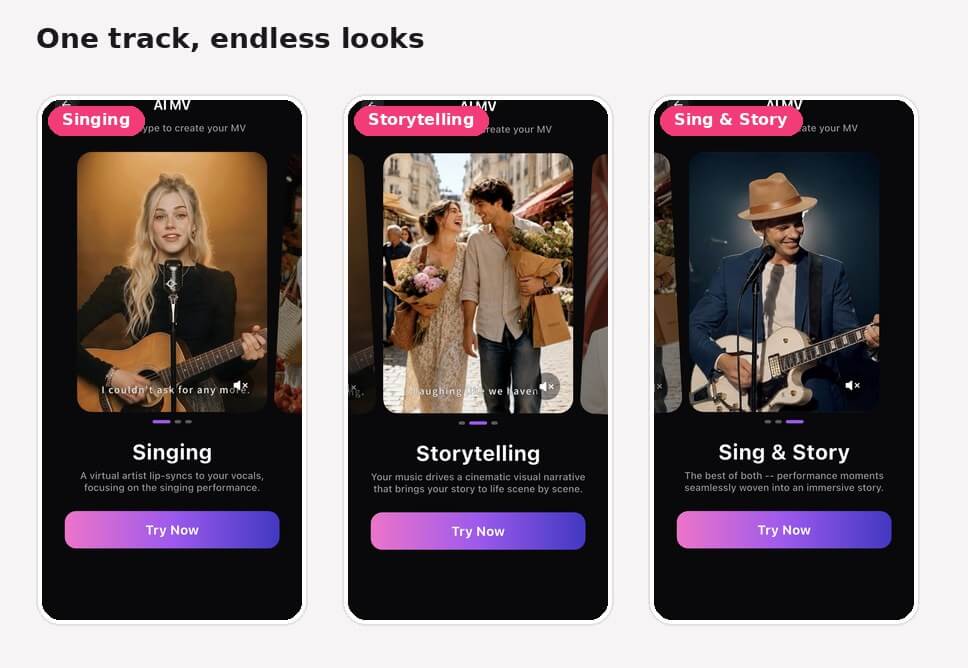
The MV type you choose changes the entire video, even with the identical song underneath it. Singing keeps the focus on a lip-synced performance. Storytelling drops the performer entirely in favor of a scene-by-scene narrative. Sing & Story cuts between the two, which is the closest thing to what a "real" music video usually looks like.
AI Music Video & Song Maker
Turn any song into a music video.
No filming, no editing timeline.
Settings that actually change the result
A handful of small settings decide whether the finished video is ready to post as-is or needs another pass. Aspect ratio defaults to 9:16 portrait, with 16:9 landscape available if you need it. Resolution defaults to 720p on the free plan; 1080p is gated behind a Muse Pro subscription. Subtitles are burned in and on by default; the watermark is off by default but re-enables itself each session on the free plan (Pro subscribers can turn it off permanently). There are also optional title and author text fields that appear as an overlay card at the start of the video — useful if you're planning to post it somewhere your name won't otherwise show up.
What it costs, roughly
Across the DIY tools, the shape of pricing is consistent even where the exact numbers aren't: a free tier that works but caps clip length and stamps a watermark on the output, then a paid tier — usually credit-based — that unlocks longer generations, higher resolution, and a clean export. YouCam Muse runs on the same credit logic: a full music video costs 200 credits to generate, whether you're on Storyboard First or Create MV Directly, and a failed render refunds automatically. If you're comparing options, the real question isn't "is it free" so much as "what does the free tier actually let you finish."
Try it now
If you've got a track sitting untouched on your phone, or nothing but a mood you want to turn into one, that's genuinely enough to start. The DIY route still has its place if you want full control over every frame and don't mind the editing pass at the end. But if what you actually want is a finished, shareable music video without opening a second app to stitch it together, that's the gap YouCam Muse is built to close.
AI Music Video & Song Maker
Turn any song into a music video.
No filming, no editing timeline.
FAQ
Can you use AI to make a music video?
Yes. Dedicated AI music video generators turn an audio track into beat-synced visuals automatically — either as short clips you assemble yourself, or as a complete video from apps that handle the whole process in one flow.
Can ChatGPT make a music video?
Not by itself. ChatGPT can help with prompts, lyrics, or planning a storyline, but generating the actual video needs a dedicated AI video or music-video tool.
How much does an AI music video maker cost?
Most tools offer a limited free tier (shorter clips, a watermark) and a paid or credit-based tier for longer, cleaner exports. YouCam Muse uses a credit system, with a full music video costing 200 credits to generate.
Is there a free AI music video generator?
Several exist, though "free" almost always comes with a catch — a clip-length cap, a watermark, or both. Read the fine print on resolution and export limits before committing to one.
Do I need a song from Suno or Udio to use YouCam Muse?
No. You can import your own audio, choose a song from the in-app library, or generate an original track with AI Song Generation if you don't have one yet.
Do I have to use my own face in the video?
No. The character photo is optional — skip it and AI casts its own virtual performer. Upload one or two face photos if you want to appear in the video yourself.
Which creation path should I pick?
Create Storyboard First is the safer default: it lets you review and edit the AI's scene-by-scene storyboard before anything renders. Create MV Directly skips that review step and is faster if you're comfortable letting AI make every call.



