



 Author: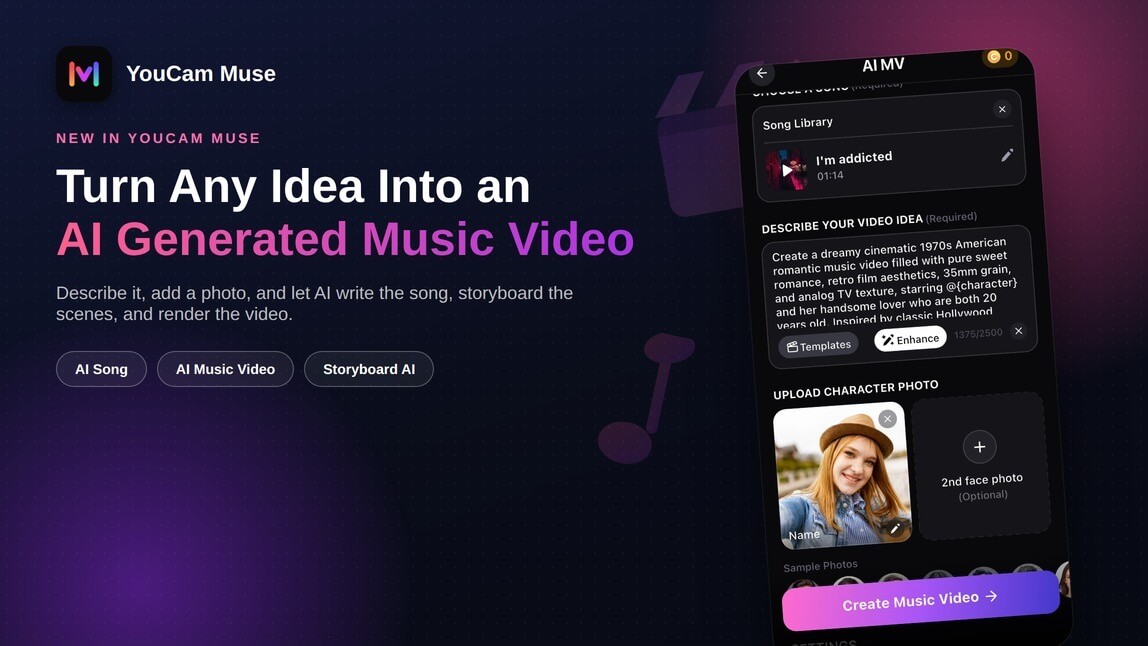
Making a real music video used to mean a studio, a camera crew, actors, and hours in an editing timeline — even a simple lyric video took production skill most people don't have. If you've ever had a song idea, a lyric, or just a feeling you wanted to turn into something visual, the gap between "I have an idea" and "I have a finished video" was enormous.
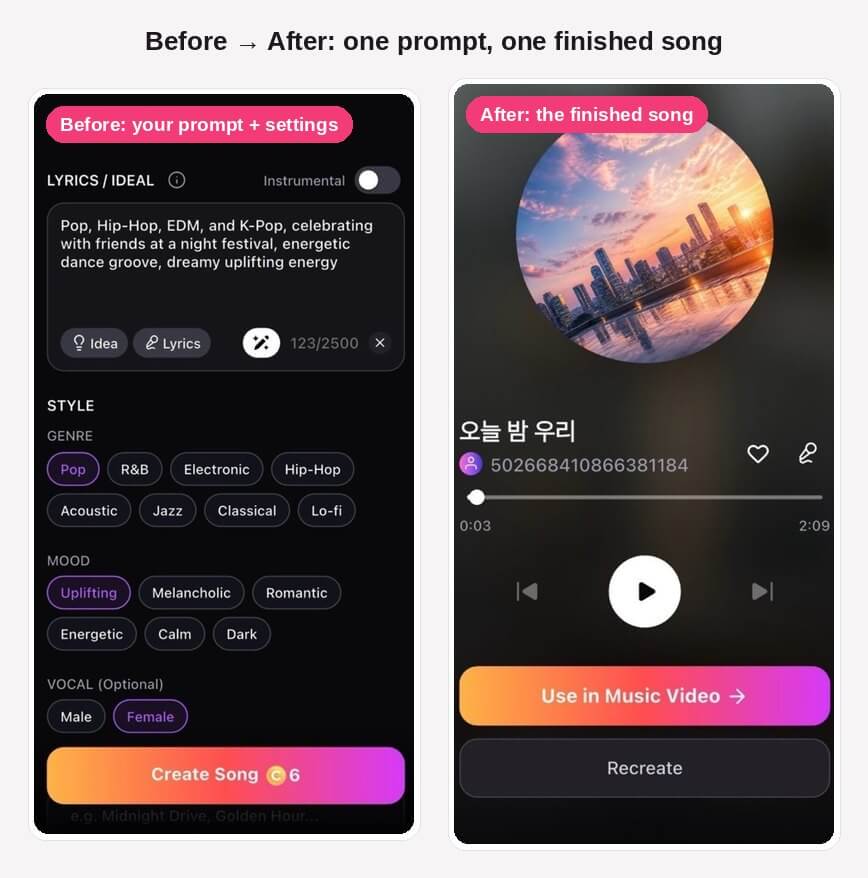
YouCam Muse closes that gap. Describe a vibe or a lyric, and its AI song generator writes a complete original track — lyrics, vocals, and instrumentation — in under a minute. Then its AI Music Video generator takes that song (or any track you already have) and builds a full cinematic music video around it: storyboard, scene transitions, and camera moves synced to the beat, starring your own photo if you want to be in it.
Some images may be AI-generated for illustration purposes.
Key Takeaways
- 🎵 AI Song generator — describe a genre or mood and get a complete original song, with lifelike vocals or instrumental-only, in under 60 seconds
- 🎬 AI Music Video generator — turns any song into a music video across three styles: Singing, Storytelling, or Sing & Story
- 🧑🎤 Star in your own video — upload up to two face photos and YouCam Muse casts real people as the on-screen performer
- 🎛️ Full creative control — let AI write the entire storyboard automatically, or review and edit every scene synopsis yourself first
- 🔁 Never start from a blank page — browse the community feed for ai cover song video ideas and remix any music video you like in one tap
- 📤 One-tap export & share — download to your camera roll or share straight to Instagram, TikTok, WhatsApp, or X
10 AI Cover Song Video Ideas
Not sure what to make first? YouCam Muse's community feed is built to solve exactly that. Browse trending music videos, top-picked songs, and new community uploads for inspiration, then when something clicks, one tap remixes it — same style and structure — as the starting point for your own ai generated music video. A few ways creators use it for ai cover song video ideas:
- Classic ballad, virtual performance — upload one face photo, pick Singing style, and let a virtual artist lip-sync your cover start to finish.
- Acoustic stripped-down cover — Custom Mode in AI Song to match the original's BPM and key, then a quiet Singing-style video to match the mood.
- Cinematic reinterpretation — drop the performer entirely with Storytelling style, turning a familiar song into a scene-by-scene narrative video instead of a straight performance.
- Duet cover — upload two character photos and cast both as on-screen performers for a shared cover.
- Genre-swap cover — import the original track, then describe a different genre or mood in your prompt (e.g., a jazz reimagining of a pop hit) with Sing & Story blending performance and narrative.
- Retro/throwback aesthetic — prompt for a specific era or film look (35mm grain, VHS texture, 1970s color) to give a modern cover a vintage music-video feel.
- Remix a trending cover — browse the community feed, find a style you like, and one-tap remix it with your own song and photo.
- Instrumental-only cover — toggle Instrumental Only and let a Storytelling-style video carry the mood without vocals.
- Your own vocals, AI-built video — record or import your own cover vocals as audio, then let AI storyboard and render the video around it.
- Cover series / challenge — reuse one MV style and prompt structure across several covers to keep a consistent look for a themed series or trending challenge.
It's one of the fastest ways to go from "I like that" to a finished video: no blank-page problem, no rebuilding a look from scratch — just remix, swap in your own song and photo, and let AI handle the rest.
How AI Music Video Works
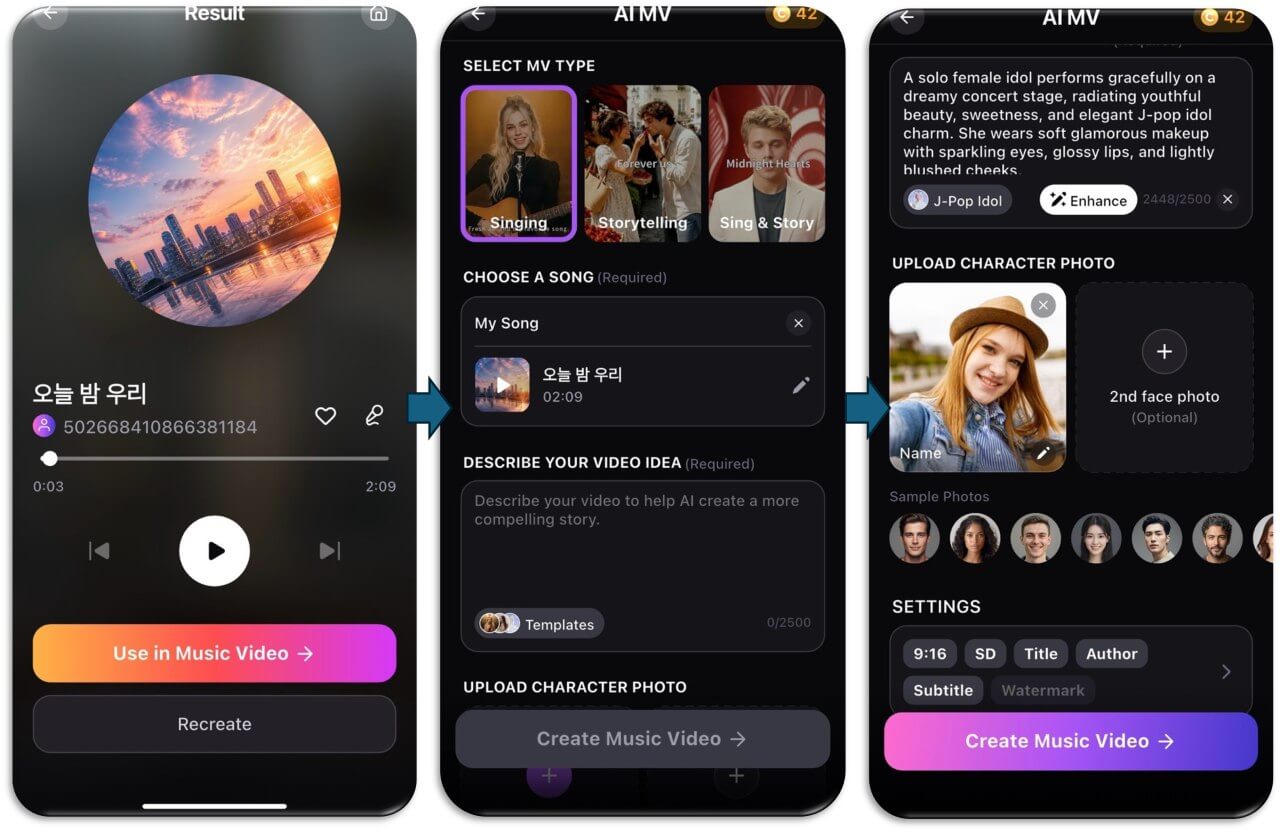
- Pick your MV type — Singing (a virtual artist lip-syncs your vocals), Storytelling (your music drives a cinematic narrative scene by scene), or Sing & Story (a blend of performance and narrative)
- Choose your song — pick a track from your AI Song library or import your own audio (MP3, AAC, WAV, or M4A, up to 50MB); imported tracks need a clip of at least 30 seconds
- Describe your video idea — a text prompt of up to 2,500 characters describing the story, look, and mood you want; a one-tap "Enhance" button rewrites your prompt for a stronger result
- Upload up to two character photos (optional) — YouCam Muse detects faces automatically and casts them as your on-screen performer(s)
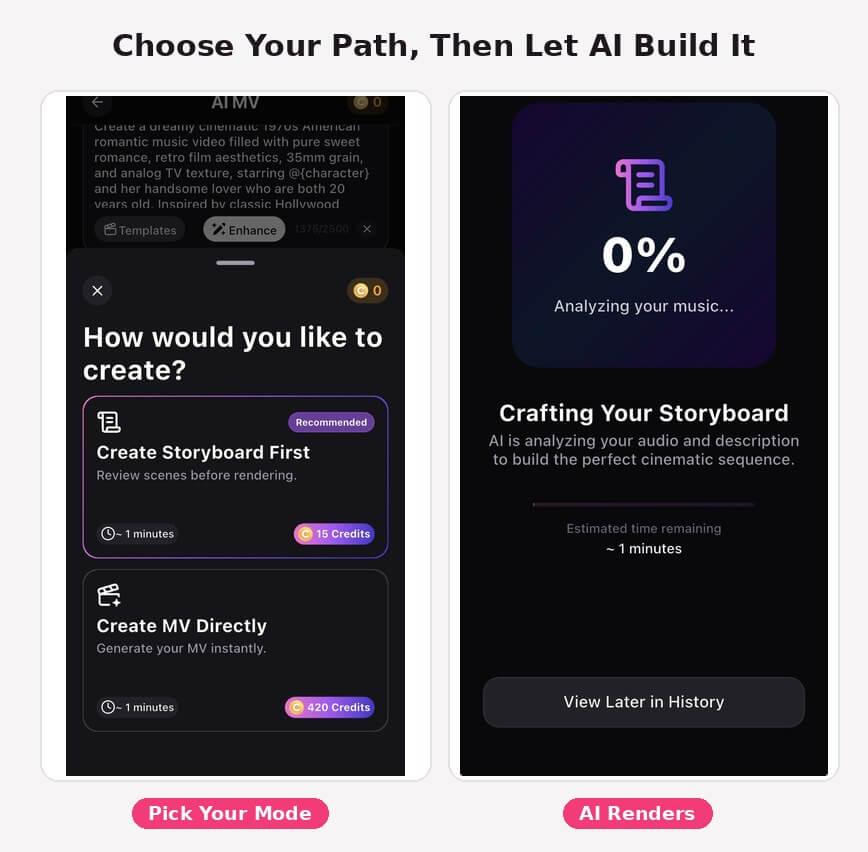
- Choose how AI builds it — "Create Storyboard First" to review and edit each scene before rendering (recommended), or "Create MV Directly" to generate the finished video in one pass
- Let AI render — storyboard generation and scene rendering run with a live progress bar and step-by-step status, and you can back out of the app — it keeps working and notifies you when it's done
- Fine-tune, then share — regenerate a scene, adjust the cover image, title, or author credit, then export to your camera roll or publish to the YouCam Muse community feed
A Peek Inside the App
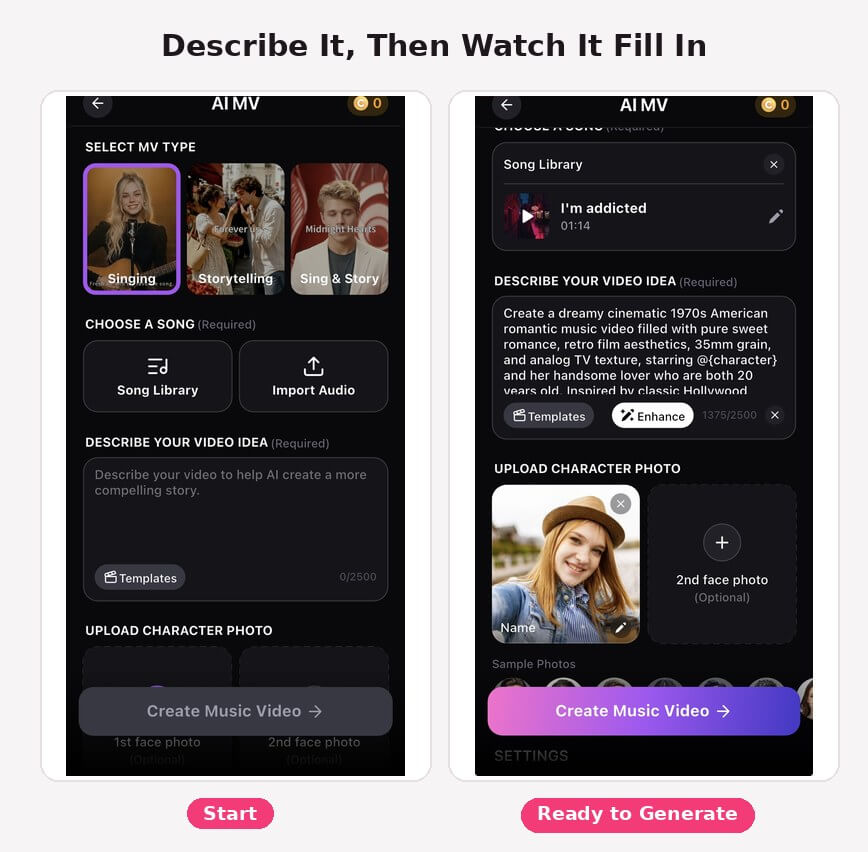
Every field on the Feature Room screen is designed to get you to a finished video fast: pick a song, describe the scene you're picturing, add a photo of the person who should star in it, and AI takes it from there.
Three Music Video Styles, One Prompt
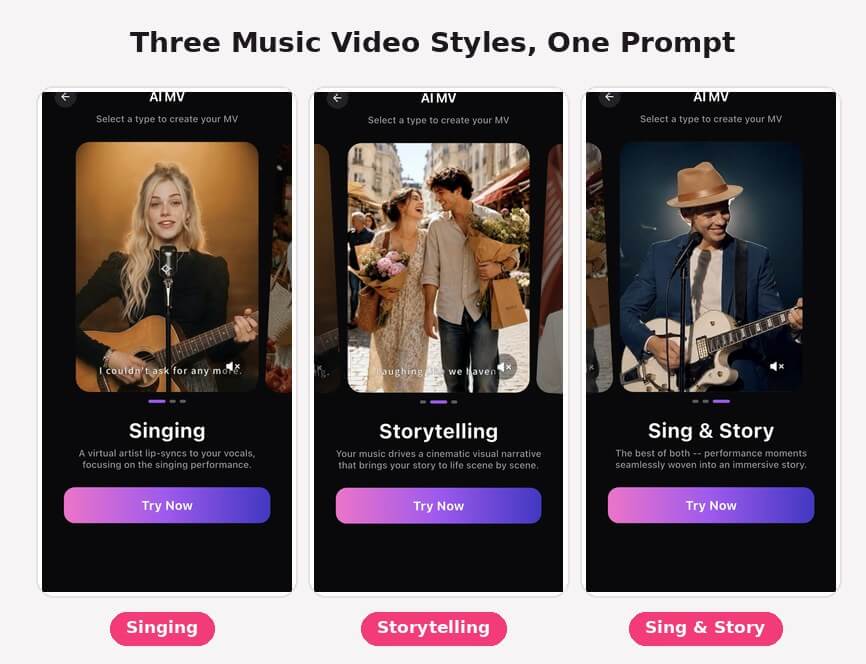
The same prompt and song can become three very different videos, depending on the MV type you pick. Singing puts a virtual performer front and center, lip-syncing your track like a live performance. Storytelling drops the performer entirely and instead builds a cinematic narrative — scene by scene — around your music, matched to the mood and pacing of the song. Sing & Story blends the two, weaving performance moments into a narrative arc. All three pull from the same song, prompt, and character photo — so experimenting with a different feel doesn't mean starting over.

AI Music Video & Song Generator
Turn any idea into a song, then a cinematic music video.
No camera, no crew, no editing skills needed.
AI Song: Your Next Hit, Written in Seconds
Every music video starts with a song, and YouCam Muse can write that song for you too. The AI Song Feature Room has two modes: Simple Mode, where you describe a vibe and genre in one field (with tappable idea chips like "Dreamy," "Energetic," or "Romantic" to help) and let AI compose the rest; and Custom Mode, where you set your own genre, mood, BPM, key, and even write lyrics line by line while AI fills in the timing and melody. An Instrumental toggle skips vocals entirely if you just want a backing track. A "Prompt Enhance" tool rewrites your description into something more likely to produce a strong result — free once per session.
Once a song is generated, the AI Song result screen gives you full playback with synced, tap-to-follow lyrics, and a one-tap "Use in Music Video" button that sends the track straight into the AI Music Video Feature Room with the song already loaded.
Never Start From a Blank Page: AI Cover Song Video Ideas
Not sure what to make first? YouCam Muse's community feed is built for exactly that. Browse trending music videos, top-picked songs, and new community uploads, and when something clicks, one tap re-creates it — style, structure, and all — as a starting point for your own version. It's one of the fastest ways to explore ai cover song video ideas without opening a blank prompt field: find a music video style you like, remix it with your own song and photo, and let AI handle the rest.
Built for Creators, Not Just Consumers
YouCam Muse is designed around real creative use cases, not just casual novelty clips:
- Songwriters and producers sketching new song ideas in minutes instead of a full studio session
- Rap and hip-hop artists testing new beats and flows before committing to a full production
- Anyone marking a moment — a birthday, a proposal, a celebration — with a personalized song and video
- Cover performers and UGC creators turning a performance into a polished, shareable music video
- Solo musicians producing showcase videos on the go, without a crew
AI Music Video & Song Generator
Turn any idea into a song, then a cinematic music video.
No camera, no crew, no editing skills needed.
Why Try Before You Buy
- No filming logistics — no studio, no crew, no location scouting; the entire video is generated from a prompt, a song, and (optionally) a photo
- No editing skills required — storyboarding, scene transitions, and beat-syncing all happen automatically; you review and adjust rather than build from scratch
- Free to start — generate your first songs and music videos on the free plan, then upgrade only if you want 1080p exports, no watermark, or priority rendering
Try It Now
Got a lyric, an idea, or just a vibe? Turn it into a finished song, then a cinematic AI generated music video, in the time it takes to describe it.
AI Music Video & Song Generator
Turn any idea into a song, then a cinematic music video.
No camera, no crew, no editing skills needed.
FAQ
What audio file formats can I import?
MP3, AAC, WAV, and M4A, up to 50MB. Imported clips need to be at least 30 seconds long to match a music video's required audio length.
What resolution can I export in?
720p is available on the free plan. 1080p exports are reserved for Muse Pro subscribers.
Does YouCam Muse add a watermark to my videos?
The watermark toggle is off by default. Muse Pro subscribers can disable it permanently; on the free plan it can be toggled off but re-enables each new session.
Can I edit a music video after it's generated?
Yes. The Edit MV screen lets you regenerate the cover image, adjust the title and author credit, and re-edit or regenerate individual scenes.
How many face photos can I use, and what if my photo has multiple people in it?
You can upload up to two character photos per video. If a photo has multiple faces, YouCam Muse detects up to six and lets you pick which one to cast.
Do I need to write my own lyrics?
No — Simple Mode in AI Song only needs a mood and genre, and AI writes and sings the rest. Custom Mode lets you write your own lyrics line by line if you want more control, or toggle Instrumental Only to skip vocals altogether.



