



 Author:
What AI vocals and lyrics do well, where they slip, and a checklist to listen with before you share a song.
AI-generated vocals and lyrics are good enough to carry a demo, but they still need a human ear. The usual weak spots are unusual words, timing, flat emotion and generic imagery, and each one is easy to check for.
This guide gives you a short listening checklist, shows how YouCam Muse lets you shape lyrics and vocals, and explains when a quick regenerate beats a manual fix.
Key Takeaways
- 🎧 Listen in passes: pronunciation first, then timing, then emotion.
- ✍️ Write your own lyrics: Custom mode lets you write each lyric line while the AI fills in timing and melody.
- 🎤 Instrumental option: switch vocals off and add your own later.
- 📜 Lyrics Sheet: swipe up on the result for synced lyrics, with the active line highlighted.
- 🎬 Reuse it: send the finished song to the AI MV feature room.
How good are AI vocals and lyrics?
Good enough for demos, hooks, drafts and social videos, and improving, but not a replacement for editing. Vocals tend to be strongest on common words and steady rhythms, and weakest on rare words, fast patter and subtle emotion. Lyrics tend to be strongest on structure and rhyme and weakest on fresh, specific detail.
A listening checklist for AI vocals
| Check | What to listen for | Quick fix |
|---|---|---|
| Pronunciation | Rare words, names or repeated syllables sounding off | Respell the word in your lyrics or swap it for a simpler one |
| Timing | Lines rushed or dragged against the beat | Shorten the line or split it in two |
| Emotion | Delivery that does not match the mood of the words | Add mood words to the song description and regenerate |
| Lyric imagery | Stock phrases instead of specific details | Add a concrete image, place or object to each verse |
| Repetition | A hook that repeats by accident | Rewrite one repeat or change the second line |
How does YouCam Muse handle vocals and lyrics?
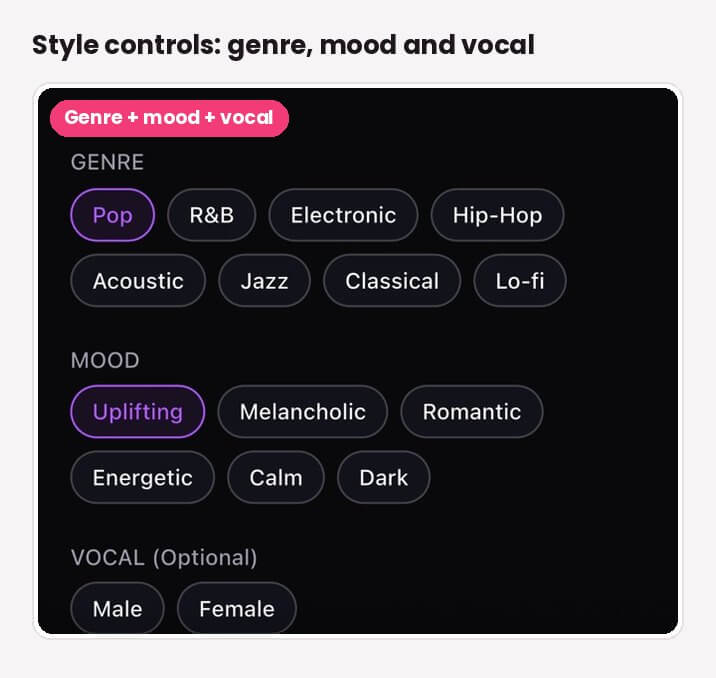
The AI Song feature has two modes. Simple is a single description box with idea chips such as Dreamy, Energetic or Romantic. Custom adds genre, BPM and key controls plus a Lyrics tab where you write each line and the AI fills in the timing and melody. A Prompt Enhance button rewrites your description, and an Instrumental toggle turns vocals off entirely.
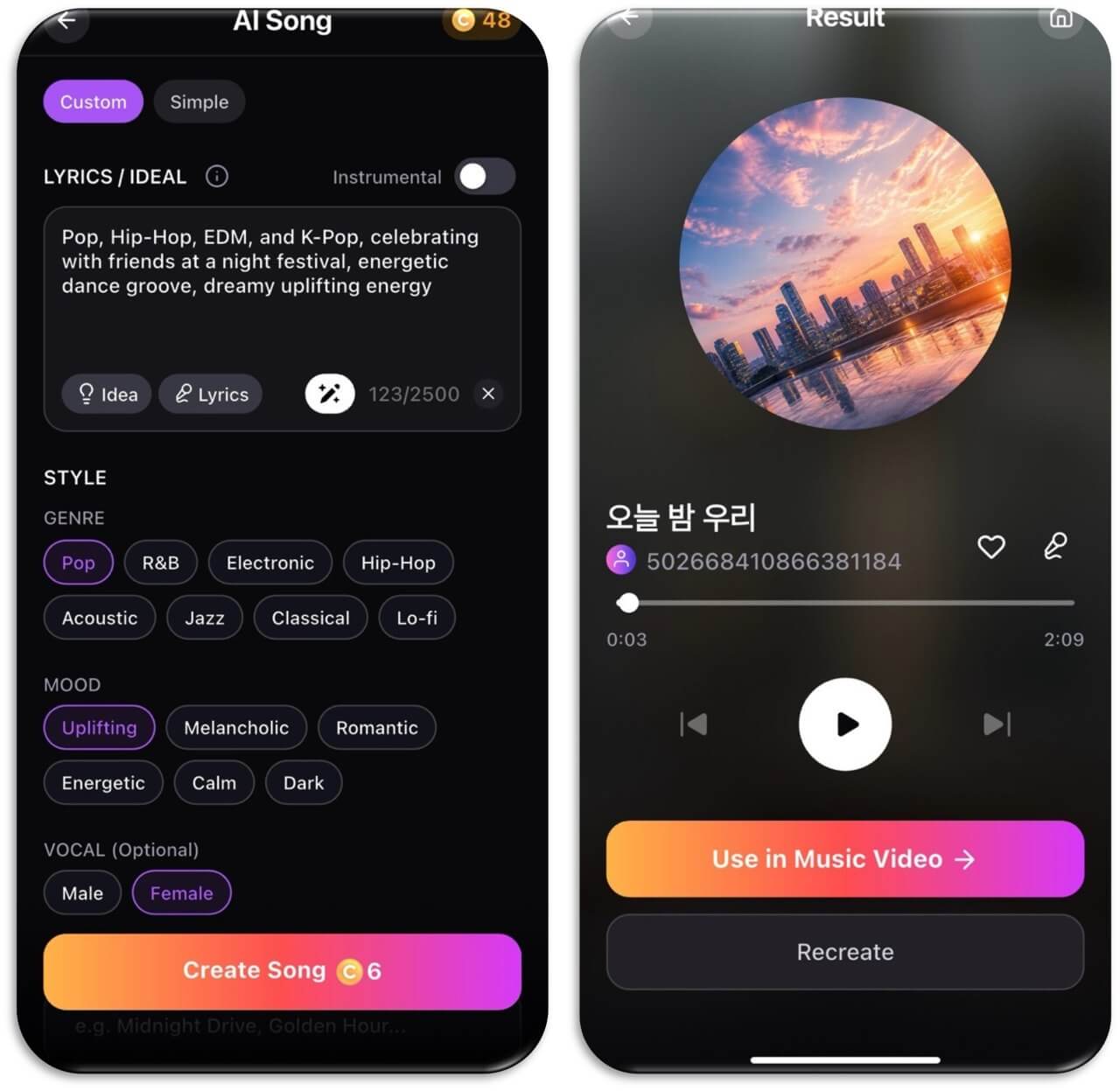
When the song is ready, the Song Result screen shows circular album art, playback controls and a swipe-up Lyrics Sheet with synced lyrics. For a step-by-step songwriting walkthrough, read how to write a song with AI, and for lyric prompts see can AI write song lyrics?.

AI Music Video & Song Maker
Turn any song into a music video.
No filming, no editing timeline.
Can you turn the song into a music video?
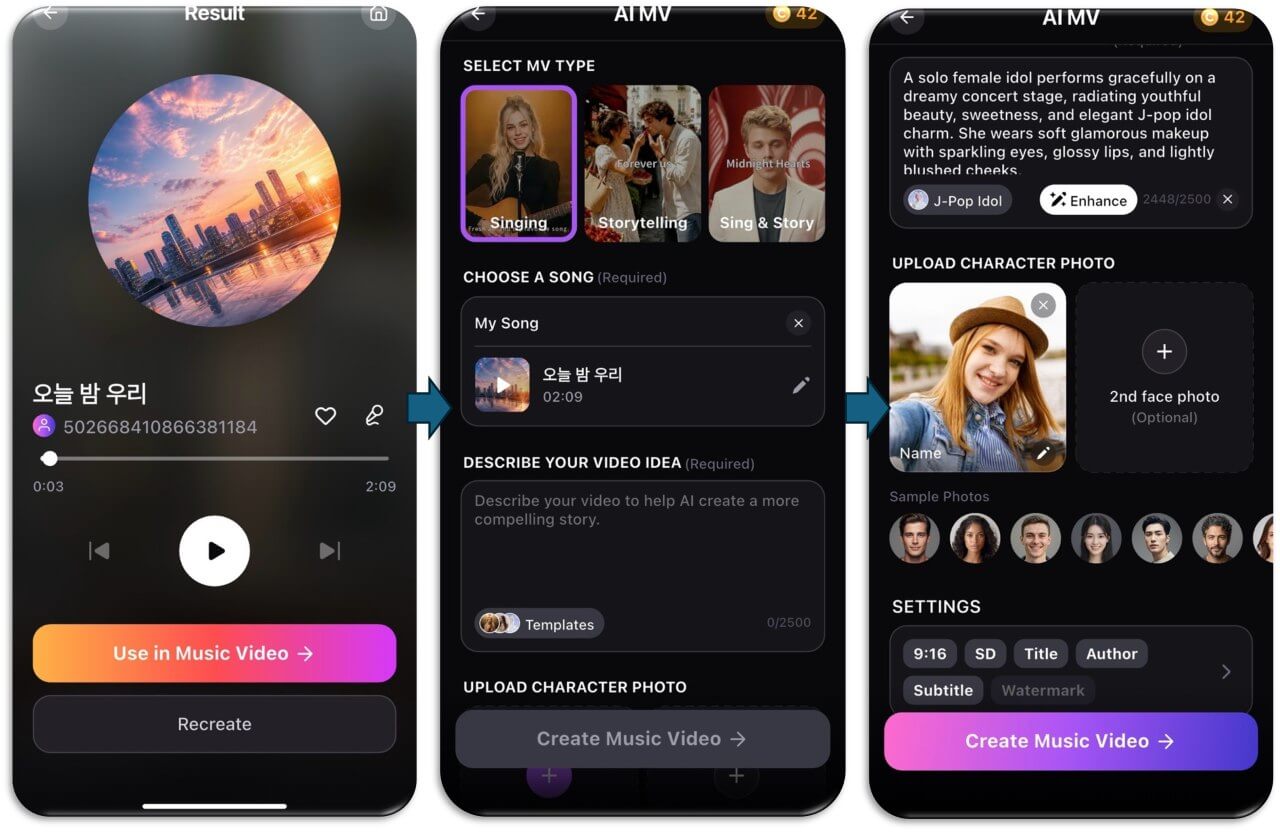
Yes. In YouCam Muse, the Song Result screen has a Use in Music Video button that opens the AI MV feature room with your song pre-loaded. The Singing type has a virtual artist lip-sync to your vocals, while Sing & Story mixes performance with a story, so the quality of your vocals shows directly on screen.
When should you regenerate and when should you edit?
- Regenerate when the whole feel is off: the mood, the genre or the vocal style.
- Edit the lyrics when one line is the problem: a hard word, a clumsy rhyme or a stock phrase.
- Go instrumental when the music is right but the vocal never lands, then record or add your own.
Rights matter once you share the result. Read is AI music legal? before you publish, and see our AI singer app guide if you want to work from your own voice.
Try it now
Write a short mood description, generate one song, and run the five-point checklist above. One careful listen usually tells you what to fix.
AI Music Video & Song Maker
Turn any song into a music video.
No filming, no editing timeline.
FAQ
Are AI vocals good enough to release?
They are good enough for demos, social clips and drafts. For a release, listen carefully with the checklist, fix weak lines, and check the rights and platform rules that apply to AI-generated music.
Why do AI vocals mispronounce words?
Rare words, names and unusual spellings are harder for vocal models. Respelling the word or choosing a simpler one in your lyrics usually helps.
Can I write my own lyrics?
Yes. In YouCam Muse Custom mode, the Lyrics tab lets you write each line while the AI fills in timing and melody.
Can I make an instrumental track?
Yes. The Instrumental toggle generates the song without vocals or lyrics.
Can I see the lyrics with the song?
Yes. Swipe up on the Song Result screen to open the Lyrics Sheet, which shows synced lyrics with the active line highlighted.
How do I put my song in a music video?
Tap Use in Music Video on the result screen. It opens the AI MV feature room with your song already loaded.



