 Author:



- The Importance of Virtual Customized Makeup Tutorials
- What Can Consumers Expect
- Creating Customized Digital Makeup Tutorials in a Few Simple Steps
- Check How to Easily Create A Virtual Customized Makeup Tutorials
- Custom Tutorials Facilitate Makeup Education Across a Variety of Touch Points
- 3 Reasons Why Youcam Tutorial Is a Must-Have Tool for Beauty Brand Education Teams:
- #1. Take Personalization to the Next Level
- #2. Empowers Consumers
- #3. Easy Setup With E-commerce Integration
(Updated on November 9th, 2026)
The Importance of Virtual Customized Makeup Tutorials

The short answer: Perfect Corp.’s YouCam Tutorial lets beauty brands turn any makeup artist’s technique into a personalized, replayable AR tutorial — mapped to each customer’s own face, skin tone, and features — so shoppers can learn a look on their own device instead of guessing from a flat photo or video. That makes it a practical education tool for brand teams, not just a novelty try-on feature, and the rest of this guide covers what it takes to set one up.
Shared Materials by Strapi
*Adjust the size of images ONLY. Please go to Strapi to edit the materials info.
What Can Consumers Expect
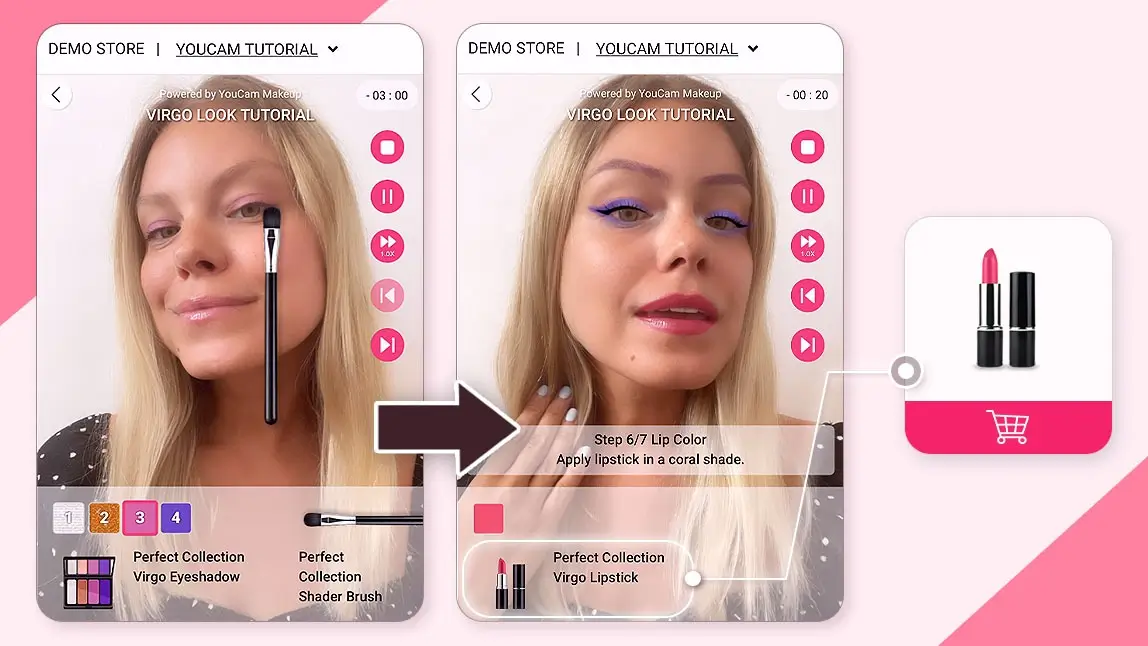
With Perfect Corp.’s YouCam Tutorial solution, customers receive a personalized makeup consultation, complete with step-by-step interactive instructions, all accessible through their laptop or mobile device.
Creating Customized Digital Makeup Tutorials in a Few Simple Steps
YouCam Tutorial provides a hyper-realistic AR-powered makeup tutorial that gives consumers an immersive instructional experience with the ultimate precision. This virtual tutorial platform utilizes a customizable face chart to show consumers how to apply makeup products to achieve the best results for their unique features. The tutorial player even features a guided narration and allows consumers to replay their tutorial videos, giving them all the tools and instructions they need to apply their makeup perfectly.
 Check How to Easily Create Virtual Customized Makeup Tutorial:
Custom Tutorials Facilitate Makeup Education Across a Variety of Touch Points
This unique experience offers consumers a safe way to explore your brand with intuitive and engaging tutorials personalized to their needs. From a brand and education team perspective, YouCam Tutorial also makes it possible for makeup artists to show their teams new looks and application techniques for:
- Working with new products at department stores
- Applying makeup backstage at fashion shows
- Doing a client’s makeup at the salon
- Preparing models for photoshoots
- Consulting with clients about their makeup application
- Applying creative and unique looks for film or theater

Shared Materials by Strapi
*Adjust the size of images ONLY. Please go to Strapi to edit the materials info.
3 Reasons Why Virtual Customized Makeup Tutorial Is a Must-Have Tool for Beauty Brand Education Teams:
#1. Take Personalization to the Next Level
YouCam Tutorial allows for even greater personalization with AR-powered guided tutorials. This takes personalization to a new level. With a hyper-personalized educational experience, consumers no longer have to translate what they see on screen to their individual features, and they can explore makeup that suits their:
- Skin tone
- Skin type
- Face shape
- Facial angles
- Personal style

YouCam Tutorial offers the experience of a personal virtual makeup coach. With techniques designed just for them, consumers know that they are receiving accurate makeup tutorials that map their features at every angle.
#2. Empowers Consumers
Customers like to be in control of their shopping experience. With YouCam Tutorial, they can be. The intelligent, personalized platform allows consumers to learn at their own pace and take advantage of unlimited replay to ensure they get the maximum benefit from their tutorials. As a virtual makeup coach, YouCam Tutorial revolutionizes the makeup buying journey for consumers by allowing them to:
- Minimize repeated makeup application
- Eliminate mess and cleanup
- Share their makeup buying experience with friends and family
- Learn in a comfortable environment, like their home or on the go

Consumer research on virtual try-on consistently points the same direction: shoppers are more likely to buy from, and stick with, brands that let them preview a product before purchase. Applying this concept to virtual makeup tutorials has a similar effect by creating value for consumers and encouraging them to continue shopping with the brand. Request a FREE demo to learn how YouCam Tutorial can improve your brand engagement and increase sales.
Shared Materials by Strapi
*Adjust the size of images ONLY. Please go to Strapi to edit the materials info.
#3. Easy Setup With E-commerce Integration
YouCam Tutorial’s platform makes setup simple for brands. It uses the Perfect Cloud Console as the central command center, allowing brands to create new tutorials when needed. In the Cloud Console, brands can store any completed tutorials and render videos using AR features. The Virtual Makeup Artist app for iOS lets brands use the Apple Pencil to conveniently draw each tutorial step until they are ready to implement it with the Tutorial Player. Then, consumers can view the tutorial on the brand’s website or in-store.

With integrated e-commerce capabilities, YouCam Tutorial allows customers to purchase a brand’s products and tools instantly. This integration means consumers always get the right products for their ideal look while matching the tutorial that resonated with them.
YouCam Tutorial puts you a step ahead of the competition by giving consumers the smart instruction they need to create their favorite looks. Contact us to learn more about our beauty tech solutions trusted by over 800+ brands around the world.
The Three Benefits Compared
Decide who owns the tutorial program first. Education teams care most about personalization, e-commerce teams about the path to purchase, and IT about how little setup it takes.
| Benefit | What YouCam Tutorial does | Who it helps most |
|---|---|---|
| Personalization | Maps AR-guided steps to the customer’s skin tone, skin type, face shape, facial angles and personal style | Brand education and CX teams |
| Consumer empowerment | Lets shoppers learn at their own pace, minimize repeated application and mess, and share the experience with friends and family | E-commerce and marketing teams |
| Easy setup | Tutorials are built and stored in the Perfect Cloud Console, with integrated e-commerce so customers can buy the products shown | IT and operations teams |
FAQs: Virtual Customized Makeup Tutorials
What is a virtual customized makeup tutorial?
It’s an AR-powered, step-by-step tutorial — built with Perfect Corp.’s YouCam Tutorial — that maps a makeup look to a customer’s own face using a customizable face chart, with guided narration and unlimited replay.
Do brands need a developer team to set one up?
No. Tutorials are built and stored in the Perfect Cloud Console, and makeup artists can draw each step directly using the Virtual Makeup Artist app on iOS — no custom engineering required to launch a tutorial on your site.
Can customers buy products directly from a tutorial?
Yes. YouCam Tutorial integrates with e-commerce, so shoppers can purchase the exact products used in the tutorial without leaving the experience. Request a demo to see it configured for your product catalog.
Shared Materials by Strapi
*Adjust the size of images ONLY. Please go to Strapi to edit the materials info.
Get expert advice from Perfect Corp. and be part of the beauty tech trend. Contact us for details on beauty tech solutions trusted by 800+ brands globally.
Shared Materials by Strapi
*Adjust the size of images ONLY. Please go to Strapi to edit the materials info.
Read our “Beauty Tech: The Complete Guide” to unlock powerful ROI secrets.