Author: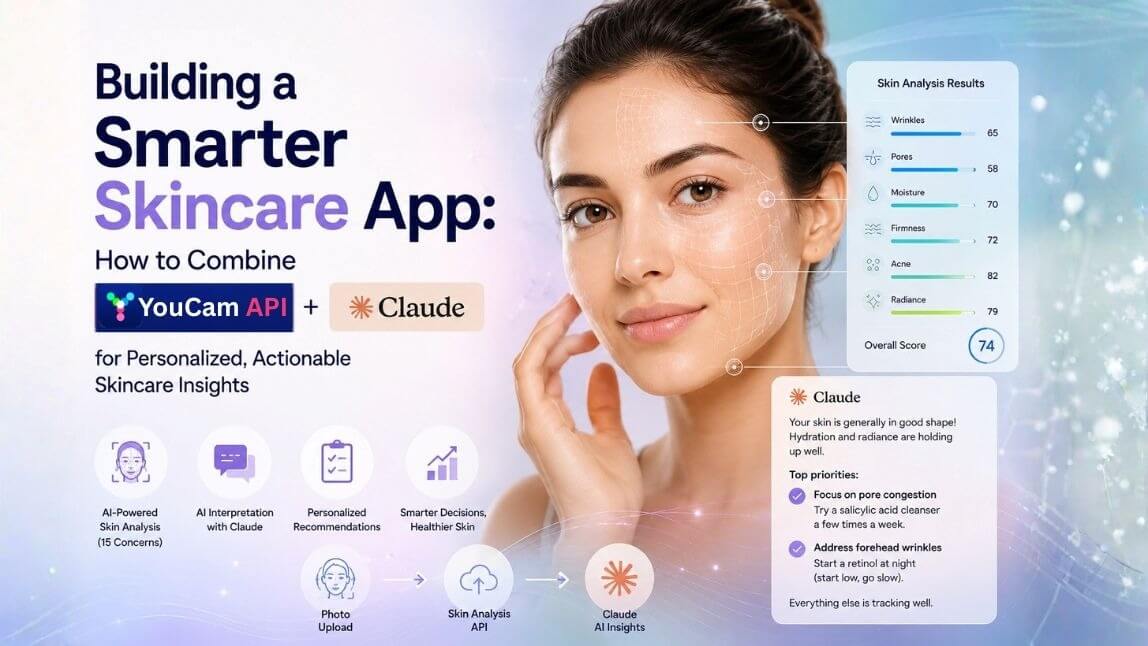
Most skin analysis tools have the same problem: they're good at generating data and bad at making that data useful.
A score of 58 for pores and 65 for wrinkles doesn't tell a user what to do next. It doesn't explain why those scores matter, what's driving them, or what a realistic improvement plan looks like. The data is there — the interpretation isn't.
That's the gap this stack closes. Perfect Corp's Skin Analysis API handles the hard part: accurate, dermatologist-verified skin scoring across 15 concerns from a single photo. Claude handles the other hard part: turning those numbers into a conversation that feels like it came from someone who actually knows skincare.
This article walks through how the integration works, what it can power, and what's changed now that both APIs are available via MCP.
| Table of Contents |
|---|
What each piece does
Perfect Corp Skin Analysis API scans a face photo and returns quantified scores for 15 skin concerns: wrinkles (broken down by forehead, crow's feet, nasolabial folds, and more), pores (by zone), moisture, firmness, acne, oiliness, redness, radiance, dark circles, eye bags, droopy eyelids, age spots, tear trough, and skin type. It also returns a skin age estimate and an overall skin health score.
The output is clean JSON — numerical scores on a 0–100 scale, mask image URLs for visual overlays, and raw vs. UI-adjusted scores depending on what you need.
Claude is a large language model that's well-suited to medical-adjacent interpretation tasks. Given a structured skin score payload and a clear system prompt, it can explain what each score means in plain language, identify which concerns warrant the most attention, suggest evidence-based next steps, and adapt its tone to the context — whether that's a medspa consultation summary, a consumer-facing skincare recommendation, or a brand's personalized product guide.
Neither tool alone gets you to a complete user experience. The API gives you precision without communication. Claude gives you communication without precision. Combined, they cover both.
How the integration works
The basic flow is straightforward:
- User submits a photo via your frontend — mobile camera, file upload, or webcam
- Your backend calls the Skin Analysis API, resizes the image to spec (long side ≤ 4096px, short side ≥ 1080px for HD), uploads via the File API, creates a task, and polls until the result is ready
- You pass the score JSON to Claude with a system prompt that defines the role, tone, and output format
- Claude's response renders in your UI — personalized, readable, actionable
The API call itself takes a few seconds. Claude's response adds another second or two. For most UI contexts, streaming Claude's response token-by-token makes the experience feel fast even before it's complete.
Here's what a minimal system prompt looks like:
You are a skincare advisor interpreting AI skin analysis results.
Scores range from 0–100, where higher = healthier.
Given the scan results below, explain what they mean in plain language.
Identify the 2–3 concerns most worth addressing.
Suggest specific, evidence-based next steps for each.
Be warm, specific, and avoid jargon.
Do not mention the numerical scores directly — translate them into language.
And a stripped-down example of the data you'd pass:
{"hd_moisture":{"ui_score":70},"hd_wrinkle":{"whole":{"ui_score":65},"forehead":{"ui_score":55}},"hd_pore":{"nose":{"ui_score":58},"cheek":{"ui_score":72}},"hd_acne":{"whole":{"ui_score":82}},"hd_radiance":{"ui_score":79},"skin_age":37,"all":{"score":74.2}}
Claude takes that payload and returns something like:
That's the difference between a dashboard and a consultation.Your skin is generally in good shape — hydration and radiance are both holding up well. The main area to focus on is your nose pores, which are showing more congestion than the rest of your face. This is usually driven by excess sebum in the T-zone and tends to respond well to a salicylic acid cleanser used a few times a week. Your forehead wrinkles are the second thing worth addressing — not dramatic, but earlier intervention with a retinol (start low, go slow) pays off more than later. Everything else is tracking well.
MCP: the faster path to integration
Until recently, connecting Claude to an external API meant writing the integration code yourself — handling auth, formatting requests, parsing responses, managing errors. It works, but it adds friction, especially at the prototyping stage.
Perfect Corp now supports Model Context Protocol (MCP), which changes the setup significantly.
MCP is an open standard that lets AI models like Claude and coding tools like Cursor understand and call external APIs directly, without custom wrapper code. Think of it as a standardized connector: instead of writing bespoke integration logic for each tool, you expose your API as an MCP server once, and any MCP-compatible client can use it immediately.
For the Skin Analysis API, this means:
- Claude Desktop and Claude Code can call the skin analysis tools directly from a conversation or agentic workflow
- Cursor can reference and invoke the API while you're building, without leaving the editor
- Any other MCP-compatible client — Windsurf, Cline, and others — gets the same access
In practice, this cuts the time from "I want to test this integration" to "I have results on screen" from hours to minutes. You're not writing plumbing code — you're building the actual product.
What you can build with this stack
The combination opens up a range of product directions, depending on who you're building for:
Personalized skincare consultation tools — The most direct application. User scans, Claude explains results and recommends a routine. Works as a standalone web tool, embedded widget, or mobile screen. Pair Claude with your product catalogue and it can surface relevant SKUs alongside the advice.
Medspa and clinic pre-consultation flows — Clients complete a scan before their appointment. Claude generates a structured summary of their skin profile — concerns, severity, history if you're storing longitudinal data. The esthetician or dermatologist walks in already oriented. Less time on intake, more time on treatment.
E-commerce personalization engines — A user scans before they shop. The skin scores feed a recommendation engine — either Claude directly, or Claude-assisted logic that maps concerns to products. Reduces returns, increases confidence at checkout, and gives you first-party skin data that's more reliable than self-reported quizzes.
Progress tracking features — Store scan results over time. Claude can compare deltas between scans: what improved, what's held steady, what might be trending in the wrong direction. This kind of longitudinal narrative is hard to generate programmatically and easy for Claude to write naturally.
Developer and enterprise sandbox environments — For teams evaluating the API before full integration, a Claude-powered sandbox lets them interact with real results in natural language without building a UI first. Useful for demos, internal tooling, and accelerating procurement decisions.
A note on the score data
One detail worth knowing before you design your prompts: the API returns two score types for each concern — raw_score and ui_score.
raw_score is the direct model output. ui_score is an adjusted version calibrated to feel more favorable — the documentation notes that consumers tend to respond better to evaluations that lean slightly positive, and the UI score reflects that calibration.
For consumer-facing experiences, ui_score is usually the right choice. For clinical or research contexts where precision matters more than emotional framing, raw_score gives you the unmodified output.
If you're using Claude to interpret results, you'll likely want to pass ui_score for consumer contexts and instruct Claude to focus on relative differences and patterns rather than absolute numbers.
Getting started
The fastest path to a working prototype:
- Get an API key at yce.perfectcorp.com — there's a free trial that includes access to the HD skin analysis endpoints
- Run the example curl calls from the documentation to confirm your auth and understand the response shape before writing any application code
- Connect via MCP if you're working in Claude or Cursor — this removes most of the integration overhead and lets you start experimenting with prompts immediately
- Iterate on your system prompt — the quality of Claude's output is almost entirely determined by how clearly you define the role, the audience, and the output format. Start simple and add specificity as you learn what your users actually need
The skin analysis market is growing quickly — the global skin analysis market is projected to reach approximately USD 7.11 billion by 2034, and the tools available to developers are now sophisticated enough that what used to require a computer vision team and months of model training can be integrated in an afternoon.
The gap between a generic skin quiz and a genuinely useful skin consultation has never been easier to close.