


Buzz Cut Filter

Secure SaaS Platform
Visualize Buzz Cut with AI Precision
Buzz cut filter moves beyond basic image overlays. Leveraging sophisticated artificial intelligence, our buzz cut generator analyzes individual characteristics to deliver an authentic, personalized virtual transformation.
How to Use the Free Buzz Cut Filter Online

Upload Photo
Upload a clear, front-facing image of yourself.

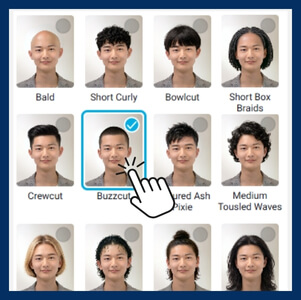
Select "Buzz Cut"
Choose the "Buzz Cut" option from the hairstyle menu.

Preview & Customize
Instantly view your new look!
Advanced Features of Buzz Cut Filter
Beyond buzz cut try-ons, our API offers a wide range of hair styling options tailored to suit each client’s unique look and preferences.
Full Buzz Cut Makeovers with Hair Color Try On
Full Buzz Cut Makeovers with Hair Color Try On
Buzz cut generator integrates seamlessly with hair color try on, allowing users to explore endless combinations of cuts and shades in real time. See exactly how that new hue interacts with your specific skin tone and fresh fade in one seamless, hyper-realistic view!
Realistic Hair Texture and Color Simulation
Realistic Hair Texture and Color Simulation
Experience the true potential of a buzz cut with advanced simulation capabilities that account for natural hair color and texture. Our AI accurately portrays how different hair types, whether fine or coarse, dark or light, will appear with a buzz cut, offering a nuanced and highly realistic preview.
Smart Style Guidance via Face Shape Detector
Smart Style Guidance via Face Shape Detector
Not every buzz cut fits every face. Our API solves this dilemma with a built-in AI Face Shape Detector that scans features to accurately identify oval, square, round, or diamond shapes. This analysis empowers users to understand their unique face shape and confidently select the buzz cut hairstyles that best balance and enhance their natural features.
Buzz Cut Filter FAQ
Does the buzz cut filter work for girls?

Yes, the buzz cut filter works for everyone regardless of gender.
Does the filter produce natural results?
Yes, the filter utilizes advanced Generative AI (GAN) technology to ensure hyper-realistic results.
How to see the preview of the buzz cut?
You can see a buzz cut preview in three simple steps:
- Upload or Scan: Open the tool and either upload a selfie or enable your live camera.
- AI Analysis: The system automatically maps your facial structure and hair line.
- Instant Apply: Select the "Buzz Cut" filter to instantly view the hairstyle on your photo or live video feed, with options to adjust the length or hair color in real-time.
Is using a buzz cut filter free?
Yes, users can typically try the buzz cut filter for free. For businesses looking to integrate the tech into their own websites or apps, professional licensing and API tiers are available.


