 Author:



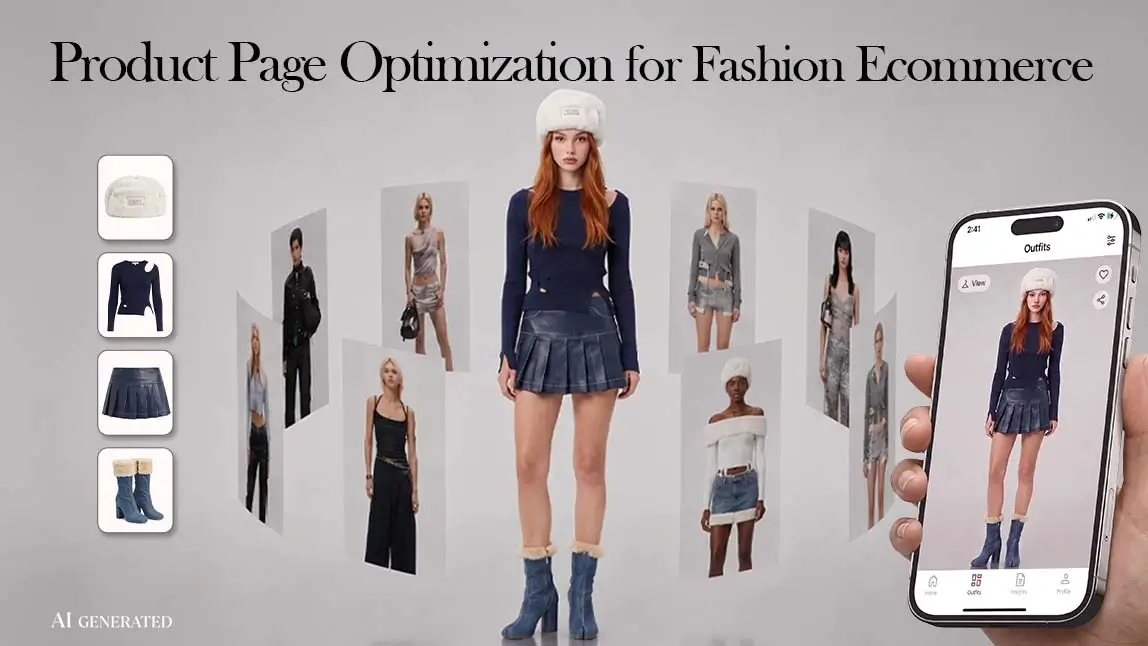
Product page optimization means improving each part of a product detail page (PDP) so shoppers can decide quickly and confidently, and so search engines understand exactly what the page sells. For fashion ecommerce, a good PDP answers the questions a fitting room would: how the garment looks on a body, how it fits, what it is made of, what delivery and returns cost, and what other buyers thought.
This guide gives you a 10-point fashion PDP checklist and then walks through each element: images, virtual try-on, size and fit information, copy and variants, reviews, page speed and product page SEO. Virtual try-on is one item on that checklist, not a replacement for the others. An API such as Perfect Corp.'s AI Clothes Changer API places a garment image onto a shopper's or model's photo, which answers "what will this look like on me?" It does not tell anyone which size to buy, so the rest of the page still has to do that job.
Table of Contents
- What Is a Product Detail Page (PDP)?
- Fashion Product Page Optimization Checklist
- Product Images: What Each Fashion PDP Needs
- Virtual Try-On on the Product Page
- Size and Fit Information
- Product Copy, Variants and Pricing
- Reviews and Social Proof
- Page Speed, Mobile Design and Product Page SEO
- How to Prioritize and Test PDP Changes
- Rolling Out Try-On Across Your Product Pages
- FAQ
- Conclusion
What Is a Product Detail Page (PDP)?

A product detail page is the page dedicated to a single product: its images, price, variants, description, reviews and the add-to-cart button. It is different from a product listing page (PLP), the category or search results grid where shoppers compare many items and filter by size, color or price. The PLP helps shoppers find a product. The PDP helps them decide whether to buy it.
Fashion PDPs carry more weight than most. Sizing differs from brand to brand, fabric can't be touched through a screen, colors shift between monitors, and one style often comes in several colorways and a dozen sizes. Every question the page leaves open is one the shopper has to guess at.
Fashion Product Page Optimization Checklist
Use these 10 points to audit an existing product detail page. The right column lists typical gaps to look for on apparel sites.
| PDP element | What a strong fashion PDP shows | Common gap |
|---|---|---|
| Product title | Garment type, key attribute and color, e.g. "Linen Wide-Leg Trousers, Olive" | Only an internal style name that nobody searches for |
| Image gallery | Front, back, side, fabric close-up and full-length on-model shots in consistent light | One angle, or flat lays only |
| Model information | Model height and the size they wear, next to the images | Missing, so shoppers guess the scale |
| Virtual try-on (optional) | A clearly labeled "see it on me" preview from the shopper's photo | Presented as if it were size advice |
| Size and fit | Garment measurements per size, a fit note and a size chart for this category | One generic chart for the whole store |
| Fabric and care | Fiber composition, stretch, lining, weight or opacity, care instructions | Vague words such as "premium fabric" |
| Variants | All colors and sizes on one page, with swatches that switch the images | Swatches that change the name but not the photos |
| Price, delivery and returns | Price, delivery estimate and return window near the add-to-cart button | Policies hidden in the footer |
| Reviews | Fit feedback, customer photos and filters by size or height | A star average with no detail |
| Speed and SEO | Compressed images, a fast main image, Product structured data that matches the page | Heavy galleries and outdated price or stock data |
Product Images: What Each Fashion PDP Needs
Shoppers can't touch the garment, so the images carry most of what they learn about it. A complete gallery usually covers:
- Front, back and side views, so shoppers can see the cut, the back neckline and how the garment falls.
- Close-ups of fabric texture, stitching, buttons, zips and prints.
- Full-length on-model shots that show proportion and length, with the model's height and size stated next to the gallery.
- One set of images per colorway, linked to the color swatches, so picking "sage" actually shows sage.
- Zoom on desktop and pinch-zoom on mobile, using images large enough to stay sharp.
Keep lighting, crop and background consistent across the catalog, so shoppers compare products rather than photo setups. Calibrate color carefully, because shoppers judge the color from your photos alone. Write descriptive alt text for every image ("olive linen wide-leg trousers, side view") instead of repeating the product name.
On-model images are usually the most expensive part of the gallery. Our guide to AI on-model product photography explains how brands turn product images into on-model photos using their own model shots. The imagery section of how to reduce returns in fashion ecommerce covers which images prevent "not as expected" returns.

Google's image rules for product listings
If your products also appear in Google Shopping or free listings, the images on your PDP and in your product feed have to meet Google Merchant Center's product data specification. Several of its rules affect fashion catalogs directly:
- Google has announced a minimum size of 500 x 500 pixels for all product images, with enforcement starting January 31, 2027.
- The main image must accurately show the product, without promotional text, watermarks or borders. Up to 10 additional images can show the product styled or in use.
- Images created with generative AI must keep the metadata that marks them as AI-generated, such as the IPTC DigitalSourceType value. Don't strip that metadata when you edit, compress or resize the files.
Virtual Try-On on the Product Page
Virtual try-on answers one specific question: how does this garment look on a body like mine? It is useful when a shopper likes a piece but can't picture it on themselves, especially for dresses, statement tops and colors they don't usually wear. Fashion brands use it on product pages in two ways.
Shopper-facing try-on
A "Try it on" button near the gallery lets a shopper upload a full-body or half-body photo. The AI Clothes Changer API combines that photo with the product image and returns a photorealistic try-on image, fitted to the shopper's build and the light in their photo. The result appears beside the standard product images, and the shopper can switch colorways and try again.
Brand-side on-model images
The same API can place new garments onto your own model photos, so new arrivals get on-model images without a full reshoot. The garment follows the pose and angle of the model photo you supply. Each angle you want in the gallery needs its own model photo, and the output resolution follows the resolution of that input photo.
Actual results from Perfect Corp.'s AI clothes virtual try-on tool.
What the AI Clothes Changer API handles
- Garment input: a front-facing product-only image, a garment photo that features a model, or a predefined style.
- Categories: tops, bottoms, dresses, outerwear, swimwear, lingerie, shoes and more, as full or partial outfits. Jackets, coats and vests can be previewed as an outer layer over the clothing already in the photo.
- Files: standard JPG or PNG images up to 10MB.
- Integration: a RESTful API with Bearer authentication and JSON responses, usable from websites, iOS and Android apps, and backend systems. It works from standard product images, with no 3D garment models required.
Review try-on images like any other product photo
Before a try-on image goes live as an on-model photo, give it the same review as a studio shot: check that the color, pattern, length and silhouette match the real garment, and choose model photos whose pose shows off the cut you want to highlight. Google's Merchant Center rules require product images to show the product accurately, so this step matters for Shopping listings too.
What try-on does not do
Try-on is visual. It shows how a garment looks, not which size will fit, so keep it separate from your size guidance and label results as previews. It is also photo-based: the result is a still image in the pose of the uploaded photo, not a live camera view or a 360-degree model. Tell shoppers how their photo is used and stored before they upload it, and keep the try-on button from crowding the add-to-cart button on mobile.
For a broader look at try-on across ecommerce categories, see AI virtual try-on for ecommerce.
AI Clothes API Playground
Upload a garment image and a model photo and see the result before you build.
Size and Fit Information
Fit is the question images can't fully answer, so the PDP has to answer it in words and numbers:
- Garment measurements for every size (chest, waist, hip, length, inseam), in inches and centimeters, with a note on how each was measured.
- A fit note that says how the piece is meant to fit: relaxed, true to size, cropped, or designed to be worn oversized.
- Model details: height and size worn, placed directly under the gallery.
- A size chart for this category, opened in context instead of on a separate page, starting on the right garment type.
- Fit feedback from reviews, such as "runs small" or "true to size", summarized near the size selector.
Keep the line between visual tools and fit tools clear. A try-on preview helps with style and color decisions. Measurements, fit notes and reviews help with size. Mixing the two sets wrong expectations and can create the very returns you're trying to prevent.
Product Copy, Variants and Pricing
Titles. Use the words shoppers actually search: garment type, a defining attribute and the color. A style name can follow, but it shouldn't replace the description.
Descriptions. Open with what the piece is and when to wear it, then give the specifics: fiber composition, stretch, lining, opacity, closures and care. Write unique copy for each product instead of reusing manufacturer text across many pages, and keep the most important details visible without extra clicks.
Variants. Keep all colors and sizes on one page whenever possible. Swatches should switch the images, show availability per size, and use color names that describe the color ("olive" rather than only "Morning Fern").
Price, delivery and returns. Show the price, any sale price, an estimated delivery date and the return window close to the add-to-cart button. Shoppers shouldn't have to leave the page to find out what a return would cost them.
Reviews and Social Proof
For clothing, the most useful reviews describe fit. Ask reviewers for their height, their usual size and the size they bought, and invite photos. Let shoppers filter reviews by size or height, show critical reviews alongside positive ones, and reply to complaints about fit or quality.
Keep the review program honest: publish every genuine review, including critical ones, never write, buy or reward reviews for a particular rating, and clearly label reviews from employees or from shoppers who received a free product.
Page Speed, Mobile Design and Product Page SEO
Start by checking which element counts as the Largest Contentful Paint on your PDP template. When it's the main product image, image fixes will have the biggest effect on load time. Google's Core Web Vitals thresholds treat a page as "good" when, for 75% of visits, Largest Contentful Paint is 2.5 seconds or less, Interaction to Next Paint is 200 milliseconds or less, and Cumulative Layout Shift is 0.1 or less. Practical fixes for PDPs:
- Serve images in modern formats (WebP or AVIF) at the size they're displayed.
- Load the main product image right away, and lazy-load only the images further down the page.
- Reserve space for images, review widgets and try-on buttons so the layout doesn't jump.
- On mobile, use a swipeable gallery, a size selector that's easy to tap, and a sticky add-to-cart bar.
Product page SEO
Product page SEO starts with the basics: a unique title tag and meta description for each product, a clean URL, a single canonical URL for color and size variants, and internal links from category pages and editorial content.
Add Product structured data with offer details (price, currency, availability) following Google's merchant listing structured data guidelines. Keep that data consistent with what the page shows. Merchant Center requires price and availability to match across your feed, landing page, checkout and structured data, and it expects the price to stay visible when an item is out of stock. Descriptive image file names and alt text help your product images appear in image search too.
How to Prioritize and Test PDP Changes
Not every fix deserves an A/B test. Fill obvious gaps first: missing measurements, swatches that don't change the photos, slow main images. Then test bigger changes on your highest-traffic product templates. A simple way to decide where to start:
- Find where shoppers stop. Compare product page views with add-to-cart rate by category, and read on-site search terms and customer service questions.
- Read return reasons. "Too small" points to size information. "Looks different" points to images, color accuracy and try-on.
- Change one thing at a time, and run each test through a full weekly cycle so weekday and weekend behavior both count.
| PDP change | Metrics to watch |
|---|---|
| New or better on-model images | Add-to-cart rate, image gallery engagement, "looks different" returns |
| Garment measurements and fit notes | Size chart opens, size-related returns, fit questions to customer service |
| Virtual try-on button | Try-on usage, add-to-cart rate after a try-on, "not as expected" returns |
| Delivery and returns info near the button | Add-to-cart rate, checkout abandonment |
| Image compression and layout fixes | Core Web Vitals, bounce rate on mobile |
Rolling Out Try-On Across Your Product Pages
Try-on on product pages is usually owned jointly by ecommerce, product and engineering teams. Fashion brands and multi-brand retailers add it to their own stores. It is also useful wherever the catalog keeps changing, such as secondhand listings photographed by sellers and rental platforms that rotate their stock.
Before any code is written, teams settle where the button sits in the mobile and desktop PDP layouts, which categories launch first, what photo guidance shoppers see, and how uploaded photos are handled under the privacy policy. A phased rollout keeps the risk small:
| Phase | What the team does | Where to start |
|---|---|---|
| 1. Prototype | Run a sample of real catalog images through the API and review fidelity by category | API Playground |
| 2. Integrate | Get an API key, connect the REST API to the PDP template and the image pipeline | API Console and the AI Clothes API reference |
| 3. Pilot | Launch on one category, A/B test the PDP template and track the metrics from the table above | Your analytics and testing tools |
| 4. Scale | Extend to more categories and estimate volume on pay-per-use plans | API pricing or Perfect Corp.'s sales team |
Developers who want to see a complete build first can follow the tutorial on building an AI clothes changer app with Cursor and the YouCam API.
Security and privacy reviews usually come up during the pilot. Perfect Corp.'s platform is certified to ISO/IEC 27001:2022, the company applies GDPR across its business, and more than 800 global brands have used its technology.

FAQ
What is product page optimization?
Product page optimization is the process of improving a product detail page's images, information, layout, speed and structured data so more visitors buy and the page ranks better in search. For fashion, it focuses on helping shoppers judge look, fit and fabric without seeing the item in person.
Is product page optimization the same as Apple's Product Page Optimization?
No. In ecommerce, the term means improving the pages that sell products on your own site. Apple's Product Page Optimization is an App Store Connect feature that lets app developers test up to three alternate versions of an app's App Store page, with different icons, screenshots and preview videos.
What should be above the fold on a product page?
On a fashion PDP, the first screen should show the main product image, the product name, the price, the color and size selectors, and the add-to-cart button. On mobile, a sticky add-to-cart bar keeps the button reachable while shoppers scroll through images and details.
What is the difference between a PDP and a PLP?
A product listing page (PLP) shows many products in a grid with filters and helps shoppers browse and compare. A product detail page (PDP) covers one product in depth and is where the add-to-cart decision happens.
How do you optimize a product page for SEO?
Write a unique title tag, meta description and product description for each item, use one canonical URL for variants, add Product structured data with price and availability that match the page, write descriptive alt text, and keep the page fast. Internal links from category pages and articles help search engines find and rank it.
Does virtual try-on help shoppers choose the right size?
No. Virtual try-on shows how a garment looks on a person's photo, not how it fits or which size to order. Size choice still depends on garment measurements, fit notes and reviews, so keep both kinds of information on the page.
Can you use AI-generated product images in Google Shopping?
Yes, as long as they meet Merchant Center's image rules. The image must accurately show the product, and AI-generated images must keep their AI metadata, such as the IPTC DigitalSourceType tag. Additional images may show the product styled or in use.
Conclusion
A strong fashion product page answers four questions before the shopper has to ask: what does it look like, how does it fit, what is it made of, and what happens if it isn't right. Start with complete images, honest size information, clear delivery and return details, and fast loading, then test changes against add-to-cart rate and return reasons. Virtual try-on fits into that plan as one lever for the "how will it look on me" question, used alongside size guidance rather than in place of it.
AI Clothes Changer API
Photo-based clothes try-on for web and mobile apps, with pay-per-use plans.
This article was edited and reviewed by the Perfect Corp. editorial team. Welcome to contact us or give us more suggestions.