


 Author:
Nobody wants to wait six months and burn $80,000 on a dev team just to find out if their app idea actually works. That is exactly the gap a no-code app builder was built to close — drag, drop, publish, done. But in 2026 the category has split in two: classic visual builders that hand you total control over a canvas, and a new wave of AI-native tools that build the whole thing from a prompt. Picking the wrong lane wastes weeks.
This guide breaks down the no-code app builder landscape as it actually stands right now — who the serious platforms are, what they cost, and where each one wins. Then it goes one step further and shows you exactly how to bolt real AI features onto a no-code app without touching a single line of code, using the same API-based approach that consumer and retail apps are already running in production.
What's in this guide:
- What Is a No-Code App Builder, Exactly?
- Why Are So Many Businesses Switching to No-Code in 2026?
- What Are the Best No-Code App Builders Right Now?
- No-Code vs. Low-Code vs. AI "Vibe Coding" — What's the Real Difference?
- How Much Does a No-Code App Builder Actually Cost?
- How Do You Add AI Features to a No-Code App Without Writing Code?
- How Do You Choose the Right No-Code App Builder for Your Project?
- What Can You Actually Build With a No-Code App Builder?
- FAQ: No-Code App Builders, Answered
What Is a No-Code App Builder, Exactly?
A no-code app builder is a visual development platform that lets you assemble a working web or mobile app by dragging components onto a canvas, wiring them to a database, and defining logic with menus instead of syntax. Under the hood it's still real software — the builder is just generating and hosting the code for you.
Three things happen behind every no-code screen you touch:
| Layer | What It Does | What You'd Normally Write |
|---|---|---|
| UI / Design | The screens, buttons, and layouts users see | HTML, CSS, Swift/Kotlin |
| Database | Where your users, orders, and content live | SQL, schema migrations |
| Logic / Workflows | What happens when someone taps a button | JavaScript, Python, backend functions |
That's the whole trick: the builder swaps a text editor for a visual one, so a marketer, founder, or ops manager can ship something that used to require a full engineering sprint.
Why Are So Many Businesses Switching to No-Code in 2026?

Watch the video, a famous YouTuber MakerThrive demonstrates the simple, intuitive integration workflow of the YouCam Virtual Try-On API alongside its powerful Playground testing features.
The honest answer: speed and headcount. Engineering talent is still expensive and still backlogged, and most internal tools, MVPs, and customer-facing microapps don't need a custom-built stack from scratch. Analysts covering the space have repeatedly flagged that the majority of new business applications built going forward will involve low-code or no-code tooling somewhere in the stack, and internal builder teams keep showing up as one of the fastest-growing categories inside operations departments.
Founders lean on no-code to validate an idea before hiring a single engineer. Enterprises lean on it to let non-technical teams ship internal tools without waiting on a sprint queue. Agencies lean on it to deliver client work in days instead of quarters. Same tool, three very different reasons — all of them boiling down to "we needed this live faster than a dev cycle allows."
What Are the Best No-Code App Builders Right Now?
We compared platforms on four things that actually matter once you're past the demo: how far you can scale, how steep the learning curve really is, what it costs at production volume, and whether it can output a real installable mobile app or just a web page pretending to be one.
| Platform | Best For | Native Mobile App? | Starting Price |
|---|---|---|---|
| Bubble | Complex web apps & MVPs | Via wrapper | Free / $32+ mo |
| Glide | Fast internal tools from spreadsheets | Yes (PWA/native) | Free / $25+ mo |
| FlutterFlow | True native iOS & Android apps | Yes, native | Free / $30+ mo |
| Adalo | Beginner-friendly mobile apps | Yes | Free / $36+ mo |
| Softr | Client portals & directories on Airtable | Web/PWA | Free / $49+ mo |
| AppSheet | Internal business tools, Google Workspace teams | Yes (PWA) | Free / $5-10 per user |
| Thunkable | Native mobile apps, drag-and-drop logic | Yes, native | Free / $19+ mo |
| Webflow | Marketing sites with light app logic | Web only | Free / $14+ mo |
Bubble: Best for Complex Web Apps
Bubble is the closest thing the no-code world has to a full programming language with the syntax removed. It handles genuinely complex logic, custom databases, and third-party API connections, which is why it's the default pick for founders building a real SaaS product rather than a simple form-fed app.
Glide: Best for Turning a Spreadsheet Into an App
Glide's whole premise is turning a Google Sheet or Airtable base into a polished mobile app in an afternoon. It's the fastest path from "we have data in a spreadsheet" to "our team has an app on their phone," which makes it a favorite for internal ops tools.
FlutterFlow: Best for True Native Mobile Apps
FlutterFlow builds on top of Google's Flutter framework, so what you drag and drop compiles down to genuinely native iOS and Android code — not a wrapped web view. Teams that need App Store-grade performance without hiring a mobile team gravitate here.
Adalo: Best for First-Time Builders
Adalo trades some power for a genuinely gentle learning curve. Component libraries, simple logic, and a forgiving interface make it the platform we'd hand to someone building their very first app, full stop.
Softr: Best for Client Portals and Directories
Softr sits directly on top of Airtable and turns a database into a polished portal, directory, or member dashboard without a single custom query. Agencies use it constantly to spin up client-facing tools fast.
AppSheet: Best for Teams Already Living in Google Workspace
Now owned by Google, AppSheet plugs straight into Sheets and Workspace data, which makes it the path of least resistance for internal tools at companies already running their operations through Google's ecosystem.
No-Code vs. Low-Code vs. AI "Vibe Coding" — What's the Real Difference?
These three terms get thrown around like synonyms, and they are not. Here's the actual line between them:
| Approach | How It Works | Who It's For |
|---|---|---|
| No-Code | 100% visual: drag, drop, connect. No code panel exists. | Non-technical founders, ops teams, marketers |
| Low-Code | Visual builder plus an escape hatch to write custom code where needed | Technical teams who want speed without giving up control |
| AI / "Vibe Coding" | You describe the app in a prompt and an AI model generates the code or app structure for you | Anyone comfortable directing an AI assistant, technical or not |
The three are converging fast — most of the no-code platforms above now ship an AI assistant that can scaffold a screen from a prompt, and most AI-native "vibe coding" tools now expose a visual canvas once the AI has done its first pass. In practice, the smart move in 2026 is treating them as a spectrum you move along, not three separate camps you pick once and never leave.
How Much Does a No-Code App Builder Actually Cost?
Free tiers exist across every platform on this list, and they're genuinely usable for prototypes. The catch shows up once you need a custom domain, remove the platform's branding, add more than a handful of users, or unlock native mobile publishing — that's when most tools push you into a paid plan.
| Budget | What You Get | Typical Monthly Range |
|---|---|---|
| Free | Prototype, learn the tool, limited users/records, platform branding | $0 |
| Starter | Custom domain, more capacity, basic integrations | $15–$50 |
| Business | Native app store publishing, higher usage caps, priority support | $50–$200+ |
| Enterprise | SSO, dedicated infrastructure, custom contracts | Custom quote |
One line item people consistently underestimate: usage-based add-ons. Database rows, workflow runs, and API calls to outside services often bill separately from the base subscription, so a "cheap" plan can get expensive fast once real users show up.
How Do You Add AI Features to a No-Code App Without Writing Code?
This is where most "best no-code app builder" roundups stop short — they'll tell you which platform to pick, but not how to actually make your app feel smart once it's live. There are three practical routes, and you can combine all three in the same build.
Route 1: Use the Platform's Built-In AI Features
Every major builder on this list now ships some native AI layer — an assistant that writes workflow logic from a prompt, generates copy for your UI, or auto-builds a first draft of your database schema. This is the fastest win and requires zero setup, but it's usually limited to what the platform's own AI can do inside its own walls.
Route 2: Plug In a Specialized AI API
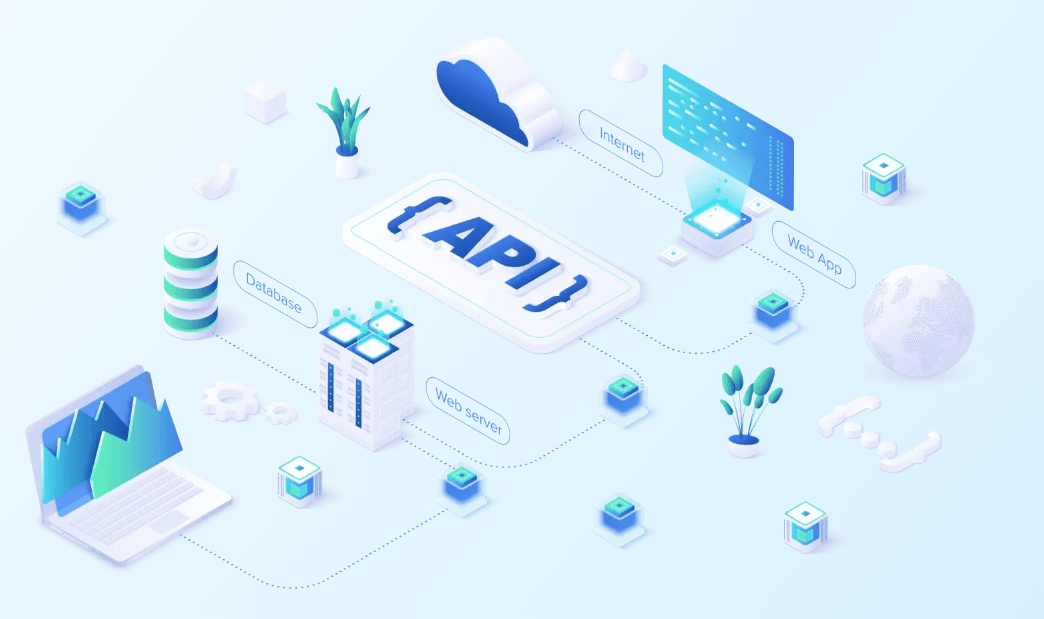
For anything more specialized than "write me some text," the move is connecting your app to a purpose-built API through the same webhook or HTTP request block every no-code builder already includes — no backend code required, just a URL and an API key dropped into a workflow step.
This is exactly how consumer, retail, and wellness apps add features like generative image editing, computer-vision analysis, or virtual try-on without a computer vision team on payroll: platforms like Perfect Corp's visual AI APIs are built specifically to be dropped into an existing app through a simple call, and Perfect Corp's own guide to API integration walks through the request/response pattern that applies whether the API you're calling handles payments, images, or anything in between.
If you want to see what a specialized AI API actually returns before wiring it in, Perfect Corp's AI API Playground lets you test a live visual-AI endpoint in the browser with zero setup — a useful sanity check for what "no-code AI integration" looks like in practice, in any vertical.
Route 3: Automate With an AI Agent Layer
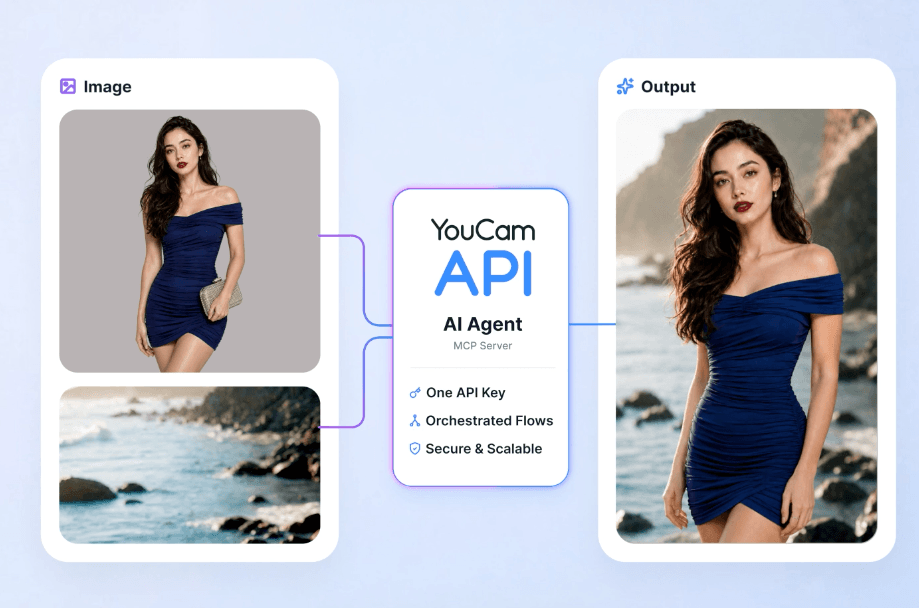
Stack all three and you get an app that was built visually, thinks with AI where it matters, and never required a single engineer to ship version one.
How Do You Choose the Right No-Code App Builder for Your Project?
Run your project through this checklist before committing to a platform — switching later is painful, because most builders don't export your app cleanly to another tool.
- Does it need to be a real mobile app? If yes, narrow to FlutterFlow, Adalo, Glide, or Thunkable — the others are web-first.
- How complex is the logic? Simple CRUD app → Glide or Softr. Genuinely complex product → Bubble.
- Who's maintaining it after launch? If it's a non-technical team member, weight the learning curve heavily.
- Will it need AI features? Confirm the platform supports outbound API calls (webhook/HTTP request blocks) — almost all serious ones do.
- What's the realistic user count at scale? Price out the paid tier at your target volume, not the free tier, before you fall in love with a tool.
Want a second opinion on the AI layer specifically? Talk to Perfect Corp's API team about which visual-AI features are realistic to bolt onto your no-code build and roughly what they cost to run at scale.
What Can You Actually Build With a No-Code App Builder?
The honest ceiling is higher than most people assume, and lower than the hype suggests. Here's where no-code genuinely shines:
- Internal tools: inventory trackers, approval workflows, employee directories
- MVPs and startup prototypes: validate demand before writing custom code
- Client portals: branded dashboards for agency or consulting clients
- Marketplaces and directories: listings, bookings, member communities
- Consumer mobile apps with AI features: booking apps, retail try-on experiences, and wellness apps that plug in a specialized API rather than building the model from scratch
Where it still struggles: apps with extremely high-performance requirements (real-time multiplayer, heavy 3D rendering), deeply proprietary algorithms you don't want living on a third-party platform, or systems that need to integrate with legacy enterprise infrastructure in non-standard ways. For everything else, there's a no-code builder that can get you to launch.
FAQ: No-Code App Builders, Answered
What is a no-code app builder?
A no-code app builder is a platform that lets you design, connect, and publish a working web or mobile app using visual drag-and-drop tools instead of writing programming code, with the platform generating and hosting the underlying software for you.
Is a no-code app builder free?
Most major platforms offer a free tier for prototyping and learning, but publishing to app stores, removing platform branding, custom domains, and higher user or record limits typically require a paid plan starting anywhere from about $15 to $50 a month.
Can I publish a no-code app to the App Store and Google Play?
Yes, with builders like FlutterFlow, Adalo, Thunkable, and Glide, which compile or wrap your app for native mobile publishing. Web-first tools like Webflow or Bubble typically need an additional wrapper service to reach app stores.
Do I own the app I build on a no-code platform?
Generally yes — you own your data, content, and business logic — but the app itself usually runs on that platform's infrastructure, meaning you can't simply move it to another host the way you could with custom-written code. Always check a platform's specific export and data-ownership terms before committing to a serious build.
What's the difference between no-code and low-code?
No-code is entirely visual with no code editor at all, aimed at non-technical builders. Low-code keeps the visual canvas but adds an option to drop into custom code for edge cases, aimed at technical teams who want speed without losing flexibility.
Which no-code app builder is best for beginners?
Adalo and Glide are generally considered the gentlest starting points thanks to simplified logic and forgiving interfaces, while Bubble and FlutterFlow offer more power at the cost of a steeper learning curve.
Can no-code apps include real AI features, not just chatbots?
Yes. Beyond a platform's built-in AI assistant, most no-code builders support outbound API calls through webhook or HTTP request blocks, which means you can connect specialized AI services — from language models to computer-vision APIs — the same way a custom-coded app would, just without writing the integration code by hand.
The Bottom Line
There's no single "best" no-code app builder in 2026 — there's a best one for what you're actually shipping. Pick based on whether you need native mobile, how complex your logic really is, and who's stuck maintaining it after launch. Then, once the app is live, don't stop at forms and dashboards — wiring in a specialized AI API through a simple webhook is the difference between an app that just stores data and one that actually feels intelligent to the person using it.



