 Author:


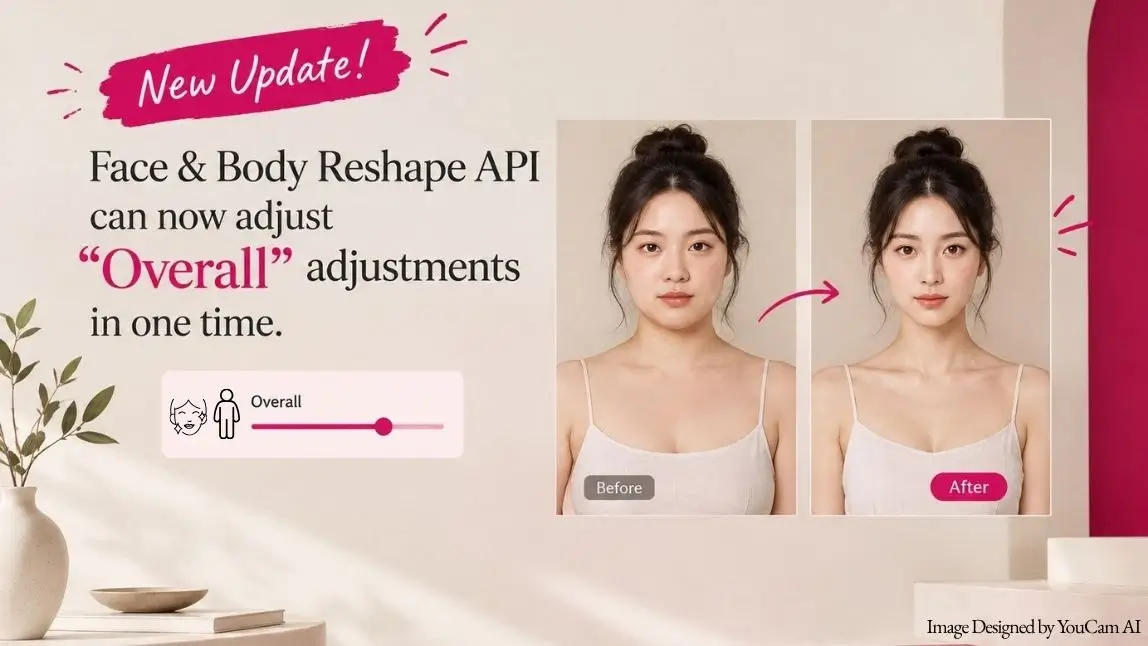
With Face Reshape and Body Reshape, that used to mean two separate numbers: one for the left side, one for the right. Nudge one, forget the other, and the face tips slightly out of balance. Multiply that by seven parameters across two APIs, and a simple edit turns into a small math problem.
Not anymore. Face Reshape and Body Reshape now ship an Overall parameter.
Highlights of This Release:
What's New: One Parameter, Both Sides
Every affected parameter in Face Reshape and Body Reshape now has an Overall counterpart alongside its existing _left and _right fields. Send Overall on its own and both sides move together. Nothing about the existing left/right parameters changes, they still work exactly as before.
It is a small addition to the request body with an outsized effect on how fast you can iterate: one field instead of two, one drag instead of two, and no more mental math to keep a face or body symmetrical.
Every L/R Parameter Gets an Overall Twin
Face Reshape: Eyes, Face Width and Chin
Eye size gets a new eye_size parameter, ranged -100 to 100, the same as eye_size_left and eye_size_right. Face width and chin size follow the same pattern with face_reshape and chin_reshape. Dial in a subtler jawline or slightly wider eyes in one call instead of two matching ones.
// Before (left/right only)
"eye_size_left": 0,    // -100~100
"eye_size_right": 0,   // -100~100

// Now, Overall added alongside the existing fields
"eye_size_left": 0,    // -100~100
"eye_size_right": 0,   // -100~100
"eye_size": 0           // -100~100, new Overall parameter
Body Reshape: Breast, Neck and Shoulders
The same upgrade covers Body Reshape: breast, neck, shoulder and squared_shoulder join their existing left/right pairs. Note that neck keeps its original 0 to 100 range rather than -100 to 100, so a full-body edit doesn't need any new range logic on your end, it just mirrors whatever the L/R version already used.
"breast": 0,             // -100~100
"neck": 0,               // 0~100
"shoulder": 0,           // -100~100
"squared_shoulder": 0    // -100~100
How the Engine Decides Which Number Wins
Overall doesn't override a value you've explicitly set. The rule is simple: each side prioritizes its own value first. If a side is left blank, it falls back to Overall. If both are blank, it defaults to 0, exactly like today.
That means you can mix and match freely: send Overall for a quick symmetrical edit, or override just one side when you need an asymmetrical look, without ever touching the other parameter.
One Drag Syncs Both Sides in the Playground
The same logic drives the Playground slider. Drag the Overall slider, and the Left and Right sliders move with it in real time. Drag either Left or Right on its own, and Overall resets to 0, since the two sides are no longer matched.
You always get visual, immediate feedback on which side is actually driving the result, so it stays obvious whether you're making a balanced adjustment or a deliberately asymmetrical one.
Old vs New: Before v1.15 and Now
| Aspect | Before v1.15 | v1.15 and later |
|---|---|---|
| Symmetrical edits | Set left and right separately, matching values by hand | Set Overall once, both sides follow |
| Asymmetrical edits | Fully supported via left/right | Still fully supported, unchanged |
| Playground UI | Left and Right sliders only | Overall slider added, synced live with Left and Right |
| API request size | Two fields per feature for a symmetrical change | One field per feature for a symmetrical change |
How to Get Started
Overall Adjustment ships in API version v1.15. It's already live in the API Playground, and the underlying endpoints are ready for integration now.
Try Face Reshape in the API Playground, or head straight to Body Reshape to test breast, neck and shoulder adjustments with the new slider. Building your own UI on top of the API? The same eye_size, face_reshape, chin_reshape, breast, neck, shoulder and squared_shoulder fields are ready to call today.
FAQ
Does Overall replace the left/right parameters?
No. eye_size_left, eye_size_right and the rest of the left/right fields still work exactly as before. Overall is an additional field, not a replacement.
What happens if I send both Overall and a side value?
The side you set explicitly always wins. Overall only fills in a side you left blank.
What if I don't send Overall or a side at all?
The value defaults to 0, same behavior as today.
Is the value range different for Overall?
No. Each Overall parameter uses the same range as its left/right counterpart, -100 to 100 for most, 0 to 100 for neck.
Can I test this before I touch the API?
Yes. The Overall slider is already live in the API Playground for both Face Reshape and Body Reshape, so you can try the behavior before writing a single line of integration code.
Ready to stop doing the left-right math yourself? Open the Face Reshape Playground and drag the new Overall slider once.