Author:


Everyone has a haircut they think about but never book. The pixie. The curtain bangs. The chop that feels great in the mirror at 11pm and terrifying at 11am. The reason is simple: hair grows back slowly, and a bad decision lives on your head for months. That is exactly the gap AI hairstyle try-on closes. Today you can upload one selfie, try hairstyles across dozens of cuts, lengths, and colors, and see photorealistic results in seconds, all before a single scissor touches your head. For salons and beauty brands, the same technology has become a conversion engine, turning browsers into booked appointments and product buyers. Here is how it works, how accurate it really is, and how to get results that actually look like you.
What This Guide Covers
- What Does It Actually Mean to Try Hairstyles Online?
- How Do AI Hairstyle Try-Ons Actually Work?
- How Do You Try Hairstyles on Yourself in Under a Minute?
- Which Hairstyle Should You Try First for Your Face Shape?
- How Accurate Are Virtual Hairstyle Try-Ons in 2026?
- Why Do Some Try-On Results Look Fake?
- Can You Try Hairstyles on Curly, Coily, and Textured Hair?
- Can You Try Hair Colors at the Same Time?
- Should Men Try Hairstyles Online Too?
- How Do Salons and Beauty Brands Use Hairstyle Try-On?
- How Do You Add Hairstyle Try-On to Your Own App or Site?
- Frequently Asked Questions
What Does It Actually Mean to Try Hairstyles Online?

See this happen on your own selfie in the live hairstyle try-on
Trying hairstyles online means uploading a photo of yourself, or opening your camera, and letting an AI model replace your current hair with a different cut, length, texture, or color while keeping your face, skin tone, and head shape unchanged. Modern tools return a photorealistic preview in a few seconds, so you can compare several styles side by side before committing to a salon appointment.
That definition matters, because two very different things get sold under the same name. The old version was a wig overlay: a flat PNG of hair dropped onto a photo, usually misaligned, usually obvious. The current version generates new pixels. It rebuilds the hair from scratch around your actual head, matching your lighting and your hairline instead of covering it.
You can see the difference immediately in a live virtual hairstyle try-on demo, where the same photo runs through more than 190 styles and bang shapes without ever looking pasted on.
Try-On Versus Recommendation: Two Different Tools
Worth separating these early. A try-on shows you what a style looks like on your head. A recommendation engine tells you which styles to consider based on your face proportions and hair characteristics. The best experiences run both: analysis narrows the list, try-on confirms the winner. If a tool only does one, you either get a great picture of a bad idea, or great advice you cannot visualize.
How Do AI Hairstyle Try-Ons Actually Work?

Under the hood, a hairstyle try-on is a three-stage pipeline. Nothing about it is magic, but every stage has to be right or the illusion breaks.
Stage One: Separating Hair From Everything Else
The system first performs facial detection and builds a precise map of your head, then segments the image into regions: skin, hair, background, clothing, and accessories. This is harder than it sounds. Flyaway strands, dark hair against a dark background, and hair that overlaps a shoulder all create ambiguous edges. Quality here decides whether the final result has a clean hairline or a smudged halo.
Stage Two: Generating the New Style
Once the hair region is isolated, a generative model, typically a GAN or a diffusion-based architecture, synthesizes the requested style inside that region. It is not retrieving a stock image of a bob and stretching it. It is producing new hair that follows your skull shape, your part, your hairline, and your head angle. That is why the same bob looks different on two different people, which is the whole point.
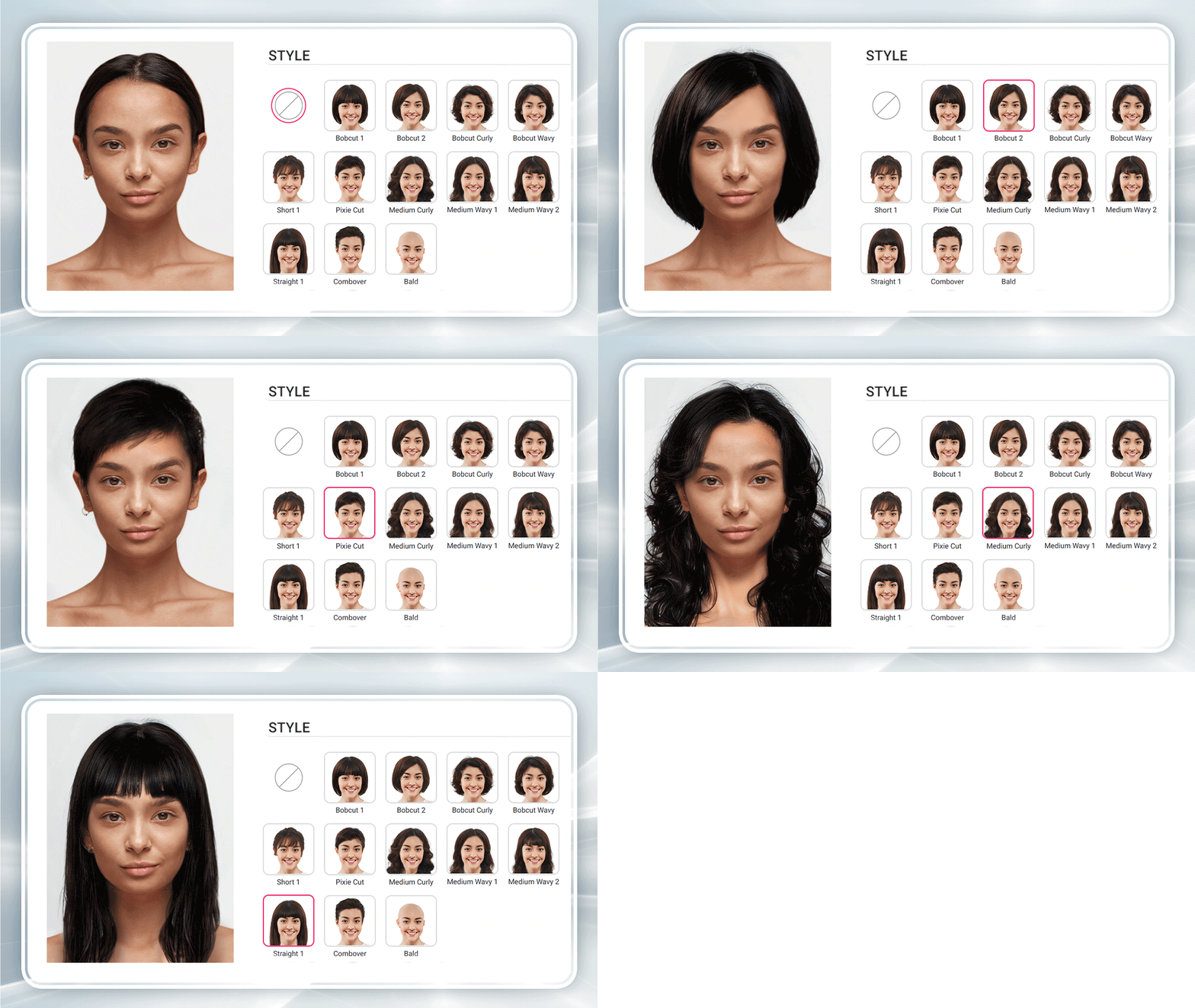
Watch the generator rebuild 190+ styles on a single photo
Stage Three: Relighting and Blending
The final stage matches the generated hair to the photo it lives in. Direction of light, color temperature, shadow falloff on the neck and cheek, and the soft transition at the forehead all get reconciled. Skip this step and you get the tell-tale sticker look: perfect hair, wrong light, uncanny result.
Perfect Corp.'s approach layers this generation on top of a broader facial analysis stack, the same technology family behind its AI beauty and hair analysis products used by 800+ brand partners worldwide.
How Do You Try Hairstyles on Yourself in Under a Minute?

The workflow is genuinely fast. Here is the sequence that produces the best results.
- Take a front-facing photo in even light. Face the window, not a ceiling bulb. Keep your chin level and your eyes toward the lens.
- Pull your hair back off your forehead. A visible hairline gives the model an anchor to build from, which dramatically improves short-cut previews.
- Remove hats, hoods, and heavy headbands. Glasses are usually fine. Anything that hides the top of your head is not.
- Upload and pick a style. Start with something close to your current length so you can calibrate how truthful the tool is, then go dramatic.
- Compare at least three options side by side. Single results are hard to judge. Contrast is what reveals the right answer.
- Save the winner and bring it to your stylist. A reference image of the cut on your own face beats a celebrity screenshot every single time.
That last step is the one people skip and later regret. Stylists consistently report that a reference photo of the client's own face removes most of the translation problem in a consultation.
Ready to see it on your own photo? Open the AI haircut filter and run your selfie through a few styles before your next booking.
Which Hairstyle Should You Try First for Your Face Shape?

Test your shortlist against your own face shape
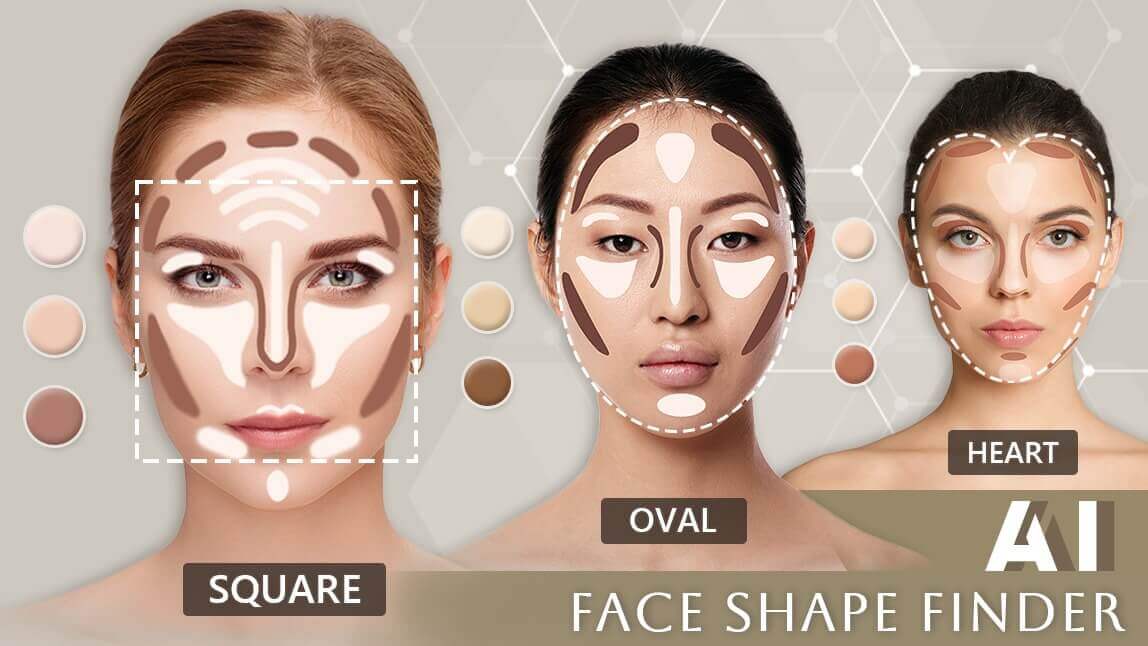
Face shape is a starting filter, not a law. Use it to build a shortlist, then let the try-on settle the argument. Here is the practical cheat sheet.
| Face Shape | What You Are Balancing | Styles Worth Trying First | Approach With Care |
|---|---|---|---|
| Oval | Almost nothing, proportions are already balanced | Blunt bob, long layers, curtain bangs, pixie | Very heavy full fringe that shortens the face |
| Round | Adding vertical length, softening width at the cheeks | Long layers, side-swept bangs, collarbone lob, volume at the crown | Chin-length blunt cuts that sit at the widest point |
| Square | Softening a strong jaw line | Soft waves, wispy bangs, layered shag, side part | Very blunt, chin-grazing lines that echo the jaw |
| Heart | Balancing a wider forehead against a narrower chin | Chin-length bob, curtain bangs, waves that add width at the jaw | Tight slicked-back styles that expose the full forehead |
| Long / Oblong | Adding horizontal width, breaking vertical lines | Blunt fringe, mid-length waves, bob with volume at the sides | Very long, flat, one-length hair |
| Diamond | Softening prominent cheekbones | Textured lob, side-swept fringe, chin-length layers | Severe center parts pulled tight to the head |
Not sure which category you fall into? Facial analysis tools measure the proportions for you rather than making you guess in a mirror. Pair that with a try-on and you have moved from opinion to evidence.
How Accurate Are Virtual Hairstyle Try-Ons in 2026?

Here is the honest answer, because overselling this helps nobody.
What AI try-on gets right, reliably: silhouette, length, overall shape, parting, fringe placement, and general color impression. If a preview tells you a jaw-length bob widens your face, believe it. That judgment is geometric, and geometry is what these models handle best.
What it approximates: texture behavior over time, volume once your hair is dry and lived in, and how a cut moves when you turn your head. A static preview cannot know that your hair collapses by 3pm or that your cowlick has opinions.
What it cannot know at all: your growth pattern, your density in specific zones, how much time you will actually spend styling, and whether your stylist can execute the cut on your hair type. That last one is a conversation, not a computation.
| Aspect of the Preview | Trust Level | Why |
|---|---|---|
| Overall length and silhouette | High | Purely geometric, modeled directly on your head shape |
| Fringe and bang placement | High | Anchored to your real hairline and forehead height |
| Color impression against your skin tone | Medium to high | Accurate in even light, shifts under warm indoor lighting |
| Volume and body | Medium | Rendered as an average, not from your actual density |
| Day-two behavior and movement | Low | A still image cannot simulate how hair falls over time |
| Maintenance and styling effort | Not modeled | Depends on your routine, products, and stylist |
The practical takeaway: use the preview to eliminate bad options with confidence, and to shortlist good ones. Use your stylist to validate the last 10 percent. Given that the average person visits a salon only three or four times a year, eliminating one regrettable cut is worth a lot.
Why Do Some Try-On Results Look Fake?
Nine times out of ten it is the input photo, not the model. This is the section every other guide skips, and it is the one that actually changes your results.
| Symptom | Likely Cause | Fix |
|---|---|---|
| Fuzzy halo around the new hair | Low contrast between hair and background, or a busy background | Shoot against a plain wall in even light |
| Short cuts look wrong or bulky | Your current long hair is hiding the shape of your head | Tie hair back and retake the photo |
| Hairline sits too high or too low | Forehead is covered by existing bangs | Clip the fringe back so the hairline is visible |
| Hair color looks off | Warm indoor bulbs or a strong color cast in the room | Use daylight, or shoot near a window |
| Style does not follow your head | Photo taken at a steep angle or from below | Shoot straight on at eye level |
| Result looks flat and pasted | Heavy phone beauty filters already applied | Turn off in-camera smoothing before you shoot |
| Accessories bleed into the hair | Hats, hoods, or wide headbands cross the hair region | Remove headwear, keep glasses if you like |

Retake your photo, then run it through the try-on again
One more practical note: motion blur is the silent killer. A slightly soft photo produces a slightly soft result, and soft hair reads as fake even when the shape is perfect.
Can You Try Hairstyles on Curly, Coily, and Textured Hair?
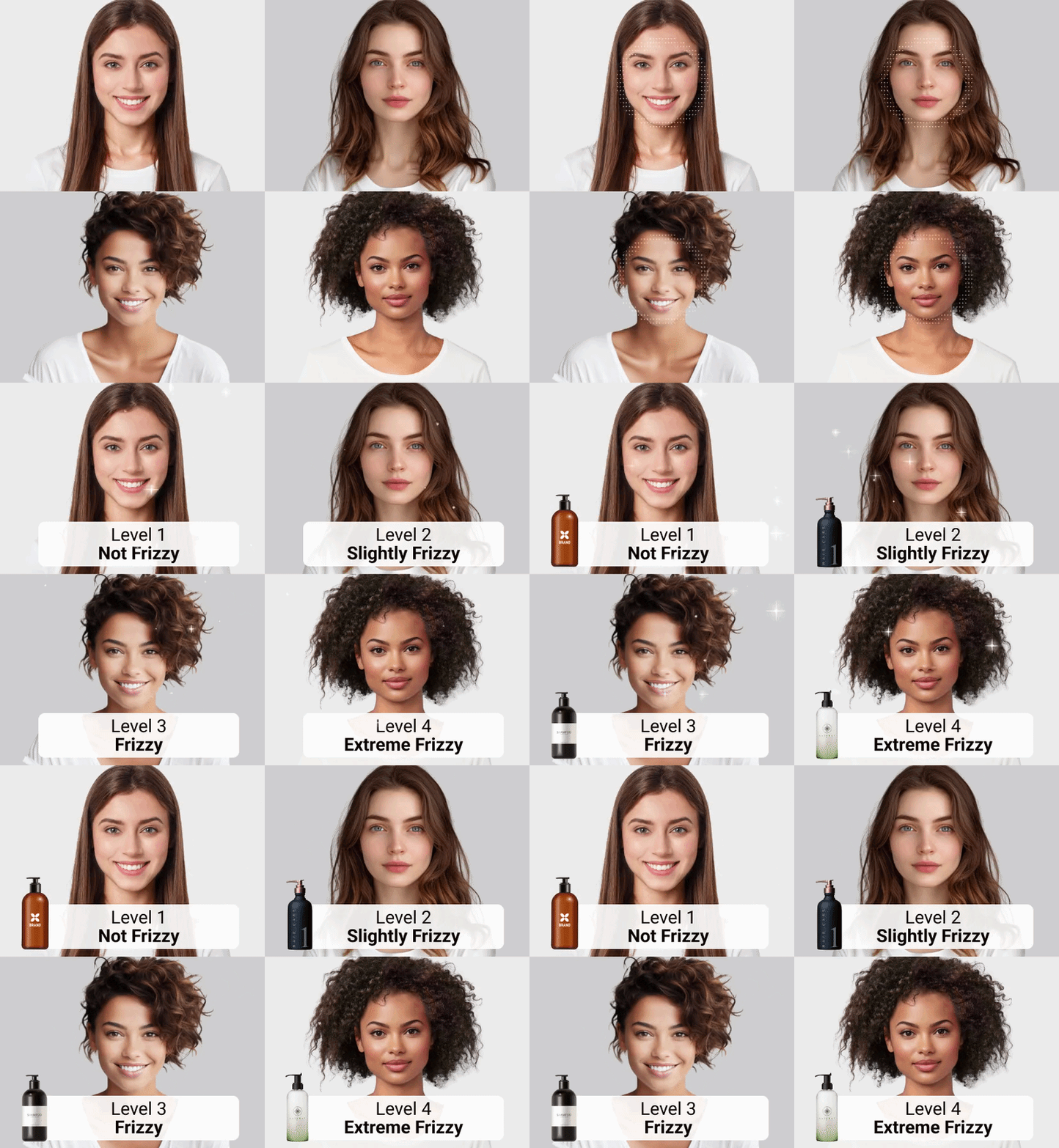
Check your curl pattern in the hair type demo
Yes, and this is where tools separate themselves fast. Straight and loosely wavy hair is the easy case, so almost every product handles it. Coily and tightly textured hair is the honest test, because it involves complex volume, three-dimensional shape, and edges that no simple mask can trace.
What to look for in a tool that genuinely supports textured hair:
- Volume that sits correctly. A generated afro or twist-out should occupy real space around the head, not lie flat like a printed pattern.
- Curl pattern that stays consistent. Coil size should be uniform across the whole style, not tighter on one side.
- Protective styles in the library. Braids, locs, twists, and cornrows should be first-class options, not an afterthought category.
- Edges and baby hairs rendered, not erased. Losing the hairline detail is the clearest sign a model was trained narrowly.

Texture also affects which cuts are realistic to request. A style that reads as a soft lob on 1C hair becomes a very different shape on 3C, since shrinkage can pull apparent length up substantially. Running a hair type analysis demo before you shortlist styles gives you a texture baseline to work from, and a hair length detection demo helps set realistic expectations about where a cut will actually land.
Can You Try Hair Colors at the Same Time?

Cycle through every shade in the hair color simulator
Color is the lowest-risk, highest-anxiety decision in hair. Bleach is expensive, slow, and unforgiving, which makes previewing it disproportionately valuable.
Good color simulation does more than tint pixels. It has to preserve the natural variation in your hair, the darker roots, the lighter mid-lengths, the way light catches the top layer, while shifting the underlying tone. Flat recoloring is instantly recognizable and tells you nothing useful about whether a shade suits you.
Two things to test deliberately when you preview color:
- Contrast against your skin. Hold the preview next to your unedited photo. If the color washes you out on screen, it will wash you out in the chair.
- Shade at both ends of the range. Try the lightest and darkest version of a family, not just the middle. The boundaries tell you where your limit is.
A dedicated hair color simulator demo lets you cycle through shades on your own photo, and pairing that with a cut preview answers the two questions people actually have at the same time. If frizz is part of your decision, a hair frizziness demo shows how condition factors into the finished look.
Should Men Try Hairstyles Online Too?

Preview fades, crops and beard pairings on your own photo
Arguably more, because the decisions are more frequent and less reversible in the short term. A man who books every four weeks makes twelve or thirteen cut decisions a year, and a buzz cut that does not suit your head shape is a two-month commitment with no fix.
The categories most worth previewing:
- Fade height. Low, mid, and high fades change your entire face proportion. This is the highest-value preview in men's hair.
- Buzz cuts and very short crops. These reveal head shape and hairline completely, so seeing them first is genuinely useful.
- Beard pairing. A cut rarely works in isolation. Testing a style with and without facial hair changes the verdict more often than people expect.
- Growing it out. Previewing the mid-length awkward stage helps you decide whether you have the patience for it.

Perfect Corp.'s generative AI haircut simulator coverage goes deeper on how the simulation handles short cuts and beard combinations.
How Do Salons and Beauty Brands Use Hairstyle Try-On?

This is the half of the story consumer guides leave out. Virtual try-on is not just a toy, it is a commercial layer, and the use cases are concrete.
Salons: Turning Consultations Into Bookings
The riskiest moment in a salon consultation is the gap between what a client describes and what the stylist hears. A shared preview on a tablet closes it. Clients commit faster, request bolder services, and complain less, because expectations were set visually before the cut began. Chains also use previews as a pre-booking step on their websites, which qualifies the appointment before anyone walks in.
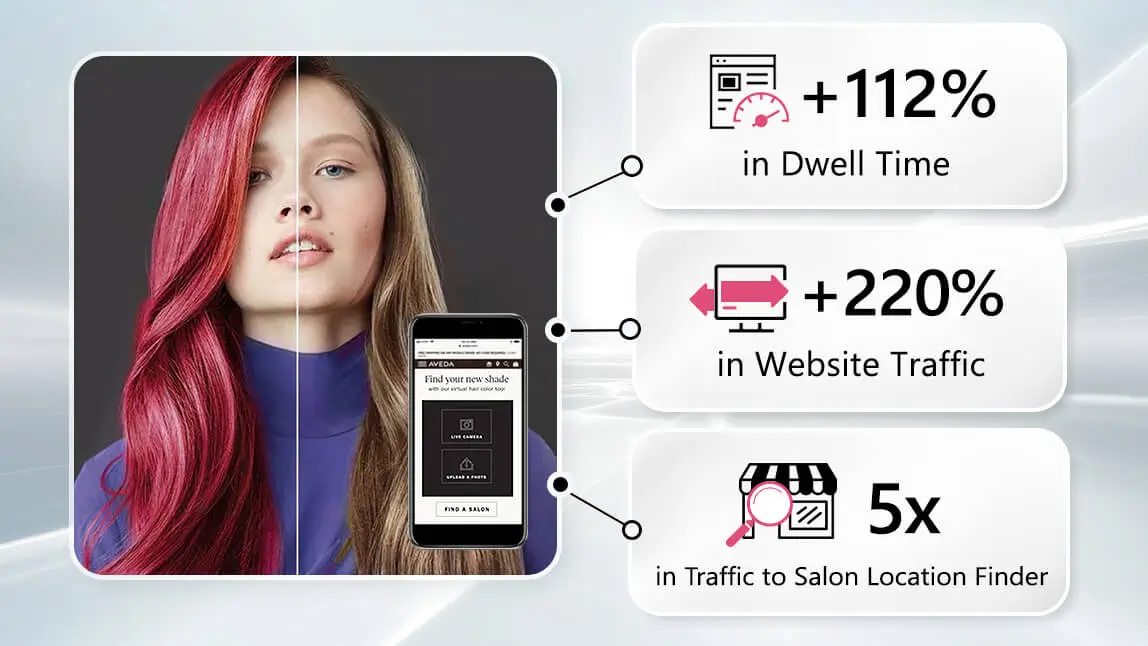
Hair Color and Care Brands: Reducing the Purchase Barrier
At-home color is bought on hope. A try-on replaces hope with a preview, which lifts conversion and cuts returns from people who bought the wrong shade. Brands embed the experience on product detail pages so the preview and the buy button live in the same place.
Retail and E-commerce: Extending Time on Page
Try-on is inherently repeat-use. People do not test one style, they test eight. That behavior lengthens sessions, generates first-party preference data, and gives merchandisers a reason to recommend a matching product set alongside the winning look.
Media, Apps, and Social: Built-in Shareability
Before and after pairs are natively shareable, which turns each session into distribution. Consumer apps use this loop to acquire users at a fraction of paid social cost.
Want to see the full experience the way your customers would? Explore the Perfect Corp. showcase library and run the hair demos on a real photo.
How Do You Add Hairstyle Try-On to Your Own App or Site?

You do not need to train a model. The practical path for most teams is an API call.
- Send a photo. Post the user's image to the endpoint, along with the style or color identifier you want applied.
- Receive a rendered result. The response returns the generated image, typically within seconds, ready to display.
- Wrap it in your own interface. The style picker, the comparison view, and the save flow all stay yours, which keeps the experience on-brand.
Things worth confirming before you commit to any provider:
- Style library depth and how often it refreshes. Trends move quarterly. A static library ages fast.
- Texture coverage. Ask specifically about coily and protective styles, not just the demo reel.
- Latency at your traffic level. Seconds are fine, ten seconds is a drop-off.
- Image handling and retention policy. Selfies are personal data. Know what happens to them.
- Mobile web performance. Most try-on traffic is phone traffic.
You can test the endpoints yourself in the AI Playground before writing any integration code.
Frequently Asked Questions
How can I try hairstyles on my own face?
Upload a clear, front-facing photo to a virtual hairstyle tool, then select the cut or color you want to preview. The AI replaces your hair while keeping your face unchanged, and returns a photorealistic result in a few seconds. For the best output, use daylight, keep your hairline visible, and remove any headwear.
Is there a free way to try hairstyles online?
Yes. Several browser-based tools let you try hairstyles without paying or installing an app, including free demos that run more than 190 styles on a single uploaded photo. Free tiers usually limit resolution or download options rather than the try-on itself.
How accurate are AI hairstyle try-ons?
Very accurate for shape, length, silhouette, and fringe placement, which are the things most people are actually deciding between. Less accurate for volume, day-two behavior, and how a cut moves. Treat the preview as a reliable filter for eliminating bad options, and confirm the final details with your stylist.
Can I try hairstyles without uploading a photo?
Most tools offer model photos you can practice on, which is useful for browsing a style library. To see a style on yourself, though, you need your own image. Some tools also support live camera preview instead of a file upload if you prefer not to store a photo.
What hairstyle suits my face shape?
As a starting point: round faces suit long layers and side-swept bangs, square faces suit soft waves and wispy fringes, heart shapes suit chin-length bobs, and long faces suit blunt fringes with width at the sides. Use the table earlier in this guide to build a shortlist, then test it on your own photo rather than trusting the rule alone.
Can men try hairstyles online too?
Absolutely. Fade height, buzz cuts, crops, and beard pairings all preview well, and men typically make more cut decisions per year than women do. Short styles are especially worth previewing because they reveal head shape and hairline in a way longer hair does not.
Can I try hair colors as well as cuts?
Yes, and most quality tools let you combine them. A good color simulation preserves the natural light and dark variation in your hair instead of applying a flat tint, which is what makes a preview genuinely useful for deciding on bleach or a bold shade.
What kind of photo works best for a hairstyle try-on?
Front-facing, eye level, even daylight, plain background, hairline visible, no hat, no heavy in-camera smoothing filter. If you are previewing short cuts, tie your hair back first. A sharp photo matters more than a high-megapixel one.
Is my photo safe when I try hairstyles online?
It depends entirely on the provider. Check whether images are processed and discarded or stored, whether they are used for model training, and whether the policy is stated plainly. Reputable enterprise providers publish retention terms. If a tool does not say, treat that as an answer.
How long does an AI hairstyle try-on take?
Usually a few seconds per style on a modern service. Anything much slower than ten seconds tends to lose users, which is why latency is one of the first things to test when evaluating a provider.
Can I try hairstyles on curly or coily hair?
Yes, but tool quality varies more here than anywhere else. Look for correct volume, consistent curl pattern, protective styles like braids and locs in the library, and preserved edges. Also remember shrinkage: a length that looks mid-back on straight hair sits much higher on tightly coiled hair.
Do salons actually use virtual hairstyle try-on?
Increasingly, yes. Salons use it during consultations to align on the result before cutting, and on their websites as a pre-booking step. The main benefit is fewer mismatched expectations, which means fewer corrections and more confident clients.
Can I download or share the try-on results?
Most tools let you save or share the generated image. This is the point of the exercise: bringing a preview of the cut on your own face to your stylist is far more useful than showing them a photo of someone else.
Can businesses add hairstyle try-on to their own website or app?
Yes, through an API or SDK. You send a photo and a style identifier, and you receive a rendered image back to display inside your own interface. This keeps the branding and the user flow entirely under your control while the generation happens on the provider's infrastructure.
What is the difference between a hairstyle try-on and a hairstyle recommendation?
A try-on shows you a style on your head. A recommendation analyzes your face proportions and hair characteristics to suggest which styles are likely to suit you. The strongest experiences use both: the recommendation builds the shortlist, the try-on picks the winner.
The Short Version

Save your favourite before you book the chair
Trying hairstyles used to mean imagination and hope. Now it means a selfie, ten seconds, and evidence. The technology is reliable where it counts, shape, length, fringe, and color impression, and honest enough about its limits that you should still talk to your stylist before the big chop.
For brands and salons, the calculation is simpler still: previews reduce hesitation, and reduced hesitation shows up in bookings and baskets.
Try it on your own photo first. Run a few styles through the AI hairstyle demo, or browse more hair technology guides to see what else AI can read from a single selfie.